
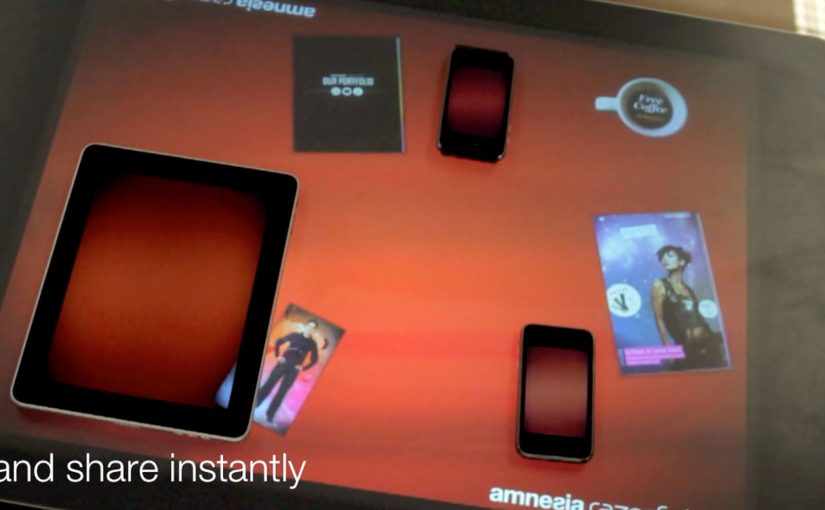
You place two iPhones and an iPad around a Microsoft Surface table. With a single gesture, a photo slides off one device, travels across the tabletop, and drops into another device. The transfer is instant, and the UI makes it feel like content is physically moving between screens.
Amnesia Razorfish is back in the news with the launch of Amnesia Connect. It is software that enables instant, seamless sharing and transfer of content, including photos, music, and embedded apps, between multiple handheld devices using a Microsoft Surface table and a single gesture. Here, gesture sharing means a swipe across the Surface table that triggers a direct handoff of content between nearby devices.
How the “single gesture” illusion works
In the moment, the Surface table connects devices over WiFi and shares in real time. The table tracks each object’s position, so the visual effect stays locked to the device placement. Because the visuals stay locked to each device’s position, the transfer feels credible rather than arbitrary. Content appears to move in and out of the iPad and iPhone exactly where they sit on the table.
What is supported right now, and what comes next
The software works with Apple iOS devices, and it is being developed to work with Android, Windows Phone, and BlackBerry smartphones. The concept scales anywhere multiple devices need to share quickly without cables, menus, or friction. In multi-device brand experiences, that matters because several people can understand the transfer at the same time.
Why brands care about gesture-based sharing
As smartphones become omnipresent, this kind of interaction opens a different design space for brand experiences. The strongest part of the idea is not the transfer alone, but the way it turns sharing into something people can instantly see and understand together. The real question is not whether the table can pass content between devices, but whether the brand can make that transfer feel natural, social, and self-explanatory. The business value is that the interaction demonstrates the benefit in public, instead of relying on explanation.
Extractable takeaway: When a digital action is turned into a visible group moment, the brand does less explaining and the product benefit becomes easier to grasp.
What to steal for multi-device sharing
- Make “sharing” visible. If content looks like it physically moves between screens, people immediately understand what happened.
- Remove menus from the core action. The gesture should be the transfer, not a shortcut to a dialog box.
- Use spatial consistency as the magic trick. When the UI stays locked to where devices sit, the illusion feels real.
- Design for group participation. Multi-device interactions work best when they create a moment people can do together, in plain sight.
A few fast answers before you act
What is gesture sharing in a multi-device experience?
Gesture sharing is when users move content between devices through physical gestures, like swiping an item from one screen to another, rather than using menus, Bluetooth pairing, or file dialogs.
How does a Microsoft Surface table enable this?
The table tracks where devices sit and aligns the interface to that physical layout. It also supports real-time connectivity so content can transfer while the visuals stay spatially consistent.
What makes this feel “seamless” to users?
The key is removing steps. No selecting recipients, no attaching files, no waiting screens. The motion itself becomes the transfer, and the UI reinforces that mental model.
Why is this stronger than a normal send flow?
A normal send flow hides the action inside menus and confirmations. This pattern makes the transfer visible, immediate, and shared, so people understand both the feature and the benefit at a glance.
Where can brands apply this pattern?
Anywhere shared exploration matters. Retail demonstrations, event installations, collaborative product discovery, and multi-screen storytelling all benefit when “sharing” becomes a visible group interaction.