
Tokyo Shimbun: AR Reader App for Kids

Tokyo Shimbun: AR Reader App for Kids

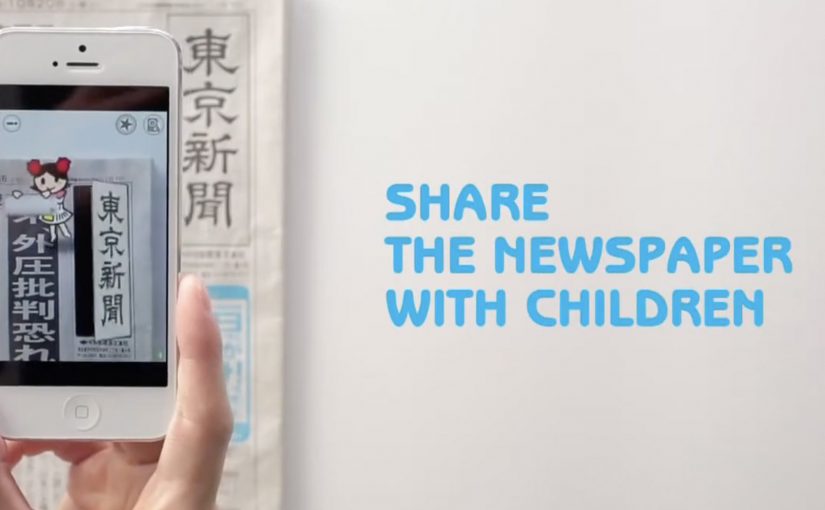
A kid points a smartphone at a newspaper article and the page starts “talking back”. Characters pop up, headlines simplify, and the story becomes easier to understand without leaving print.

Connected devices such as smartphones and tablets have contributed to an explosion in digital media consumption. As these devices gain adoption, print newspapers around the world are seen suffering from declining readership and revenue. To combat this, Tokyo Shimbun, along with Dentsu Tokyo, came up with a new way to connect with readers. An augmented reality reader app brings the newspaper to life by overlaying educational, kid-friendly versions of selected articles.

How the newspaper becomes a “teaching layer”

The mechanism is straightforward. The app uses the phone camera to recognize specific articles, then overlays animated commentary, simplified explanations, and visual cues on top of the printed page so kids can follow along. Here, “teaching layer” means this AR overlay that translates the printed article into simpler language and guided visuals. Because the overlay sits directly on the printed article, kids do not have to leave the page to get context, which lowers friction and keeps attention on the story.

In publishing and media brands that still rely on print touchpoints, augmented reality can turn paper into an entry point for younger audiences without abandoning the physical ritual of reading.

Why this lands with parents and kids

It respects the newspaper as a shared household object, but removes the comprehension barrier for children. The child gets a friendly “translator”. The parent gets a moment of joint attention that feels educational, not like more screen time for its own sake.

Extractable takeaway: If you want kids to adopt a legacy touchpoint, use the digital layer to reduce comprehension friction first and add spectacle second.

What the business intent looks like

This is not only a novelty layer. It is a retention and habit play. If children can engage with a paper alongside adults, the newspaper has a better chance of staying present in the home and staying relevant as a family product.

The real question is whether the AR layer builds repeat, family co-reading habits, not whether it feels novel the first time.

Practical moves for print-plus-AR translation

  • Overlay explanation, not just effects. Make the digital layer add clarity, not only animation.
  • Choose a narrow trigger set. Start with selected stories that benefit most from translation and context.
  • Design for “family co-use”. Make it easy for a parent to participate without taking over the phone.
  • Keep the print object central. The magic works best when the page remains the interface.

A few fast answers before you act

What does the Tokyo Shimbun AR reader app do?

It lets kids scan selected newspaper articles with a smartphone and see animated, kid-friendly explanations layered on top of the print page.

Why pair augmented reality with a newspaper at all?

Because the newspaper is still a household touchpoint. AR can lower comprehension barriers for kids while keeping the shared reading ritual intact.

Is this mainly entertainment or education?

The strongest value is educational translation. The animations act as attention hooks, but the real utility is simplifying and explaining complex topics.

What makes this different from sending kids to a website?

The entry point stays on the printed page. The experience is anchored in the article the family is already holding, which supports shared attention.

What is the biggest execution risk?

If scanning is finicky or the overlays feel gimmicky, kids will not repeat the behavior and parents will not recommend it.
Gesture Sharing using Microsoft Surface

Gesture Sharing using Microsoft Surface

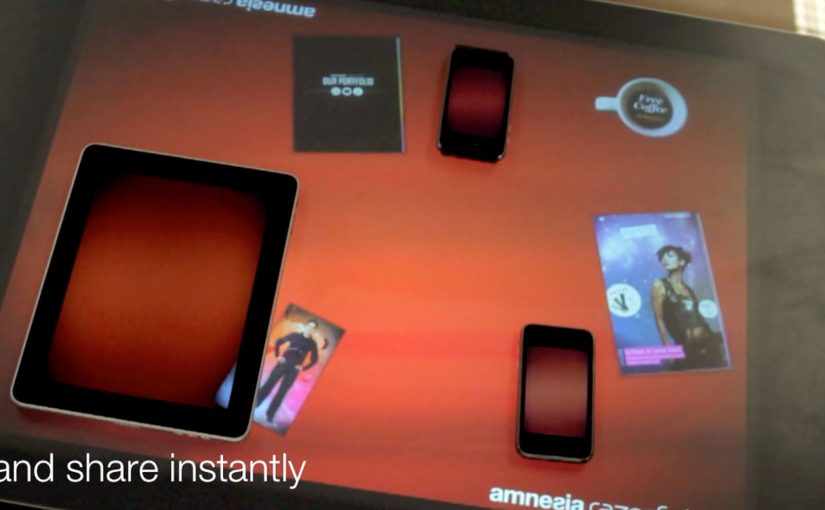
You place two iPhones and an iPad around a Microsoft Surface table. With a single gesture, a photo slides off one device, travels across the tabletop, and drops into another device. The transfer is instant, and the UI makes it feel like content is physically moving between screens.

Amnesia Razorfish is back in the news with the launch of Amnesia Connect. It is software that enables instant, seamless sharing and transfer of content, including photos, music, and embedded apps, between multiple handheld devices using a Microsoft Surface table and a single gesture. Here, gesture sharing means a swipe across the Surface table that triggers a direct handoff of content between nearby devices.

How the “single gesture” illusion works

In the moment, the Surface table connects devices over WiFi and shares in real time. The table tracks each object’s position, so the visual effect stays locked to the device placement. Because the visuals stay locked to each device’s position, the transfer feels credible rather than arbitrary. Content appears to move in and out of the iPad and iPhone exactly where they sit on the table.

What is supported right now, and what comes next

The software works with Apple iOS devices, and it is being developed to work with Android, Windows Phone, and BlackBerry smartphones. The concept scales anywhere multiple devices need to share quickly without cables, menus, or friction. In multi-device brand experiences, that matters because several people can understand the transfer at the same time.

Why brands care about gesture-based sharing

As smartphones become omnipresent, this kind of interaction opens a different design space for brand experiences. The strongest part of the idea is not the transfer alone, but the way it turns sharing into something people can instantly see and understand together. The real question is not whether the table can pass content between devices, but whether the brand can make that transfer feel natural, social, and self-explanatory. The business value is that the interaction demonstrates the benefit in public, instead of relying on explanation.

Extractable takeaway: When a digital action is turned into a visible group moment, the brand does less explaining and the product benefit becomes easier to grasp.

What to steal for multi-device sharing

  • Make “sharing” visible. If content looks like it physically moves between screens, people immediately understand what happened.
  • Remove menus from the core action. The gesture should be the transfer, not a shortcut to a dialog box.
  • Use spatial consistency as the magic trick. When the UI stays locked to where devices sit, the illusion feels real.
  • Design for group participation. Multi-device interactions work best when they create a moment people can do together, in plain sight.

A few fast answers before you act

What is gesture sharing in a multi-device experience?

Gesture sharing is when users move content between devices through physical gestures, like swiping an item from one screen to another, rather than using menus, Bluetooth pairing, or file dialogs.

How does a Microsoft Surface table enable this?

The table tracks where devices sit and aligns the interface to that physical layout. It also supports real-time connectivity so content can transfer while the visuals stay spatially consistent.

What makes this feel “seamless” to users?

The key is removing steps. No selecting recipients, no attaching files, no waiting screens. The motion itself becomes the transfer, and the UI reinforces that mental model.

Why is this stronger than a normal send flow?

A normal send flow hides the action inside menus and confirmations. This pattern makes the transfer visible, immediate, and shared, so people understand both the feature and the benefit at a glance.

Where can brands apply this pattern?

Anywhere shared exploration matters. Retail demonstrations, event installations, collaborative product discovery, and multi-screen storytelling all benefit when “sharing” becomes a visible group interaction.