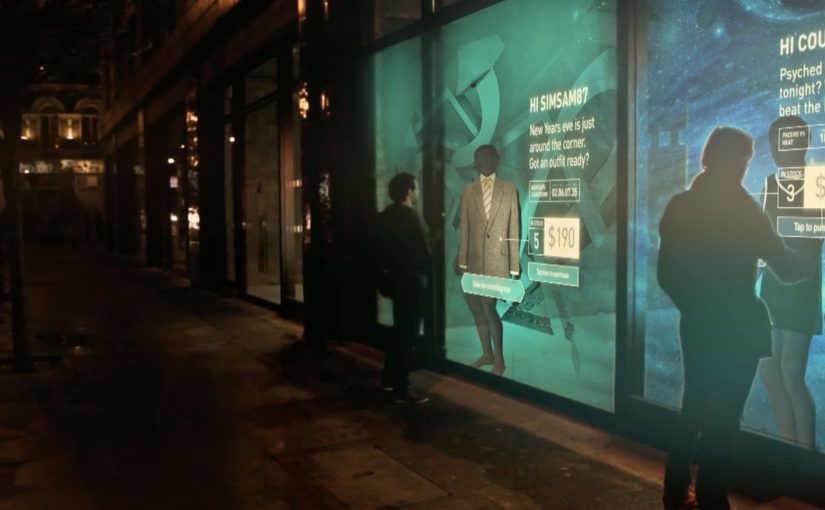
Shop windows, billboards, bus stops, and car showrooms do not have to be passive experiences. In the video below, a prototype interactive digital display adapts to whoever stands in front of it.
The display identifies shoppers using Bluetooth Low Energy (BLE) and reacts to personal data stored on the shopper’s mobile device, such as shopping habits and preferences. Shoppers can swipe through personalised content, place items in a virtual shopping cart, and purchase straight from the display.
When glass turns into a shoppable interface
This “adaptive storefront” concept takes a familiar retail surface and makes it behave like a storefront UI. Here, “adaptive storefront” means the window can recognise a nearby device via BLE and change what it shows based on data available on that device. Not a poster. Not a looped video. A live interface that changes per person and lets you complete an action while you are still in that high-intent moment of attention.
How the prototype behaves in front of a shopper
- Detect. BLE proximity is used to recognise that a specific shopper is present.
- Adapt. The display adjusts what it shows based on data available on the shopper’s phone.
- Let the shopper drive. Swiping changes what is on screen, rather than forcing a fixed sequence.
- Close the loop. Items can be added to a cart and purchased directly from the display.
In physical retail environments, the storefront is the first high-attention interface a brand controls before a shopper reaches the shelf.
Why it lands
Because the display can recognise a nearby device and accept input on the surface, it compresses discovery, consideration, and purchase into one interaction. The value is not the novelty of a “smart window”. It is the reduction of steps between interest and action, while the shopper’s intent is still fresh. The real question is whether you can do that with clear permission and control, not silent personalisation.
Extractable takeaway: A surface becomes valuable when it combines context with immediate action. Personalisation only earns its keep when it removes friction and helps a shopper decide faster, not when it merely looks clever.
What it is really trying to unlock for brands
Behind the demo is a clear ambition. Turn high-footfall surfaces into conversion surfaces. If the experience is permissioned and useful, it can bridge the gap between physical browsing and digital checkout without forcing a shopper to open an app, search, and start over.
That also hints at a measurement upgrade. A storefront that can be interacted with can be instrumented. What people swipe. What they ignore. What they add. Where they drop. That is a very different feedback loop than counting impressions.
Practical takeaways for adaptive storefronts
- Start with one job-to-be-done. For example, “help me shortlist”, “show me what is in stock”, or “let me buy in two taps”.
- Make control obvious. If swiping is the interaction, design the UI so people understand it in one second.
- Keep data minimal and on-device. Use only what is needed to improve relevance, and avoid making the experience feel intrusive.
- Design for the environment. Glare, distance, dwell time, and group behaviour change everything compared to mobile UX.
- Plan the opt-in moment. The experience works best when the shopper understands why the screen adapts and what they get in return.
A few fast answers before you act
What is an “adaptive storefront” in plain terms?
It is a storefront display that changes what it shows based on who is standing in front of it, and lets the shopper interact and buy directly on the surface.
Why use BLE for this type of experience?
BLE enables low-power proximity detection, so a display can recognise a nearby device and trigger the right experience without requiring scanning a code each time.
What data is needed to personalise the display?
Only enough to improve relevance. For example, stated preferences, browsing history, or saved items, ideally kept on the shopper’s phone and shared with clear permission.
What makes this feel useful instead of creepy?
Permission, transparency, and value. The shopper should understand what is happening, control it, and get something meaningfully better than a generic screen.
What should you measure in a pilot?
Opt-in rate, interaction rate, add-to-cart rate, conversion rate, and whether the experience reduces time-to-decision without increasing drop-off.