
Microsoft HoloLens: Elevator Maintenance

Augmented reality leaves the demo room

Microsoft HoloLens is not only about futuristic consumer experiences. Its real power emerges in enterprise environments.

A strong example is ThyssenKrupp, which uses HoloLens to redefine how elevator maintenance is performed in the field.

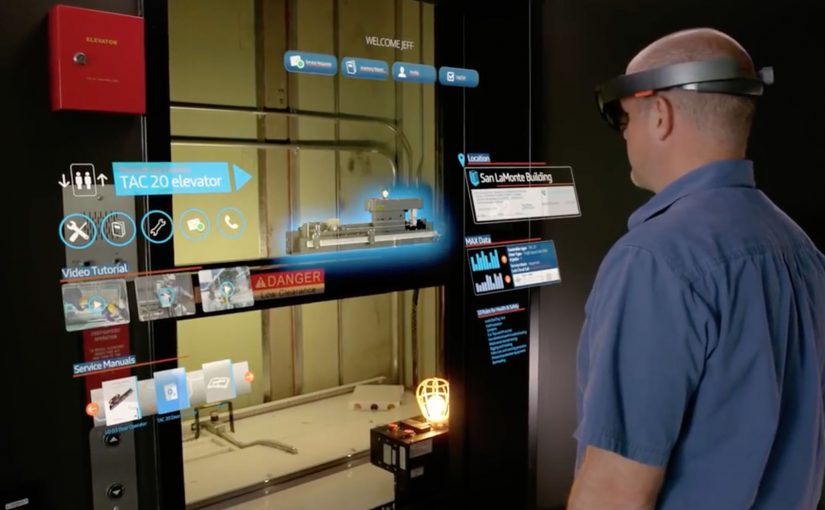
Instead of relying on manuals, phone calls, or trial and error, technicians receive contextual, real-time information directly in their line of sight.

How HoloLens changes elevator servicing

With HoloLens, elevator technicians see what they need while keeping their hands free.

Technical documentation, schematics, and checklists appear as holograms overlaid onto the physical elevator system.

Remote experts can see exactly what the technician sees and guide them step by step.

This turns maintenance into a guided, collaborative process rather than an isolated task.

In industrial field service teams, the constraint is getting expert judgement to the point of work fast enough to prevent rework and downtime.

Why this matters for industrial operations

The impact goes beyond convenience. Because guidance is delivered in-context and hands-free, technicians can complete complex steps with fewer avoidable mistakes.

Extractable takeaway: When you embed expert guidance into the job itself, you turn specialist knowledge into a repeatable operating system for the frontline.

The real question is whether you can make frontline expertise repeatable inside the workflow, not whether you can ship an AR pilot.

Enterprise AR is worth doing when it removes friction from real maintenance workflows, not when it adds another screen.

  • Reduced downtime
  • Shorter training cycles
  • Improved first-time fix rates

Most importantly, expertise becomes scalable.

Knowledge is no longer locked in the heads of a few specialists. It becomes part of the workflow.

A glimpse of the future of work

This use case shows what augmented reality does best.

It does not replace workers. It augments them.

Complex tasks become easier. Errors decrease. Confidence increases. Work becomes safer and more efficient.

This is where mixed reality stops being a novelty and starts being infrastructure. By mixed reality here, I mean digital guidance and remote expertise anchored onto the physical job, not a virtual-world detour.

What to copy from this AR service pattern

  • Instrument the moment of work. Put the next step where the technician is looking, not in a manual that forces context switching.
  • Make escalation visual. Let remote experts share the same view so guidance is specific and actionable.
  • Scale expertise as workflow. Capture checks, sequences, and decision points so outcomes do not depend on a few specialists.

A few fast answers before you act

What is the Microsoft HoloLens elevator maintenance use case?

ThyssenKrupp uses Microsoft HoloLens so field technicians can see schematics, checklists, and contextual guidance overlaid onto the elevator system while working hands-free.

How does HoloLens change the maintenance workflow?

It puts documentation and step-by-step instructions into the technician’s line of sight, and enables remote experts to see what the technician sees so they can guide the job in real time.

Is this only relevant for elevators?

No. The same pattern applies to any field service or industrial maintenance scenario where hands-free guidance, fast troubleshooting, and expert escalation reduce downtime and errors.

What is the measurable value driver in enterprise AR like this?

Reduced downtime, faster training, and higher first-time fix rates. The key is that expertise becomes repeatable and scalable inside the workflow instead of remaining locked in a few specialists.

Where does this pattern break down?

It breaks down when the underlying documentation is outdated, connectivity is unreliable, or remote support is not operationalized. The hardware alone does not change outcomes.
ZugSTAR: Interactive Live Video Conferencing in AR

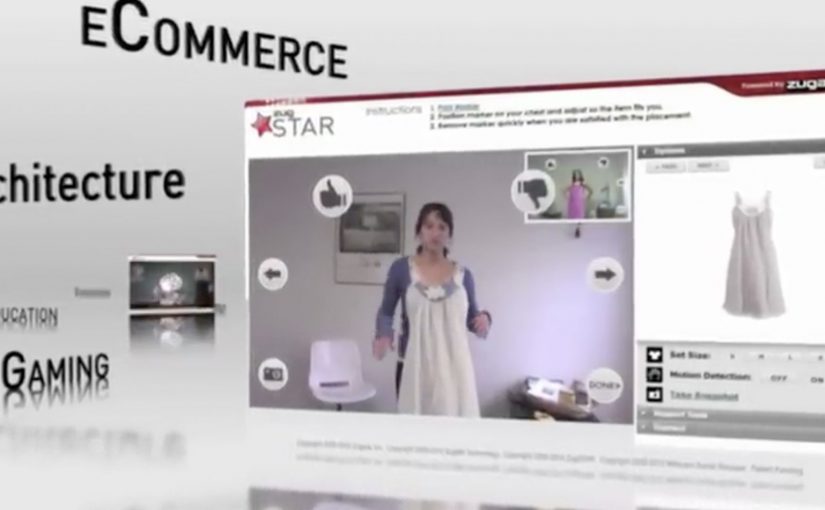
The future of video conferencing is almost here. Zugara Streaming Augmented Reality (ZugSTAR) is described as a technology that lets people in different locations share an augmented reality experience through a browser-based video conferencing system.

The promise is simple. You do not just see and hear each other. You collaborate on the same interactive layer, with 3D objects and effects that both sides can reference in real time.

What ZugSTAR is trying to change

The mechanism is a shared AR overlay inside a live video call. Instead of treating the camera feed as the whole experience, the system adds a synchronized layer that both participants can see and respond to. The result is closer to “co-present” interaction than a standard webcam call.

In global distributed teams across marketing, product, training, and sales, the biggest conferencing gap is shared context.

Why this matters beyond novelty

This kind of shared overlay can make collaboration more concrete. A product can be demonstrated in 3D, a concept can be pointed at, and a workflow can be rehearsed visually. Because both sides reference the same synchronized layer, pointing and confirming happen in one loop instead of a long back-and-forth. In theory, this reduces the need for physical proximity by making “show me” possible without shipping people or prototypes.

Extractable takeaway: When the work depends on “show me”, a shared visual layer only helps if it behaves like a stable workspace, not a decoration.

The real question is whether a shared overlay reduces misunderstanding faster than screenshare for the work you actually do.

This is worth piloting only in cases where the shared layer replaces screenshare, rather than sitting on top of it.

The differentiator is not “video conferencing”. It is synchronized interaction. Both sides are meant to experience the same AR layer at the same time, so the call becomes a workspace, not only a conversation.

Where it could be useful

  • Sales demos. Show products and configurations as interactive visuals instead of static slides.
  • Training. Walk through procedures with step-by-step overlays that feel more like guided practice.
  • Remote assistance. Use shared visuals to clarify instructions when words are not enough.
  • Creative collaboration. Iterate on concepts that benefit from spatial context and rapid visual feedback.

Design rules for shared-overlay calls

  • Make the shared layer the point. If the overlay is optional decoration, it will not change outcomes.
  • Keep interaction low-friction. The first useful action should happen in seconds.
  • Design for “pointing” and “confirming”. The fastest collaboration loops are highlight, discuss, agree.
  • Measure success as reduced back-and-forth. The win is fewer misunderstandings, not more effects.

A few fast answers before you act

What is ZugSTAR in simple terms?

It is a browser-based video conferencing concept that adds a synchronized augmented reality layer, so both participants share the same interactive visuals during the call.

How is this different from a normal video call?

A normal call shares audio and video. This approach aims to share an interactive visual workspace on top of the video, not just the camera feed.

What is the main business benefit of shared AR in conferencing?

Better shared context. When people can see and reference the same visual layer, explaining, demonstrating, and deciding can become faster.

Where does this approach struggle?

When setup friction is high, hardware requirements are unclear, or the interaction is not stable enough for real work. If it feels fragile, teams fall back to screenshare.

What should you evaluate first if you consider something like this?

Whether the shared overlay reduces misunderstandings in your core use case. If it does not, it is entertainment, not collaboration.