
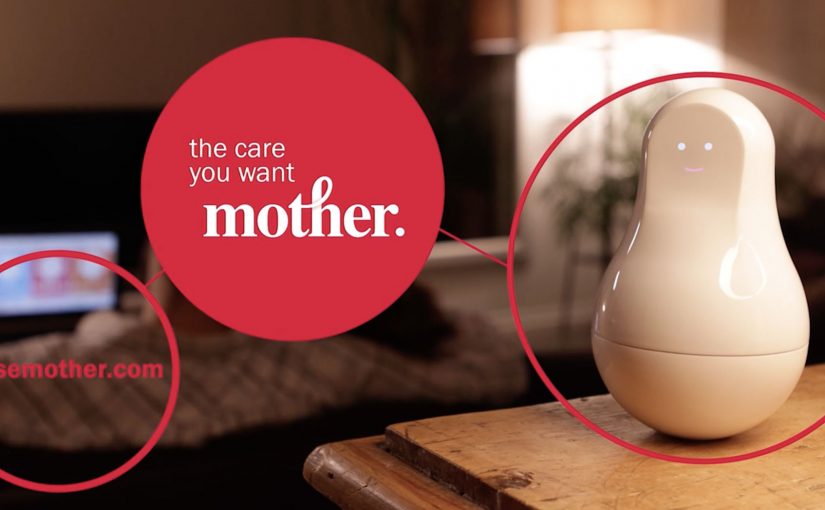
Sen.se: Mother and the Motion Cookies

Sensors are showing up everywhere, from wrist wearables like Jawbone UP and Fitbit to the first wave of “smart home” kits. The promise is always the same. Data that helps you understand your day, then nudges you when something matters.

Mother and the Motion Cookies, from connected-objects startup Sen.se, is positioned as a more flexible take on that idea. Instead of buying a single-purpose gadget for each habit, you get one “Mother” hub and a set of small sensor tags. The Motion Cookies. You decide what you want to track, attach a Cookie to the relevant object, and set alerts for the moments you care about.

Definition tightening: A Motion Cookie is a small sensor you can stick to an object. The “Mother” device is the home base that receives the signals and turns them into simple dashboards and notifications.

If you strip away the friendly character design, this is a configurable rules engine for everyday life. The sensors stay the same. The meaning changes based on what you attach them to and what you tell the app to watch for.

Watch the demo video for more.

A sensor kit that behaves like a toolkit

The smart move here is that the hardware is deliberately generic. One sensor type can be repurposed across dozens of “jobs”, depending on where you place it. Toothbrush, medication box, door, bag, water bottle. The product is less about owning the perfect device, and more about reassigning the same device as your priorities change.

In consumer IoT, products only survive if setup friction stays low and the data translates into a simple action.

Why the “Mother” framing makes the tech feel usable

Smart home products often fail at the handoff between capability and comprehension. Mother softens that gap by packaging sensing as caregiving. The real question is whether a sensor system can feel understandable enough that people actually try it. That emotional framing reduces the intimidation factor and makes experimentation feel normal.

Extractable takeaway: When your product is technically broad, give users a friendly mental model and a small first win, then let reconfiguration become the habit that unlocks the long tail of use cases.

What connected-product teams should copy

  • Design for reassignment, not perfection. People’s routines change. Your hardware should survive those changes.
  • Make “setup” the product. If a user cannot get to value in minutes, they will not get to value at all.
  • Translate sensing into verbs. “Brush”, “open”, “arrive”, “drink”, “take”. Verbs beat metrics.
  • Alert sparingly. The fastest way to kill trust is to spam people with “insights” they did not ask for.

A few fast answers before you act

What is Mother and the Motion Cookies?

It is a smart home kit with one central hub and multiple small sensor tags. You attach a sensor to an object, choose what you want to track, and get updates or alerts based on that behaviour.

What is the core idea compared to a single-purpose wearable?

Reconfigurability. The same sensors can be reassigned to different objects and routines, so the system adapts to what you want to measure this week, not what the device designer assumed forever.

What problem is it trying to solve?

Turning ambient behaviour into something actionable, without requiring you to buy a new gadget for every habit or household scenario.

Why does the “Mother” framing matter?

It makes a technically broad sensor system feel more understandable and less intimidating. That framing helps users see the product as practical support, not just instrumentation.

What makes this kind of product hard to sustain?

Reliance on companion apps and backend services, plus the challenge of keeping alerts useful rather than noisy. If the system becomes high-maintenance, it stops feeling like help.
Novalia: Playable Album Cover DJ Deck

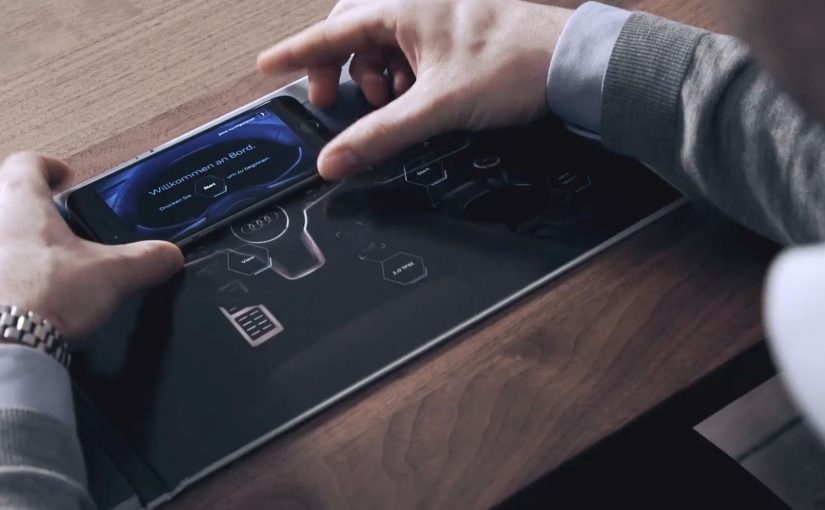
You pick up a record, touch the artwork, and the sleeve behaves like a DJ controller. Swipe to scratch. Tap to trigger effects. Use the crossfader. The physical album cover becomes an input device, not just a package.

That’s the latest project from Novalia, a Cambridge-based company that turns classic print into smart, touch-based surfaces using conductive ink and sensors, previously seen in work like The Sound of Taste.

How the album cover becomes a controller

For this release, Novalia works with DJ Qbert to create what is described as the world’s first interactive DJ decks on an album cover. The cover includes a printed mixer and deck layout. Touching the surface activates a companion setup with the Algoriddim djay app, allowing the user to scratch, mix, and fade any songs they already have loaded in the app directly from the paper surface.

Under the hood, the cover uses printed touch sensors. Those sensors translate finger position and gestures into control signals that the DJ app can interpret like a hardware controller.

In music and entertainment packaging, interactive print can turn a passive object into a playable interface, which makes “physical media” feel alive again. Here, interactive print means a printed surface with touch-sensitive inputs that control a connected digital experience.

Why this lands

This works because it collapses the gap between artwork and performance. The cover is not a souvenir. It is an instrument. That shift creates immediate curiosity and a strong demo moment, and it makes the format, vinyl and packaging, part of the innovation rather than a nostalgic constraint.

Extractable takeaway: If you want people to care about a physical format, give it a job. Turn the object into an interface that controls something digital, so “owning it” unlocks a behaviour, not just a collectible.

What the tech is really proving

Novalia is not just showing a clever one-off. It is demonstrating that printed surfaces can behave like UI. Buttons, sliders, decks, and triggers, without looking like electronics. The real question is how a printed object can stop being packaging and start behaving like an interface people want to use.

That opens the door for interactive posters, magazine inserts, packaging, and merchandise that can control sound, apps, or connected experiences while staying lightweight and familiar.

What to steal from interactive print packaging

  • Make the object the interface. The most memorable interaction is the one that defies expectations of the format.
  • Use a companion app people already accept. Pair print with a mainstream app so the learning curve stays low.
  • Design for demo. If it looks good on camera, your audience will do distribution for you.
  • Keep the interaction legible. Touch, swipe, fade, scratch. Actions should map to familiar behaviours.

A few fast answers before you act

What is a “playable” album cover?

It’s an album sleeve printed with touch sensors so the artwork functions like a controller. Your fingers become the input, and the connected app produces the sound.

What does Novalia contribute to this project?

Novalia provides the interactive print technology. Conductive ink touch sensors and the electronics layer that translates touches into control signals.

Do you control only the album’s music?

The setup is designed to control tracks loaded into the companion DJ app, so the interaction is not limited to the album content itself.

Why is this more compelling than a QR code to a playlist?

A QR code points somewhere else. This makes the physical object itself the experience, which increases replay value and perceived uniqueness.

Where does this pattern make sense outside music?

Anywhere the packaging or printed surface can become an input. Posters, product boxes, magazine inserts, event badges, and retail displays that trigger sound, data capture, or app control.