

Google Home Mini: Disney Little Golden Books

You start reading a Disney Little Golden Book out loud, and your Google Home joins in. Sound effects land on cue. The soundtrack shifts with the scene. The story feels produced, not just read.

The partnership. Disney storybooks with an audio layer

Google and Disney bring select Disney Little Golden Books to life by letting Google Home add sound effects and soundtracks as the story is read aloud.

How it works. Voice recognition that follows the reader

The feature uses voice recognition to track the pacing of the reader. If you skip ahead or go back, the sound effects adjust accordingly. If you pause reading, ambient music plays until you begin again.

In family living-room media, the win is turning passive reading into a shared, timed audio experience without adding another screen.

How you start. One voice command

To activate it, say, “Hey Google, let’s read along with Disney.”

Always listening during the story

Unlike typical commands, the smart speaker’s microphone stays on during the story so the device can follow along and add sound effects in the right moments.

Privacy note in the product promise

To address privacy concerns, Google says it does not store the audio data after the story has been completed.

Where it works

This feature works on Google Home, Home Mini, and Home Max speakers in the US.


A few fast answers before you act

What is “Read along with Disney” on Google Home?

It is a Google and Disney feature that adds sound effects and music to select Disney Little Golden Books while you read aloud.

How does it stay in sync with the reader?

Voice recognition follows the pacing of the read-out-loud audio and adjusts if you pause, skip ahead, or go back.

How do you start it?

Use the voice command shown in the post, then begin reading the supported book out loud so the speaker can follow along.

What is the key experience detail that makes it feel “produced”?

The audio layer lands on cue as you read, so the story rhythm feels guided without the reader needing to trigger effects manually.

What is the stated privacy promise during the story?

The product promise described here is that audio is used to follow the reading experience and is not kept after the story completes.
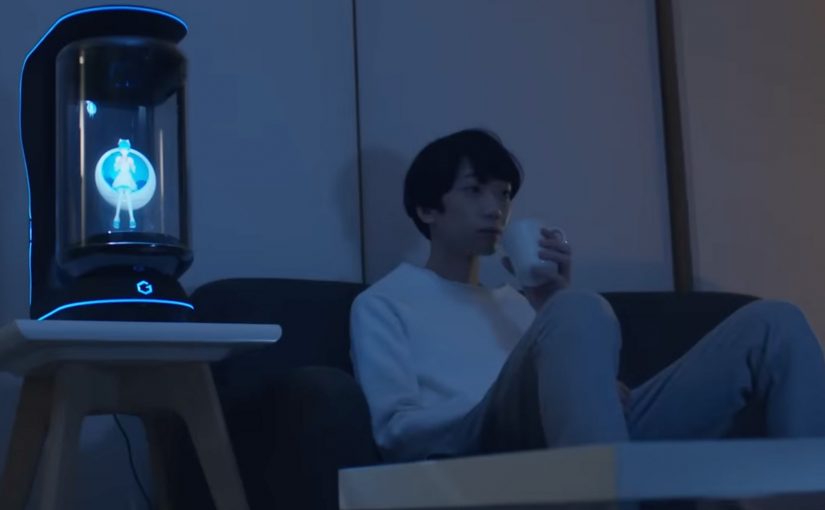
Gatebox: The Virtual Home Robot

You come home after work and someone is waiting for you. Not a speaker. Not a disembodied voice. A character in a glass tube that looks up, recognizes you, and says “welcome back.” She can wake you up in the morning, remind you what you need to do today, and act as a simple control layer for your smart home.

That is the proposition behind Gatebox. It positions itself as a virtual home robot, built around a fully interactive holographic character called Azuma Hikari. The pitch is not only automation. It is companionship plus utility. Face recognition. Voice recognition. Daily routines. Home control. A “presence” that turns a smart home from commands into a relationship.

What makes Gatebox different from Alexa, Siri, and Cortana

Gatebox competes on a different axis than mainstream voice assistants.

Voice assistants typically behave like tools. You ask. They answer. You command. They execute.

Gatebox leans into a different model:

  • Character-first interface. A persistent persona you interact with, not just a voice endpoint.
  • Ambient companionship. It is designed to greet you, nudge you, and keep you company, not only respond on demand.
  • Smart home control as a baseline. Home automation is part of the offer, not the story.

The result is a product that feels less like a speaker and more like a “someone” in the room.

Why the “holographic companion” framing matters

A lot of smart home innovation focuses on features. Gatebox focuses on behavior.

It is designed around everyday moments:

  • waking you up
  • reminding you what to remember
  • welcoming you home
  • keeping a simple loop of interaction alive across the day

That is not just novelty. It is a design bet that people want technology to feel relational, not transactional.

What the product is, in practical terms

At its most basic, Gatebox:

  • controls smart home equipment
  • recognizes your face and your voice
  • runs lightweight daily-life interactions through the Azuma Hikari character

It is currently available for pre-order for Japanese-speaking customers in Japan and the USA, at around $2,600 per unit. For more details, visit gatebox.ai.

The bigger signal for interface design

Gatebox is also a clean case study in where interfaces can go next.

Instead of:

  • screens everywhere
  • apps for everything
  • menus and settings

It bets on:

  • a single persistent companion interface
  • a character that anchors interaction
  • a device that makes “home AI” feel present, not hidden in the cloud

That is an important shift for anyone building consumer interaction models. The interface is not the UI. The interface is the relationship.


A few fast answers before you act

Q: What is Gatebox in one sentence?
A virtual home robot that combines smart home control with a holographic companion character, designed for everyday interaction.

Q: Who is Azuma Hikari?
Gatebox’s first character. A fully interactive holographic girl that acts as the interface for utility and companionship.

Q: What can it do at a basic level?
Control smart home equipment, recognize face and voice, run daily routines like wake-up, reminders, and greetings.

Q: Why compare it to Alexa, Siri, and Cortana?
Because it is positioned as more than a voice assistant. It is a character-first, companion-style interface.

Q: What is the commercial status?
Available for pre-order for Japanese-speaking customers in Japan and the USA, at around $2,600 per unit.