Manus AI: Action Engine for Marketing

Manus AI: Action Engine for Marketing

Manus AI is interesting because it changes the unit of AI adoption in marketing. The useful question is no longer whether AI can write better copy, but whether it can safely execute repeatable marketing work across tools, accounts and output formats.

Vaibhav Sisinty, founder of GrowthSchool, frames the hype in the video, but the useful part is the work pattern: browser shopping, download cleanup, Meta ads analysis, Slack triage, influencer research, prototype building and Telegram-based task handoff.

These are not glamorous use cases. They are the small operational gaps that make marketing teams slower than they should be: extracting data, checking dashboards, comparing options, building lists, scanning messages, formatting outputs and turning loose requests into usable artefacts.

The operating shift: from answer to action

Most marketing teams still use AI as an answer layer. They ask for ideas, summaries, drafts, research angles, prompt variants or campaign copy, and then people still move the work manually through browsers, spreadsheets, CMS workflows, ad platforms, project tools and approval chains.

Manus describes itself as an action engine. An action engine is an AI layer that can plan, execute and package work across tools, rather than only generate recommendations.

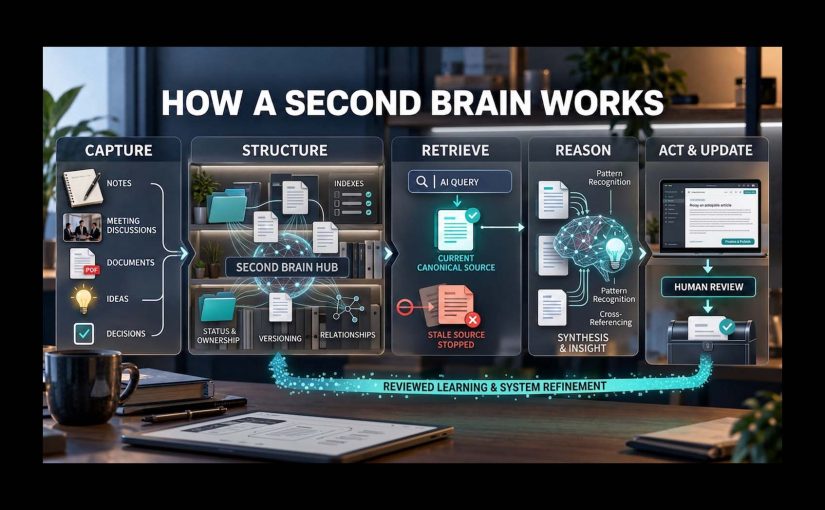
The mechanism is straightforward: Manus combines planning, browser operation, connectors, file access, code generation and output packaging, so a marketing request can move from prompt to finished artefact without being manually rebuilt in five separate tools.

For marketing teams, that puts the pressure point on operating model design, not on prompt novelty.

This mechanism matters because execution creates real business value only when the system can reach the right tools, use the right data, follow the right rules and hand back something a team can trust.

The marketing question: control before scale

The real question is whether a marketing organization can give any agent safe enough access, clear enough tasks and strong enough controls to make the output usable.

The stance here is clear: treat Manus as a workbench for bounded execution, not as a replacement for marketing judgment.

In a real marketing stack, that distinction matters because the work crosses content systems, asset libraries, product data, CRM, analytics, ad platforms, consent, identity and approval workflows.

The Meta angle matters, but not as gossip

Manus still presents itself as part of Meta, while recent reporting says China has blocked the acquisition or ordered the transaction unwound. That tension deserves a brief mention, but it should not dominate the argument.

The business signal is not the takeover drama. It is that the market is moving from AI tools that advise marketers to AI systems that can sit closer to actual work.

That is why the Meta connection is relevant: ads, creators, messaging and business pages are workflow surfaces, not just media surfaces.

If an execution agent can sit near those surfaces, the commercial value is not another content generator. The value is shorter distance between insight, action, packaging and follow-up.

Governance decides whether this scales

An agent that can open browsers, read accounts, analyze campaigns, create files, draft replies and ship prototypes is useful only when access rights, approval steps and logs are explicit. Before scaling it, marketing teams need to define which accounts can be touched, which actions are read-only, which outputs require human approval, which data is excluded and which records prove what happened.

Without this, the failure mode is obvious. The agent becomes another shadow workflow, fast enough to bypass controls and persuasive enough to hide weak evidence.

That is also where adoption gets decided. People will not use an agent because it is magical; they will use it because it removes low-value work without making them responsible for invisible risk.

What marketing teams should operationalize

The practical move is not to connect everything at once. Start with bounded, reversible work: campaign monitoring, reporting summaries, initial lists of potential creators and influencers, content calendars, competitive scans, meeting follow-ups, prototype briefs and internal workflow cleanup. These jobs have enough friction to matter, enough structure to test, and low enough downside if a human reviewer stays in the loop.

Takeaway: Offerings like Manus AI are useful for marketing when they are treated as execution layers for controlled workflows, with clear access rules, human approval points, source checks, output QA and measurable time saved.


A few fast answers before you act

What is Manus AI?

Manus AI is a general-purpose AI agent designed to execute tasks, not just answer prompts. In marketing, that means it can support research, reporting, campaign analysis, workflow automation and prototype creation when access and review are controlled.

How is Manus different from ChatGPT or Claude?

ChatGPT and Claude are usually used as reasoning and drafting interfaces. Manus is positioned closer to an execution environment because it can use browser operation, connectors and output generation to turn a request into a finished artefact.

Should marketing teams connect Manus to real accounts?

Not without data governance and security review. Start with read-only access where possible, confirm what data leaves your environment, exclude sensitive customer or employee data, require human approval before external actions, and keep logs for every workflow that affects campaigns, customers or brand assets.

Does the Meta acquisition story change the marketing argument?

Only slightly. The ownership story is unstable, but the operating lesson is stable: AI agents are moving closer to ads, creators, messaging, commerce and business workflows.

What is the best first use case for Manus in marketing?

Start with recurring analysis and packaging work. Weekly campaign summaries, potential creator and influencer lists, competitor scans and meeting-to-action-plan workflows are easier to govern than live publishing or customer-facing execution.

Nas.com: Photo to Full-Funnel Marketing

Nas.com: Photo to Full-Funnel Marketing

From lead capture to full-funnel self-service

In December, I used Nas.io as an example of AI shrinking one specific acquisition job: describe the offer, generate a simple lead-capture page, and give a non-technical user a working front door to demand. Four months later, the proposition is materially bigger and rebranded as Nas.com, which now presents a workflow that starts with a photo and expands into storefront setup, listing creation, marketing content, ad creation, and customer acquisition support from the same system.

The mechanism is more important than the brand story. Nas describes onboarding from a prompted idea or photo, then layers in content generation for visuals, ads for campaign creation, lead discovery, and direct outreach, so the user is not just building a page but moving from product image to market-facing execution inside one operating environment. Its own documentation frames that environment as the place to create products, set up the website, run marketing tools, and manage the business in detail.

That is a meaningful expansion from their narrower self-service example from December.

It lands because it compresses several steps that normally sit across separate tools and handoffs. The same workflow helps a user move from product image to storefront, assets, and first activation steps, which is exactly what the live demo below shows.

What Nas is really signaling

What Nas is really signaling is a photo-to-market self-service workflow in which a simple image or prompt triggers page creation, asset generation, activation setup, and early demand capture inside one platform.

That is the important shift. The story is no longer that AI can make content. The more important move is that work which normally sits across separate tools and specialist queues, storefront setup, creative production, ad launch, lead discovery, and outreach, is being compressed into one connected operating layer. On Nas’s own marketing assets, the promise is clear: build the store, generate the listings and content, help with marketing, and move directly into customer acquisition from the same environment. That same positioning is paired with a scale claim that 350,000 people across 150+ countries are already selling on the platform.

Enterprise teams should treat this as an operating-model signal about how marketing work will increasingly be expected to function.

The real question is whether your brand, content, CRM, and commerce stack can let non-technical teams do the equivalent safely, quickly, and with governance.

No serious enterprise is going to replace its CMS, PIM, DAM, CIAM, consent layer, analytics stack, or media controls with a creator platform. That would miss the point. The real enterprise implication is expectation shift. Once people see more of the path from offer to activation compressed into one guided flow, they stop accepting ticket queues, repeated re-entry, and tool switching as normal for work that should already be semi-automated.

Why this matters for consumer experience platforms

For enterprise teams, this is less about storefront software and more about workflow design. A consumer experience platform only becomes commercially useful when it can turn brand intent into live, measurable market activity without making every step depend on specialist mediation.

That is why the Nas example matters. It does not just simplify creation. It pulls creation and activation closer together. The page, the assets, the ad setup, the lead discovery, and the outreach logic sit near each other in the same operating layer. That proximity matters because every extra handoff slows launch speed, raises coordination cost, and makes self-service impossible in practice.

This is where many large organisations are still weak. They may own all the component systems, but the systems do not behave like one usable operating model for non-technical teams. Capability exists. Flow does not.

What the enterprise should copy, and what it should not

The lesson is not to let anyone prompt anything. The lesson is to package complexity behind automated, governed workflows.

That means approved prompts, approved source data, brand-safe templates, channel rules, claims controls, embedded legal checks, human review thresholds, role permissions, and measurement wired into one non-technical, low-friction flow. If that wiring is missing, self-service becomes rework, inconsistency, and compliance debt dressed up as speed.

The practical target is not more AI content. The target is governed prompt-enabled execution across the journey, asset creation, landing-page setup, product-page enrichment, lead capture, paid activation, and performance measurement, all with clear ownership and auditability built in.

The move to make now

If you run a consumer experience platform, start by choosing one repeatable workflow where speed matters, governance is manageable, and value is visible. Product-detail enhancement, campaign landing pages, local paid-social creative, and email variant creation are better starting points than broad AI transformation programmes because they force workflow clarity, ownership, and measurable outcomes.

Takeaway: remove tech complexity and enable brand teams to create and activate their own assets through AI prompts inside governed workflows now, or be ready to play catch-up when competitors make this level of self-service feel normal.


A few fast answers before you act

Is Nas.com just another storefront builder?

No. Nas is positioning the product more broadly than storefront hosting. Its own marketing assets describe store setup plus content generation, ad launch, lead discovery, and outreach from the same environment.

What is the most important shift in this example?

The shift is that creation and activation are being compressed into one guided workflow, which reduces the gap between having something to sell and being able to put it in front of demand.

Is this fully automatic marketing?

No. The help documentation describes tools that simplify creation, ad setup, lead finding, and outreach, but the user still chooses goals, reviews outputs, and decides what to run.

What should enterprise teams copy first?

Copy the workflow logic first. Pick one repeatable use case where a non-technical team should be able to move from idea to approved market output with minimal handoffs.

What has to be true for this to work in an enterprise?

You need approved data sources, prompt guardrails, template logic, review thresholds, permissions, and measurement embedded in the workflow, not bolted on later.

Why act now instead of waiting?

Because once this interaction model becomes normal outside the enterprise, internal teams will stop accepting fragmented execution models as inevitable. The firms that win will be the ones that hide complexity without giving up governance.

AI Image Tools: From Prompt to Publish

AI Image Tools: From Prompt to Publish

Most coverage of AI image tools still reads like a model beauty contest. One tool wins on realism, another on style, another on speed, and the audience gets the usual low-value conclusion: try them all and see what sticks.

That is not how serious content teams operate. Julia McCoy’s walkthrough is useful because it puts seven popular image tools in one frame, but the more commercially useful lens is different. The job is not to admire outputs. It is to identify which image model helps a team move from prompt to publish with the least waste.

Identifying image models that can actually ship assets

Most teams do not need the most impressive image model in the abstract. They need the right model for the job in front of them, which means matching the tool to the asset type, approval risk, speed requirement, and downstream workflow.

The missing discipline is model-fit. Model-fit is the discipline of choosing an image generator based on what the asset needs to do in production, not just how good the first output looks on screen.

In enterprise content operations, the winning model is usually the one that survives review, resize, and reuse without spawning manual cleanup. At enterprise scale, the issue is not just image quality. It is whether the asset can move cleanly into DAM, CMS, localization, and approval workflows without creating governance exceptions.

The right image model is the one that reduces production friction, preserves brand control, and helps teams ship usable assets. The real question is not which model looks best in a demo, but which one moves a team from prompt to publish with the least waste.

What each image tool is really good at

DALL-E 3 in ChatGPT: Best when teams need fast branded content

DALL-E 3 is best understood as a conversational image generator inside a broader workflow. Its advantage is not just image creation. It is the ability to iterate in natural language, refine outputs quickly, and adapt formats without breaking flow. That makes it especially useful for social graphics, rough branded concepts, and content support assets where speed matters as much as polish.

This is where operator value shows up. If a team can move from idea to usable asset in one conversational environment, production friction drops. The catch is that text rendering can still be unreliable, which means it should support content production, not replace design QA.

Midjourney Alpha: Best when the brief needs visual drama

Midjourney Alpha is a high-detail image model built for stronger visual impact. Its web interface makes the workflow cleaner than the old Discord-first experience, but the reason teams use it is simpler. It produces more dramatic, presentation-friendly imagery when the brief needs mood, depth, or aesthetic intensity.

That makes it a fit for keynote headers, thought-leadership visuals, blog hero art, and concept-led storytelling. The trade-off is practical. High aesthetic quality does not always translate into reliable likeness, identity accuracy, or brand-safe precision.

Meta AI: Best when speed of iteration matters more than finish

Meta AI is most useful as a fast iteration tool. Its strength is responsiveness. It lets users shape and reshape images quickly while prompting, which makes it valuable for early concept exploration and low-friction experimentation.

For content teams, that matters when the task is not final asset creation but directional testing. It is less useful when the workflow depends on reference-image fidelity or more controlled production behavior.

Microsoft Designer: Best for learning prompts and creating simple content fast

Microsoft Designer is less about highest-end image quality and more about accessibility. It helps users understand what prompt ingredients influence outputs, which makes it useful for beginners or teams building prompt literacy.

That makes it a practical choice for low-risk social content, internal creative exploration, or teams still learning how to brief image models effectively. The limitation is consistency. What helps teams learn does not always help them ship premium assets.

Canva Magic Media: Best when generation needs to flow straight into design

Canva Magic Media matters because it sits inside a design workflow marketers already use. That is its real advantage. The value is not only the image. It is the reduced distance between generation, editing, background removal, layout, and final export.

For marketers and in-house content teams, that can matter more than absolute model quality. If the asset is headed straight into campaign design or social production, workflow integration often beats raw creative range.

Adobe Firefly: Best when style control and enterprise workflow matter

Adobe Firefly is the most relevant tool here for teams that care about stylistic control and closer alignment with professional creative workflows. Its strength is not just generation. It is controlled generation inside a broader production ecosystem.

That makes it more commercially useful for teams already operating in Adobe-heavy environments. The value is greater when governance, consistency, and downstream editing matter more than novelty.

My Mood AI: Best when the brief depends on face fidelity

My Mood AI is not really competing for the same role as the broader image generators. It is a likeness-focused workflow built for personal headshots, creator-style visuals, and portrait-led use cases where the face is the asset.

That distinction matters. When the task is human likeness, general-purpose image models still break too often. A specialist approach makes more sense because the commercial requirement is not “make an image.” It is “make this person usable on-brand.”

Why workflow fit matters more than model hype

A lot of teams still talk about AI image tools as if the whole story is creative novelty. That undersells the real business value. The gain is operational.

When the brief is routed to the right model, review cycles shorten, manual cleanup falls, and more assets make it through approval into live use.

That is why workflow fit matters more than model hype. DALL-E 3 compresses ideation inside chat. Canva and Microsoft reduce handoff friction for everyday content creation. Adobe Firefly is stronger when generation needs to stay connected to a broader creative stack. Midjourney is more useful when visual impact is the point of the asset, not just a nice bonus.

The business mistake is trying to standardize on one “best” image model. The better move is to standardize on routing logic. Which briefs need speed. Which need design-system continuity. Which need strong hero visuals. Which need face fidelity. Which need heavy post-generation editing. That is the difference between tool sampling and commercially useful transformation.

A practical image stack teams can actually use

If I were setting this up for a content organization, I would not start by asking which single image tool to buy into. I would map asset demand first, then assign model lanes around asset class, approval risk, editing depth, and likelihood of reuse. Used properly, this is a governed routing layer, not an experimentation sandbox. Teams need approved tools by asset type, defined QA gates, and clear escalation when briefs require design, legal, or brand review.

Start with DALL-E 3, Meta AI, Microsoft Designer, and Canva for fast ideation and everyday content support. Move to Midjourney Alpha and Adobe Firefly when visual finish or downstream creative control matters more. Keep My Mood AI for portrait-led work where recognizability is the requirement rather than a nice-to-have. That routing model is more useful than forcing every brief through one “best” tool, because it cuts waste where content teams usually lose time: revision, cleanup, and rework.


A few fast answers before you act

Which AI image tool is best for fast branded content?

DALL-E 3 is the cleanest fit when the team wants conversational prompting and quick variations inside ChatGPT, while Canva and Microsoft Designer are stronger when the asset needs to move immediately into design or presentation workflows.

Which tool is best for presentation-grade visual impact?

Midjourney Alpha is the strongest fit when the asset needs mood, detail, and visual drama to carry the message. It is the best choice here when aesthetic intensity is part of the business value.

Which image tool fits marketers already working in design platforms?

Canva is the easiest fit for fast marketing production, while Adobe Firefly becomes more relevant when the team already works inside a professional Adobe-centered creative environment.

Can one image model cover every content use case?

No. The smarter operating model is to assign different tools to different jobs instead of pretending one model should own social content, hero art, headshots, and design-integrated production all at once.

What usually breaks before publish?

The failure point is usually not whether the tool can generate an image. It is whether the image survives review, edit depth, channel adaptation, and stakeholder scrutiny without creating more cleanup than value.

How should teams evaluate AI image tools commercially?

Evaluate them by prompt-to-publish fit. Look at production friction, brand control, workflow integration, face fidelity where needed, and how much manual rework the tool creates before an asset can ship.