
Google Home Mini: Disney Little Golden Books

Google Home Mini: Disney Little Golden Books

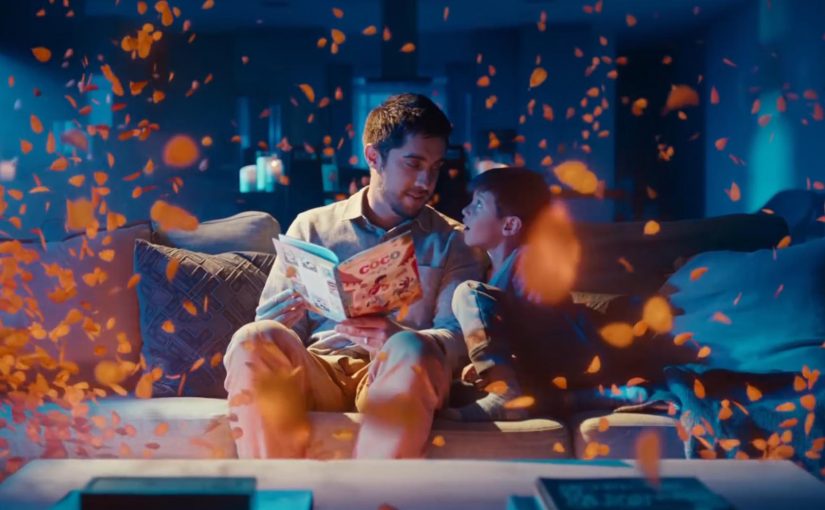
You start reading a Disney Little Golden Book out loud, and your Google Home joins in. Sound effects land on cue. The soundtrack shifts with the scene. The story feels produced, not just read.

The partnership. Disney storybooks with an audio layer

Google and Disney bring select Disney Little Golden Books to life by letting Google Home add sound effects and soundtracks as the story is read aloud.

How it works. Voice recognition that follows the reader

The feature uses voice recognition to track the pacing of the reader. If you skip ahead or go back, the sound effects adjust accordingly. If you pause reading, ambient music plays until you begin again. Because it can follow your pacing in real time, the audio can land on cue without you triggering effects manually.

Why it lands. Produced storytime without a screen

In family living-room media, the win is turning passive reading into a shared, timed audio experience without adding another screen. The listener hears the same beats the reader sees, so the room stays in one moment instead of splitting attention across devices.

Extractable takeaway: When you add an audio layer to an analog ritual, sync it to human pacing rather than button presses, so the experience feels guided while staying hands-free.

The real question is whether the audio layer earns its place by deepening the ritual, not by adding novelty.

This is a strong pattern for smart speakers because it increases interactivity without pulling a family into more screen time.

How you start. One voice command

To activate it, say, “Hey Google, let’s read along with Disney.”

Always listening during the story

Unlike typical commands, the smart speaker’s microphone stays on during the story so the device can follow along and add sound effects in the right moments.

Privacy note in the product promise

To address privacy concerns, Google says it does not store the audio data after the story has been completed.

Where it works

This feature works on Google Home, Home Mini, and Home Max speakers in the US.

What to copy for read-along audio experiences

  • Anchor to a ritual. Start with something people already do, then add audio that fits the habit.
  • Follow the human pace. Track reading speed, pauses, and backtracking so timing feels natural.
  • Keep it screen-free. Make the audio layer the enhancement, not a gateway to another display.
  • State the privacy posture. If the mic stays on, explain clearly what is and is not retained.

A few fast answers before you act

What is “Read along with Disney” on Google Home?

It is a Google and Disney feature that adds sound effects and music to select Disney Little Golden Books while you read aloud.

How does it stay in sync with the reader?

Voice recognition follows the pacing of the read-out-loud audio and adjusts if you pause, skip ahead, or go back.

How do you start it?

Use the voice command shown in the post, then begin reading the supported book out loud so the speaker can follow along.

What is the key experience detail that makes it feel “produced”?

The audio layer lands on cue as you read, so the story rhythm feels guided without the reader needing to trigger effects manually.

What is the stated privacy promise during the story?

The product promise described here is that audio is used to follow the reading experience and is not kept after the story completes.
Gatebox: The Virtual Home Robot

Gatebox: The Virtual Home Robot

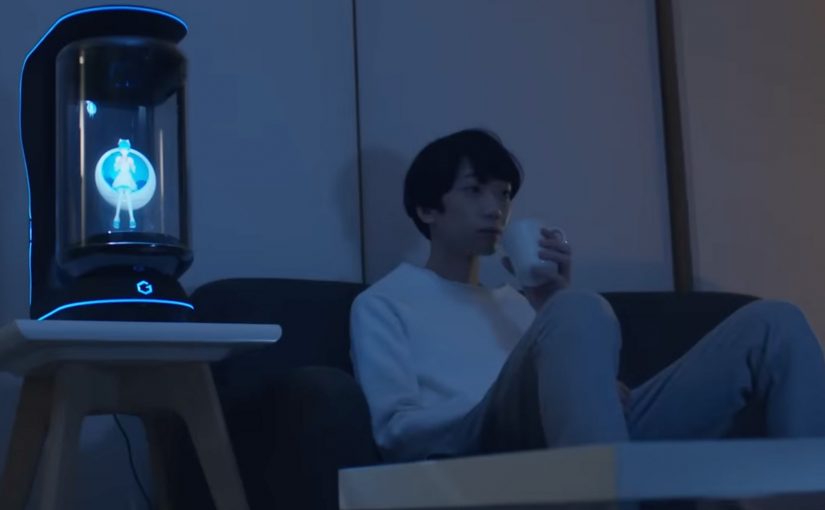
You come home after work and someone is waiting for you. Not a speaker. Not a disembodied voice. A character in a glass tube that looks up, recognizes you, and says “welcome back.” She can wake you up in the morning, remind you what you need to do today, and act as a simple control layer for your smart home.

That is the proposition behind Gatebox. It positions itself as a virtual home robot, built around a fully interactive holographic character called Azuma Hikari. Here, “virtual home robot” means a stationary device that uses a character interface to run simple routines and smart home control, rather than a mobile physical robot. The pitch is not only automation. It is companionship plus utility. Face recognition. Voice recognition. Daily routines. Home control. A “presence” that turns a smart home from commands into a relationship.

What makes Gatebox different from Alexa, Siri, and Cortana

Gatebox competes on a different axis than mainstream voice assistants.

Voice assistants typically behave like tools. You ask. They answer. You command. They execute.

Gatebox leans into a different model:

  • Character-first interface. A persistent persona you interact with, not just a voice endpoint.
  • Ambient companionship. It is designed to greet you, nudge you, and keep you company, not only respond on demand.
  • Smart home control as a baseline. Home automation is part of the offer, not the story.

The result is a product that feels less like a speaker and more like a “someone” in the room.

In consumer smart homes, the interface layer matters as much as the devices, because it shapes whether automation feels like commands or companionship.

Why the “holographic companion” framing matters

A lot of smart home innovation focuses on features. Gatebox focuses on behavior. By keeping a persistent character in your peripheral vision, it turns prompts into small social cues, which is why it can feel relational rather than transactional.

Extractable takeaway: If you want technology to be used every day, design for a lightweight loop of interaction that stays alive between commands, not just for perfect answers on demand.

It is designed around everyday moments:

  • waking you up
  • reminding you what to remember
  • welcoming you home
  • keeping a simple loop of interaction alive across the day

That is not just novelty. It is a design bet that people want technology to feel relational, not transactional.

What the product is, in practical terms

At its most basic, Gatebox:

  • controls smart home equipment
  • recognizes your face and your voice
  • runs lightweight daily-life interactions through the Azuma Hikari character

It is currently available for pre-order for Japanese-speaking customers in Japan and the USA, at around $2,600 per unit. For more details, visit gatebox.ai.

The business bet behind a companion interface

The real question is whether your home interface should be a command surface, or a companion that maintains a simple relationship across the day.

The intent is straightforward: keep the interaction loop alive so “smart home control” becomes a daily habit, not a feature you try once and forget.

Character-first companions are a stronger interaction bet than voice-only assistants when you want sustained engagement, as long as utility stays the default.

The bigger signal for interface design

Instead of:

  • screens everywhere
  • apps for everything
  • menus and settings

It bets on:

  • a single persistent companion interface
  • a character that anchors interaction
  • a device that makes “home AI” feel present, not hidden in the cloud

That is an important shift for anyone building consumer interaction models. The interface is not the UI. The interface is the relationship.

Four patterns to borrow for companion interfaces

  • Design for in-between moments. Build a lightweight loop of greetings, nudges, and routines that persists between explicit commands.
  • Make utility the baseline, not the punchline. The companion framing works only if home control and reminders stay reliable and fast.
  • Anchor interaction in one persistent “someone”. A stable persona reduces friction compared to hopping between apps, menus, and settings.
  • Use presence to change behavior. A visible, ambient interface shifts usage from “ask when needed” to “engage because it is there”.

A few fast answers before you act

What is Gatebox in one sentence?

Gatebox is a virtual home robot that combines smart home control with a holographic companion character, designed for everyday interaction.

Who is Azuma Hikari?

Azuma Hikari is Gatebox’s first character, presented as an interactive holographic girl that acts as the interface for utility and companionship.

What can it do at a basic level?

At a basic level, it can control smart home equipment, recognize face and voice, and run daily routines like wake-up, reminders, and greetings.

Why compare it to Alexa, Siri, and Cortana?

The comparison helps clarify positioning. Gatebox frames itself as more than a voice assistant, using a character-first, companion-style interface instead of a purely voice-first tool.

What is the commercial status?

It is described as available for pre-order for Japanese-speaking customers in Japan and the USA, at around $2,600 per unit.

13th Street: Last Call Interactive Horror

13th Street: Last Call Interactive Horror

Last year Lacta Chocolates came up with a web-based interactive love story called Love at first site. Now Jung von Matt and Film Deluxe take the same “viewer participation” impulse into a darker genre with an interactive horror experience designed for cinemas. Here, viewer participation means the audience can influence what happens on screen instead of only reacting to it.

The movie is called Last Call by 13th Street, and it is billed as the first interactive horror movie in the world.

How the film turns a screening into a live conversation

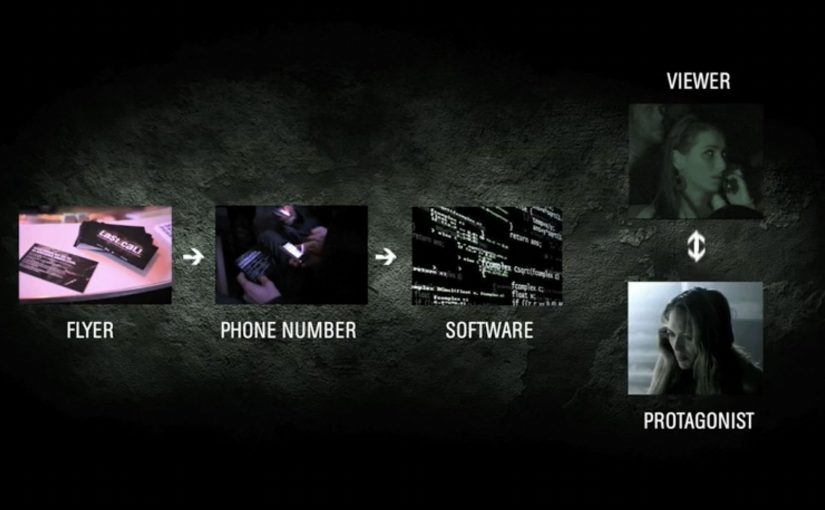
The core mechanic is simple and high-stakes. The audience can communicate with the protagonist through specially developed speech recognition that turns one participant’s answers, delivered via mobile phone, into on-screen instructions.

Instead of passively watching a character make bad decisions, one viewer gets pulled into the story and has to direct what happens next, under pressure, in front of a room full of people.

In European entertainment marketing, the strongest channel ideas are the ones that turn passive viewing into a shared physical experience.

Why it lands: it converts fear into responsibility

Horror is already interactive in your head. You are constantly thinking “don’t go in there” or “run”. Last Call makes that internal commentary explicit, then gives the viewer control at exactly the moment when tension is highest. That works because it turns private fear into public responsibility, which intensifies tension instead of interrupting it.

Extractable takeaway: If you want interactivity to feel meaningful, make the choice time-critical and socially visible. When a whole room watches one person decide, even simple branching choices feel heavier.

The intent: make a channel brand feel like an event

This is not interactivity for its own sake. It is a positioning play. The real question is whether the interaction makes 13th Street feel like the only place this kind of horror experience could happen.

The phone call is the hook, but the real product is the shared story people retell afterwards: “someone in our screening got the call”.

What to steal for your own interactive storytelling

  • Choose one decisive moment: interactivity works best when it happens at a peak, not throughout.
  • Keep the command vocabulary tight: yes or no, left or right, stay or flee. Clarity beats cleverness.
  • Make the interaction legible to spectators: the audience should understand what the caller chose without needing explanation.
  • Design for group emotion: the collective tension and reaction is part of the value.
  • Build the “retellable” sentence: “the character called an audience member” is stronger than any tagline.

A few fast answers before you act

What makes Last Call “interactive”?

A participant receives a mobile phone call and speaks choices that are translated via speech recognition into commands, which trigger different follow-up scenes.

Why use a phone call instead of a web interface?

A phone call feels personal and urgent, which matches horror. It also keeps the participant’s hands free and the interaction fast enough for a live screening.

Is this a real branching film or a gimmick?

It works like a branching structure with pre-produced scenes, selected based on a small set of recognized commands. The novelty is the live calling mechanic in a cinema context.

What is the biggest risk when copying this format?

Latency and ambiguity. If recognition is slow or choices are unclear, tension collapses. The interaction has to feel instantaneous and unmissable.

What is the transferable principle beyond horror?

Put the audience in a single, decisive role at a high-emotion peak. One clear decision, delivered fast, can create a stronger memory than many shallow interactions.