
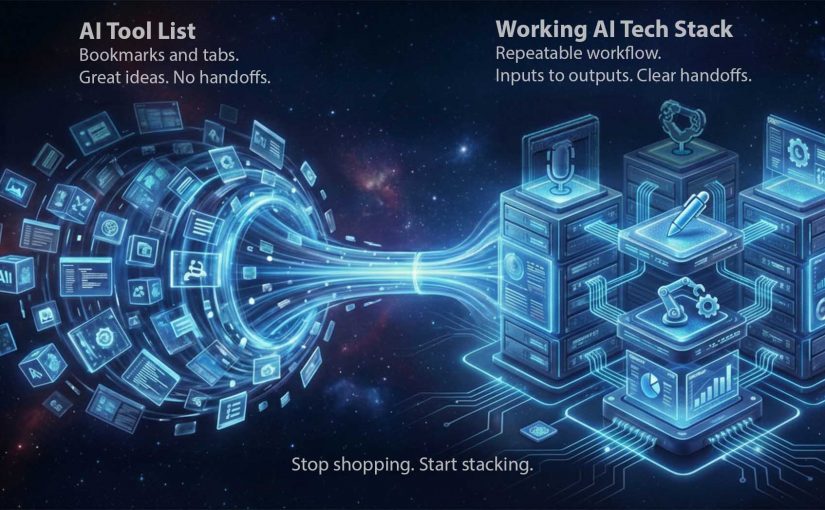
From AI Tool List to Working AI Tech Stack

From “pick 20 tools” to “run a working stack”

I recently came across the below video from Dan Martell which frames “zero-code million-dollar business” as a tool-selection problem. That framing is useful. However the right conclusion for marketers and brands watching is not “go pick 20 tools”. The right conclusion is “stop shopping. Start stacking”. In 2026, you should start focusing more on the ability to pick, connect, and operationalize capabilities.

By “working AI tech stack” I mean a small, repeatable set of tools that moves work from input to output with the least friction. It is not a folder of bookmarks. It is a production line.

The useful takeaway isn’t the list. It’s the operating model.

Most people consume AI content and walk away with a shopping list. That is the wrong takeaway. The useful takeaway is operational. Arrange capabilities into a workflow that consistently produces outputs. Briefs, assets, approvals, launches, responses, and measurable improvements.

A list creates options. A stack creates throughput. Throughput is how reliably your team converts intent into shipped work, week after week, without rebuilding the process every time.

The mechanism: a stack is just clean handoffs

A working AI tech stack is a sequence with explicit handoffs:

Inputs → Synthesis → Creation → Automation → Distribution → Measurement

Each step has one job. Each step produces an artifact someone else can use. Each handoff is defined so the work does not stall in Slack, email, or “waiting for approval”.

In global FMCG and retail marketing organizations, the bottleneck is rarely ideas but the handoffs between people, tools, and approvals.

Why this lands with leaders

Tool lists feel like progress because they are concrete and low-commitment. You can bookmark them and feel “covered”. Stacks feel harder because they force decisions: what is the workflow, who owns each step, where do we enforce quality and risk controls.

Extractable takeaway: If you cannot name the exact step a tool owns in a repeatable workflow (input → transformation → handoff → output), it is not part of your stack yet. It is just potential.

The business intent: less software. More shipped outcomes

For marketers and brands, the goal is not “using AI”. The goal is operational leverage:

The real question is not how many AI tools you can name, but whether your team can move work through a repeatable line with clear ownership and handoffs.

  • Faster cycle time from brief to asset.
  • Fewer revision loops because synthesis and constraints are done upfront.
  • Fewer dropped balls because handoffs are automated.
  • More reuse of institutional knowledge because answers are captured once and searchable.
  • Higher output without lowering standards.

This is also where governance belongs. A stack needs rules about what data can go where, who can approve what, and which steps require a human decision.

In enterprise teams, that also means deciding how the stack connects to existing systems of record such as CMS, DAM, CRM, analytics, and approval workflows, instead of creating a parallel shadow process.

The working stack blueprint: tools mapped from Inputs to Measurement

Below are the 20 tools referenced in the video, placed where they most naturally fit in the production line. You can use fewer than 20. The point is the flow.

The hard part is rarely access to another model. It is integration, ownership, QA thresholds, and escalation logic across the workflow.

Inputs: capture raw material without losing signal

Manus

Manus is designed to act more like a task runner than a chatbot. You give it a goal and it works through steps to deliver outputs, not just advice. Example: collect competitor screenshots, extract claims, summarize patterns, and deliver a brief plus a slide outline.

SocialSweep

SocialSweep is positioned as a way to search your network and relationship graph with context. It helps you identify who you know, why they are relevant, and what to say. Example: find warm paths to retail media decision-makers, then draft an intro message that references shared context.

HireAlli

HireAlli is positioned around capturing commercial intent from website traffic so teams can follow up faster. Example: flag repeat visits to pricing pages, then route the lead to sales with a summary of pages viewed and a recommended next message.

Synthesis: turn messy inputs into a usable brief and plan

NotebookLM

NotebookLM is useful when you want answers grounded in the sources you provide. It helps you summarize, compare, and extract structure from documents. Example: upload research PDFs and prior campaign docs, then generate a launch FAQ and a messaging hierarchy that stays consistent with those materials.

Claude

Claude is a general assistant that excels at drafting, rewriting, and structuring thinking. Use it to turn raw notes into clear decisions and action plans. Example: paste a workshop transcript and request a decision log, assumptions, risks, and a one-page brief for stakeholders.

ChatGPT

ChatGPT is a general-purpose assistant for ideation, drafting, analysis, and reusable workflows. It is especially useful when you iterate toward a spec. Example: ask clarifying questions for a campaign brief, then output a structured creative and media spec the team can execute.

Creation: produce assets that are actually shippable

Gamma

Gamma helps turn rough thinking into a structured deck or document quickly. It is strong when the bottleneck is narrative structure, not visual polish. Example: paste the brief, generate a 10-slide storyline, then refine the argument and flow before design.

Descript

Descript lets you edit audio and video through text. You edit the transcript like a document and the media follows. Example: clean up a leadership video by removing filler words, tightening sections, and exporting both a long version and short clips.

ElevenLabs

ElevenLabs generates natural-sounding speech from text and supports scalable voice workflows. It is useful for narration, localization, and voiceovers. Example: create a consistent “brand voice” narration for product explainers, then generate localized voiceovers without re-recording.

Lovable

Lovable is positioned as an AI-assisted way to build apps or web experiences without traditional engineering. Think prototypes, internal tools, and simple customer experiences. Example: describe an internal campaign intake tool, generate a prototype, then iterate requirements until it is usable.

Automation: make the handoffs run without nagging humans

Make

Make connects apps into workflows using triggers and actions. It is the plumbing that turns “good tools” into “a working line”. Example: when a brief is approved, create tasks, notify stakeholders, generate a first draft, and route it to review automatically.

ChatAid

ChatAid is positioned as an AI support layer that can answer recurring questions and route issues. It fits both internal enablement and customer-facing support when designed with escalation rules. Example: answer “where is the latest asset” or “what is the policy”, and escalate to a human when confidence is low.

Distribution: move outputs into channels that drive outcomes

Revio

Revio is positioned around managing inbound conversations across social channels in one place. It helps teams respond consistently and not miss high-intent messages. Example: unify DMs so customer questions and sales inquiries do not get lost across platforms.

YourAtlas

YourAtlas is positioned around AI agents that can handle inbound qualification and booking. This matters in service businesses and lead-driven funnels. Example: handle inbound calls or requests 24/7, capture required details, then hand off qualified appointments to humans.

Membership.io

Membership.io supports structured memberships and gated content experiences. It is a distribution layer for expertise and ongoing value, not just content hosting. Example: package a learning path for partners or teams, with searchable resources and a community layer to reduce repeated questions.

BuddyPro

BuddyPro is positioned around turning your content and methods into an always-on assistant people can query. It is a distribution mechanism for expertise at scale. Example: clients query your “playbook assistant” for next steps between calls, and you control what it can and cannot answer.

Measurement: close the loop so the stack improves every cycle

Hiro Finance

Hiro Finance is positioned around cash-flow visibility and planning. It helps decision-makers see financial reality without spreadsheet archaeology. Example: run a weekly check on runway, recurring costs, and upcoming risk points before you scale spend.

HelloFrank

HelloFrank is positioned around deeper business-context finance insights. It can help detect spend anomalies and surface what changed month-over-month. Example: find subscription creep and cost spikes, then turn it into a prioritized cleanup plan.

Revaly

Revaly is positioned around payment performance and reducing failed transactions that create involuntary churn. It matters most where recurring revenue is sensitive to declines. Example: identify where legitimate payments fail and improve recovery rates without harming customer trust.

Precision

Precision is positioned around turning KPIs into a practical operating rhythm. It helps teams focus attention on what moved and what to do next. Example: generate a weekly performance brief. These metrics shifted, here are likely drivers, here is what we should test or fix this week.

What a marketing operations leader should implement first

  • Start with one workflow you ship weekly. Assign a named owner and baseline cycle time, rework, and approval latency before you expand the stack.
  • Assign ownership per step. Tools without owners become clutter.
  • Build the handoffs before you add more tools. Automation is what turns tools into a line.
  • Define where humans must decide. Brand-sensitive, compliance-sensitive, and customer-sensitive steps need a review point.
  • Run a monthly keep-or-kill review. If a tool is not improving cycle time or quality, remove it.

A few fast answers before you act

What is the single biggest mistake teams make with AI tools right now?

They treat AI as a chat window to copy and paste from, instead of an execution layer connected to a workflow that ships outputs.

What is a “working AI tech stack” in one sentence?

A working AI tech stack is a small set of connected tools that reliably turns inputs like notes and briefs into shippable outputs, with minimal friction and clear handoffs.

How do I decide if a tool belongs in my stack?

If you cannot name the exact step it owns and the handoff it triggers, it is not part of the stack yet.

What should a marketing leader implement first?

One throughput line, end to end. Inputs → Synthesis → Creation → Automation → Distribution → Measurement. Then automate handoffs before adding new tools.

How do I avoid tool sprawl?

Set constraints: one tool per job, a clear owner, and a monthly keep-or-kill review tied to measured outcomes.


AI Trends 2026: 9 Shifts Changing Work & Home

AI will impact everything in 2026, from your fridge to your finances. The interesting part is not “more AI features”. It is AI becoming an execution layer that can decide and act across systems, not just advise inside a chat box. That shift matters because once AI can execute, throughput and experience depend less on prompts and more on integration, permissions, and policy.

The nine trends below are a useful provocation. I outline each shift, then add the operator lens: what is realistically visible in the market this year, and what still needs a breakthrough proof point before it goes mainstream.

The 9 trends, plus what you can realistically expect to see this year

Trend 1: AI will buy from AI

We move from “people shopping with AI help” to agents transacting with other agents, purchasing that is initiated, negotiated, confirmed, and tracked with minimal human intervention. This shows up first inside high-integration ecosystems. Enterprise procurement, marketplaces, and platforms with clean APIs, strong identity controls, and policy layers. Mass adoption needs serious integration across catalogs, pricing, budgets, approvals, payments, and compliance, so this needs high-profile integration before it becomes mainstream behavior.

Trend 2: Everything gets smart

Not just more connected devices, but environments that sense context, adapt, and coordinate, from home energy to health to kitchen routines. You will start seeing this more clearly, but it requires consumers to spend money to upgrade. The early phase looks like pockets of “smart” inside one ecosystem because upgrade cycles are slow and households hate complexity. It will be visible this year, but it is gated by consumer investment.

Trend 3: Everyone will have an AI assistant

The tangible version is not a chatbot you consult. It is a persistent layer that can take actions across your tools: triage inbox, draft and send, schedule, summarize, file, create tasks, pull data, and nudge you when a decision is needed. This year, the realistic signals are assistants embedded in software people already live in, email, calendar, docs, messaging, CRM. In enterprise terms, the shift matters when assistants move from chat surfaces into governed actions across CRM, service, commerce, and content workflows. You will see “do it for me” actions that work reliably inside one suite. You will not yet see one universal assistant that flawlessly operates across every app and identity boundary, because permissions and integration are still the hard limit.

Trend 4: No more waiting on hold

AI takes first contact, resolves routine requests, and escalates when needed. This is one of the clearest near-term value cases because it hits cost, speed, and experience. Expect fast adoption because the workflows are structured and the economics are obvious. The difference between “good” and “painful” will be escalation design and continuous quality loops. Otherwise you just replace “waiting on hold” with “arguing with a bot”. The hard part is not model quality alone. It is orchestration across knowledge sources, case history, identity, entitlements, handoff rules, and QA.

Trend 5: AI agents running entire departments

Agents coordinate end-to-end processes across functions, with humans supervising outcomes rather than executing every task. Mainstream is still a few years out. First we need a high-profile proof of concept that survives audit, risk, and operational messiness. This year, the credible signal is narrower agent deployments: specific workflows, explicit boundaries, measurable KPIs. By “agentic workflows” I mean systems that can plan a sequence of steps and take tool actions, within explicit boundaries, to complete a task. “Entire departments” comes later, once governance and integration maturity catch up.

Trend 6: Household AI robots

Robots handle basic household tasks. The near-term reality is that cost and reliability keep this premium and limited for now. This year you may see early adopters, pilots, and narrow-function home robots and services. Mainstream needs prices to fall significantly, plus safety, support, and maintenance models to mature. This is expensive investment until it gets cheaper.

Trend 7: AI robots will drive your car

This spans autonomous driving and even robots physically operating existing cars. The bottleneck is public safety, liability, and regulation. Mainstream is still some years away largely due to government frameworks and insurance constraints. The earlier signals show up in controlled environments, private roads, campuses, warehouses, and geofenced routes where risk can be bounded.

Trend 8: AI-powered delivery

Automation expands across delivery chains, from warehouse robotics to last-mile drones and ground robots. Adoption will be uneven. You will see faster rollout where regulation is lighter or clearer, and in constrained zones like campuses and planned communities. More regulated markets will follow slowly, which means this trend will look “real” in some countries earlier than others.

Trend 9: Knowing AI = career advantage

AI literacy becomes an operating advantage when teams can turn model use into repeatable workflows with governance, accountability, and measurable impact. Prompting is table stakes. The advantage compounds when you can move from using AI to integrating it into repeatable workflows with governance and measurable impact. The speed of that shift, from “use” to “integrate”, determines how quickly this advantage becomes visible at scale.

The real question is whether you are treating AI as a feature add-on, or as an execution layer with integration, explicit permissions, and measurement.

If you want durable advantage in 2026, build the integration and guardrails first, then scale the “do it for me” moments.

In enterprise and consumer ecosystems, the practical winners are the organizations that treat AI as an execution layer with integration, governance, and measurement built in.

2026 is a signal year, not an endpoint

Do not treat these nine trends as predictions you must “believe”. Treat them as signals that AI is moving from assistance into action.

Extractable takeaway: When AI starts taking action, advantage shifts to teams that can connect systems, grant permissions safely, and prove outcomes with measurement.

Some shifts will show up quickly because the economics are clean and the workflows are structured. Others need a breakthrough proof point, cheaper hardware, or regulatory clarity. Commercial value will appear first in a narrow set of high-volume workflows where integration, compliance, and measurement can be proven early. The leaders who pull ahead this year will be the ones who build integration, guardrails, and measurement early, so when the wave accelerates, they are scaling from a foundation, not improvising in a panic.

What to operationalize from these 2026 shifts

  • Pick a few workflows, not “AI everywhere”. Start with bounded tasks where inputs, approvals, and outputs are clear.
  • Make permissions and escalation explicit. Define what the assistant can do, when it must ask, and how humans take over cleanly.
  • Invest in integration and data hygiene. Catalogs, identity, policies, and reliable APIs are what make “do it for me” work.
  • Measure the delta. Track cycle time, resolution quality, and error handling so automation improves instead of drifting.

A few fast answers before you act

What are the biggest AI trends to watch in 2026?

The nine shifts to watch are agent-to-agent buying, smarter consumer tech, mainstream AI assistants, AI-first customer service, narrower agent deployments in business functions, household robots, autonomous driving progress, AI-powered delivery, and AI literacy becoming a career differentiator.

Which AI trends will show visible adoption this year?

Customer service automation (no more waiting on hold) will scale fastest because the workflows are structured and the economics are clear. You will also see clearer signals in “smart everything” and AI assistants, mainly inside closed ecosystems and major software suites.

What will slow down “AI buying from AI”?

Integration and policy. Autonomous purchasing needs clean product data, pricing, payments, approvals, identity, and compliance across multiple systems. Expect early signals in high-integration marketplaces and enterprise procurement before mass adoption.

Are “AI agents running entire departments” realistic in 2026?

You will see more narrow, high-impact agentic workflows. Department-level autonomy is likely still a few years out because it needs high-profile proof points that survive audit, risk, and real operational complexity.

When will robots in homes and cars become mainstream?

Not yet. The early phase is expensive and limited. Mainstream adoption depends on price drops, reliability, safety standards, and support models, plus regulation, liability, and insurance frameworks that make autonomy feel dependable at scale.

Why does AI literacy become a career advantage in 2026?

Because advantage compounds when people move from using AI to integrating it into repeatable workflows with governance and measurable impact. Prompting helps. Integration changes throughput and business outcomes.

AI in Hollywood: Threat or Storytelling Upgrade?

AI is now part of everyday filmmaking. Some people see opportunity. Others see threat.

But the more useful question for studios, streamers, agencies, and brand content teams is not whether AI arrives. It is where AI belongs in the production stack, who governs its use, and what value it creates without breaking trust.

AI is already in how films get made. Whether we admit it or not

The debate often sounds theoretical. Meanwhile, AI is already doing real work in how films get made. From early ideas to post-production: scripting support, concept design, scoring, editing assistance, voice work, and performance modification.

That matters for one simple reason. The question is no longer “Will AI arrive?”. The question is “What kind of AI use becomes normal, and under what rules?”.

If you look closely, the industry is already making that choice in small, easy-to-miss steps. The tools are frequently packaged as “features” inside software people already trust. Auto-transcription. Auto reframing for different screen formats. Tools that automatically cut out subjects from backgrounds. Tools that track motion in a shot. Noise reduction. Dialogue cleanup. Autotagging clips by faces or scenes. Call it machine learning, call it AI. The practical outcome is the same. Decisions that used to require time, specialists, or budget are getting compressed into buttons.

Because these features ship as defaults inside tools people already use, adoption becomes invisible, and “normal” shifts one button at a time.

The real question is how AI gets used, and what standards come with it.

In Hollywood production and modern brand storytelling teams, AI shifts the cost curve of production while raising the premium on taste, direction, and rights management.

In practice, that moves competitive advantage away from access to tools and toward workflow design, rights controls, approval logic, and the ability to scale output without losing trust.

AI is a tool. What matters is how you use it

There’s a repeating pattern in creative industries.

Extractable takeaway: When a tool compresses cost and time, the differentiator moves upstream to taste, direction, and the rules around what you are allowed to use.

A new tool arrives. People fear it will dilute artistry, eliminate jobs, and flood the market with mediocrity. Some jobs do change. Some workflows do get automated. Then the craft adapts, and the best creators use the tool to raise the ceiling, not lower the bar.

Sound did not kill cinema. Digital did not kill cinematography. Non-linear editing did not kill storytelling. CGI did not kill practical effects. What changed was access, speed, and the competitive baseline.

The sober takeaway is this. AI at its core is a tool. Like any tool, it amplifies intent. Without taste, it accelerates slop, meaning output that is fast but unconsidered. With taste, it accelerates iteration.

AI is leveling the playing field for filmmakers and creators

Here’s where the conversation gets practical.

AI lowers the cost of getting from idea to “something you can show.” It helps smaller teams and individual creators move faster. It also lets bigger studios compress timelines.

That’s the real shift. Capability is becoming less tied to budget, and more tied to taste, direction, and how well you use the tool.

Does AI help you be creative, or does it replace you?

Used well, AI helps you unlock options and enhance what you already made. It is not about creating a film from scratch. You still have to create. You still have to shoot. You still have to film. The difference is access. AI puts capabilities that used to require six-figure VFX budgets within reach, so more of your ideas can make it to the screen.

The line that matters is this: enhancement, not replacement.

The dark side. When “faster and cheaper” wins

The risk is not that AI exists. The risk is that business pressure pushes studios to use it as a shortcut.

When “cheap and fast” replaces craft, the damage shows up quickly: fewer human jobs, weaker trust, and more content that feels engineered instead of made. This is where AI stops being a creative tool and becomes a replacement strategy.

The real operating failure is deploying generative capability without provenance checks, consent rules, crediting standards, and escalation paths across creative, legal, and production.

The pragmatic answer. It’s not AI or artists. It’s AI and artists

The realistic future is hybrid.

The best work will blend the organic and the digital. It will use AI to strengthen a filmmaker’s vision, not replace it. CGI can strengthen practical effects, and editing software can assemble footage but not invent the story. Similarly, AI can support creation without owning authorship.

So the goal is not “pick a side.” The goal is to learn how to use the machine without losing the magic. Also to make sure the tech does not drown out the heart.

AI is here to stay. Your voice still matters

AI is not going away. Ignoring it will not make it disappear. Using it without understanding it is just as dangerous.

The creators who win are the ones who learn what it can do, what it cannot do, and where it belongs in the craft.

The teams that pull ahead will not be the ones with the most AI features. They will be the ones that integrate AI into a governed production system that improves speed, protects rights, and preserves distinctive output.

Because the thing that still differentiates film is not gear and not budget. It is being human.

AI can generate a scene. It cannot know why a moment hurts. It can imitate a joke. It cannot understand why you laughed. It can approximate a performance. It cannot live a life.

That’s why your voice still matters. Your perspective matters. Your humanity is the point.

What to change in your next AI-assisted cut

  • Set the “allowed use” rules first. Decide what inputs are permitted, what must be licensed, and what needs explicit consent.
  • Use AI to expand options, not to dodge choices. Faster iteration is only useful if a human still owns direction and taste.
  • Protect trust as a production requirement. If viewers or talent feel tricked, the work loses leverage no matter how efficient it was to make.
  • Design for credit and accountability. Make it clear who is responsible for decisions, even when parts of the pipeline are automated.

A few fast answers before you act

Will AI destroy Hollywood?

It is more likely to change how work is produced and distributed than to “destroy” storytelling. The biggest shifts tend to be in speed, cost, and versioning, meaning producing multiple tailored cuts quickly. The hardest parts still sit in direction, taste, performance, and trust.

Where is AI already being used in film and TV workflows?

Common uses include ideation support, previs, VFX assistance, localization, trailer and promo variations, and increasingly automated tooling around editing and asset management. The impact is less “one big replacement” and more many smaller accelerations across the pipeline.

What is the real risk for creators?

The risk is not only job displacement. It is also the erosion of creative leverage if rights, compensation models, and crediting norms lag behind capability. Governance, contracts, and provenance, meaning where assets came from and what rights attach to them, become part of the creative stack.

What still differentiates great work if everyone has the same tools?

Clear point of view, human insight, strong craft choices, and the ability to direct a team. Tools compress execution time. They do not automatically create meaning.

What should studios, brands, and agencies do now?

Set explicit rules for data, rights, and provenance. Build repeatable workflows that protect brand and talent. Invest in directing capability and taste. Treat AI as production infrastructure, not as a substitute for creative leadership.