ChatGPT Model Changes: Who Pays?

ChatGPT reported that an approved document update was blocked and sent the task to ChatGPT Work. When I checked, it had prepared the updated file but never tried to save the changes to Google Drive.

I spent three days trying to get my existing setup working reliably with the newer ChatGPT models. Instead, I was carrying more of it in my head. There were documented execution failures, but no controlled evidence that a model change caused them.

This is the transition cost I want to make visible. Transition cost is the human effort needed to keep an established workflow dependable through an AI model change. For marketing, CRM and customer experience leaders, the practical lesson is to test workflow completion and recovery alongside the quality of the answer.

The working system: more than a conversation

I use ChatGPT with a Second Brain. Second Brain is my maintained collection of working notes, reference material and agreed rules. Those rules cover current sources, approval boundaries, document staging, verification and temporary-file cleanup.

In earlier posts, I explored how my Second Brain became an operating model, the work left after AI says it has finished and why greater AI capability does not automatically mean greater value. This experience raised another question: what happens to an established working system when the model changes?

My Second Brain setup is eight months old, and I’ve refined its workflows and governance over that time. The move from GPT-5.6 Sol to GPT-6 Astra in ChatGPT Work was the first time I had to revise its governance instructions for a major model update. My existing instructions were not being followed consistently. I went back to GPT-5.6 Sol and worked with it to create an onboarding process to check how a new model would work with my Second Brain.

That process made the checks explicit: which current sources the assistant should use, which actions were technically available, which were authorized, and how completed work should be verified. It gave me a structure for checking whether the new model could work within the agreements I had already established.

I also reviewed whether my instructions and governance needed adjustment. For Astra, I did make changes. Stable governance did not mean keeping every sentence untouched.

The experience felt like rebuilding part of the working relationship. I was only trying to establish continuity within the system I already used.

I later investigated another round of problems while working with GPT-6 Sol and GPT-6.1 Sol. The investigation recorded cases where an action was already authorized and a procedure existed, but the assistant still did not carry the work through.

The execution gap: prepared is not completed

For the stalled update, a file-based recovery procedure had already been documented. The assistant prepared the replacement Markdown and obtained a usable file reference, but did not call the action that would update the existing document.

That distinction matters. An attempted update rejected by a service is one kind of evidence. An update never submitted is another. ChatGPT had not tried to save the changes to Google Drive, so there was no failed save attempt to support its claim that the update was blocked.

I still needed the document saved. ChatGPT Work completed that particular handoff and verified the result. Later, when I explicitly directed regular ChatGPT to use the documented Python-based fallback, it updated the existing file and verified the complete saved contents.

Those were useful recoveries. They also required me to remember the working procedure, challenge the diagnosis and direct the next step.

I needed to know whether ChatGPT would complete authorized work without me managing the route to completion.

The human cost: supervising the supervisor

I was checking more than the quality of an answer. I was checking whether an action had been attempted, whether a blocker had evidence and whether the assistant was judging the right scope.

Coordination returned to me because the workflow depended on my remembering successful procedures, correcting interpretations and prompting the next authorized action.

For marketing, CRM and customer experience teams, that is a risk to evaluate wherever an assistant participates in briefs, approvals or handoffs.

I also had to check ChatGPT’s own checks. In one case, it claimed that all the conversation’s material knowledge had been preserved, then withdrew that claim after acknowledging it had reviewed only selected excerpts. In another, it saved the passage I had requested but called the task incomplete because other parts of the conversation were missing. I had never asked it to save those parts.

I had to correct both the work and the assessment of the work.

As more recovery moved into ChatGPT Work, I also encountered capacity pressure. I reset my ChatGPT Work usage limit twice in 24 hours and began questioning whether I needed a more expensive subscription. That did not establish that paying more would repair the failures.

The experience left me with a fairly uncomfortable conclusion:

I started out trying to train AI to work for me. Three days later, I realised I had become its debugger, supervisor and quality-control department.

The diagnosis: no single proven cause

The write history included failures under both tested models. Reconnecting the Google account and reinstalling the Drive plugin was followed by successful writes, but later sessions still reported blockers. Two subsequent updates also passed verification with the prior content and file identity preserved.

Those successful updates contradicted what Gemini had told me: that regular ChatGPT could not save those changes to Google Drive. They did not establish a permanent repair across sessions or explain why an available action had been left unattempted.

I also believe model upgrades can expose weaknesses in the instructions themselves. Wording can be ambiguous, checks can trigger too broadly, and rules can accumulate in the wrong place.

OpenAI’s own Astra guidance discusses how inherited instructions can overconstrain the model or encourage it to stop before the work is complete. It also describes problems with overly broad triggers and unnecessary checks. This is guidance about coding-agent workflows, not a diagnosis of my ChatGPT system, but it makes the counterargument worth taking seriously.

The answer is not to add a rule after every disappointment. First check whether an existing rule already covers the requirement and whether the assistant applied it. If the wording is unclear, improve it. If a technical handoff fails, investigate that failure. If an authorized step was never attempted, do not rename the omission as a proven platform limitation.

Revising my instructions should not mean giving ChatGPT more authority. The same approval and access boundaries still apply. A pause can be justified when authorization or a file’s eligibility for deletion is genuinely unclear. That is different from reopening a decision already supplied.

Connection state, tool handoffs and instruction-following problems were not cleanly isolated. That uncertainty limits the technical conclusion, not the human effort I experienced.

The acceptance test: measure unprompted completion

Workflow continuity means completing established work after a model change under the same rules for sources, approvals and verification. It belongs in the acceptance criteria for a ChatGPT model change.

A demonstration of a good answer is too narrow for that purpose. The real question is whether the replacement can finish familiar work without making the user reconstruct the process.

I would start with three representative tests:

  • Update an approved campaign brief. Use a noncritical document, preserve unrelated content and the existing file, then verify the saved result.
  • Carry a corrected decision forward. Save it in the right record and use the corrected version in the next step, without reopening a resolved decision.
  • Handle a blocker properly. Establish what was attempted and what failed, use an available authorized recovery route, or provide a complete handoff that retains the task and its approval boundaries.

Start with the current instructions. Keep inputs, available tools, execution surfaces and relevant settings consistent when comparing models. Repeat the checks in fresh sessions and record where the human had to intervene. If an instruction needs revision, make the smallest evidenced change and check the result again.

Separate necessary approvals from repeated approval requests. Separate a corrected result from first-attempt completion. A test that succeeds only after I supply the forgotten procedure demonstrates a recovery path, not unprompted reliability.

I have not tested a coordinated multi-model setup. Using several models could add interpretations of the same instructions and more handoffs to check. Clear responsibilities and common checks might limit that extra work.

ChatGPT continuity: include the recovery work

For a team adopting ChatGPT, someone should own the transition checks and record the recovery work. Otherwise, a successful final output can conceal the effort required to obtain it. My experience does not provide a universal cost figure. It provides a reason to count that effort before declaring an upgrade successful.

Takeaway: Before adopting a new ChatGPT model more widely, test representative work under the same instructions, approval boundaries and verification expectations. Record human corrections, repeated instructions, recovery steps and additional usage alongside the result. Change rules only when evidence identifies a need, preserve their safeguards and retest. Treat a successful recovery as evidence of that recovery, not proof of a dependable routine.


A few fast answers before you act

What is the human transition cost of a ChatGPT model change?

The human transition cost of a ChatGPT model change is the effort needed to keep established work dependable through the transition. It can include diagnosing interruptions, clarifying instructions, checking completion claims and directing recovery. The amount must be observed in the actual workflow, not assumed for every release.

Does a failure after a ChatGPT model change prove a regression?

A failure after a ChatGPT model change does not by itself prove that the replacement model caused it. Instructions, available context, connections, tools and permissions may also affect execution. Causal comparison requires matched conditions and evidence of actual attempts and results.

Does a successful ChatGPT file update prove that reliability is restored?

A successful ChatGPT file update establishes that the tested operation worked under those conditions. It does not prove consistent behavior across sessions or explain earlier failures. Repeated tests should distinguish independent completion from success achieved after corrective human prompting.

Should every ChatGPT execution failure lead to another instruction?

A ChatGPT execution failure should first be checked against the instructions already in place. Establish whether the rule was missing, ambiguous, unavailable or not followed. Revise wording only for an evidenced need, preserve safeguards and test the adjustment rather than assuming that another rule fixes execution.

Does a more capable ChatGPT model need broader authority?

A more capable ChatGPT model does not automatically need broader authority. Reading, editing, deleting and publishing are separate permissions. Keep existing approval boundaries unless the user explicitly changes them, while allowing already-authorized work to proceed within its agreed scope.

What practical test should precede wider adoption of a replacement ChatGPT model?

Test a new ChatGPT model on familiar, noncritical work and record both the result and the human intervention required. Repeat under matched conditions, including fresh sessions. Can the replacement model complete the same representative task under the same rules, with the same approval boundaries and verification expectations?

My AI Finished. I Wasn’t Done.

An AI workflow updated 125 files in my knowledge system. Then the chat broke.

The files had changed, but I had no completion message. Fortunately, I was already using two chats: one to develop the strategy and prompt, the other to execute with a more capable model. While the execution chat was unavailable, I used the first to inspect the saved results without repeating the update.

For leaders putting AI into recurring work, the practical question is how much work a team can safely hand over. My recent experiments show why the answer depends on verified delivery, clear ownership and the effort that comes back when a run fails.

The handover: 125 files and a broken chat

This was a controlled update to my Second Brain. My Second Brain is a structured collection of knowledge files that AI can read and update within agreed limits. I used ChatGPT Work with Astra at Extra High to add four YAML metadata fields to each of 125 Markdown files. These are structured properties at the top of a file.

A streaming error prevented a usable completion message, and the Work chat became inaccessible on my phone. Some hours later, back at my desk, I opened a support ticket with OpenAI. Independent of the open ticket, after a six-hour wait, the chat became accessible through my desktop browser, but its visible history was blank. When I asked, the AI said it could still access the history and confirmed completion.

Because the updated files were saved outside the failed conversation, the other chat could inspect them. It confirmed that all 125 contained the four requested fields.

For teams maintaining shared content and reporting, the equivalent requirement is that completed work remains verifiable when the conversation that produced it becomes unavailable.

Consider a regional content update handed from one team to another. The recipient needs to know which records changed, which checks passed and what remains unresolved before deciding whether anything needs to be repeated. Otherwise, even a successful update can leave the next team investigating instead of using it.

The update succeeded. The handover failed. I still had to spend time checking that the work was complete.

The report: plenty of output, more auditing

My weekly campaign-intelligence task exposed a different problem.

One report had 16 campaign cards and six AI items. The audit still rejected its coverage claim. Some video links were marked as usable without confirming that readers could actually watch the campaign videos.

I went through three audit passes on the campaign workflow. A later weekly run still needed more corrections.

The brief sounded straightforward: find relevant campaigns, establish what launched and when, and provide working links to the sources and relevant campaign videos. The report arrived. Then I had to check whether it had met that brief.

An unchecked campaign claim can become an agency briefing error. Catch it after work has started, and brand and agency teams may have to redo the research, recommendation and brief.

Updating the runbook gave the next run better instructions. But I still had to check subsequent reports to see whether the same failures returned.

The real question is how much work remains with the person who supposedly delegated the task to the AI.

The fallback: ten URLs, back on my desk

My website-indexing workflow made that burden concrete.

The intended daily routine was to inspect eligible Ramble pages in Google Search Console, request indexing for up to ten URLs and record the outcomes. This meant submitting requests for Google to consider.

In a batch of ten selected URLs, ChatGPT Work successfully submitted one before Google Search Console returned an error. That left nine unsubmitted. I submitted those manually.

I subsequently defined a recovery path. On the next daily occurrence, the ChatGPT Work cloud browser could not be opened or run for the task. ChatGPT advised me to open a support ticket. But repeated checking and manual execution left too much work with me. So I stopped the workflow without opening a support ticket for this failure.

The technical cause remains unresolved. The operating outcome was clear: this workflow had failed to take the recurring task off my hands.

In a content operation, someone still has to notice the missed work, clear the backlog and decide whether the workflow should continue. A manual fallback can be sensible. It still needs an owner, time and a place in the business case.

The infrastructure: delivering a checked result

My LinkedIn post-performance workflow showed what a more complete delivery could look like. It used authenticated browser access to open the analytics, export the native spreadsheet and inspect its contents. It then recorded the metrics in my maintained Second Brain source, read them back to check that everything had been saved, deleted the exact temporary export and verified its removal.

That sequence of connected access, execution and verification completed successfully. The result was available in the record for subsequent analysis, with the temporary file removed after the checks.

For shared marketing reporting, the same approach would give the next analyst a saved result they could inspect and reuse. Source retrieval, recording and verification would be part of delivery, reducing the work each recipient has to reconstruct.

This chain produced useful work. Reliable repetition and net time saved still need demonstrating.

The model: one part of the service

Comparing ChatGPT Plus and Pro pushed me to separate three questions:

  • Can the model do the thinking the task requires?
  • Can the environment complete the required actions?
  • Does the workflow deliver usable work with an acceptable review burden?

A more capable model may help with difficult reasoning. It does not establish that a browser session will work, a saved result will be checked or a missed delivery will reach the right person.

The same separation belongs in an enterprise buying decision. Model quality, tool access, capacity and operating effort each need assessment. A successful run is evidence for that task and setup; attributing the benefit to a higher subscription tier requires a separate comparison.

The economics: count the work that comes back

I would judge an AI workflow by accepted output and the total human effort needed to obtain it. By accepted output, I mean a result that meets the agreed requirements and is usable for its intended purpose.

If a report needs two repairs before acceptance, it is one delivered report with three attempts behind it. A scheduled run that produces nothing usable still belongs in the record. So does time spent maintaining instructions, recovering access and finishing the task manually.

For a team pilot, three measures would make the business case more useful: acceptance on first delivery, human review and recovery effort, and whether the output was actually used. Missing and abandoned runs must stay visible. Before claiming time savings, count the time spent running, checking and fixing the AI workflow, then compare it with the time the same task took before.

Ownership matters just as much. Someone needs responsibility for missed runs and recovery. Someone needs authority to accept the result. In a small team, those may be the same person. Both responsibilities still need to be explicit.

Controls also take time. If every harmless step needs approval, the task keeps returning to its owner. Checks should sit at consequential decisions, while already-authorised work continues. The result must be worth the money and staff time spent producing, checking and correcting it.

The next step: test the AI handover

The next test is whether a colleague can use the result and handle a failed run without calling the person who built the workflow. That shows whether the team can operate it when its creator is unavailable.

Choose one recurring workflow and define what its recipient needs to accept the result. Name who handles failures, run it through its normal schedule and test a handover to another team member. Record missing and repaired deliveries, actual use and total human effort against the existing process. Expand when the evidence supports the extra scale; narrow or stop when the work keeps coming back.


A few fast answers before you act

Is a scheduled task the same as an AI agent?

No. A schedule determines when work starts. An AI agent uses a model, instructions and tools to pursue a goal and choose its next steps. In ChatGPT Work, a scheduled task can run this kind of workflow. Setting the schedule alone does not make it reliable.

What should count as successful AI delivery?

Successful delivery means the result meets its agreed requirements and is available where the recipient needs it. Record any review, correction or recovery required. A useful result can still have failed its first delivery.

Why keep AI workflow records outside the chat?

Saved results and decision records support continuity when a conversation becomes unavailable. Recovery depends on what was preserved and can be inspected. Another AI’s assurance of completion should be checked against the saved result.

Will a more expensive AI plan make workflows reliable?

A higher price does not establish reliable execution. Evaluate model quality, tools, access, capacity and recovery separately, using comparable work. Attribute a subscription benefit only when the evidence supports it.

How much governance does an AI workflow need?

Match controls to the consequences. Name who accepts the result and who handles failures. Use mechanical checks where possible, reserve approval for decisions that require it and let already-authorised work continue. Measure the review burden alongside errors caught.

What should an enterprise AI pilot measure?

Measure acceptance on first delivery, human review and recovery effort, and practical use against the existing process. Include missing runs, abandoned work and instruction maintenance. Test whether another team member can operate the workflow.

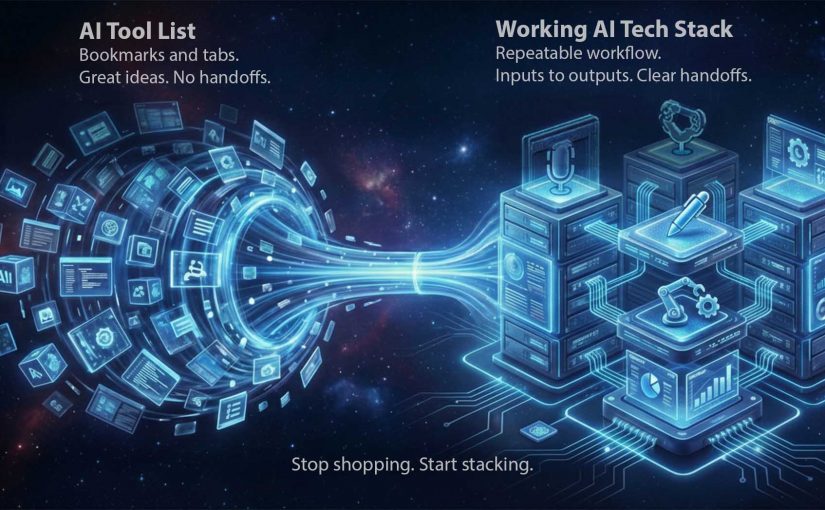
From AI Tool List to Working AI Tech Stack

From “pick 20 tools” to “run a working stack”

I recently came across the below video from Dan Martell which frames “zero-code million-dollar business” as a tool-selection problem. That framing is useful. However the right conclusion for marketers and brands watching is not “go pick 20 tools”. The right conclusion is “stop shopping. Start stacking”. In 2026, you should start focusing more on the ability to pick, connect, and operationalize capabilities.

By “working AI tech stack” I mean a small, repeatable set of tools that moves work from input to output with the least friction. It is not a folder of bookmarks. It is a production line.

The useful takeaway isn’t the list. It’s the operating model.

Most people consume AI content and walk away with a shopping list. That is the wrong takeaway. The useful takeaway is operational. Arrange capabilities into a workflow that consistently produces outputs. Briefs, assets, approvals, launches, responses, and measurable improvements.

A list creates options. A stack creates throughput. Throughput is how reliably your team converts intent into shipped work, week after week, without rebuilding the process every time.

The mechanism: a stack is just clean handoffs

A working AI tech stack is a sequence with explicit handoffs:

Inputs → Synthesis → Creation → Automation → Distribution → Measurement

Each step has one job. Each step produces an artifact someone else can use. Each handoff is defined so the work does not stall in Slack, email, or “waiting for approval”.

In global FMCG and retail marketing organizations, the bottleneck is rarely ideas but the handoffs between people, tools, and approvals.

Why this lands with leaders

Tool lists feel like progress because they are concrete and low-commitment. You can bookmark them and feel “covered”. Stacks feel harder because they force decisions: what is the workflow, who owns each step, where do we enforce quality and risk controls.

Extractable takeaway: If you cannot name the exact step a tool owns in a repeatable workflow (input → transformation → handoff → output), it is not part of your stack yet. It is just potential.

The business intent: less software. More shipped outcomes

For marketers and brands, the goal is not “using AI”. The goal is operational leverage:

The real question is not how many AI tools you can name, but whether your team can move work through a repeatable line with clear ownership and handoffs.

  • Faster cycle time from brief to asset.
  • Fewer revision loops because synthesis and constraints are done upfront.
  • Fewer dropped balls because handoffs are automated.
  • More reuse of institutional knowledge because answers are captured once and searchable.
  • Higher output without lowering standards.

This is also where governance belongs. A stack needs rules about what data can go where, who can approve what, and which steps require a human decision.

In enterprise teams, that also means deciding how the stack connects to existing systems of record such as CMS, DAM, CRM, analytics, and approval workflows, instead of creating a parallel shadow process.

The working stack blueprint: tools mapped from Inputs to Measurement

Below are the 20 tools referenced in the video, placed where they most naturally fit in the production line. You can use fewer than 20. The point is the flow.

The hard part is rarely access to another model. It is integration, ownership, QA thresholds, and escalation logic across the workflow.

Inputs: capture raw material without losing signal

Manus

Manus is designed to act more like a task runner than a chatbot. You give it a goal and it works through steps to deliver outputs, not just advice. Example: collect competitor screenshots, extract claims, summarize patterns, and deliver a brief plus a slide outline.

SocialSweep

SocialSweep is positioned as a way to search your network and relationship graph with context. It helps you identify who you know, why they are relevant, and what to say. Example: find warm paths to retail media decision-makers, then draft an intro message that references shared context.

HireAlli

HireAlli is positioned around capturing commercial intent from website traffic so teams can follow up faster. Example: flag repeat visits to pricing pages, then route the lead to sales with a summary of pages viewed and a recommended next message.

Synthesis: turn messy inputs into a usable brief and plan

NotebookLM

NotebookLM is useful when you want answers grounded in the sources you provide. It helps you summarize, compare, and extract structure from documents. Example: upload research PDFs and prior campaign docs, then generate a launch FAQ and a messaging hierarchy that stays consistent with those materials.

Claude

Claude is a general assistant that excels at drafting, rewriting, and structuring thinking. Use it to turn raw notes into clear decisions and action plans. Example: paste a workshop transcript and request a decision log, assumptions, risks, and a one-page brief for stakeholders.

ChatGPT

ChatGPT is a general-purpose assistant for ideation, drafting, analysis, and reusable workflows. It is especially useful when you iterate toward a spec. Example: ask clarifying questions for a campaign brief, then output a structured creative and media spec the team can execute.

Creation: produce assets that are actually shippable

Gamma

Gamma helps turn rough thinking into a structured deck or document quickly. It is strong when the bottleneck is narrative structure, not visual polish. Example: paste the brief, generate a 10-slide storyline, then refine the argument and flow before design.

Descript

Descript lets you edit audio and video through text. You edit the transcript like a document and the media follows. Example: clean up a leadership video by removing filler words, tightening sections, and exporting both a long version and short clips.

ElevenLabs

ElevenLabs generates natural-sounding speech from text and supports scalable voice workflows. It is useful for narration, localization, and voiceovers. Example: create a consistent “brand voice” narration for product explainers, then generate localized voiceovers without re-recording.

Lovable

Lovable is positioned as an AI-assisted way to build apps or web experiences without traditional engineering. Think prototypes, internal tools, and simple customer experiences. Example: describe an internal campaign intake tool, generate a prototype, then iterate requirements until it is usable.

Automation: make the handoffs run without nagging humans

Make

Make connects apps into workflows using triggers and actions. It is the plumbing that turns “good tools” into “a working line”. Example: when a brief is approved, create tasks, notify stakeholders, generate a first draft, and route it to review automatically.

ChatAid

ChatAid is positioned as an AI support layer that can answer recurring questions and route issues. It fits both internal enablement and customer-facing support when designed with escalation rules. Example: answer “where is the latest asset” or “what is the policy”, and escalate to a human when confidence is low.

Distribution: move outputs into channels that drive outcomes

Revio

Revio is positioned around managing inbound conversations across social channels in one place. It helps teams respond consistently and not miss high-intent messages. Example: unify DMs so customer questions and sales inquiries do not get lost across platforms.

YourAtlas

YourAtlas is positioned around AI agents that can handle inbound qualification and booking. This matters in service businesses and lead-driven funnels. Example: handle inbound calls or requests 24/7, capture required details, then hand off qualified appointments to humans.

Membership.io

Membership.io supports structured memberships and gated content experiences. It is a distribution layer for expertise and ongoing value, not just content hosting. Example: package a learning path for partners or teams, with searchable resources and a community layer to reduce repeated questions.

BuddyPro

BuddyPro is positioned around turning your content and methods into an always-on assistant people can query. It is a distribution mechanism for expertise at scale. Example: clients query your “playbook assistant” for next steps between calls, and you control what it can and cannot answer.

Measurement: close the loop so the stack improves every cycle

Hiro Finance

Hiro Finance is positioned around cash-flow visibility and planning. It helps decision-makers see financial reality without spreadsheet archaeology. Example: run a weekly check on runway, recurring costs, and upcoming risk points before you scale spend.

HelloFrank

HelloFrank is positioned around deeper business-context finance insights. It can help detect spend anomalies and surface what changed month-over-month. Example: find subscription creep and cost spikes, then turn it into a prioritized cleanup plan.

Revaly

Revaly is positioned around payment performance and reducing failed transactions that create involuntary churn. It matters most where recurring revenue is sensitive to declines. Example: identify where legitimate payments fail and improve recovery rates without harming customer trust.

Precision

Precision is positioned around turning KPIs into a practical operating rhythm. It helps teams focus attention on what moved and what to do next. Example: generate a weekly performance brief. These metrics shifted, here are likely drivers, here is what we should test or fix this week.

What a marketing operations leader should implement first

  • Start with one workflow you ship weekly. Assign a named owner and baseline cycle time, rework, and approval latency before you expand the stack.
  • Assign ownership per step. Tools without owners become clutter.
  • Build the handoffs before you add more tools. Automation is what turns tools into a line.
  • Define where humans must decide. Brand-sensitive, compliance-sensitive, and customer-sensitive steps need a review point.
  • Run a monthly keep-or-kill review. If a tool is not improving cycle time or quality, remove it.

A few fast answers before you act

What is the single biggest mistake teams make with AI tools right now?

They treat AI as a chat window to copy and paste from, instead of an execution layer connected to a workflow that ships outputs.

What is a “working AI tech stack” in one sentence?

A working AI tech stack is a small set of connected tools that reliably turns inputs like notes and briefs into shippable outputs, with minimal friction and clear handoffs.

How do I decide if a tool belongs in my stack?

If you cannot name the exact step it owns and the handoff it triggers, it is not part of the stack yet.

What should a marketing leader implement first?

One throughput line, end to end. Inputs → Synthesis → Creation → Automation → Distribution → Measurement. Then automate handoffs before adding new tools.

How do I avoid tool sprawl?

Set constraints: one tool per job, a clear owner, and a monthly keep-or-kill review tied to measured outcomes.