
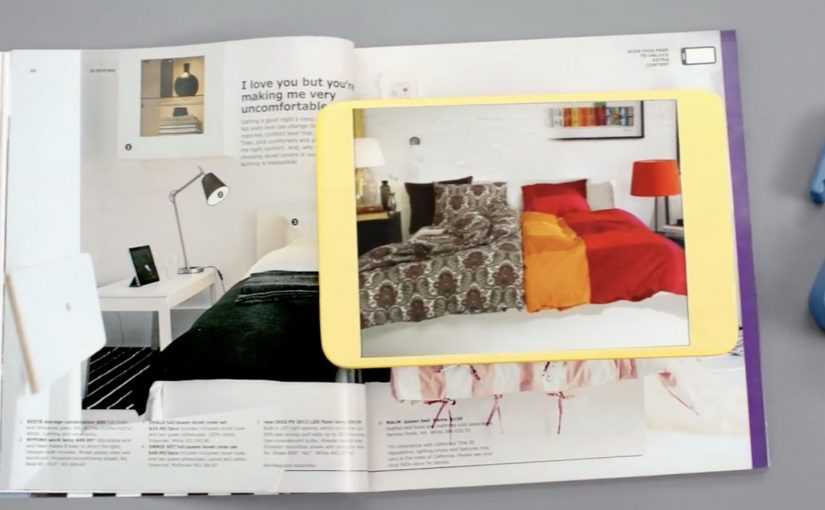
Every year, the IKEA Catalog inspires people around the world to create homes they love. For the 2013 edition, IKEA takes the inspiration one step further by bringing technology to the paper catalog and creating a more seamless connection to purchase.
IKEA worked with McCann New York to re-imagine the catalog via a visual recognition app that brings select pages and the offerings within to life. The experience is positioned around inspirational videos, designer stories, “X-ray” views that peek inside furniture, and more.
How the catalog becomes an interface
The mechanic is page recognition. You point your phone at a printed page and the app identifies the exact spread, then overlays or opens the matching digital layer. That is what “visual recognition” means here. The camera view is used to recognize the image itself, so the print can stay clean without obvious codes taking over the layout.
This is interactive print done as a product layer, not as a QR code workaround. The page remains a premium editorial surface, and the interactivity is unlocked through recognition rather than visible markers.
In global retail organizations with massive print distribution, recognition-based layers let brands turn a static catalog into a measurable, updateable experience without redesigning the entire print grammar.
The real question is whether your print can behave like an interface without sacrificing the editorial feel that makes people pick it up in the first place.
Why “X-ray” and stories beat a pure commerce push
What makes this approach land is that it does not start with “buy now.” It starts with curiosity. Here, the “X-ray” layer is a simple cutaway view that lets people see inside furniture to understand utility. Peek inside a unit. Watch the product in context. Hear the thinking behind a room setup. Those are the moments where browsing becomes intent.
Extractable takeaway: If you want print-to-digital to stick, lead with reassurance and curiosity, not a commerce CTA. Use interactivity to remove uncertainty in one fast payoff, not to add a menu of options.
The “X-ray” idea is also a smart translation of a physical store behavior. People open drawers and cupboards in-store to understand utility. This gives a lightweight version of that reassurance from the page.
What IKEA is really building with this
At face value, it is an augmented catalog. Underneath, it is a bridge between inspiration and action. A catalog is already a decision-shaping channel. Adding tappable layers makes it a trackable channel and creates new points where IKEA can educate, reassure, and nudge the path to purchase.
Copyable moves for print-to-digital catalogs
- Keep the print clean. If the page looks like a code sheet, you lose the lifestyle premium.
- Use interactivity to remove uncertainty. Show how it works, what fits inside, how it looks in a room.
- Design for quick wins. One scan should yield something useful immediately, not a long menu.
- Make the layer repeatable. If it can work on many pages, it becomes a system, not a stunt.
A few fast answers before you act
What is a “visual recognition” catalog app?
An app that recognizes a printed page using the phone camera, then unlocks related digital content tied to that exact spread.
Why is recognition better than QR codes for premium catalogs?
Because it preserves design. Recognition can keep layouts clean and still enable interaction, while QR codes often force visible markers into the page.
What is the “X-ray” feature actually communicating?
Utility and confidence. It helps people understand storage and function without needing to visit a store or guess from a single photo.
What is the main business value of interactive print?
It turns inspiration into measurable engagement and creates additional moments to guide purchase decisions, especially for considered categories like furniture.
What is the biggest risk with print-to-digital layers?
Friction. If scanning is slow, unreliable, or the payoff is thin, people abandon the habit after one try.