
Microsoft HoloLens: Elevator Maintenance

Augmented reality leaves the demo room

Microsoft HoloLens is not only about futuristic consumer experiences. Its real power emerges in enterprise environments.

A strong example is ThyssenKrupp, which uses HoloLens to redefine how elevator maintenance is performed in the field.

Instead of relying on manuals, phone calls, or trial and error, technicians receive contextual, real-time information directly in their line of sight.

How HoloLens changes elevator servicing

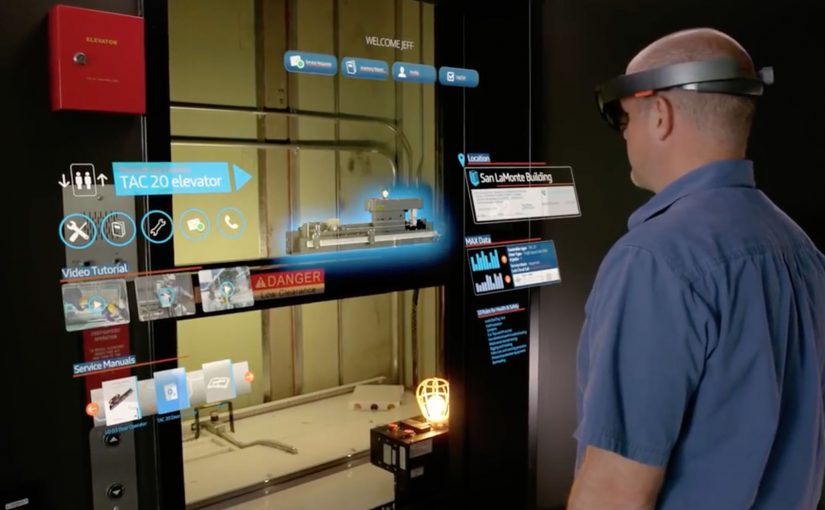
With HoloLens, elevator technicians see what they need while keeping their hands free.

Technical documentation, schematics, and checklists appear as holograms overlaid onto the physical elevator system.

Remote experts can see exactly what the technician sees and guide them step by step.

This turns maintenance into a guided, collaborative process rather than an isolated task.

In industrial field service teams, the constraint is getting expert judgement to the point of work fast enough to prevent rework and downtime.

Why this matters for industrial operations

The impact goes beyond convenience. Because guidance is delivered in-context and hands-free, technicians can complete complex steps with fewer avoidable mistakes.

Extractable takeaway: When you embed expert guidance into the job itself, you turn specialist knowledge into a repeatable operating system for the frontline.

The real question is whether you can make frontline expertise repeatable inside the workflow, not whether you can ship an AR pilot.

Enterprise AR is worth doing when it removes friction from real maintenance workflows, not when it adds another screen.

  • Reduced downtime
  • Shorter training cycles
  • Improved first-time fix rates

Most importantly, expertise becomes scalable.

Knowledge is no longer locked in the heads of a few specialists. It becomes part of the workflow.

A glimpse of the future of work

This use case shows what augmented reality does best.

It does not replace workers. It augments them.

Complex tasks become easier. Errors decrease. Confidence increases. Work becomes safer and more efficient.

This is where mixed reality stops being a novelty and starts being infrastructure. By mixed reality here, I mean digital guidance and remote expertise anchored onto the physical job, not a virtual-world detour.

What to copy from this AR service pattern

  • Instrument the moment of work. Put the next step where the technician is looking, not in a manual that forces context switching.
  • Make escalation visual. Let remote experts share the same view so guidance is specific and actionable.
  • Scale expertise as workflow. Capture checks, sequences, and decision points so outcomes do not depend on a few specialists.

A few fast answers before you act

What is the Microsoft HoloLens elevator maintenance use case?

ThyssenKrupp uses Microsoft HoloLens so field technicians can see schematics, checklists, and contextual guidance overlaid onto the elevator system while working hands-free.

How does HoloLens change the maintenance workflow?

It puts documentation and step-by-step instructions into the technician’s line of sight, and enables remote experts to see what the technician sees so they can guide the job in real time.

Is this only relevant for elevators?

No. The same pattern applies to any field service or industrial maintenance scenario where hands-free guidance, fast troubleshooting, and expert escalation reduce downtime and errors.

What is the measurable value driver in enterprise AR like this?

Reduced downtime, faster training, and higher first-time fix rates. The key is that expertise becomes repeatable and scalable inside the workflow instead of remaining locked in a few specialists.

Where does this pattern break down?

It breaks down when the underlying documentation is outdated, connectivity is unreliable, or remote support is not operationalized. The hardware alone does not change outcomes.
Microsoft HoloLens: The Next Step of Computing

Microsoft brings holograms into the real world

At Microsoft’s Windows 10 event, the company unveils a new augmented reality experience for the platform called HoloLens.

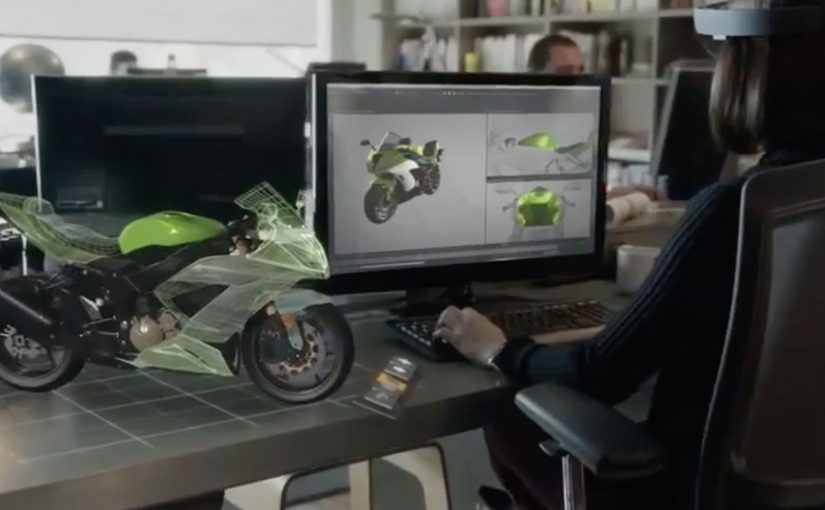
Using a special holographic headset, Windows 10 users can make holograms appear in real life. Not on a screen. In the room, anchored to space.

This is the kind of step-change that reframes computing from something you look at to something you live inside.

Watch below how Microsoft demonstrates holograms as spatial interfaces, not screen content.

What makes HoloLens different

HoloLens is positioned as an untethered augmented reality experience, built to feel like a real device rather than a lab prototype.

The device is said to use:

  • See-through lenses
  • Spatial sound
  • Advanced sensors
  • A dedicated holographic processing unit

Together, these elements aim to deliver a state-of-the-art mixed reality experience without cables or external trackers.

In this context, augmented reality means digital objects are layered into the real world through see-through optics, not a fully immersive virtual environment.

Why this matters

HoloLens signals a shift in interface design. Instead of dragging windows around a flat screen, digital objects become part of physical space. Apps turn into holograms. Workflows become spatial. Interaction becomes more natural because it maps to how people already understand the world.

In global digital product and marketing teams, the significance is not just the headset. It is the move from screen-first design to space-first interaction.

Extractable takeaway: HoloLens is important because it presents AR not as a feature inside existing software, but as a new computing layer where interface, content, and context are all anchored to physical space.

What to steal from this launch

The real question is not whether holograms look futuristic. It is whether a new interface model changes behavior in a way people can feel immediately.

That is what this launch gets right. It demonstrates the shift through experience, not just specification. The message is simple: when a technology changes where interaction happens, it also changes how products should be designed.

  • Lead with the interaction shift, not the feature list. Show what changes in the user’s behavior before explaining the underlying technology.
  • Make the benefit visible in context. Demonstrate the experience in a real environment so people immediately understand the practical value.
  • Use the demo as proof, not decoration. The strongest launch moments show the product working in the exact conditions users care about.
  • Explain the stack after the experience lands. Once the audience feels the change, technical details reinforce credibility instead of creating friction.
  • Design for the new interface model. If interaction moves from screens to space, content, UI, and workflows must be rethought for that environment.

A few fast answers before you act

Is HoloLens virtual reality?

No. It is augmented reality using see-through lenses that overlay holograms onto the real world.

What is the key technical promise?

Untethered, spatially aware holograms powered by sensors, spatial sound, and a dedicated holographic processing unit.

Why is being untethered important?

Untethered hardware makes the experience feel like a real computing device instead of a lab setup, which lowers friction for everyday use and demonstration.

What changes when apps become spatial?

The interface moves off the screen and into physical space, which changes how people place, view, and interact with digital content while moving through the real world.

What makes this feel like a new computing layer?

The shift is not only visual. It combines sensing, sound, and spatial anchoring so digital objects behave as if they belong in the room, not just on a display.