
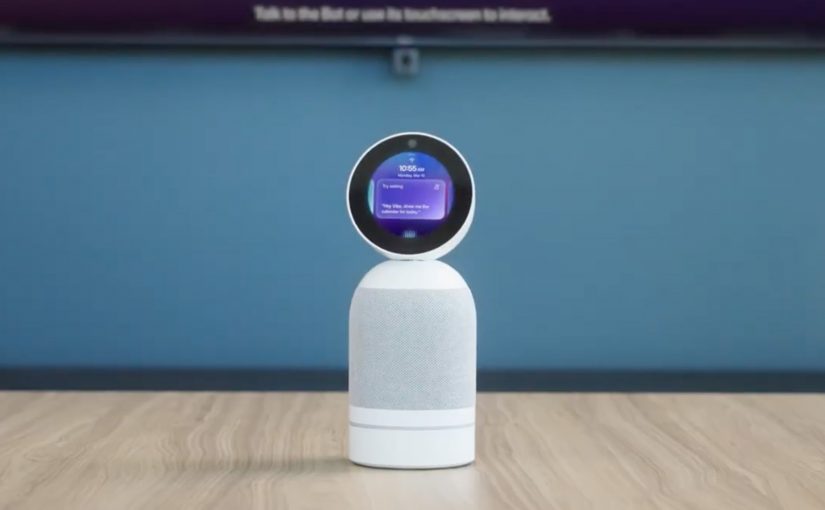
Vibe Bot: AI Meeting Assistant With Memory

At CES 2026, I am seeing a familiar pattern. Earlier AI bot ideas are returning with a new coat of paint, powered by stronger models, better microphones, better cameras, and much tighter product positioning.

Razer’s Project AVA is one example. It reads like a modern update of the “companion in a box” category, echoing Japan’s Gatebox virtual home robot from 2016. Think less novelty bot, more designed product, with better sensing, better personalization, and clearer use cases.

And then there is Vibe Bot. It is not a “robot comeback story” in the literal sense, but it does feel like a spiritual successor to Jibo. The social robot pitched for the family back in 2014. Same emotional shape. Different job to do. This time, the target is the meeting room and the problem is continuity.

What is Vibe Bot?

Vibe Bot is an in-room AI meeting assistant with memory. It captures room-wide audio and video, generates transcripts and summaries, and supports conversation continuity by carrying decisions forward so meetings do not reset every week.

What Vibe Bot is trying to own

In other words, it is meeting intelligence plus decision logging, packaged as AI hardware built for real rooms.

  • Capture meetings with room-wide audio and video
  • Generate speaker-aware transcripts, summaries, and action items
  • Track decisions and surface prior context on demand
  • Sync with calendars and join Zoom, Google Meet, or Teams with minimal setup
  • Connect to external displays and pair wirelessly as a camera, mic, and casting device

This is not just meeting notes. It is a product trying to own the layer between conversation and execution. The strategic bet is continuity. Less rehashing, fewer resets, more forward motion.


What I find strategically interesting is that:

  1. Hardware is back in the AI conversation. We went from bots, to apps, to copilots. Now we are circling back to room-based systems because the capture layer matters.
  2. Context is the moat. Summaries are table stakes. The defensible value is continuity over time, across people, decisions, and follow-ups.
  3. Meeting tools are becoming workflow tools. The winners will connect decisions to action, not just document what happened.
  4. Privacy is now a product feature. If a device sits in a room, trust is part of the user experience, not a compliance footnote.

Vibe Bot fits a broader CES 2026 pattern. AI agents are evolving from chat windows into systems that live where work happens. In this case, the bet is that the meeting room becomes a persistent context engine. If this category gets it right, teams will spend less time reconstructing the past and more time executing the next step.

If Vibe succeeds, it becomes a small but important building block of a contextual AI workspace where teams can retrieve “what we decided and why” on demand. More product info at https://vibe.us/products/vibe-bot/


A few fast answers before you act

What is Vibe Bot and what problem does it solve?

Vibe Bot is an AI meeting assistant designed to capture, remember, and surface context across meetings. It addresses a common failure point in modern work: decisions and insights get discussed repeatedly but are rarely retained, connected, or reused.

What does “AI with memory” actually mean in a meeting context?

AI with memory goes beyond transcription. It stores decisions, preferences, recurring topics, and unresolved actions across meetings, allowing future conversations to start with context instead of repetition.

How is this different from standard meeting transcription tools?

Most meeting tools record what was said. Vibe Bot focuses on what matters over time. It connects meetings, tracks evolving decisions, and helps teams avoid re-litigating the same topics week after week.

Why is memory becoming more important than note-taking?

Knowledge work has shifted from isolated meetings to continuous collaboration. Without memory, teams lose momentum. Memory enables continuity, accountability, and faster decision-making across complex organizations.

What risks should leaders consider with AI meeting memory?

Persistent memory raises governance and trust questions. Teams must define what is remembered, who can access it, how long it is retained, and how sensitive information is protected. Without clear rules, memory becomes a liability instead of an asset.

Where does an AI meeting assistant deliver the most value?

The highest value appears in leadership forums, recurring operational meetings, and cross-functional programs where context is fragmented and decisions span weeks or months.

What is a practical first step before rolling this out broadly?

Start with one recurring meeting type. Define what the AI should remember, what it should ignore, and how humans validate outputs. Measure whether decision velocity and follow-through improve before scaling.
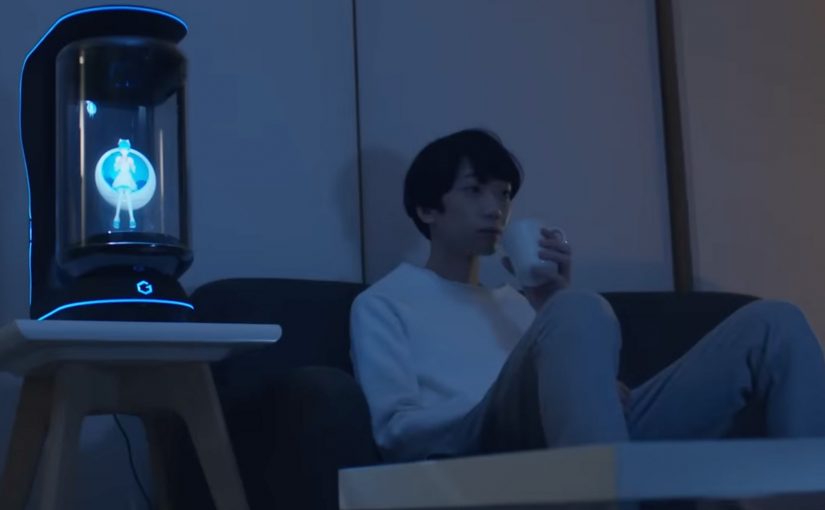
Gatebox: The Virtual Home Robot

You come home after work and someone is waiting for you. Not a speaker. Not a disembodied voice. A character in a glass tube that looks up, recognizes you, and says “welcome back.” She can wake you up in the morning, remind you what you need to do today, and act as a simple control layer for your smart home.

That is the proposition behind Gatebox. It positions itself as a virtual home robot, built around a fully interactive holographic character called Azuma Hikari. The pitch is not only automation. It is companionship plus utility. Face recognition. Voice recognition. Daily routines. Home control. A “presence” that turns a smart home from commands into a relationship.

What makes Gatebox different from Alexa, Siri, and Cortana

Gatebox competes on a different axis than mainstream voice assistants.

Voice assistants typically behave like tools. You ask. They answer. You command. They execute.

Gatebox leans into a different model:

  • Character-first interface. A persistent persona you interact with, not just a voice endpoint.
  • Ambient companionship. It is designed to greet you, nudge you, and keep you company, not only respond on demand.
  • Smart home control as a baseline. Home automation is part of the offer, not the story.

The result is a product that feels less like a speaker and more like a “someone” in the room.

Why the “holographic companion” framing matters

A lot of smart home innovation focuses on features. Gatebox focuses on behavior.

It is designed around everyday moments:

  • waking you up
  • reminding you what to remember
  • welcoming you home
  • keeping a simple loop of interaction alive across the day

That is not just novelty. It is a design bet that people want technology to feel relational, not transactional.

What the product is, in practical terms

At its most basic, Gatebox:

  • controls smart home equipment
  • recognizes your face and your voice
  • runs lightweight daily-life interactions through the Azuma Hikari character

It is currently available for pre-order for Japanese-speaking customers in Japan and the USA, at around $2,600 per unit. For more details, visit gatebox.ai.

The bigger signal for interface design

Gatebox is also a clean case study in where interfaces can go next.

Instead of:

  • screens everywhere
  • apps for everything
  • menus and settings

It bets on:

  • a single persistent companion interface
  • a character that anchors interaction
  • a device that makes “home AI” feel present, not hidden in the cloud

That is an important shift for anyone building consumer interaction models. The interface is not the UI. The interface is the relationship.


A few fast answers before you act

Q: What is Gatebox in one sentence?
A virtual home robot that combines smart home control with a holographic companion character, designed for everyday interaction.

Q: Who is Azuma Hikari?
Gatebox’s first character. A fully interactive holographic girl that acts as the interface for utility and companionship.

Q: What can it do at a basic level?
Control smart home equipment, recognize face and voice, run daily routines like wake-up, reminders, and greetings.

Q: Why compare it to Alexa, Siri, and Cortana?
Because it is positioned as more than a voice assistant. It is a character-first, companion-style interface.

Q: What is the commercial status?
Available for pre-order for Japanese-speaking customers in Japan and the USA, at around $2,600 per unit.

Project Soli: Hands Become the Interface

Google ATAP builds what people actually use

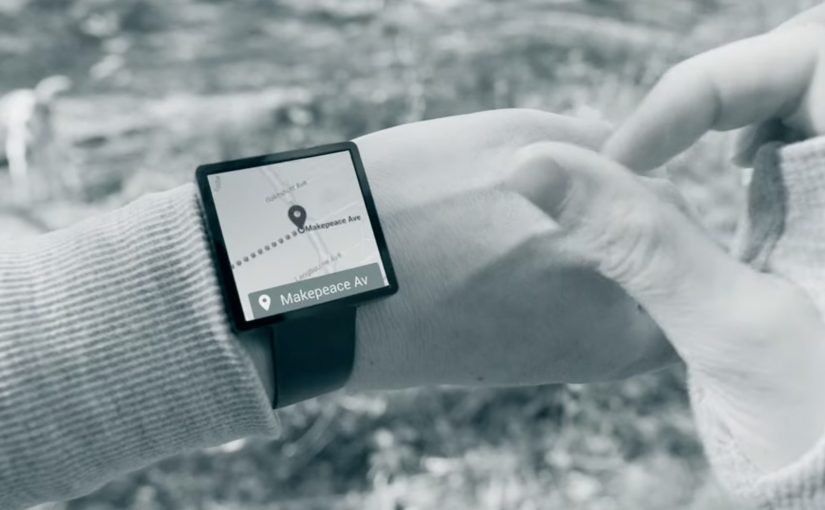
Google ATAP is tasked with creating cool new things that we’ll all actually use. At the recently concluded Google I/O event, they showcase Project Soli. A new kind of wearable technology that wants to make your hands and fingers the only user interface you’ll ever need.

This is not touchless interaction as a gimmick. It is a rethink of interface itself. Your gestures become input. Your hands become the control surface.

The breakthrough is radar, not cameras

To make this possible, Project Soli uses a radar that is small enough to fit into a wearable like a smartwatch.

The small radar picks up movements in real time and interprets how gestures alter its signal. This enables precise motion sensing without relying on cameras or fixed environmental conditions.

The implication is straightforward. Interaction moves from screens to motion. User interfaces become something you do, not something you tap.

In wearable computing and ambient interfaces, the real unlock is interaction that works in motion, without relying on tiny screens.

Why this matters for wearable tech

Wearables struggle when they copy the smartphone model onto tiny screens. Project Soli pushes in the opposite direction.

Instead of shrinking interfaces, it removes them. The wearable becomes a sensor-driven layer that listens to intent through movement.

If this approach scales, it changes what wearable interaction can be. Less screen dependency. More natural control. Faster micro-interactions.


A few fast answers before you act

Is Project Soli just gesture control?

It is gesture control powered by a radar sensor small enough for wearables, designed to make hands and fingers the primary interface.

Why use radar instead of cameras?

Radar can sense fine motion without relying on lighting, framing, or line-of-sight in the same way camera-based systems do.

What is the real promise here?

Interfaces that disappear. Interaction becomes physical, immediate, and wearable-friendly.