
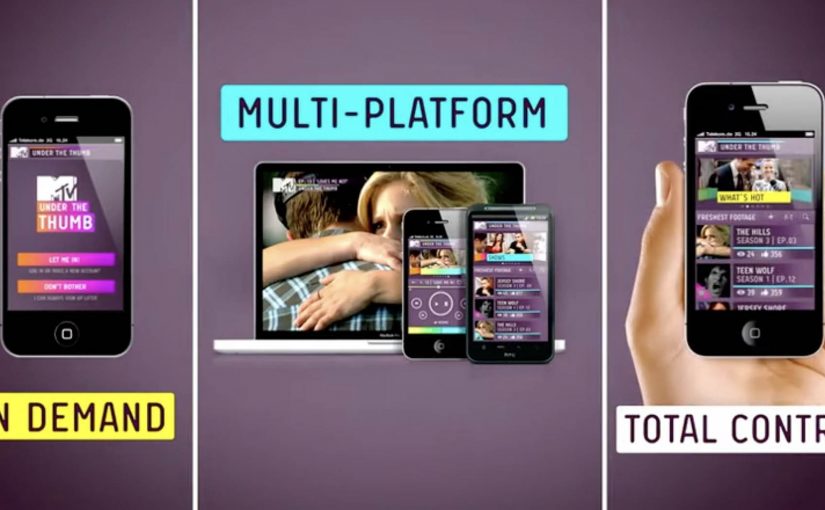
A social TV app that moves with you
MTV’s Under The Thumb is positioned as an interactive platform that changes how Europe’s digital teenagers watch and share entertainment across devices.
One product, three viewing modes
When you’re out and about, MTV shows can be streamed on demand on your phone.
When you’re at home, the app turns into a remote control by pairing with a browser on a PC, laptop, or connected TV, so you can drive playback on a bigger screen from your phone.
When you’re feeling social, it syncs viewing with friends so you can watch the same show and chat together in real time, even when you are in different places.
Why the mechanism is the message
The “platform” claim only holds if the app earns repeat use in different contexts. The real question is whether it becomes a repeatable daily habit, not just a clever demo. Under The Thumb does that by bundling three habits into one interface: portable streaming, at-home viewer control, and co-viewing chat. Here, “second screen” means the phone acts as the controller while video plays on a larger display, and “co-viewing” means friends watch the same content in sync while chatting. That combination turns a media brand into something closer to a routine than a channel. This is a stronger product bet than treating second-screen features as a one-off gimmick.
Extractable takeaway: Under The Thumb combines on-the-go streaming, at-home phone-as-remote viewer control, and real-time co-viewing chat in one app, so the same service stays useful across the day.
In European youth entertainment, the phone is where attention, conversation, and control converge, even when video shifts to a bigger screen.
Launch momentum, before the ads even land
The app is unveiled at the Mobile World Congress in Barcelona. In the launch window, it is described as spreading fast among tech and TV audiences, with download velocity reported as strong even before MTV’s supporting advertising campaign fully kicks in.
For more visit www.mtvunderthethumb.com.
Second-screen patterns worth copying
- Design for context switching. Keep the same service useful when people move from mobile bursts to a bigger screen at home.
- Make viewer control the default. Let the phone run playback on the larger display so attention stays on the show, not on setup.
- Layer in social without breaking flow. Sync co-viewing and chat so conversation stays aligned with what is on screen.
A few fast answers before you act
What is MTV Under The Thumb?
It is a social TV app for MTV that combines on-demand mobile streaming, second-screen remote control for larger displays, and co-viewing with chat.
How does the dual-screen remote feature work?
The phone pairs with a browser on a PC, laptop, or connected TV. Your phone then controls playback on the bigger screen while the service continues to run through the app experience.
What does “co-viewing” mean in this context?
Co-viewing means friends watch the same content at the same time while chatting in-app, with viewing synchronized so the conversation matches the moment on screen.
Why is this a smart move for a youth entertainment brand?
It follows real behavior. People watch in short bursts on mobile, shift to bigger screens at home, and want to talk while they watch. The app is designed to keep MTV present across all three situations.
What should product teams copy from this model?
Design for context switching. Make the same service valuable in multiple moments of the day, and give users clear viewer control plus a lightweight social layer that does not interrupt playback.