
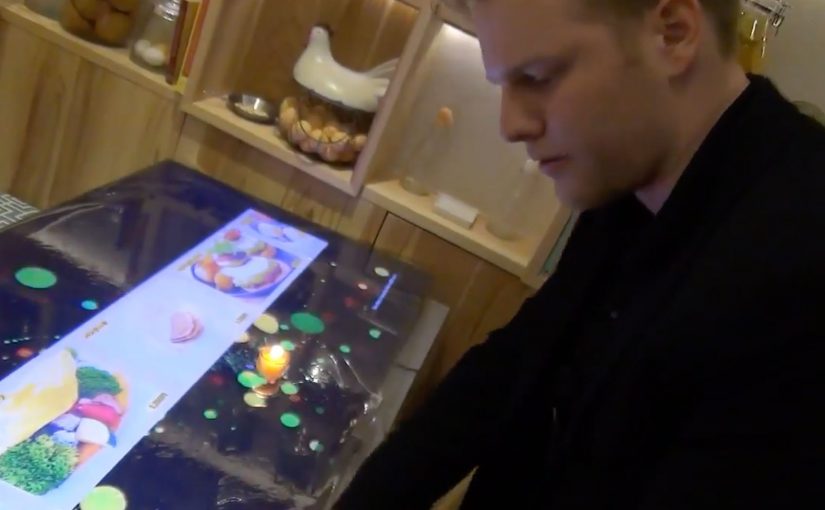
Restaurant of the Future: AR Dining

The restaurant of the future is a technology experience

Restaurants of the future are no longer defined only by food, service, or ambiance.

They become technology-driven environments, where digital interfaces blend directly into the dining experience.

Smartglasses, augmented reality, gesture-based interfaces, customer face identification, avatars, and seamless wireless payments begin to coexist at the table.

The result is not a single gadget. It is a fully integrated experience.

When dining becomes augmented

In the restaurant of the future, the menu does not need to live on paper or even on a phone.

Information can appear in front of the guest through smartglasses or augmented displays. Dishes can be visualized before ordering. Nutritional details, origin stories, or preparation methods can surface on demand.

Gestures replace clicks. Presence replaces navigation.

The dining experience becomes interactive without feeling mechanical.

Identity replaces interaction

Face recognition and customer identification change how restaurants think about service.

Returning guests can be recognized instantly. Preferences, allergies, and past orders can be recalled automatically. Avatars and digital assistants can guide choices or explain dishes without interrupting human staff.

The restaurant adapts to the guest, not the other way around.

Payment disappears into the experience

Wireless payment technologies remove the most artificial moment in dining.

There is no need to ask for the bill. No waiting. No interruption.

Payment happens seamlessly as part of the experience, triggered by confirmation, gesture, or departure. Money moves, but attention stays on dining.

Mirai Resu. Japan’s restaurant of the future

To illustrate this vision, a short video from Mirai Resu in Japan shows what a fully integrated restaurant experience can look like.

Smartglasses, augmented visuals, gesture-based interaction, avatars, and invisible payment mechanisms come together into a single flow.

This is not a concept mock-up. It is a concrete glimpse into how dining, technology, and experience design merge.

In hospitality experience design, technology only “wins” when it fades into the flow and makes the human experience feel more effortless.

In experience-led hospitality brands, the winning AR layer is the one that keeps guests present while the service logic runs quietly in the background.

The real shift. Experience over interface

The most important takeaway is not the individual technologies. It is the shift away from explicit interfaces toward ambient interaction. By ambient interaction, I mean in-context cues and hands-free inputs that let guests act without hunting through screens. Restaurants should use this pattern to remove friction in ordering and paying, not to turn the table into a device demo. The real question is whether the tech can disappear enough that guests remember the meal, not the UI. Because the interaction happens in the moment and stays tied to the table, it keeps attention on dining, which is why it feels like hospitality rather than software.

Extractable takeaway: If an experience needs a screen to be understood, it is still an interface. The closer interaction stays to the real-world moment, the more it reads as service.

Steal this from AR dining

  • Prototype the full flow, not a feature. Order, identity, assistance, and payment should feel like one service journey.
  • Keep interaction in-context. Use gestures and overlays only when they reduce steps and keep guests present.
  • Make personalization explicit and optional. Recognition only lands when guests understand the trade and can opt out.

A few fast answers before you act

Is this about replacing staff with machines?

No. The value is removing friction so staff can focus more on hospitality and less on transactional steps.

Why does augmented reality matter in dining?

It can add information and interaction in-context, without pulling guests out of the moment or forcing phone-first behavior.

What does the Mirai Resu example actually demonstrate?

It demonstrates orchestration. Multiple technologies can be combined into one coherent service flow, rather than isolated gimmicks.

Where does “customer identification” fit in this vision?

It enables recognition on approach and service personalization, but it only works when guests understand the trade and feel in control.

What is the design principle to steal?

Design for experience continuity. Keep attention on dining, and make technology support the flow rather than interrupt it.
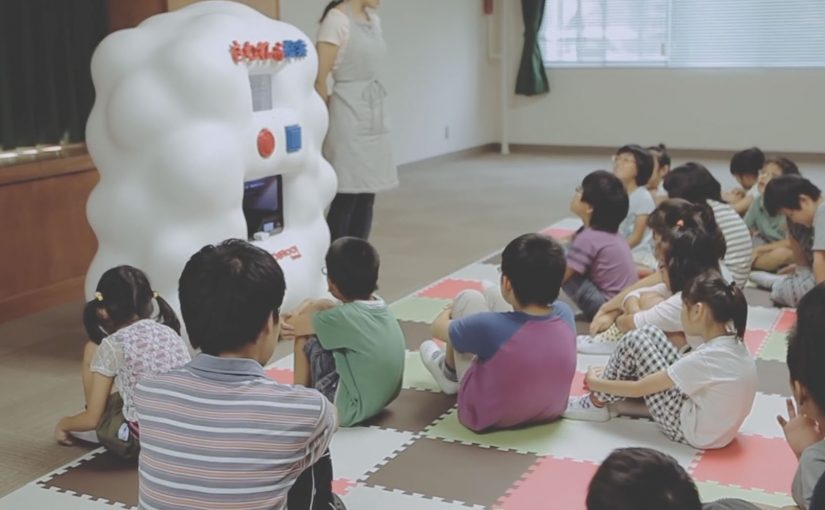
Yahoo! JAPAN: Hands On Search

Yahoo! JAPAN introduces what it calls “Hands On Search”. A hands-on search experience that lets visually impaired children explore online concepts through touch, not screens.

A voice-activated kiosk is set up so children can speak what they want to “search” for. The system recognises the verbal request, pulls a corresponding 3D model, and prints a small physical object. For the first time, children can hold what they usually only hear described. From animals to landmarks and buildings.

Search becomes a physical output

The mechanism is voice input plus 3D printing output. Instead of returning text, images, or audio, the search result is manufactured into a tactile model the child can feel in their hands. Because the output is tactile, the child can verify shape and scale directly, which is why the interaction shifts from description to discovery.

In accessible technology design, the strongest innovation is often a translation layer that converts a dominant medium into the sense that an excluded audience can reliably use. That is the pattern worth copying. Change the output medium, not just the narration layer.

In accessible-learning contexts, the constraint is rarely intent but whether the output can be inspected without sight.

Why it lands

It reframes “search” as something more than browsing. It becomes discovery you can share in a classroom. The real question is whether your product can render its core value into the senses your excluded users actually rely on. The moment the object prints is also the moment learning becomes concrete. It is not an abstract promise about inclusion. It is a visible, touchable outcome.

Extractable takeaway: If your experience is inherently visual, do not just add narration. Add an equivalent output that preserves shape and scale in a form people can physically inspect, so learning moves from description to direct exploration.

Tactile-search patterns for product teams

  • Design for the missing sense, not the average user. Start with the constraint, then build the interface around it.
  • Make the interaction one-step. Voice request in. Physical result out. No menus, no setup rituals.
  • Curate the object library. Accessibility fails when content quality is inconsistent. The “catalogue” is part of the product.
  • Prototype in real learning environments. Schools and educators reveal whether the tool supports teaching, not just demos.

A few fast answers before you act

What is Hands On Search in one sentence?

It is a concept machine that turns spoken searches into small 3D-printed models, so visually impaired children can “touch” search results.

Why does 3D printing matter here?

Because it converts information into form. For someone who cannot see images, a physical model can communicate shape, proportion, and structure directly.

Is this a campaign or a product direction?

It plays like a campaign film, but the underlying idea is a product direction. Search as an output system that can render to different senses depending on user needs.

What is the biggest risk in copying this idea?

Building a beautiful prototype without a sustainable content pipeline. If the object library is thin, slow to expand, or low fidelity, usefulness drops quickly.

Where should you prototype first?

Prototype where learning happens. Schools and educators will quickly show whether the tool supports teaching, not just demos.

Sony: Headphone Music Festival AR posters

People in Tokyo who wear headphones, or simply want to try new ones, were treated to an augmented reality music festival from Sony Japan. Four popular local rock groups were turned into original AR performances, then “played” through band tour posters placed in busy locations. Sony-branded headphone trial stations were set up nearby so anyone could join in.

The loop is clean. Spot the poster. Scan it. Get a performance that feels like it is happening in your surroundings. Then step over and compare that moment on Sony headphones.

What makes this feel like a festival, not a tech demo

The execution is essentially a pop-up concert system distributed across the city. The posters act as stages. The phone acts as the ticket. The headphone stand acts as the product trial. That chain of touchpoints is why the experience reads as “festival” rather than “app feature.”

The mechanism: posters as portals

Instead of forcing people into a microsite or a branded app maze, Sony uses a familiar object. The tour poster. The poster becomes the launch surface for AR content. That matters because it removes the biggest friction in mobile AR. The “what do I point my camera at” question.

In supporting materials, the technology is described as Sony’s SmartAR and a smartphone app that recognises the posters and overlays 3D performance content into the live camera view. The mechanics stay invisible to the audience. They just see the band appear.

In dense urban retail markets, AR works best when it turns everyday street media into an immediate try-before-you-buy demo.

The real question is whether your AR trigger reduces friction enough that product trial becomes the next obvious step.

Why it lands for headphone marketing

Headphones are hard to sell with words. Most people cannot translate driver specs into feeling. This activation sells through a direct comparison. You hear a performance, then you hear it again through the product the brand wants you to try.

Extractable takeaway: A retail AR activation lands when the trigger is already in public view, the payoff is instant, and the path from wow-moment to product trial is one physical step away.

It also frames Sony as the host of the music moment, not just the logo next to it. That is a stronger association than “better sound.” It is “better access to the thing you love.”

The business intent behind the street setup

The intent is not just awareness. It is footfall and trial. The AR content pulls people in, but the trial stations convert curiosity into a product experience. If you can get someone to listen for 30 seconds, you can start building preference.

Steal this for poster-triggered AR trials

  • Anchor AR to a physical trigger people already understand. Posters, packaging, signage, tickets.
  • Make the payoff immediate. The first five seconds decide whether AR feels magical or annoying.
  • Keep the bridge to trial short. If you sell hardware, put the demo within sightline of the trigger.
  • Use content that earns replays. Music clips, reveals, limited drops, rotating “sets” work better than static overlays.
  • Design for scanning in real conditions. Glare, crowds, bad signal, rushed users. Make recognition forgiving.

A few fast answers before you act

What is the Sony “Headphone Music Festival” idea?

It is a street-based AR activation where tour posters trigger AR music performances on a phone. Sony pairs that content with nearby headphone trial stations so people can immediately test the product while they are engaged.

Why use posters instead of geofencing or QR codes?

Posters provide a clear camera target and an obvious reason to scan. They also carry cultural meaning. A tour poster already signals music and discovery, so the AR layer feels natural.

What makes AR effective for selling headphones?

It creates a controlled listening moment in an uncontrolled environment. The activation gives you a reason to put headphones on right now and compare the experience immediately.

What is the biggest pitfall in poster-triggered AR campaigns?

Recognition friction. If the scan fails or the experience takes too long to load, people abandon it. The trigger must be reliable and the content must appear quickly.

How do you measure success for this kind of activation?

Track scans per poster location, completion rates for the AR experience, and trial-station interactions. If possible, connect trial interactions to store visits or product interest signals.