One of the main problems with buying clothes online is simple. You cannot feel the fit. So you guess, the parcel arrives, and the return loop starts again.
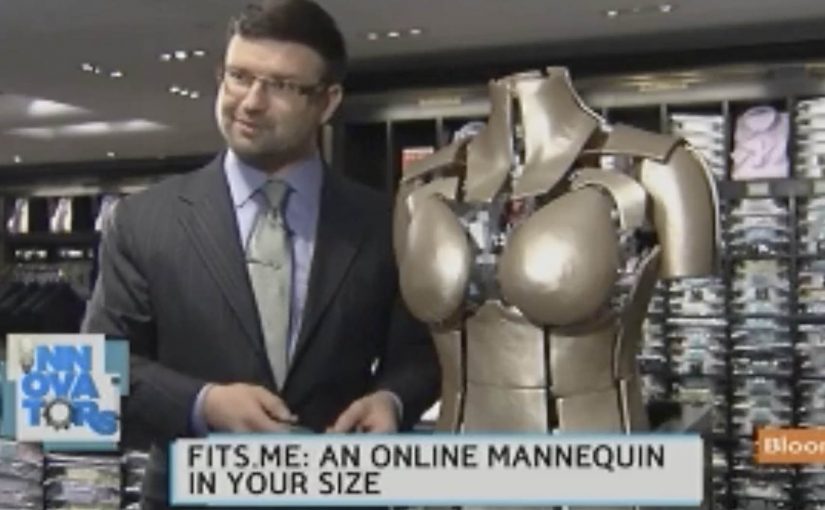
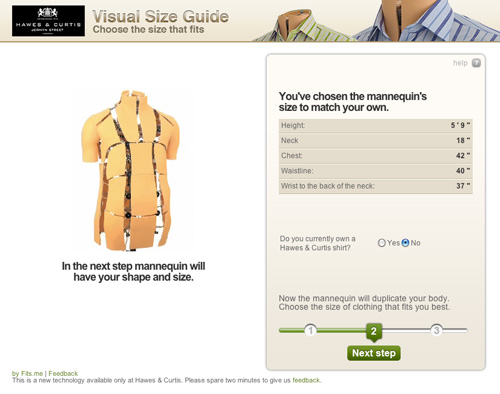
Fits.me, an Estonian company, builds a Virtual Fitting Room around a shape-shifting robotic mannequin. Instead of trying to “predict” fit with a size chart, the mannequin physically changes form to match your body dimensions, letting you preview how different sizes sit on a body shaped like yours.
A mannequin that changes shape so the garment can do the explaining
The mechanism is a robotic mannequin, often referred to as a FitBot, a shape-adjustable mannequin that can be tuned across a wide range of body measurements. Clothing is photographed on the mannequin in multiple sizes, and the shopper can compare how the same item behaves as size changes, on a body that resembles their own. Because the garment is shown on the same body shape across sizes, the comparison makes fit differences visible and reduces guesswork.
In online apparel retail, fit uncertainty drives returns and suppresses conversion, so anything that reduces sizing doubt tends to outperform its surface-level novelty.
Why this approach feels more “real” than a size chart
What makes it persuasive is that it turns sizing into a visual comparison instead of a number. The real question is whether you can help a shopper see the trade-offs between sizes before checkout, without asking them to trust a black-box recommendation. If you have that problem, this is the right pattern to use. You are not being told “you are a Medium.” You are shown what Small, Medium, and Large look like on a similar shape, which is closer to the in-store decision process.
Extractable takeaway: When a purchase decision depends on a physical sensation you cannot deliver online, replace the missing sensation with a repeatable visual proof that helps shoppers compare options, not just read recommendations.
What the rollout says about where the pain is
At the time, the system is positioned around a male mannequin first, with Fits.me saying it is planning to unveil a female version in November. That sequencing is a reminder that “who we can fit well” is often a product constraint, not a marketing choice, especially when the technology depends on physical ranges and repeatable photography.
For more information visit www.fits.me.
What to steal from Fits.me’s FitBot
- Make fit a comparison, not a verdict. Let shoppers see multiple sizes side by side on a body-like reference instead of outputting a single “recommended” size.
- Design for confidence, then measure it. Track size changes after viewing, conversion on fitted items, and return-rate shifts by category.
- Respect constraint sequencing. If the system only fits certain body ranges well at first, be explicit about where it is reliable and expand the range as the asset library grows.
A few fast answers before you act
What is a “Virtual Fitting Room” in this Fits.me context?
It is a system that uses a shape-adjustable robotic mannequin to model how garments look across sizes on a body shaped to match the shopper’s measurements, so shoppers can compare fit visually before buying.
Why does this reduce returns in theory?
Because it reduces guesswork. When shoppers can see how different sizes drape and sit, they are less likely to buy multiple sizes “just in case,” and less likely to be surprised when the item arrives.
What is the key difference versus typical size charts or recommendation widgets?
This approach is comparison-first. It shows a garment on a body-like reference across multiple sizes, rather than outputting a single recommended size and asking the shopper to trust it.
When does a visual fit tool like this not help much?
It helps most with size uncertainty, but it cannot fully replace tactile judgments like fabric feel or personal comfort preferences, so some returns will still be driven by “feel” rather than fit.
What should retailers measure if they deploy something like this?
Engagement with the fitting experience, size-selection changes after viewing, conversion lift on fitted products, and return-rate reduction by category and by first-time versus repeat shoppers.