
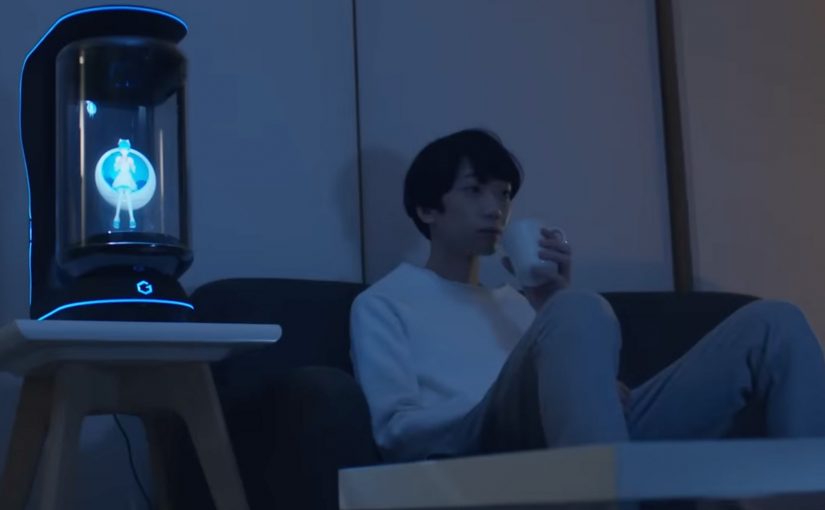
Gatebox: The Virtual Home Robot

You come home after work and someone is waiting for you. Not a speaker. Not a disembodied voice. A character in a glass tube that looks up, recognizes you, and says “welcome back.” She can wake you up in the morning, remind you what you need to do today, and act as a simple control layer for your smart home.

That is the proposition behind Gatebox. It positions itself as a virtual home robot, built around a fully interactive holographic character called Azuma Hikari. Here, “virtual home robot” means a stationary device that uses a character interface to run simple routines and smart home control, rather than a mobile physical robot. The pitch is not only automation. It is companionship plus utility. Face recognition. Voice recognition. Daily routines. Home control. A “presence” that turns a smart home from commands into a relationship.

What makes Gatebox different from Alexa, Siri, and Cortana

Gatebox competes on a different axis than mainstream voice assistants.

Voice assistants typically behave like tools. You ask. They answer. You command. They execute.

Gatebox leans into a different model:

  • Character-first interface. A persistent persona you interact with, not just a voice endpoint.
  • Ambient companionship. It is designed to greet you, nudge you, and keep you company, not only respond on demand.
  • Smart home control as a baseline. Home automation is part of the offer, not the story.

The result is a product that feels less like a speaker and more like a “someone” in the room.

In consumer smart homes, the interface layer matters as much as the devices, because it shapes whether automation feels like commands or companionship.

Why the “holographic companion” framing matters

A lot of smart home innovation focuses on features. Gatebox focuses on behavior. By keeping a persistent character in your peripheral vision, it turns prompts into small social cues, which is why it can feel relational rather than transactional.

Extractable takeaway: If you want technology to be used every day, design for a lightweight loop of interaction that stays alive between commands, not just for perfect answers on demand.

It is designed around everyday moments:

  • waking you up
  • reminding you what to remember
  • welcoming you home
  • keeping a simple loop of interaction alive across the day

That is not just novelty. It is a design bet that people want technology to feel relational, not transactional.

What the product is, in practical terms

At its most basic, Gatebox:

  • controls smart home equipment
  • recognizes your face and your voice
  • runs lightweight daily-life interactions through the Azuma Hikari character

It is currently available for pre-order for Japanese-speaking customers in Japan and the USA, at around $2,600 per unit. For more details, visit gatebox.ai.

The business bet behind a companion interface

The real question is whether your home interface should be a command surface, or a companion that maintains a simple relationship across the day.

The intent is straightforward: keep the interaction loop alive so “smart home control” becomes a daily habit, not a feature you try once and forget.

Character-first companions are a stronger interaction bet than voice-only assistants when you want sustained engagement, as long as utility stays the default.

The bigger signal for interface design

Instead of:

  • screens everywhere
  • apps for everything
  • menus and settings

It bets on:

  • a single persistent companion interface
  • a character that anchors interaction
  • a device that makes “home AI” feel present, not hidden in the cloud

That is an important shift for anyone building consumer interaction models. The interface is not the UI. The interface is the relationship.

Four patterns to borrow for companion interfaces

  • Design for in-between moments. Build a lightweight loop of greetings, nudges, and routines that persists between explicit commands.
  • Make utility the baseline, not the punchline. The companion framing works only if home control and reminders stay reliable and fast.
  • Anchor interaction in one persistent “someone”. A stable persona reduces friction compared to hopping between apps, menus, and settings.
  • Use presence to change behavior. A visible, ambient interface shifts usage from “ask when needed” to “engage because it is there”.

A few fast answers before you act

What is Gatebox in one sentence?

Gatebox is a virtual home robot that combines smart home control with a holographic companion character, designed for everyday interaction.

Who is Azuma Hikari?

Azuma Hikari is Gatebox’s first character, presented as an interactive holographic girl that acts as the interface for utility and companionship.

What can it do at a basic level?

At a basic level, it can control smart home equipment, recognize face and voice, and run daily routines like wake-up, reminders, and greetings.

Why compare it to Alexa, Siri, and Cortana?

The comparison helps clarify positioning. Gatebox frames itself as more than a voice assistant, using a character-first, companion-style interface instead of a purely voice-first tool.

What is the commercial status?

It is described as available for pre-order for Japanese-speaking customers in Japan and the USA, at around $2,600 per unit.
FOREO: MODA Digital Makeup Artist

Never got the hang of applying makeup with your own hands? MODA from FOREO is billed as a digital makeup artist that takes the “tutorial” culture online and turns it into an automated, 30-second application moment.

From a chosen look to a mapped face

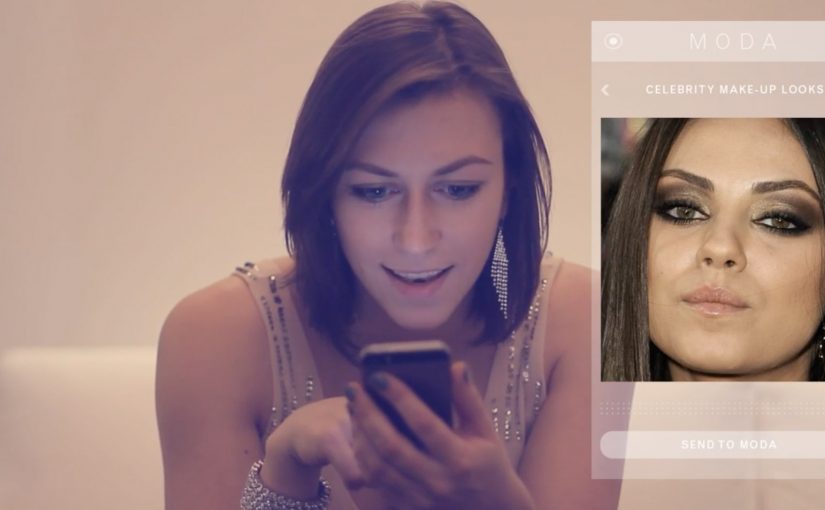
The flow starts in an app: you select a style to emulate. That style can come from MODA’s image library, a celebrity photo, or a picture of a fashionable friend. MODA then scans facial features to align the look. In other words, it maps facial landmarks so placement follows the wearer’s features. MODA then adapts colors and shapes to suit the wearer’s skin tone and face shape.

How the device applies the look

Once the selection is set, the user places their face into the device and MODA “paints” the chosen look directly onto the face, described as using makeup ink that is FDA-approved. Here, “ink” refers to the makeup medium the device dispenses onto the skin. The proposition is speed and repeatability: copy a look, personalize it, apply it, done.

In consumer beauty tech, shifting makeup from manual skill to an automated service experience changes the value from “how well you apply” to “how fast you can experiment”.

Why this idea has an audience

Online videos teaching people to copy celebrity styles are already a mass behavior. MODA’s bet is that many people do not want more instruction. They want a shortcut. Because the device applies the look for you after scanning and personalization, “trying a look” can become as easy as choosing one. The real question is whether the applied result looks credible enough that people will trust it without extra tutorial time. This framing is compelling because it shifts beauty from a practiced skill to a repeatable service moment.

Extractable takeaway: When a category is stuck on “learn the skill,” the highest-leverage innovation is often a service layer that turns inspiration into a fast, repeatable outcome, not another tutorial.

What MODA teaches about beauty UX

  • Collapse inspiration to action. Let people pick a reference look and get to an applied result quickly.
  • Personalize by default. Use scanning and simple adjustments so the outcome fits the individual, not just the template.
  • Design for repeatability. Make it easy to re-run a look, tweak it, and compare outcomes without starting from scratch.

A few fast answers before you act

What is MODA in one line?

A device billed as a “digital makeup artist” that uses an app selection plus facial scanning to apply a chosen makeup look in about 30 seconds.

What makes this different from AR try-on?

AR try-on is an on-screen overlay that previews a look digitally. MODA’s promise is physical application on the face after scanning and customization.

How does a user choose a look?

Through an integrated smartphone app, choosing from a library or supplying a reference image such as a celebrity photo or a friend’s picture.

How does MODA personalize a look to your face?

It’s described as scanning facial features and then adapting the chosen reference look by adjusting placement, shapes, and color choices to better fit the wearer’s face shape and skin tone before applying it.

Who is MODA pitched for?

People who want to experiment with different looks quickly, especially those who do not enjoy the learning curve of manual application and tutorials.

Jibo: The Social Robot for the Family

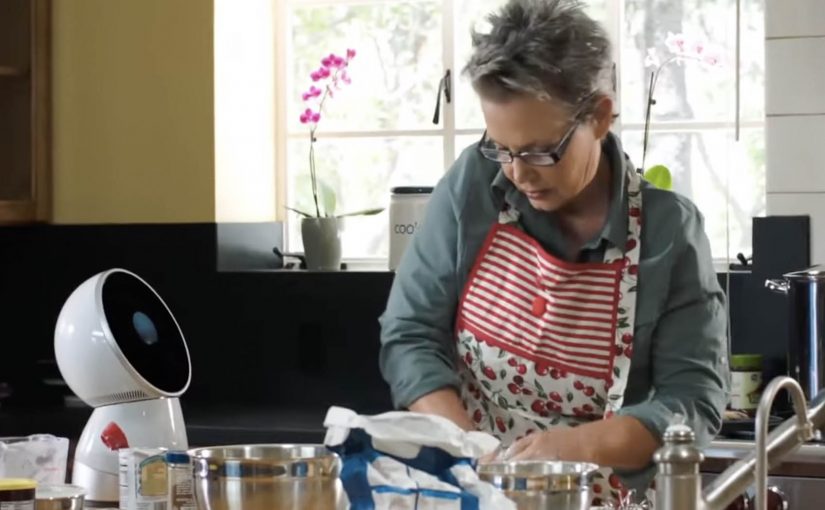
A robot that provides a personal and meaningful human experience is set to become reality through Jibo, an 11 inch tall, 6 pound, swiveling circular robot. Friendly, helpful and intelligent, Jibo is billed as the world’s first social robot for the family. Here, “social robot” means a robot designed to feel present and interactive in everyday home life, not just to complete tasks.

Here is a short demo video created for its crowdfunding campaign.

The pitch is “relationship”, not “utility”

The mechanism is straightforward. A small tabletop robot with a swiveling body and a screen uses motion, timing, and conversational cues to feel present in the room, rather than behaving like a static gadget. That matters because a sense of presence makes the product easier to imagine in the home than a static device would.

In consumer technology launches, the hard part is not explaining what the product does. It is making people feel why they would want it in their home.

Why it lands

This works because it frames the robot as a character. When a device has personality, the viewer stops evaluating it like a spec sheet and starts imagining it as part of daily routines. That shift is exactly what a crowdfunding-style launch needs, because belief and emotional attachment matter before the product is widely available.

Extractable takeaway: If you are launching something unfamiliar, do not lead with feature lists. Lead with a clear role the audience can picture, then use design and behavior to make that role feel natural and desirable.

What the business intent really is

The demo video is doing more than product explanation. It is creating a category frame. “Social robot for the family” is a positioning stake, and the crowdfunding moment is the fastest way to turn curiosity into momentum, pre-orders, and a community that will advocate for the concept.

The real question is not whether the robot can do enough, but whether people can imagine wanting it around them every day. For a product like this, positioning the relationship comes before explaining the utility.

What product marketers should borrow

  • Make a new category legible. Give the audience a simple label they can repeat to others.
  • Use behavior as proof. How the product moves, reacts, and “shows attention” can persuade faster than technical claims.
  • Sell the role. “What is this in my life” beats “what is this in the lab”.
  • Build community early. Crowdfunding works best when supporters feel like first insiders, not early buyers.

A few fast answers before you act

What is Jibo?

Jibo is a small tabletop robot positioned as a “social robot for the family”, designed to deliver a more personal, human-feeling interaction than a typical gadget.

How big is it?

The project describes Jibo as about 11 inches tall and around 6 pounds.

What does “social robot” mean here?

It refers to a robot designed for human interaction and presence in the home, using behavior and personality cues rather than only task execution.

Why launch via a crowdfunding demo video?

Because new categories need belief before they need scale. A demo video can communicate the role, the feeling, and the promise quickly, then convert interest into early supporters.

What is the main lesson for product marketers?

When the product is unfamiliar, show the “relationship” it creates in context, then let the technology sit behind the experience.