
WestJet Flight Light

WestJet Flight Light

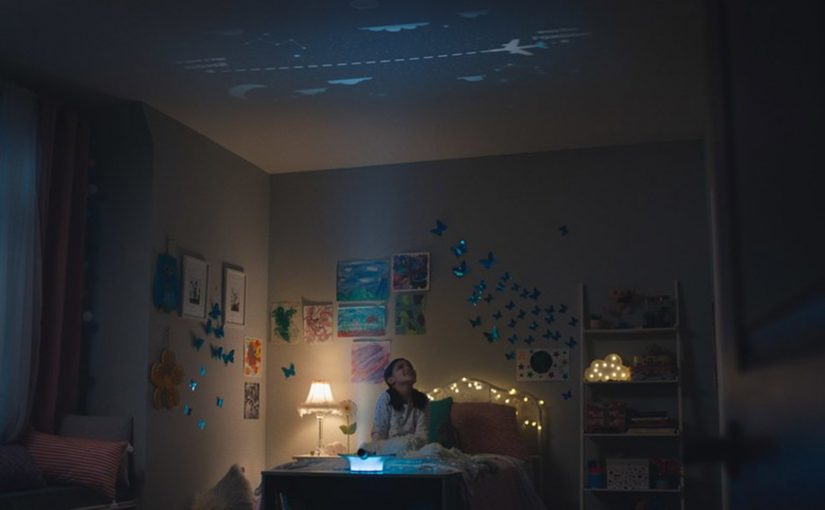
WestJet creates a small device with a big emotional job. WestJet Flight Light is a nightlight that uses live flight data to project a parent’s WestJet flight path onto a child’s bedroom ceiling, turning the wait into a visual, interactive countdown of hours and minutes until the parent returns.

In airlines and other service businesses, more brands move beyond selling a product and start designing convenience services that drive repeat usage and loyalty by solving real-life friction.

By convenience services, I mean a branded layer that uses operational data to make a recurring job easier for the customer.

Here, the friction is business travel. WestJet wants frequent travellers to pursue work opportunities without losing connection with the people waiting at home. Flight Light makes the journey feel present. Not abstract.

Why the concept works

The power is not the hardware. It is the experience design. A child’s instinct is to count down. Flight Light makes that countdown tangible and playful by projecting the route in the place where bedtime routines already happen, which turns waiting into anticipation.

Extractable takeaway: If you can turn operational data into a repeatable ritual in the customer’s real environment, you create loyalty that feels like care, not marketing.

The service logic

This is a brand service that behaves like a product. A brand service is a repeatable utility that makes the brand part of a real-life routine. Live flight data becomes a family connection layer. The airline becomes part of the at-home story, not just the transport provider.

The real question is whether your operational data can earn a role in the customer’s routines, not just inside your app.

Brands should treat data as experience material when it reduces anxiety or effort in a moment that already exists in the customer’s life.

Beta-testing and what it signals

WestJet says a prototype of Flight Light exists, with beta testing scheduled to begin later this year. That is the bridge between a cute concept and something that can be operated, supported, and scaled.

Borrowable moves from Flight Light

  • Start with a real-life routine. Bedtime already has attention and emotion. Place the experience there.
  • Use operational data as story material. Flight status becomes a shared narrative the family can follow.
  • Make the countdown visible. Turn “when are you home?” into a simple, comforting visual progression.
  • Design for repeat trips. The value compounds when the service works the same way every time the parent travels.

A few fast answers before you act

What is WestJet Flight Light?

A nightlight concept that uses live WestJet flight data to project a parent’s flight path onto a child’s bedroom ceiling as an interactive countdown to their return.

Who is it designed for?

Business travellers and frequent flyers with families, especially parents who travel regularly for work.

What is the core experience design move?

It turns live flight status data into a comforting, visible bedtime ritual that makes the trip home feel real and close.

What problem is it solving?

It reduces the emotional friction of business travel by making a parent’s trip home visible and countable during a child’s bedtime routine, instead of feeling distant and abstract.

Why is it a brand service, not just a gadget?

The value comes from turning live flight data into an at-home experience a family can reuse on every trip. The nightlight is the interface. The service is the connection layer.
Amazon Dash: The Button That Rewrites Loyalty

Amazon Dash: The Button That Rewrites Loyalty

A one-click purchase is not the point. Default is.

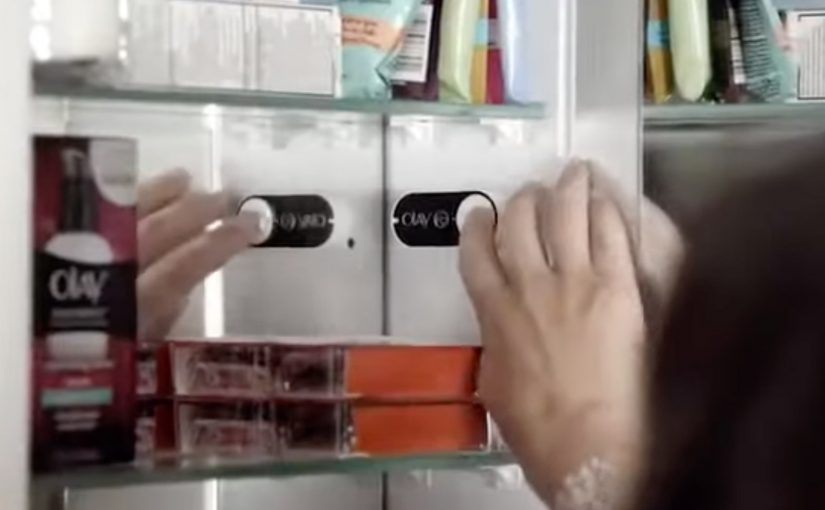
Amazon Dash Button looks simple. A branded button you stick near the place of usage. You press it. The same item arrives again.

But the strategic move is not “one click.” It is making the reorder the default behavior.

Dash Button turns repeat buying into an ambient habit. By “ambient habit,” I mean a repeat action triggered by the environment rather than an active shopping session. It shifts commerce away from discovery and toward automation. It pushes the battle for the customer from the shelf and the screen to the home.

What the Dash Button does

Dash Button is a small connected device tied to one specific product, and often one specific pack size. You link it to your Amazon account. You place it where the need occurs.

Examples are obvious in everyday life:

  • Detergent button near the washing machine
  • Coffee button in the kitchen
  • Pet food button near the feeding area

When the product runs low, you press. Amazon confirms the order, typically via app notifications, and ships.

The experience is intentionally narrow. That narrowness is the innovation.

In consumer convenience products, loyalty is often less about love and more about default.

In high-frequency household categories, the interface at the point of use can matter more than the message at the point of sale.

Why the narrowness matters

Dash Button removes three high-friction moments that brands fight over every day. Because one button equals one SKU, the moment of need no longer reopens the choice.

Extractable takeaway: If you can turn repeat purchase into a single configured action, you shift competition from persuasion in the moment to setup before the moment.

  1. Search. The customer does not type a query.
  2. Comparison. The customer does not see alternatives.
  3. Persuasion. The customer does not view ads, ratings, or promotions in the moment.

In other words, the customer does not shop. They simply replenish.

Once a household adopts replenishment behavior, the role of branding changes. The brand becomes less about persuasion and more about being the chosen default.

The hidden bet. Repeat purchases are the real moat

Dash Button is a physical expression of a platform strategy.

If Amazon captures replenishment categories, it wins the durable, high-frequency part of retail. The items that quietly drive recurring revenue and predictable logistics.

The button also functions as a data instrument. It reveals how often a household needs a product, where it is used, and which categories are truly habitual versus occasional.

That insight feeds subscriptions, predictive delivery, and future interface removal.

What this signals to CPG and retail leaders

Dash Button compresses marketing into an upstream decision.

The real question is how you become the configured default before the point of purchase even exists.

For CPG leaders, this forces uncomfortable clarity on loyalty, pack architecture, trade visibility, and availability. For retailers, it signals a shift in power toward whoever owns the reorder interface.

The consumer tension. Convenience vs control

Dash Button introduces a trust tradeoff.

Consumers value convenience, but they also worry about accidental orders, loss of price checks, oversimplified choice, and dependence on a single platform.

Those tensions do not invalidate the model. They clarify what platforms must solve through better confirmations, clearer reorder states, and smarter replenishment rules.

The bigger story. Interfaces disappear

Dash Button fits a broader direction in commerce. Buying moves away from screens and toward contexts.

The pattern is consistent: less explicit shopping, more embedded intent, more automation, and more default-driven brand outcomes.

Dash Button is not the endpoint. It is an early, tangible step toward commerce that feels invisible.

What to steal from Dash-default loyalty

  • Win the setup, not the moment. Treat the “configured default” as the real battleground, not the last-second persuasion layer.
  • Make narrowness a feature. If the goal is replenishment, deliberately constrain the action so choice does not reopen at the moment of need.
  • Put the trigger where the need occurs. The closer the interface sits to usage, the more it behaves like an always-on shelf for repeat buying.
  • Design for convenience with control. Keep confirmations and reorder states clear so automation feels helpful, not risky.

A few fast answers before you act

What was Amazon Dash?

Dash was a physical reorder button that let customers buy a specific everyday product with one press, removing browsing and checkout steps.

What is the core mechanism?

Turning replenishment into a default action. One button equals one SKU. The interface collapses choice into speed and habit.

Why does this change loyalty dynamics?

Because the reorder interface becomes the brand decision. If the button exists, switching requires extra effort, so the default compounds over time.

What is the business intent?

Increase repeat purchase frequency and reduce churn by owning the replenishment moment and lowering friction to near zero.

What should other brands steal?

Design for the reorder moment. If your category is habitual, the winning move is to remove steps, make the default easy, and earn repeat behavior through convenience.

Jibo: The Social Robot for the Family

Jibo: The Social Robot for the Family

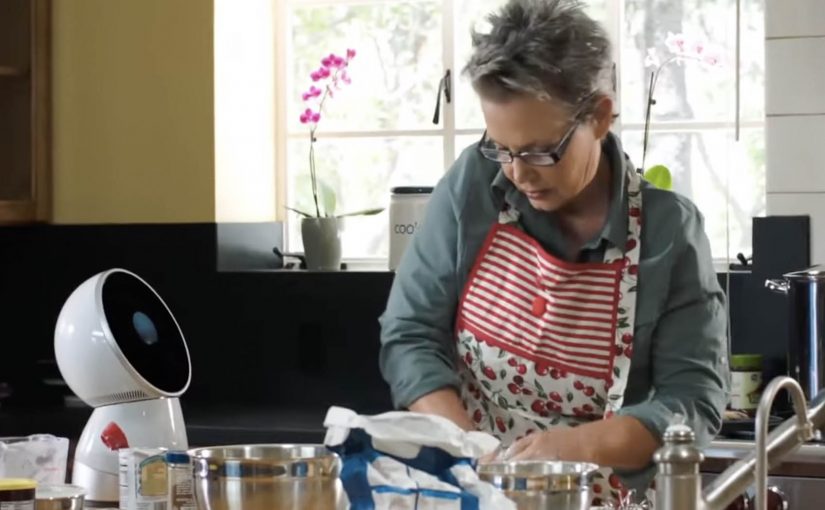
A robot that provides a personal and meaningful human experience is set to become reality through Jibo, an 11 inch tall, 6 pound, swiveling circular robot. Friendly, helpful and intelligent, Jibo is billed as the world’s first social robot for the family. Here, “social robot” means a robot designed to feel present and interactive in everyday home life, not just to complete tasks.

Here is a short demo video created for its crowdfunding campaign.

The pitch is “relationship”, not “utility”

The mechanism is straightforward. A small tabletop robot with a swiveling body and a screen uses motion, timing, and conversational cues to feel present in the room, rather than behaving like a static gadget. That matters because a sense of presence makes the product easier to imagine in the home than a static device would.

In consumer technology launches, the hard part is not explaining what the product does. It is making people feel why they would want it in their home.

Why it lands

This works because it frames the robot as a character. When a device has personality, the viewer stops evaluating it like a spec sheet and starts imagining it as part of daily routines. That shift is exactly what a crowdfunding-style launch needs, because belief and emotional attachment matter before the product is widely available.

Extractable takeaway: If you are launching something unfamiliar, do not lead with feature lists. Lead with a clear role the audience can picture, then use design and behavior to make that role feel natural and desirable.

What the business intent really is

The demo video is doing more than product explanation. It is creating a category frame. “Social robot for the family” is a positioning stake, and the crowdfunding moment is the fastest way to turn curiosity into momentum, pre-orders, and a community that will advocate for the concept.

The real question is not whether the robot can do enough, but whether people can imagine wanting it around them every day. For a product like this, positioning the relationship comes before explaining the utility.

What product marketers should borrow

  • Make a new category legible. Give the audience a simple label they can repeat to others.
  • Use behavior as proof. How the product moves, reacts, and “shows attention” can persuade faster than technical claims.
  • Sell the role. “What is this in my life” beats “what is this in the lab”.
  • Build community early. Crowdfunding works best when supporters feel like first insiders, not early buyers.

A few fast answers before you act

What is Jibo?

Jibo is a small tabletop robot positioned as a “social robot for the family”, designed to deliver a more personal, human-feeling interaction than a typical gadget.

How big is it?

The project describes Jibo as about 11 inches tall and around 6 pounds.

What does “social robot” mean here?

It refers to a robot designed for human interaction and presence in the home, using behavior and personality cues rather than only task execution.

Why launch via a crowdfunding demo video?

Because new categories need belief before they need scale. A demo video can communicate the role, the feeling, and the promise quickly, then convert interest into early supporters.

What is the main lesson for product marketers?

When the product is unfamiliar, show the “relationship” it creates in context, then let the technology sit behind the experience.