Start from a single image of your product and easily create high quality, customized product shots to elevate your marketing.
A jar in your hand. A whole shoot in your CMS
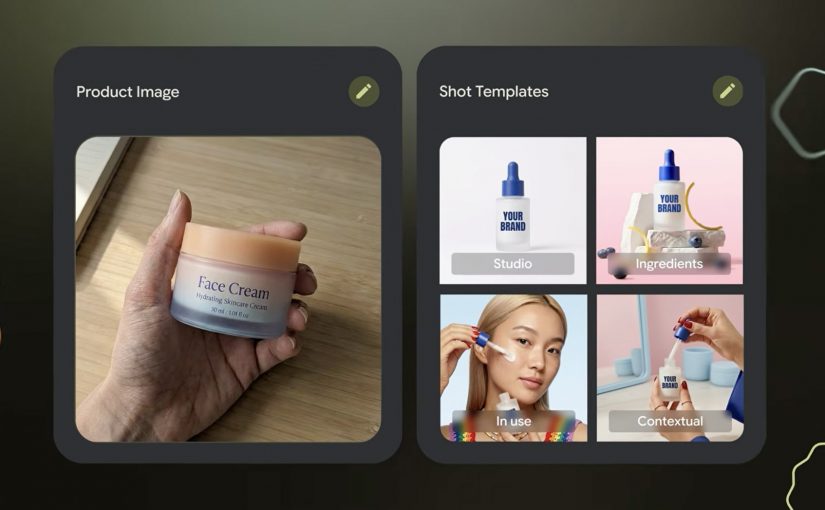
Start with the most ordinary thing in e-commerce. A single product photo, shot on a desk, held in a hand, good enough for internal approval but nowhere near “campaign-ready”. Then imagine turning that one image into a set of studio and lifestyle shots that look like you planned the lighting, the surface, the props, and the framing.
That is the pitch behind Photoshoot, a feature inside Pomelli from Google Labs: take a basic product image and generate professional-grade marketing imagery fast, without booking a studio for every new variant. “Studio-grade” here means assets that can sit on a PDP or paid social without instantly looking like “placeholder content”.
How Photoshoot turns one product photo into usable marketing imagery
Photoshoot is not just “generate me a nicer background”. It is a guided flow designed to keep output consistent.
- Pick a product photo. The input can be imperfect. The tool is explicitly designed to handle “don’t worry about polish”.
- Choose a template. Templates are pre-built shot styles (for example studio or lifestyle) that constrain composition so results do not drift into random aesthetics.
- Generate. Pomelli applies your brand aesthetic via its Business DNA, then generates new shots. Business DNA is Pomelli’s saved brand profile derived from your website (voice, fonts, imagery, color palette).
- Refine. You iterate with finishing touches, then download assets or store them back into Business DNA for reuse in later campaigns.
Under the hood, Google describes this as combining business context (Business DNA) with Nano Banana image generation to produce the final scenes.
In high-velocity retail and FMCG e-commerce teams shipping new SKUs (Stock Keeping Units) and promos weekly across many markets, this is the shortest path from “we have a product” to “we have compliant, channel-ready variants”.
The real question is whether one approved product shot can produce enough on-brand variants to increase throughput without increasing review drag.
Why it lands. Because it cuts the real friction, not the fun part
Most teams are not blocked on “having ideas”. They are blocked on throughput with consistency: getting enough variants, in enough formats, that still look on-brand, pass review, and do not trigger rework across design, legal, and local markets.
This is why the mechanism matters. Because Photoshoot grounds outputs in Business DNA and constrains composition via templates, the results tend to feel brand-consistent faster, which reduces review churn and makes variant production scalable.
Extractable takeaway: If you want generative creative to survive enterprise review, do not start with infinite freedom. Start with constraints that encode your brand (a reusable brand profile) and your channel rules (shot templates), then let the model fill in the pixels inside that box.
The business intent is blunt. Production leverage for asset variants
“Production leverage” is the multiplier you get when one person-hour produces many more usable assets without multiplying headcount or agency spend. For e-commerce teams, Photoshoot is essentially a variant engine.
- More PDP (Product Detail Pages) imagery coverage without re-shooting every pack change.
- More paid social iterations without waiting on design queues.
- Faster seasonal refreshes when the same SKU needs a new context (spring, gifting, back-to-work).
- A tighter loop between merchandising and creative because the cost of “try another angle” collapses.
Important reality check: you still need governance. Treat outputs like any other marketing asset. Rights, claims, pack accuracy, and local compliance do not disappear just because generation is fast.
Where to try it?
The Pomelli app on Google Labs is where you can access the experience.
However availability is currently limited. Pomelli has been launched as a public beta experiment in the United States, Canada, Australia, and New Zealand (English).
What to steal for your next asset sprint if the app is available in your region
- Codify brand constraints first. Build a reusable “brand profile” (fonts, tone, visual rules) before you chase more generations.
- Template your shots like you template layouts. Decide the 6 to 10 shot types you actually need (hero studio, detail crop, lifestyle context, ingredient cue) and standardize them.
- Design for review speed. Define what “acceptable” means (pack legibility, logo integrity, claims, background rules), then generate inside those rails.
- Run a SKU ladder test. Start with 10 SKUs across easy and hard surfaces (glass, reflective, metallic). If it fails there, it will fail at scale.
- Instrument the pipeline. Track time-to-first-usable, approval rate, and rework causes. That is how you prove leverage, not by “wow, looks nice”.
A few fast answers before you act
What is Pomelli Photoshoot, in one sentence?
Pomelli Photoshoot is a feature inside Google Labs’ Pomelli that turns a single product photo into professional-style studio and lifestyle marketing images using brand context and image generation.
What is the mechanic marketers should care about?
You choose a product image, select a curated template (studio or lifestyle), generate variants grounded in your Business DNA, then refine and download or reuse those assets in future campaigns.
What does “Business DNA” actually mean here?
Business DNA is Pomelli’s saved brand profile derived from your website, such as tone of voice, fonts, imagery, and color palette, which Pomelli uses to keep generated outputs consistent.
Where is Pomelli available right now?
Pomelli is in public beta in English in the United States, Canada, Australia, and New Zealand. It is not currently available in Germany.
What is the first safe way to pilot this in an enterprise team?
Pilot it on a small SKU set with strict shot templates and review criteria, then measure approval rate and rework reasons before scaling variant production.