
Google Labs: The emerging content stack

Google Labs: The emerging content stack

Most AI product interviews are easy to ignore. This one matters because, in a recent interview between Vaibhav Sisinty, founder of GrowthSchool, and Josh Woodward, VP, Google Labs & Google Gemini, Woodward walks through a set of public Google AI products and experiments that, taken together, reveal a much bigger shift in how Google wants creative work to happen.

One interview. Seven demos. One much bigger signal.

On the surface, this looks like another executive interview plus product showcase. Underneath, it is a useful snapshot of Google’s current AI surface across content, design, research, image editing, music, immersive world-building, and communication. Google Labs is the home for AI experiments at Google, and the interview makes that portfolio feel less like scattered demos and more like an emerging system.

The setup is simple. One conversation shows how a marketer can move from source material to interface concept to visual asset to soundtrack to presentation layer without switching mental models every five minutes. That is why the interview matters more than the usual AI highlight reel.

Google is no longer just shipping tools. It is sketching a marketing workflow.

A marketing workflow is the connected chain of jobs from understanding a brief to shipping an asset, interface, or experience.

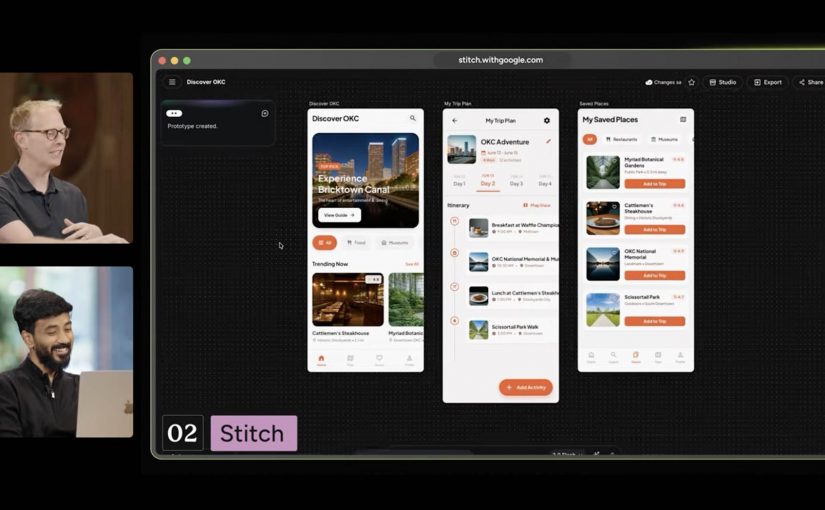
Google’s current AI surface now covers adjacent stages of work that used to require a mess of separate tools. Stitch handles UI design and front-end generation for apps and websites. NotebookLM handles source-grounded understanding. Pomelli handles on-brand marketing content. Nano Banana 2 handles image generation and editing. Lyria 3 handles music creation inside Gemini. Beam extends the stack into communication.

In practical terms, this means more of the work can happen inside one Google-shaped environment instead of bouncing across a pile of disconnected tools. For enterprise teams, the more important question is whether that upstream work can move cleanly into existing content, design, and approval flows without creating new governance gaps.

My view is that Google is not showing isolated AI tricks here. It is sketching the outline of a marketer-friendly workflow it wants to own. The real question is not whether every tool is perfect yet. It is whether Google can make enough of the workflow usable, governable, and economically attractive in one environment that teams start shifting production behavior, not just experimenting at the edges.

The tools that make the pattern easy to see

Pomelli

Pomelli is the most directly marketer-facing tool in the set. It is built to help businesses generate on-brand content faster. Easy use case: give it your site and product context, then generate campaign-ready visuals and messaging variations for social, ecommerce, or CRM. I unpacked one part of that story in my earlier Pomelli Photoshoot deep dive.

Stitch

Stitch is Google’s answer to fast interface ideation. It turns prompts into UI concepts and front-end output for mobile apps and websites. Easy use case: turn a campaign landing-page idea or app flow into a first working interface before design and dev teams invest heavier production time.

NotebookLM

NotebookLM stands out because it starts from your own source material. It helps turn messy research into usable understanding. Easy use case: upload research docs, interview notes, or previous campaigns and use it to build a grounded strategy summary, FAQ, or narrative draft.

Project Genie

Project Genie is the experimental outlier, but it matters because it points to where interactive creation is heading. It lets users explore generated worlds in real time from simple prompts. Easy use case: prototype a branded world, retail concept, or immersive experience before committing to a more expensive 3D or gaming build.

Nano Banana 2

Nano Banana 2 is Google’s latest image-generation and editing push inside Gemini. It is built for faster visual creation, editing, and iteration. Easy use case: create localized campaign visuals, packaging mockups, or quick ad variants from one approved base asset without opening a traditional creative suite first.

Lyria 3 in Gemini

Lyria 3 brings music creation into Gemini. It lets users generate short custom tracks from prompts and creative inputs. Easy use case: create a first-pass soundtrack or mood bed for a product reel, internal concept film, or social clip before moving into full production.

Google Beam

Google Beam, formerly Project Starline, is the communication layer in this broader picture. It turns standard video streams into a more life-sized and spatial experience. Easy use case: use it for high-stakes remote collaboration, premium client conversations, or executive workshops where trust and presence matter more than standard video calls can deliver.

Why this lands faster than most AI demos

Most AI demos still fail the practical test. They show capability without showing where that capability fits into real work. This one lands because the tools map onto jobs people already understand. Research. Design. Asset creation. Editing. Sound. Presentation. Collaboration.

That is what makes the portfolio more memorable than a long list of model upgrades. People do not buy into AI because a benchmark moved. They buy in when they can picture a job getting easier, faster, or more creatively open.

What Google is really trying to own

Google’s business intent looks bigger than feature adoption. It is trying to make more of the marketer’s daily workflow feel native to its own ecosystem, from idea formation to content generation to communication. That is a stronger strategic position than winning a one-off feature comparison.

That has direct platform and MarTech implications. If more synthesis, interface ideation, and content creation start upstream inside Google’s environment, teams will need to decide how that work hands off into existing CMS, DAM, CRM, analytics, and approval workflows without creating fresh fragmentation.

This is also why labs.google matters in the story. It is not just a gallery of experiments. It is the clearest public window into which adjacent jobs Google thinks belong together next.

What marketers should take from this now

Do not watch this interview as another AI tool roundup. Watch it as a preview of how Google wants more of the marketer workflow to happen inside one ecosystem.

Extractable takeaway: The strategic signal here is not one impressive Google AI demo. It is that Google is assembling enough connected creative building blocks that marketers can start reducing tool sprawl and shortening the path from brief to output.

The practical move is to run one tightly scoped pilot across synthesis, interface concepts, and visual production. NotebookLM for synthesis. Stitch for interface concepts. Pomelli or Nano Banana 2 for visual production. Put one owner on it, define the handoff into your existing content and approval flow, and measure whether cycle time, iteration speed, or asset throughput actually improves.


A few fast answers before you act

Which Google tools in this interview matter most for marketers right now?

NotebookLM, Stitch, Pomelli, Nano Banana 2, and Lyria 3 are the most directly useful because they map to research, interface concepts, asset creation, editing, and soundtrack generation.

Why does this interview matter more than a normal product launch video?

Because it shows multiple Google AI products side by side, which makes the workflow pattern easier to spot than a single product announcement.

Is Google Labs just a showcase site?

No. It is Google’s public home for AI experiments, which makes it the best place to track how Google is connecting adjacent creative and knowledge tasks.

What is the clearest first test for a marketing team?

Use NotebookLM to digest source material, Stitch to mock the experience, and Pomelli or Nano Banana 2 to produce first-pass campaign assets.

What is the strategic takeaway for leaders?

Evaluate these tools as a workflow play, not as isolated demos, because the compounding value comes from reducing friction between connected jobs.
Pomelli Photoshoot: Fast studio-quality assets

Pomelli Photoshoot: Fast studio-quality assets

Start with one approved product image, then generate channel-ready variants fast enough to reduce reshoot demand, review churn, and asset bottlenecks.

A jar in your hand. A whole shoot in your CMS

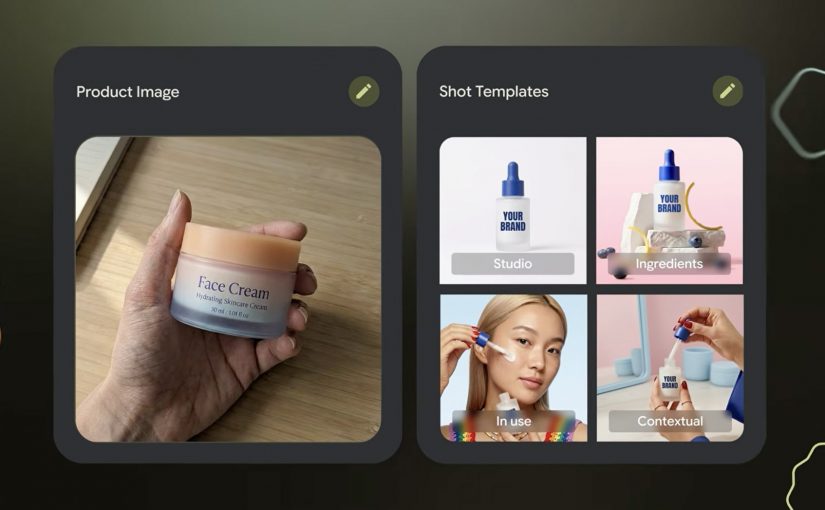
Start with the most ordinary thing in e-commerce. A single product photo, shot on a desk, held in a hand, good enough for internal approval but nowhere near “campaign-ready”. Then imagine turning that one image into a set of studio and lifestyle shots that look like you planned the lighting, the surface, the props, and the framing.

That is the pitch behind Photoshoot, a feature inside Pomelli from Google Labs: take a basic product image and generate professional-grade marketing imagery fast, without booking a studio for every new variant. “Studio-grade” here means assets that can sit on a PDP or paid social without instantly looking like “placeholder content”.

How Photoshoot turns one product photo into usable marketing imagery

Photoshoot is not just “generate me a nicer background”. It is a guided flow designed to keep output consistent.

  1. Pick a product photo. The input can be imperfect. The tool is explicitly designed to handle “don’t worry about polish”.
  2. Choose a template. Templates are pre-built shot styles (for example studio or lifestyle) that constrain composition so results do not drift into random aesthetics.
  3. Generate. Pomelli applies your brand aesthetic via its Business DNA, then generates new shots. Business DNA is Pomelli’s saved brand profile derived from your website (voice, fonts, imagery, color palette).
  4. Refine. You iterate with finishing touches, then download assets or store them back into Business DNA for reuse in later campaigns.

Under the hood, Google describes this as combining business context (Business DNA) with Nano Banana image generation to produce the final scenes.

In high-velocity retail and FMCG e-commerce teams shipping new SKUs (Stock Keeping Units) and promos weekly across many markets, this is the shortest path from “we have a product” to “we have compliant, channel-ready variants”.

The real question is whether one approved product shot can produce enough on-brand variants to increase throughput without increasing review drag.

Why it lands. Because it cuts the real friction, not the fun part

Most teams are not blocked on “having ideas”. They are blocked on throughput with consistency: getting enough variants, in enough formats, that still look on-brand, pass review, and do not trigger rework across design, legal, and local markets.

This is why the mechanism matters. Because Photoshoot grounds outputs in Business DNA and constrains composition via templates, the results tend to feel brand-consistent faster, which reduces review churn and makes variant production scalable.

Extractable takeaway: If you want generative creative to survive enterprise review, do not start with infinite freedom. Start with constraints that encode your brand (a reusable brand profile) and your channel rules (shot templates), then let the model fill in the pixels inside that box.

The business intent is blunt. Production leverage for asset variants

“Production leverage” is the multiplier you get when one person-hour produces many more usable assets without multiplying headcount or agency spend. For e-commerce teams, Photoshoot is essentially a variant engine.

Its real enterprise value appears when it fits between PIM, DAM, CMS, and channel publishing as part of the asset supply chain, rather than sitting as a standalone creative tool.

  • More PDP (Product Detail Pages) imagery coverage without re-shooting every pack change.
  • More paid social iterations without waiting on design queues.
  • Faster seasonal refreshes when the same SKU needs a new context (spring, gifting, back-to-work).
  • A tighter loop between merchandising and creative because the cost of “try another angle” collapses.

Important reality check: you still need governance. Treat outputs like any other marketing asset. Rights, claims, pack accuracy, and local compliance do not disappear just because generation is fast.

Without asset lineage, approval states, and pack-level control, faster generation just pushes bottlenecks downstream into legal review, localization, and channel operations.

Where it fits, if available in your region

For enterprise teams, the more important question is not where to access the tool, but who owns the workflow, approval model, and publishing controls around it.

The Pomelli app on Google Labs is where you can access the experience.

However availability is currently limited. Pomelli has been launched as a public beta experiment in the United States, Canada, Australia, and New Zealand (English).

What to steal for your next asset sprint if the app is available in your region

  • Codify brand constraints first. Build a reusable “brand profile” (fonts, tone, visual rules) before you chase more generations.
  • Template your shots like you template layouts. Decide the 6 to 10 shot types you actually need (hero studio, detail crop, lifestyle context, ingredient cue) and standardize them.
  • Design for review speed. Define what “acceptable” means (pack legibility, logo integrity, claims, background rules), then generate inside those rails.
  • Run a SKU ladder test. Start with 10 SKUs across easy and hard surfaces (glass, reflective, metallic). If it fails there, it will fail at scale.
  • Instrument the pipeline. Track time-to-first-usable, approval rate, and rework causes. That is how you prove leverage, not by “wow, looks nice”.

A few fast answers before you act

What is Pomelli Photoshoot, in one sentence?

Pomelli Photoshoot is a feature inside Google Labs’ Pomelli that turns a single product photo into professional-style studio and lifestyle marketing images using brand context and image generation.

What is the mechanic marketers should care about?

You choose a product image, select a curated template (studio or lifestyle), generate variants grounded in your Business DNA, then refine and download or reuse those assets in future campaigns.

What does “Business DNA” actually mean here?

Business DNA is Pomelli’s saved brand profile derived from your website, such as tone of voice, fonts, imagery, and color palette, which Pomelli uses to keep generated outputs consistent.

Where is Pomelli available right now?

Pomelli is in public beta in English in the United States, Canada, Australia, and New Zealand. It is not currently available in Germany.

What is the first safe way to pilot this in an enterprise team?

Pilot it on a small SKU set with strict shot templates and review criteria, then measure approval rate and rework reasons before scaling variant production.

Volkswagen Smileage: Road Trips with Google

Volkswagen Smileage: Road Trips with Google

With the Volkswagen Smileage app, road trips are never going to be the same again. Smileage is the in-app points system you earn from trip activity and social participation. Powered by Google the app is set to socialise road trips world over.

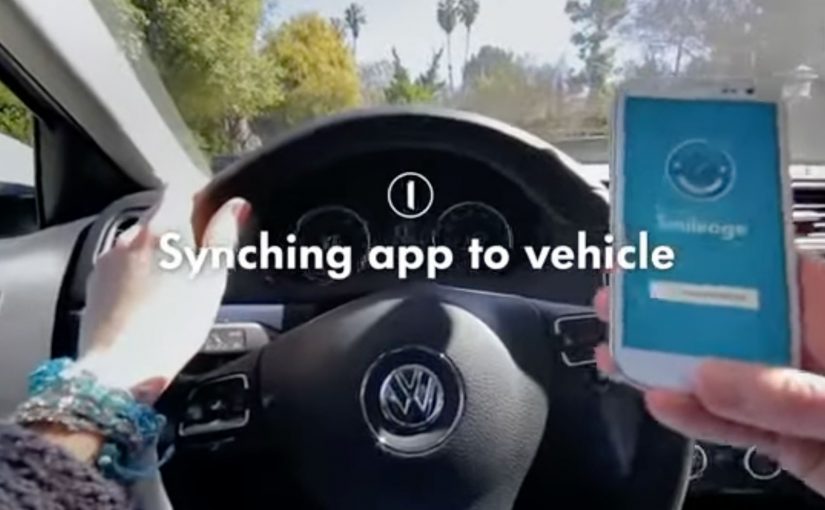
To start earning Smileage you have to pair the app with your car and sign in with your Google account. Once synced, the app automatically connects each time you go for a ride.

Friends can then watch and comment on your journey in real time while you earn Smileage through shared photos, kilometers, checkins, comments, likes and punches, the app’s name for quick in-app interactions from other nearby Volkswagens.

The car becomes a social object

The concept here is not just “tracking”. It is making the trip legible and interactive for people who are not in the car. Because spectators can react and contribute in real time, the drive becomes more shareable and more repeatable than a private commute.

  • Automatic connection. Pair once, then the app connects when you drive.
  • Live participation. Friends can watch and comment in real time.
  • Gamified reward loop. Points are earned through trip activity and social interactions.

Why the Google sign-in matters

In global automotive and mobility brands, the growth lever is turning driving time into something other people can see and join in.

The real question is whether your product turns real-world activity into something other people can participate in, not just something you can track.

Signing in with a Google account signals that this is more than a standalone app. It is built to plug into existing identity, location, and potentially mapping behavior. That is what enables a smoother experience and a more connected ecosystem around the trip. This is the right trade when you want engagement to extend beyond the driver.

Gamification that is tied to behavior

The points system is not abstract. It is linked directly to what happens on a trip. Photos, kilometers, check-ins, comments, likes, and even “punches” from nearby Volkswagens. The incentives are designed to encourage both movement and sharing.

Extractable takeaway: When rewards map to real-world actions and make those actions socially visible, the loop feels earned and keeps paying out after the trip ends.

  1. Drive. Kilometers and check-ins create baseline progress.
  2. Share. Photos create moments worth reacting to.
  3. Engage. Comments and likes add social energy.
  4. Connect. Nearby Volkswagens add community and surprise.

In connected consumer products, engagement grows fastest when real-world activity, identity, and social participation are designed as one loop.

What to take from this if you build connected experiences

  1. Reduce setup friction. Pair once. Auto-connect later.
  2. Design for spectators. The audience is part of the experience, not just the driver.
  3. Reward real activity. Gamification works best when points map to meaningful behavior.
  4. Use social to extend usage. Trips become more memorable when others can join in.

A few fast answers before you act

What is Volkswagen Smileage?

It is an app that pairs with your Volkswagen and Google account to make road trips social, letting friends follow and comment live while you earn points for trip activity and engagement.

How do you start earning Smileage?

You pair the app with your car and sign in with your Google account. Once synced, it connects automatically each time you go for a ride.

How do you earn points in the app?

Through shared photos, kilometers, check-ins, comments, likes, and “punches” from other nearby Volkswagens.

What is the main experience benefit for users?

Road trips become shareable in real time, turning the drive into a live story that friends can react to and participate in.

What is the transferable lesson for connected products?

If you combine automatic sensing with social participation and rewards tied to real behavior, you can turn routine usage into a repeatable engagement loop.