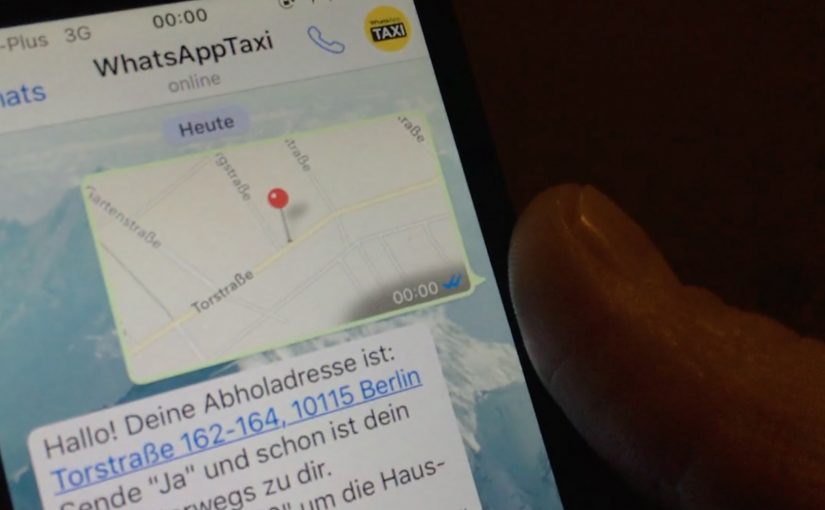
You need a taxi. Instead of calling or using a dedicated app, you open WhatsApp, share your location, and place the order by message. Taxi Deutschland positions “WhatsApp Taxi” as a simple way to request a cab in major German cities using the behavior people already know. Messaging.
Why this shows up now
After years of public sharing and transparency on social media, people gravitate toward more intimate, private, and even anonymous ways to communicate. That shift boosts the popularity of messaging apps and ephemeral messaging. Chat apps become hubs for social networks, games, e-commerce, and more.
The service. Taxi ordering by location message
Taxi Deutschland launches a new service called “WhatsApp Taxi” that allows users in major German cities to order a taxi by simply sharing their location via a WhatsApp message. The interaction is reduced to one core input. Your location.
The pattern. Messaging becomes an interface
Just last week I wrote about how KLM was starting to use Facebook Messenger for customer service related queries and tasks. WhatsApp Taxi sits in the same movement. Utility shifts into the messaging layer, which means the chat app becomes the place where the service starts, is confirmed, and is updated. The chat thread becomes the service surface.
In service categories where the audience already coordinates through chat, the smarter move is often to reduce entry friction rather than build another interface.
Why this lands for service adoption
This is a stronger service design move than another branded utility app because one familiar message and one high-confidence input make the service easier to try, which is why the interaction feels lighter and more repeatable.
Extractable takeaway: When the job to be done can be triggered with one trusted input inside a familiar chat flow, messaging can outperform a dedicated interface on adoption because it removes setup and learning cost.
The real question is whether your service needs a dedicated interface at all when messaging can already handle the request, confirmation, and follow-up. For Taxi Deutschland, the business intent is to reduce ordering friction and capture demand inside an existing behavior instead of forcing a new app habit.
What service brands can lift from WhatsApp Taxi
- Ship in the behaviour people already have: If your audience already lives in messaging, put the service where the habit already exists.
- Reduce the request to one high-confidence input: Location-first is a clean pattern when the service is fundamentally “come to me”.
- Make chat the interface: Treat the thread as the order surface. Request, confirmation, updates, and support stay in one place.
- Keep the interaction minimal: If one message can start the service, adoption is easier than “install app, register, learn UI”.
- Design for repeat use: The same simple flow should work the second time without needing new learning or setup.
A few fast answers before you act
What is WhatsApp Taxi?
A Taxi Deutschland service that lets users order a taxi via WhatsApp by sharing their location in a message.
Where does it work?
Taxi Deutschland positions the service for use in major German cities.
What is the core user action?
Send your location via WhatsApp message to initiate the taxi order.
Why is this a marketing and product signal?
It shows how messaging apps evolve from communication tools into utility layers where services can be initiated and managed.
What is the transferable lesson for brands?
If your service can be reduced to a small set of high-confidence inputs, messaging can become a low-friction interface that people already understand.