
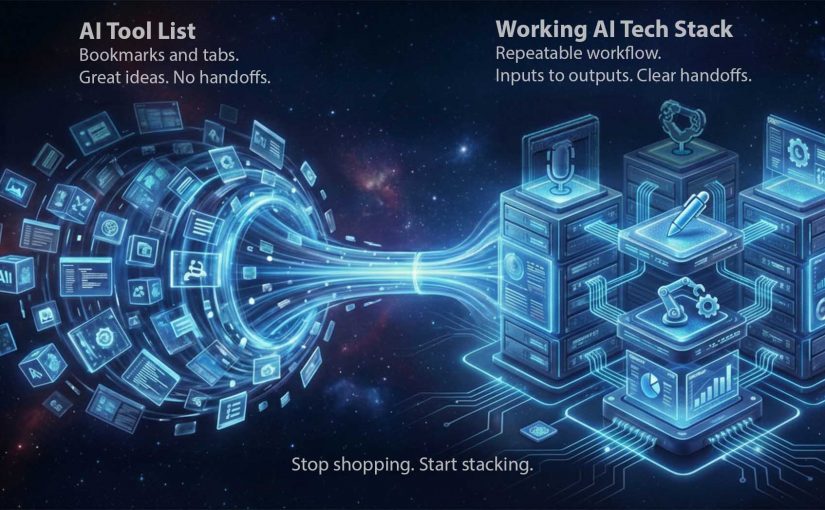
From AI Tool List to Working AI Tech Stack

From “pick 20 tools” to “run a working stack”

I recently came across the below video from Dan Martell which frames “zero-code million-dollar business” as a tool-selection problem. That framing is useful. However the right conclusion for marketers and brands watching is not “go pick 20 tools”. The right conclusion is “stop shopping. Start stacking”. In 2026, you should start focusing more on the ability to pick, connect, and operationalize capabilities.

By “working AI tech stack” I mean a small, repeatable set of tools that moves work from input to output with the least friction. It is not a folder of bookmarks. It is a production line.

The useful takeaway isn’t the list. It’s the operating model.

Most people consume AI content and walk away with a shopping list. That is the wrong takeaway. The useful takeaway is operational. Arrange capabilities into a workflow that consistently produces outputs. Briefs, assets, approvals, launches, responses, and measurable improvements.

A list creates options. A stack creates throughput. Throughput is how reliably your team converts intent into shipped work, week after week, without rebuilding the process every time.

The mechanism: a stack is just clean handoffs

A working AI tech stack is a sequence with explicit handoffs:

Inputs → Synthesis → Creation → Automation → Distribution → Measurement

Each step has one job. Each step produces an artifact someone else can use. Each handoff is defined so the work does not stall in Slack, email, or “waiting for approval”.

In global FMCG and retail marketing organizations, the bottleneck is rarely ideas but the handoffs between people, tools, and approvals.

Why this lands with leaders

Tool lists feel like progress because they are concrete and low-commitment. You can bookmark them and feel “covered”. Stacks feel harder because they force decisions: what is the workflow, who owns each step, where do we enforce quality and risk controls.

Extractable takeaway: If you cannot name the exact step a tool owns in a repeatable workflow (input → transformation → handoff → output), it is not part of your stack yet. It is just potential.

The business intent: less software. More shipped outcomes

For marketers and brands, the goal is not “using AI”. The goal is operational leverage:

The real question is not how many AI tools you can name, but whether your team can move work through a repeatable line with clear ownership and handoffs.

  • Faster cycle time from brief to asset.
  • Fewer revision loops because synthesis and constraints are done upfront.
  • Fewer dropped balls because handoffs are automated.
  • More reuse of institutional knowledge because answers are captured once and searchable.
  • Higher output without lowering standards.

This is also where governance belongs. A stack needs rules about what data can go where, who can approve what, and which steps require a human decision.

The working stack blueprint: tools mapped from Inputs to Measurement

Below are the 20 tools referenced in the video, placed where they most naturally fit in the production line. You can use fewer than 20. The point is the flow.

Inputs: capture raw material without losing signal

Manus

Manus is designed to act more like a task runner than a chatbot. You give it a goal and it works through steps to deliver outputs, not just advice. Example: collect competitor screenshots, extract claims, summarize patterns, and deliver a brief plus a slide outline.

SocialSweep

SocialSweep is positioned as a way to search your network and relationship graph with context. It helps you identify who you know, why they are relevant, and what to say. Example: find warm paths to retail media decision-makers, then draft an intro message that references shared context.

HireAlli

HireAlli is positioned around capturing commercial intent from website traffic so teams can follow up faster. Example: flag repeat visits to pricing pages, then route the lead to sales with a summary of pages viewed and a recommended next message.

Synthesis: turn messy inputs into a usable brief and plan

NotebookLM

NotebookLM is useful when you want answers grounded in the sources you provide. It helps you summarize, compare, and extract structure from documents. Example: upload research PDFs and prior campaign docs, then generate a launch FAQ and a messaging hierarchy that stays consistent with those materials.

Claude

Claude is a general assistant that excels at drafting, rewriting, and structuring thinking. Use it to turn raw notes into clear decisions and action plans. Example: paste a workshop transcript and request a decision log, assumptions, risks, and a one-page brief for stakeholders.

ChatGPT

ChatGPT is a general-purpose assistant for ideation, drafting, analysis, and reusable workflows. It is especially useful when you iterate toward a spec. Example: ask clarifying questions for a campaign brief, then output a structured creative and media spec the team can execute.

Creation: produce assets that are actually shippable

Gamma

Gamma helps turn rough thinking into a structured deck or document quickly. It is strong when the bottleneck is narrative structure, not visual polish. Example: paste the brief, generate a 10-slide storyline, then refine the argument and flow before design.

Descript

Descript lets you edit audio and video through text. You edit the transcript like a document and the media follows. Example: clean up a leadership video by removing filler words, tightening sections, and exporting both a long version and short clips.

ElevenLabs

ElevenLabs generates natural-sounding speech from text and supports scalable voice workflows. It is useful for narration, localization, and voiceovers. Example: create a consistent “brand voice” narration for product explainers, then generate localized voiceovers without re-recording.

Lovable

Lovable is positioned as an AI-assisted way to build apps or web experiences without traditional engineering. Think prototypes, internal tools, and simple customer experiences. Example: describe an internal campaign intake tool, generate a prototype, then iterate requirements until it is usable.

Automation: make the handoffs run without nagging humans

Make

Make connects apps into workflows using triggers and actions. It is the plumbing that turns “good tools” into “a working line”. Example: when a brief is approved, create tasks, notify stakeholders, generate a first draft, and route it to review automatically.

ChatAid

ChatAid is positioned as an AI support layer that can answer recurring questions and route issues. It fits both internal enablement and customer-facing support when designed with escalation rules. Example: answer “where is the latest asset” or “what is the policy”, and escalate to a human when confidence is low.

Distribution: move outputs into channels that drive outcomes

Revio

Revio is positioned around managing inbound conversations across social channels in one place. It helps teams respond consistently and not miss high-intent messages. Example: unify DMs so customer questions and sales inquiries do not get lost across platforms.

YourAtlas

YourAtlas is positioned around AI agents that can handle inbound qualification and booking. This matters in service businesses and lead-driven funnels. Example: handle inbound calls or requests 24/7, capture required details, then hand off qualified appointments to humans.

Membership.io

Membership.io supports structured memberships and gated content experiences. It is a distribution layer for expertise and ongoing value, not just content hosting. Example: package a learning path for partners or teams, with searchable resources and a community layer to reduce repeated questions.

BuddyPro

BuddyPro is positioned around turning your content and methods into an always-on assistant people can query. It is a distribution mechanism for expertise at scale. Example: clients query your “playbook assistant” for next steps between calls, and you control what it can and cannot answer.

Measurement: close the loop so the stack improves every cycle

Hiro Finance

Hiro Finance is positioned around cash-flow visibility and planning. It helps decision-makers see financial reality without spreadsheet archaeology. Example: run a weekly check on runway, recurring costs, and upcoming risk points before you scale spend.

HelloFrank

HelloFrank is positioned around deeper business-context finance insights. It can help detect spend anomalies and surface what changed month-over-month. Example: find subscription creep and cost spikes, then turn it into a prioritized cleanup plan.

Revaly

Revaly is positioned around payment performance and reducing failed transactions that create involuntary churn. It matters most where recurring revenue is sensitive to declines. Example: identify where legitimate payments fail and improve recovery rates without harming customer trust.

Precision

Precision is positioned around turning KPIs into a practical operating rhythm. It helps teams focus attention on what moved and what to do next. Example: generate a weekly performance brief. These metrics shifted, here are likely drivers, here is what we should test or fix this week.

How to build a working stack without buying 20 subscriptions

  • Start with one workflow you ship weekly. Brief → assets → approvals → publish → measure.
  • Assign ownership per step. Tools without owners become clutter.
  • Build the handoffs before you add more tools. Automation is what turns tools into a line.
  • Define where humans must decide. Brand-sensitive, compliance-sensitive, and customer-sensitive steps need a review point.
  • Run a monthly keep-or-kill review. If a tool is not improving cycle time or quality, remove it.

A few fast answers before you act

What is the single biggest mistake teams make with AI tools right now?

They treat AI as a chat window to copy and paste from, instead of an execution layer connected to a workflow that ships outputs.

What is a “working AI tech stack” in one sentence?

A working AI tech stack is a small set of connected tools that reliably turns inputs like notes and briefs into shippable outputs, with minimal friction and clear handoffs.

How do I decide if a tool belongs in my stack?

If you cannot name the exact step it owns and the handoff it triggers, it is not part of the stack yet.

What should a marketing leader implement first?

One throughput line, end to end. Inputs → Synthesis → Creation → Automation → Distribution → Measurement. Then automate handoffs before adding new tools.

How do I avoid tool sprawl?

Set constraints: one tool per job, a clear owner, and a monthly keep-or-kill review tied to measured outcomes.
Use vs Integrate: AI Tools That Transform

The pilot phase is over. “Use” loses. “Integrate” wins.

Those who merely use AI will lose. Those who integrate AI will win. The experimentation era produced plenty of impressive demos. Now comes the part that separates winners from tourists. Making AI an operating capability that compounds.

Most organizations are still stuck in tool adoption. A team runs a prompt workshop. Marketing trials a copy generator. Someone adds an “intelligent chatbot” to the website. Useful, yes. Transformational, no.

The real shift is “use vs integrate”. By “integrate”, I mean embedding AI into governed, measurable workflows teams can repeat, not ad hoc tool experimentation. The real question is whether you can make AI repeatable, governed, measurable, and finance-credible across workflows that actually move revenue, cost, speed, and quality.

Because the differentiator is not whether you have access to AI. Everyone does. The differentiator is whether you can make AI repeatable, governed, measurable, and finance-credible across workflows that actually move revenue, cost, speed, and quality.

If you want one question to sanity-check your AI maturity, it is this: Who owns the continuous loop of scouting, testing, learning, scaling, and deprecating AI capabilities across the business?

What “integrating AI” actually means

Integration is not “more prompts”. It is process integration with an operating model around it.

In practice, that means treating AI like infrastructure. Same mindset as data platforms, identity, and analytics. The value comes from making it dependable, safe, reusable, and measurable.

Here is what “AI as infrastructure” looks like when it is real:

  • Data access and permissions that are designed, not improvised. Who can use what data, through which tools, with what audit trail.
  • Human-in-the-loop checkpoints by design. Not because you distrust AI. Because you want predictable outcomes, accountability, and controllable risk.
  • Reusable agent patterns and workflow components. Not one-off pilots that die when the champion changes teams.
  • A measurement layer finance accepts. Clear KPI definitions, baselines, attribution logic, and reporting that stands up in budget conversations.

When these components are standardized, variance drops and accountability increases, which is why integrated AI can scale beyond individual champions and one-off pilots.

This is why the “pilot phase is over”. You do not win by having more pilots. You win by building the machinery that turns pilots into capabilities.

In enterprise operating models, AI advantage comes from repeatable workflow integration with governance and measurement, not from accumulating tool pilots.

The bottleneck is collapsing. But only for companies that operationalize it

A tangible shift is the collapse of specialist bottlenecks.

Extractable takeaway: If the bottleneck moves but governance and measurement do not, speed turns into chaos instead of compounding advantage.

When tools like Lovable let teams build apps and websites by chatting with AI, the constraint moves. It is no longer “can we build it”. It becomes “can we govern it, integrate it, measure it, and scale it without creating chaos”.

The same applies to performance management. The promise of automated scorecards and KPI insights is not that dashboards look nicer. It is that decision cycles compress. Teams stop arguing about what the number means, and start acting on it.

But again, the differentiator is not whether someone can generate an app or a dashboard once. The differentiator is whether the organization can make it repeatable and governed. That is the gap between AI theatre, demo-driven activity with no repeatable integration, and AI advantage.

Ownership. The million-dollar question most companies avoid

I still see many organizations framing AI narrowly. Generating ads. Drafting social posts. Bolting a chatbot onto the site.

Those are fine starter use cases. But they dodge the million-dollar question. Who owns AI as an operating capability?

In my view, it requires explicit, business-led accountability, with IT as platform and risk partner. Two ingredients matter most.

  1. A top-down mandate with empowered change management

    Leaders need a shared baseline for what “integration” implies. Otherwise, every initiative becomes another education cycle. Legal and compliance arrive late. Momentum stalls. People get frustrated. Then AI becomes the next “tool rollout” story. This is where the mandate matters. Not as a slogan, but as a decision framework. What is in scope. What is out of scope. Which risks are acceptable. Which are not. What “good” looks like.

  2. A new breed of cross-functional leadership

    Not everyone can do this. You need a leader whose superpower is connecting the dots across business, data, technology, risk, and finance. Not a deep technical expert, but someone with strong technology affinity who asks the right questions, makes trade-offs, and earns credibility with senior stakeholders. This leader must run AI as an operating capability, not a set of tools.

    Back this leader with a tight leadership group that operates as an empowered “AI enablement fusion team”. It spans Business, IT, Legal/Compliance, and Finance, and works in an agile way with shared standards and decision rights. Their job is to move fast through scouting, testing, learning, scaling, and standardizing. They build reusable patterns and measure KPI impact so the organization can stop debating and start compounding.

    If that team does not exist, AI stays fragmented. Every function buys tools. Every team reinvents workflows. Risk accumulates quietly. And the organization never gets the benefits of scale.

AI will automate the mundane. It will transform everything else

Yes, AI will automate mundane tasks. But the bigger shift is transformation of the remaining work.

AI changes what “good” looks like in roles that remain human-led. Strategy becomes faster because research and synthesis compress. Creative becomes more iterative because production costs drop. Operations become more adaptive because exception handling becomes a core capability.

The workforce implication is straightforward. Your advantage will come from people who can direct, verify, and improve AI-enabled workflows. Not from people who treat AI as a toy, or worse, as a threat.

There is no one AI tool to rule them all

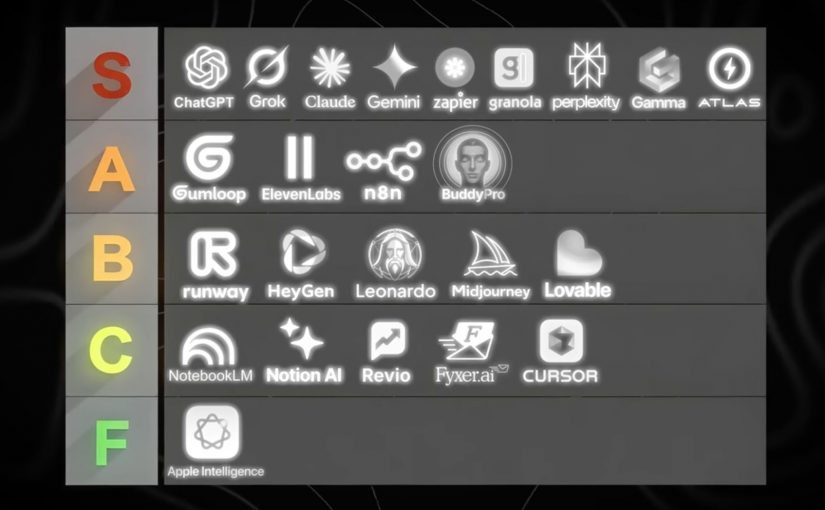
There is no single AI tool that solves everything. The smart move is to build an AI tool stack that maps to jobs-to-be-done, then standardize how those tools are used.

Also, not all AI tools are worth your time or your money. Many tools look great in demos and disappoint in day-to-day execution.

So here is a practical way to think about the landscape. A stack, grouped by what the tool does.

Here is one good example of a practical AI tool stack by use case

Foundation models and answer engines

  • ChatGPT: General-purpose AI assistant for reasoning, writing, analysis, and building lightweight workflows through conversation.
  • Claude (Anthropic): General-purpose AI assistant with strong long-form writing and document-oriented workflows.
  • Gemini (Google): Google’s AI assistant for multimodal tasks and deep integration with Google’s ecosystem.
  • Grok (xAI): General-purpose AI assistant positioned around fast conversational help and real-time oriented use cases.
  • Perplexity AI: Answer engine that combines web-style retrieval with concise, citation-forward responses.
  • NotebookLM: Document-grounded assistant that turns your sources into summaries, explanations, and reusable knowledge.
  • Apple Intelligence: On-device and cloud-assisted AI features embedded into Apple operating systems for everyday productivity tasks.

Creative production. Image, video, voice

  • Midjourney: High-quality text-to-image generation focused on stylized, brandable visual outputs.
  • Leonardo AI: Image generation and asset creation geared toward design workflows and production-friendly variations.
  • Runway ML: AI video generation and editing tools for fast content creation and post-production acceleration.
  • HeyGen: Avatar-led video creation for localization, explainers, and synthetic presenter formats.
  • ElevenLabs: AI voice generation and speech synthesis for narration, dubbing, and voice-based experiences.

Workflow automation and agent orchestration

  • Zapier: No-code automation for connecting apps and triggering workflows, increasingly AI-assisted.
  • n8n: Workflow automation with strong flexibility and self-hosting options for technical teams.
  • Gumloop: Drag-and-drop AI automation platform that connects data, apps, and AI into repeatable workflows.
  • YourAtlas: AI sales agent that engages leads via voice, SMS, or chat, qualifies them, and books appointments or routes calls without humans.

Productivity layers and knowledge work

  • Notion AI: AI assistance inside Notion for writing, summarizing, and turning workspace content into usable outputs.
  • Gamma: AI-assisted creation of presentations and documents with fast narrative-to-slides conversion.
  • Granola AI: AI notepad that transcribes your device audio and produces clean meeting notes without a bot joining the call.
  • Buddy Pro AI: Platform that turns your knowledge into an AI expert you can deploy as a 24/7 strategic partner and revenue-generating asset.
  • Revio: AI-powered sales CRM that automates Instagram outreach, scores leads, and provides coaching to convert followers into revenue.
  • Fyxer AI: Inbox assistant that connects to Gmail or Outlook to draft replies in your voice, organize email, and automate follow-ups.

Building software faster. App builders and AI dev tools

  • Lovable: Chat-based app and website builder that turns requirements into working product UI and flows quickly.
  • Cursor AI: AI-native code editor that accelerates coding, refactoring, and understanding codebases with embedded assistants.

Why this video is worth your time

Tool lists are everywhere. What is rare is a ranking based on repeated, operational exposure across real businesses.

Dan Martell frames this in a way I like. He treats tools as ROI instruments, not as shiny objects. He has tested a large number of AI tools across his companies, then sorts them into what is actually worth adopting versus what is hype.

That matters because most teams do not have a tooling problem. They have an integration problem. A “best tools” list only becomes valuable when you connect it to your operating model, your workflows, your governance, and your KPI layer.

Practical moves to integrate AI

If you are a CDO, CIO, CMO, or you run digital transformation in any serious way, here is the practical stance.

  • Stop optimising for pilots. Start optimising for capabilities.
  • Decide who owns the continuous loop. Make it explicit. Fund it properly.
  • Build reusable patterns with governance. Measure what finance accepts.
  • Treat tools as interchangeable components. Your real advantage is the operating model that lets you reuse, scale, and improve AI capabilities over time.

That is what “integrate” means. And that is where the winners will be obvious.


A few fast answers before you act

What does “integrating AI” actually mean?

Integrating AI means embedding AI into core workflows with clear ownership, governance, and measurement. It is not about running more pilots or using more tools. It is about making AI repeatable, auditable, and finance-credible across the workflows that drive revenue, cost, speed, and quality.

What is the difference between using AI and integrating AI?

Using AI is ad hoc and tool-led. Teams experiment with prompts, copilots, or point solutions in isolation. Integrating AI is workflow-led. It standardizes data access, controls, reusable patterns, and KPIs so AI outcomes can scale across the organization.

What is the simplest way to test AI maturity in an organization?

Ask who owns the continuous loop of scouting, testing, learning, scaling, and deprecating AI capabilities. If no one owns this end to end, the organization is likely accumulating pilots and tools rather than building an operating capability.

What does “AI as infrastructure” look like in practice?

AI as infrastructure includes standardized access to data, policy-based permissions, auditability, human-in-the-loop checkpoints, reusable workflow components, and a measurement layer that links AI activity to business KPIs.

What KPIs make AI initiatives finance-credible?

Common KPIs include cycle-time reduction, cost-to-serve reduction, conversion uplift, content throughput, quality improvements, and risk reduction. What matters most is agreeing on baselines and attribution logic with finance upfront.

What is a practical first step leaders can take in the next 30 days?

Select one or two revenue or cost workflows. Define the baseline. Introduce human-in-the-loop checkpoints. Instrument measurement. Then standardize the pattern so other teams can reuse it instead of starting from scratch.