
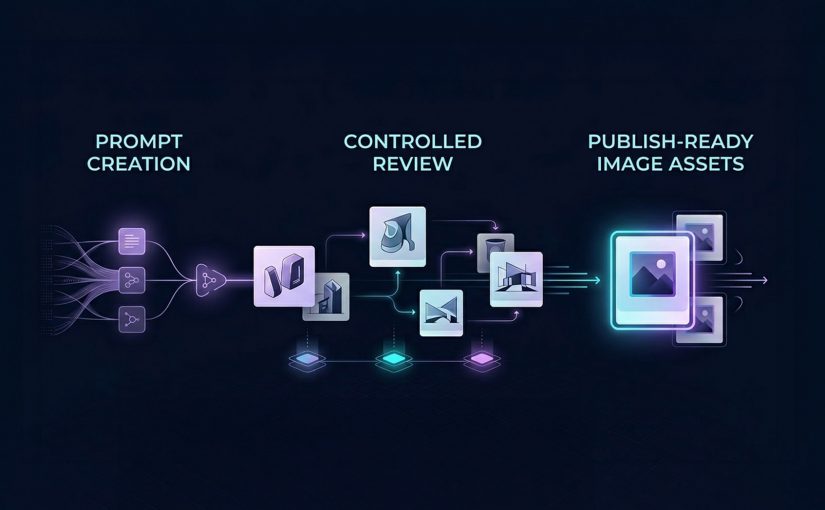
AI Image Tools: From Prompt to Publish

AI Image Tools: From Prompt to Publish

Most coverage of AI image tools still reads like a model beauty contest. One tool wins on realism, another on style, another on speed, and the audience gets the usual low-value conclusion: try them all and see what sticks.

That is not how serious content teams operate. Julia McCoy’s walkthrough is useful because it puts seven popular image tools in one frame, but the more commercially useful lens is different. The job is not to admire outputs. It is to identify which image model helps a team move from prompt to publish with the least waste.

Identifying image models that can actually ship assets

Most teams do not need the most impressive image model in the abstract. They need the right model for the job in front of them, which means matching the tool to the asset type, approval risk, speed requirement, and downstream workflow.

The missing discipline is model-fit. Model-fit is the discipline of choosing an image generator based on what the asset needs to do in production, not just how good the first output looks on screen.

In enterprise content operations, the winning model is usually the one that survives review, resize, and reuse without spawning manual cleanup. At enterprise scale, the issue is not just image quality. It is whether the asset can move cleanly into DAM, CMS, localization, and approval workflows without creating governance exceptions.

The right image model is the one that reduces production friction, preserves brand control, and helps teams ship usable assets. The real question is not which model looks best in a demo, but which one moves a team from prompt to publish with the least waste.

What each image tool is really good at

DALL-E 3 in ChatGPT: Best when teams need fast branded content

DALL-E 3 is best understood as a conversational image generator inside a broader workflow. Its advantage is not just image creation. It is the ability to iterate in natural language, refine outputs quickly, and adapt formats without breaking flow. That makes it especially useful for social graphics, rough branded concepts, and content support assets where speed matters as much as polish.

This is where operator value shows up. If a team can move from idea to usable asset in one conversational environment, production friction drops. The catch is that text rendering can still be unreliable, which means it should support content production, not replace design QA.

Midjourney Alpha: Best when the brief needs visual drama

Midjourney Alpha is a high-detail image model built for stronger visual impact. Its web interface makes the workflow cleaner than the old Discord-first experience, but the reason teams use it is simpler. It produces more dramatic, presentation-friendly imagery when the brief needs mood, depth, or aesthetic intensity.

That makes it a fit for keynote headers, thought-leadership visuals, blog hero art, and concept-led storytelling. The trade-off is practical. High aesthetic quality does not always translate into reliable likeness, identity accuracy, or brand-safe precision.

Meta AI: Best when speed of iteration matters more than finish

Meta AI is most useful as a fast iteration tool. Its strength is responsiveness. It lets users shape and reshape images quickly while prompting, which makes it valuable for early concept exploration and low-friction experimentation.

For content teams, that matters when the task is not final asset creation but directional testing. It is less useful when the workflow depends on reference-image fidelity or more controlled production behavior.

Microsoft Designer: Best for learning prompts and creating simple content fast

Microsoft Designer is less about highest-end image quality and more about accessibility. It helps users understand what prompt ingredients influence outputs, which makes it useful for beginners or teams building prompt literacy.

That makes it a practical choice for low-risk social content, internal creative exploration, or teams still learning how to brief image models effectively. The limitation is consistency. What helps teams learn does not always help them ship premium assets.

Canva Magic Media: Best when generation needs to flow straight into design

Canva Magic Media matters because it sits inside a design workflow marketers already use. That is its real advantage. The value is not only the image. It is the reduced distance between generation, editing, background removal, layout, and final export.

For marketers and in-house content teams, that can matter more than absolute model quality. If the asset is headed straight into campaign design or social production, workflow integration often beats raw creative range.

Adobe Firefly: Best when style control and enterprise workflow matter

Adobe Firefly is the most relevant tool here for teams that care about stylistic control and closer alignment with professional creative workflows. Its strength is not just generation. It is controlled generation inside a broader production ecosystem.

That makes it more commercially useful for teams already operating in Adobe-heavy environments. The value is greater when governance, consistency, and downstream editing matter more than novelty.

My Mood AI: Best when the brief depends on face fidelity

My Mood AI is not really competing for the same role as the broader image generators. It is a likeness-focused workflow built for personal headshots, creator-style visuals, and portrait-led use cases where the face is the asset.

That distinction matters. When the task is human likeness, general-purpose image models still break too often. A specialist approach makes more sense because the commercial requirement is not “make an image.” It is “make this person usable on-brand.”

Why workflow fit matters more than model hype

A lot of teams still talk about AI image tools as if the whole story is creative novelty. That undersells the real business value. The gain is operational.

When the brief is routed to the right model, review cycles shorten, manual cleanup falls, and more assets make it through approval into live use.

That is why workflow fit matters more than model hype. DALL-E 3 compresses ideation inside chat. Canva and Microsoft reduce handoff friction for everyday content creation. Adobe Firefly is stronger when generation needs to stay connected to a broader creative stack. Midjourney is more useful when visual impact is the point of the asset, not just a nice bonus.

The business mistake is trying to standardize on one “best” image model. The better move is to standardize on routing logic. Which briefs need speed. Which need design-system continuity. Which need strong hero visuals. Which need face fidelity. Which need heavy post-generation editing. That is the difference between tool sampling and commercially useful transformation.

A practical image stack teams can actually use

If I were setting this up for a content organization, I would not start by asking which single image tool to buy into. I would map asset demand first, then assign model lanes around asset class, approval risk, editing depth, and likelihood of reuse. Used properly, this is a governed routing layer, not an experimentation sandbox. Teams need approved tools by asset type, defined QA gates, and clear escalation when briefs require design, legal, or brand review.

Start with DALL-E 3, Meta AI, Microsoft Designer, and Canva for fast ideation and everyday content support. Move to Midjourney Alpha and Adobe Firefly when visual finish or downstream creative control matters more. Keep My Mood AI for portrait-led work where recognizability is the requirement rather than a nice-to-have. That routing model is more useful than forcing every brief through one “best” tool, because it cuts waste where content teams usually lose time: revision, cleanup, and rework.


A few fast answers before you act

Which AI image tool is best for fast branded content?

DALL-E 3 is the cleanest fit when the team wants conversational prompting and quick variations inside ChatGPT, while Canva and Microsoft Designer are stronger when the asset needs to move immediately into design or presentation workflows.

Which tool is best for presentation-grade visual impact?

Midjourney Alpha is the strongest fit when the asset needs mood, detail, and visual drama to carry the message. It is the best choice here when aesthetic intensity is part of the business value.

Which image tool fits marketers already working in design platforms?

Canva is the easiest fit for fast marketing production, while Adobe Firefly becomes more relevant when the team already works inside a professional Adobe-centered creative environment.

Can one image model cover every content use case?

No. The smarter operating model is to assign different tools to different jobs instead of pretending one model should own social content, hero art, headshots, and design-integrated production all at once.

What usually breaks before publish?

The failure point is usually not whether the tool can generate an image. It is whether the image survives review, edit depth, channel adaptation, and stakeholder scrutiny without creating more cleanup than value.

How should teams evaluate AI image tools commercially?

Evaluate them by prompt-to-publish fit. Look at production friction, brand control, workflow integration, face fidelity where needed, and how much manual rework the tool creates before an asset can ship.
Use vs Integrate: AI Tools That Transform

Use vs Integrate: AI Tools That Transform

The pilot phase is over. “Use” loses. “Integrate” wins.

Those who merely use AI will lose. Those who integrate AI will win. The experimentation era produced plenty of impressive demos. Now comes the part that separates winners from tourists. Making AI an operating capability that compounds.

Most organizations are still stuck in tool adoption. A team runs a prompt workshop. Marketing trials a copy generator. Someone adds an “intelligent chatbot” to the website. Useful, yes. Transformational, no.

The real shift is “use vs integrate”. By “integrate”, I mean embedding AI into governed, measurable workflows teams can repeat, not ad hoc tool experimentation. The real question is whether you can make AI repeatable, governed, measurable, and finance-credible across workflows that actually move revenue, cost, speed, and quality.

Because the differentiator is not whether you have access to AI. Everyone does. The differentiator is whether you can make AI repeatable, governed, measurable, and finance-credible across workflows that actually move revenue, cost, speed, and quality.

If you want one question to sanity-check your AI maturity, it is this: Who owns the continuous loop of scouting, testing, learning, scaling, and deprecating AI capabilities across the business?

What “integrating AI” actually means

Integration is not “more prompts”. It is process integration with an operating model around it.

In practice, that means treating AI like infrastructure. Same mindset as data platforms, identity, and analytics. The value comes from making it dependable, safe, reusable, and measurable.

Here is what “AI as infrastructure” looks like when it is real:

  • Data access and permissions that are designed, not improvised. Who can use what data, through which tools, with what audit trail.
  • Human-in-the-loop checkpoints by design. Not because you distrust AI. Because you want predictable outcomes, accountability, and controllable risk.
  • Reusable agent patterns and workflow components. Not one-off pilots that die when the champion changes teams.
  • A measurement layer finance accepts. Clear KPI definitions, baselines, attribution logic, and reporting that stands up in budget conversations.

When these components are standardized, variance drops and accountability increases, which is why integrated AI can scale beyond individual champions and one-off pilots.

This is why the “pilot phase is over”. You do not win by having more pilots. You win by building the machinery that turns pilots into capabilities.

In enterprise operating models, AI advantage comes from repeatable workflow integration with governance and measurement, not from accumulating tool pilots.

The bottleneck is collapsing. But only for companies that operationalize it

A tangible shift is the collapse of specialist bottlenecks.

Extractable takeaway: If the bottleneck moves but governance and measurement do not, speed turns into chaos instead of compounding advantage.

When tools like Lovable let teams build apps and websites by chatting with AI, the constraint moves. It is no longer “can we build it”. It becomes “can we govern it, integrate it, measure it, and scale it without creating chaos”.

The same applies to performance management. The promise of automated scorecards and KPI insights is not that dashboards look nicer. It is that decision cycles compress. Teams stop arguing about what the number means, and start acting on it.

But again, the differentiator is not whether someone can generate an app or a dashboard once. The differentiator is whether the organization can make it repeatable and governed. That is the gap between AI theatre, demo-driven activity with no repeatable integration, and AI advantage.

Ownership. The million-dollar question most companies avoid

I still see many organizations framing AI narrowly. Generating ads. Drafting social posts. Bolting a chatbot onto the site.

Those are fine starter use cases. But they dodge the million-dollar question. Who owns AI as an operating capability?

In my view, it requires explicit, business-led accountability, with IT as platform and risk partner. Two ingredients matter most.

  1. A top-down mandate with empowered change management

    Leaders need a shared baseline for what “integration” implies. Otherwise, every initiative becomes another education cycle. Legal and compliance arrive late. Momentum stalls. People get frustrated. Then AI becomes the next “tool rollout” story. This is where the mandate matters. Not as a slogan, but as a decision framework. What is in scope. What is out of scope. Which risks are acceptable. Which are not. What “good” looks like.

  2. A new breed of cross-functional leadership

    Not everyone can do this. You need a leader whose superpower is connecting the dots across business, data, technology, risk, and finance. Not a deep technical expert, but someone with strong technology affinity who asks the right questions, makes trade-offs, and earns credibility with senior stakeholders. This leader must run AI as an operating capability, not a set of tools.

    Back this leader with a tight leadership group that operates as an empowered “AI enablement fusion team”. It spans Business, IT, Legal/Compliance, and Finance, and works in an agile way with shared standards and decision rights. Their job is to move fast through scouting, testing, learning, scaling, and standardizing. They build reusable patterns and measure KPI impact so the organization can stop debating and start compounding.

    If that team does not exist, AI stays fragmented. Every function buys tools. Every team reinvents workflows. Risk accumulates quietly. And the organization never gets the benefits of scale.

AI will automate the mundane. It will transform everything else

Yes, AI will automate mundane tasks. But the bigger shift is transformation of the remaining work.

AI changes what “good” looks like in roles that remain human-led. Strategy becomes faster because research and synthesis compress. Creative becomes more iterative because production costs drop. Operations become more adaptive because exception handling becomes a core capability.

The workforce implication is straightforward. Your advantage will come from people who can direct, verify, and improve AI-enabled workflows. Not from people who treat AI as a toy, or worse, as a threat.

There is no one AI tool to rule them all

There is no single AI tool that solves everything. The enterprise job is to map tools to workflow roles inside the stack you already run, then govern how they connect to content, CRM, analytics, service, and commerce workflows.

Also, not all AI tools are worth your time or your money. Many tools look great in demos and disappoint in day-to-day execution.

So here is a practical way to think about the landscape. A stack, grouped by what the tool does.

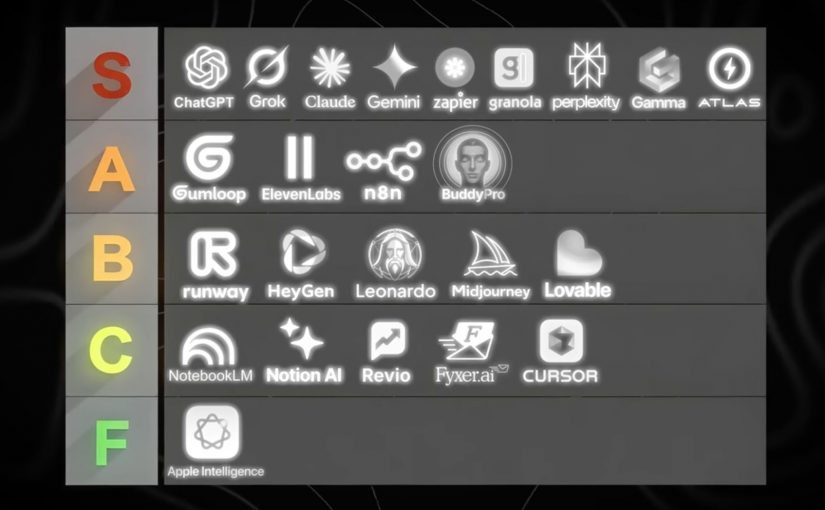
Here is one good example of a practical AI tool stack by use case

Foundation models and answer engines

  • ChatGPT: General-purpose AI assistant for reasoning, writing, analysis, and building lightweight workflows through conversation.
  • Claude (Anthropic): General-purpose AI assistant with strong long-form writing and document-oriented workflows.
  • Gemini (Google): Google’s AI assistant for multimodal tasks and deep integration with Google’s ecosystem.
  • Grok (xAI): General-purpose AI assistant positioned around fast conversational help and real-time oriented use cases.
  • Perplexity AI: Answer engine that combines web-style retrieval with concise, citation-forward responses.
  • NotebookLM: Document-grounded assistant that turns your sources into summaries, explanations, and reusable knowledge.
  • Apple Intelligence: On-device and cloud-assisted AI features embedded into Apple operating systems for everyday productivity tasks.

Creative production. Image, video, voice

  • Midjourney: High-quality text-to-image generation focused on stylized, brandable visual outputs.
  • Leonardo AI: Image generation and asset creation geared toward design workflows and production-friendly variations.
  • Runway ML: AI video generation and editing tools for fast content creation and post-production acceleration.
  • HeyGen: Avatar-led video creation for localization, explainers, and synthetic presenter formats.
  • ElevenLabs: AI voice generation and speech synthesis for narration, dubbing, and voice-based experiences.

Workflow automation and agent orchestration

  • Zapier: No-code automation for connecting apps and triggering workflows, increasingly AI-assisted.
  • n8n: Workflow automation with strong flexibility and self-hosting options for technical teams.
  • Gumloop: Drag-and-drop AI automation platform that connects data, apps, and AI into repeatable workflows.
  • YourAtlas: AI sales agent that engages leads via voice, SMS, or chat, qualifies them, and books appointments or routes calls without humans.

Productivity layers and knowledge work

  • Notion AI: AI assistance inside Notion for writing, summarizing, and turning workspace content into usable outputs.
  • Gamma: AI-assisted creation of presentations and documents with fast narrative-to-slides conversion.
  • Granola AI: AI notepad that transcribes your device audio and produces clean meeting notes without a bot joining the call.
  • Buddy Pro AI: Platform that turns your knowledge into an AI expert you can deploy as a 24/7 strategic partner and revenue-generating asset.
  • Revio: AI-powered sales CRM that automates Instagram outreach, scores leads, and provides coaching to convert followers into revenue.
  • Fyxer AI: Inbox assistant that connects to Gmail or Outlook to draft replies in your voice, organize email, and automate follow-ups.

Building software faster. App builders and AI dev tools

  • Lovable: Chat-based app and website builder that turns requirements into working product UI and flows quickly.
  • Cursor AI: AI-native code editor that accelerates coding, refactoring, and understanding codebases with embedded assistants.

Why this video is worth your time

Tool lists are everywhere. What is rare is a ranking based on repeated, operational exposure across real businesses.

Dan Martell frames this in a way I like. He treats tools as ROI instruments, not as shiny objects. He has tested a large number of AI tools across his companies, then sorts them into what is actually worth adopting versus what is hype.

That matters because most teams do not have a tooling problem. They have an integration problem. A “best tools” list only becomes valuable when you connect it to your operating model, your workflows, your governance, and your KPI layer.

For consumer-facing organizations, the real test is where a tool plugs into the content supply chain, CRM journeys, site experience, service workflows, analytics, and commerce operations.

Practical moves to integrate AI

If you are a CDO, CIO, CMO, or you run digital transformation in any serious way, here is the practical stance.

  • Stop optimising for pilots. Start optimising for capabilities.
  • Decide who owns the continuous loop. Make it explicit. Fund it properly.
  • Build reusable patterns with governance. Measure what finance accepts.
  • Treat tools as interchangeable components. Your real advantage is the operating model that lets you reuse, scale, and improve AI capabilities across content, CRM, service, analytics, and commerce workflows over time.

That is what “integrate” means. And that is where the winners will be obvious.


A few fast answers before you act

What does “integrating AI” actually mean?

Integrating AI means embedding AI into core workflows with clear ownership, governance, and measurement. It is not about running more pilots or using more tools. It is about making AI repeatable, auditable, and finance-credible across the workflows that drive revenue, cost, speed, and quality.

What is the difference between using AI and integrating AI?

Using AI is ad hoc and tool-led. Teams experiment with prompts, copilots, or point solutions in isolation. Integrating AI is workflow-led. It standardizes data access, controls, reusable patterns, and KPIs so AI outcomes can scale across the organization.

What is the simplest way to test AI maturity in an organization?

Ask who owns the continuous loop of scouting, testing, learning, scaling, and deprecating AI capabilities. If no one owns this end to end, the organization is likely accumulating pilots and tools rather than building an operating capability.

What does “AI as infrastructure” look like in practice?

AI as infrastructure includes standardized access to data, policy-based permissions, auditability, human-in-the-loop checkpoints, reusable workflow components, and a measurement layer that links AI activity to business KPIs.

What KPIs make AI initiatives finance-credible?

Common KPIs include cycle-time reduction, cost-to-serve reduction, conversion uplift, content throughput, quality improvements, and risk reduction. What matters most is agreeing on baselines and attribution logic with finance upfront.

What is a practical first step leaders can take in the next 30 days?

Select one or two revenue or cost workflows. Define the baseline. Introduce human-in-the-loop checkpoints. Instrument measurement. Then standardize the pattern so other teams can reuse it instead of starting from scratch.