

My AI Finished. I Wasn’t Done.

An AI workflow updated 125 files in my knowledge system. Then the chat broke.

The files had changed, but I had no completion message. Fortunately, I was already using two chats: one to develop the strategy and prompt, the other to execute with a more capable model. While the execution chat was unavailable, I used the first to inspect the saved results without repeating the update.

For leaders putting AI into recurring work, the practical question is how much work a team can safely hand over. My recent experiments show why the answer depends on verified delivery, clear ownership and the effort that comes back when a run fails.

The handover: 125 files and a broken chat

This was a controlled update to my Second Brain. My Second Brain is a structured collection of knowledge files that AI can read and update within agreed limits. I used ChatGPT Work with Astra at Extra High to add four YAML metadata fields to each of 125 Markdown files. These are structured properties at the top of a file.

A streaming error prevented a usable completion message, and the Work chat became inaccessible on my phone. Some hours later, back at my desk, I opened a support ticket with OpenAI. Independent of the open ticket, after a six-hour wait, the chat became accessible through my desktop browser, but its visible history was blank. When I asked, the AI said it could still access the history and confirmed completion.

Because the updated files were saved outside the failed conversation, the other chat could inspect them. It confirmed that all 125 contained the four requested fields.

For teams maintaining shared content and reporting, the equivalent requirement is that completed work remains verifiable when the conversation that produced it becomes unavailable.

Consider a regional content update handed from one team to another. The recipient needs to know which records changed, which checks passed and what remains unresolved before deciding whether anything needs to be repeated. Otherwise, even a successful update can leave the next team investigating instead of using it.

The update succeeded. The handover failed. I still had to spend time checking that the work was complete.

The report: plenty of output, more auditing

My weekly campaign-intelligence task exposed a different problem.

One report had 16 campaign cards and six AI items. The audit still rejected its coverage claim. Some video links were marked as usable without confirming that readers could actually watch the campaign videos.

I went through three audit passes on the campaign workflow. A later weekly run still needed more corrections.

The brief sounded straightforward: find relevant campaigns, establish what launched and when, and provide working links to the sources and relevant campaign videos. The report arrived. Then I had to check whether it had met that brief.

An unchecked campaign claim can become an agency briefing error. Catch it after work has started, and brand and agency teams may have to redo the research, recommendation and brief.

Updating the runbook gave the next run better instructions. But I still had to check subsequent reports to see whether the same failures returned.

The real question is how much work remains with the person who supposedly delegated the task to the AI.

The fallback: ten URLs, back on my desk

My website-indexing workflow made that burden concrete.

The intended daily routine was to inspect eligible Ramble pages in Google Search Console, request indexing for up to ten URLs and record the outcomes. This meant submitting requests for Google to consider.

In a batch of ten selected URLs, ChatGPT Work successfully submitted one before Google Search Console returned an error. That left nine unsubmitted. I submitted those manually.

I subsequently defined a recovery path. On the next daily occurrence, the ChatGPT Work cloud browser could not be opened or run for the task. ChatGPT advised me to open a support ticket. But repeated checking and manual execution left too much work with me. So I stopped the workflow without opening a support ticket for this failure.

The technical cause remains unresolved. The operating outcome was clear: this workflow had failed to take the recurring task off my hands.

In a content operation, someone still has to notice the missed work, clear the backlog and decide whether the workflow should continue. A manual fallback can be sensible. It still needs an owner, time and a place in the business case.

The infrastructure: delivering a checked result

My LinkedIn post-performance workflow showed what a more complete delivery could look like. It used authenticated browser access to open the analytics, export the native spreadsheet and inspect its contents. It then recorded the metrics in my maintained Second Brain source, read them back to check that everything had been saved, deleted the exact temporary export and verified its removal.

That sequence of connected access, execution and verification completed successfully. The result was available in the record for subsequent analysis, with the temporary file removed after the checks.

For shared marketing reporting, the same approach would give the next analyst a saved result they could inspect and reuse. Source retrieval, recording and verification would be part of delivery, reducing the work each recipient has to reconstruct.

This chain produced useful work. Reliable repetition and net time saved still need demonstrating.

The model: one part of the service

Comparing ChatGPT Plus and Pro pushed me to separate three questions:

  • Can the model do the thinking the task requires?
  • Can the environment complete the required actions?
  • Does the workflow deliver usable work with an acceptable review burden?

A more capable model may help with difficult reasoning. It does not establish that a browser session will work, a saved result will be checked or a missed delivery will reach the right person.

The same separation belongs in an enterprise buying decision. Model quality, tool access, capacity and operating effort each need assessment. A successful run is evidence for that task and setup; attributing the benefit to a higher subscription tier requires a separate comparison.

The economics: count the work that comes back

I would judge an AI workflow by accepted output and the total human effort needed to obtain it. By accepted output, I mean a result that meets the agreed requirements and is usable for its intended purpose.

If a report needs two repairs before acceptance, it is one delivered report with three attempts behind it. A scheduled run that produces nothing usable still belongs in the record. So does time spent maintaining instructions, recovering access and finishing the task manually.

For a team pilot, three measures would make the business case more useful: acceptance on first delivery, human review and recovery effort, and whether the output was actually used. Missing and abandoned runs must stay visible. Before claiming time savings, count the time spent running, checking and fixing the AI workflow, then compare it with the time the same task took before.

Ownership matters just as much. Someone needs responsibility for missed runs and recovery. Someone needs authority to accept the result. In a small team, those may be the same person. Both responsibilities still need to be explicit.

Controls also take time. If every harmless step needs approval, the task keeps returning to its owner. Checks should sit at consequential decisions, while already-authorised work continues. The result must be worth the money and staff time spent producing, checking and correcting it.

The next step: test the AI handover

The next test is whether a colleague can use the result and handle a failed run without calling the person who built the workflow. That shows whether the team can operate it when its creator is unavailable.

Choose one recurring workflow and define what its recipient needs to accept the result. Name who handles failures, run it through its normal schedule and test a handover to another team member. Record missing and repaired deliveries, actual use and total human effort against the existing process. Expand when the evidence supports the extra scale; narrow or stop when the work keeps coming back.


A few fast answers before you act

Is a scheduled task the same as an AI agent?

No. A schedule determines when work starts. An AI agent uses a model, instructions and tools to pursue a goal and choose its next steps. In ChatGPT Work, a scheduled task can run this kind of workflow. Setting the schedule alone does not make it reliable.

What should count as successful AI delivery?

Successful delivery means the result meets its agreed requirements and is available where the recipient needs it. Record any review, correction or recovery required. A useful result can still have failed its first delivery.

Why keep AI workflow records outside the chat?

Saved results and decision records support continuity when a conversation becomes unavailable. Recovery depends on what was preserved and can be inspected. Another AI’s assurance of completion should be checked against the saved result.

Will a more expensive AI plan make workflows reliable?

A higher price does not establish reliable execution. Evaluate model quality, tools, access, capacity and recovery separately, using comparable work. Attribute a subscription benefit only when the evidence supports it.

How much governance does an AI workflow need?

Match controls to the consequences. Name who accepts the result and who handles failures. Use mechanical checks where possible, reserve approval for decisions that require it and let already-authorised work continue. Measure the review burden alongside errors caught.

What should an enterprise AI pilot measure?

Measure acceptance on first delivery, human review and recovery effort, and practical use against the existing process. Include missing runs, abandoned work and instruction maintenance. Test whether another team member can operate the workflow.
Use vs Integrate: AI Tools That Transform

The pilot phase is over. “Use” loses. “Integrate” wins.

Those who merely use AI will lose. Those who integrate AI will win. The experimentation era produced plenty of impressive demos. Now comes the part that separates winners from tourists. Making AI an operating capability that compounds.

Most organizations are still stuck in tool adoption. A team runs a prompt workshop. Marketing trials a copy generator. Someone adds an “intelligent chatbot” to the website. Useful, yes. Transformational, no.

The real shift is “use vs integrate”. By “integrate”, I mean embedding AI into governed, measurable workflows teams can repeat, not ad hoc tool experimentation. The real question is whether you can make AI repeatable, governed, measurable, and finance-credible across workflows that actually move revenue, cost, speed, and quality.

Because the differentiator is not whether you have access to AI. Everyone does. The differentiator is whether you can make AI repeatable, governed, measurable, and finance-credible across workflows that actually move revenue, cost, speed, and quality.

If you want one question to sanity-check your AI maturity, it is this: Who owns the continuous loop of scouting, testing, learning, scaling, and deprecating AI capabilities across the business?

What “integrating AI” actually means

Integration is not “more prompts”. It is process integration with an operating model around it.

In practice, that means treating AI like infrastructure. Same mindset as data platforms, identity, and analytics. The value comes from making it dependable, safe, reusable, and measurable.

Here is what “AI as infrastructure” looks like when it is real:

  • Data access and permissions that are designed, not improvised. Who can use what data, through which tools, with what audit trail.
  • Human-in-the-loop checkpoints by design. Not because you distrust AI. Because you want predictable outcomes, accountability, and controllable risk.
  • Reusable agent patterns and workflow components. Not one-off pilots that die when the champion changes teams.
  • A measurement layer finance accepts. Clear KPI definitions, baselines, attribution logic, and reporting that stands up in budget conversations.

When these components are standardized, variance drops and accountability increases, which is why integrated AI can scale beyond individual champions and one-off pilots.

This is why the “pilot phase is over”. You do not win by having more pilots. You win by building the machinery that turns pilots into capabilities.

In enterprise operating models, AI advantage comes from repeatable workflow integration with governance and measurement, not from accumulating tool pilots.

The bottleneck is collapsing. But only for companies that operationalize it

A tangible shift is the collapse of specialist bottlenecks.

Extractable takeaway: If the bottleneck moves but governance and measurement do not, speed turns into chaos instead of compounding advantage.

When tools like Lovable let teams build apps and websites by chatting with AI, the constraint moves. It is no longer “can we build it”. It becomes “can we govern it, integrate it, measure it, and scale it without creating chaos”.

The same applies to performance management. The promise of automated scorecards and KPI insights is not that dashboards look nicer. It is that decision cycles compress. Teams stop arguing about what the number means, and start acting on it.

But again, the differentiator is not whether someone can generate an app or a dashboard once. The differentiator is whether the organization can make it repeatable and governed. That is the gap between AI theatre, demo-driven activity with no repeatable integration, and AI advantage.

Ownership. The million-dollar question most companies avoid

I still see many organizations framing AI narrowly. Generating ads. Drafting social posts. Bolting a chatbot onto the site.

Those are fine starter use cases. But they dodge the million-dollar question. Who owns AI as an operating capability?

In my view, it requires explicit, business-led accountability, with IT as platform and risk partner. Two ingredients matter most.

  1. A top-down mandate with empowered change management

    Leaders need a shared baseline for what “integration” implies. Otherwise, every initiative becomes another education cycle. Legal and compliance arrive late. Momentum stalls. People get frustrated. Then AI becomes the next “tool rollout” story. This is where the mandate matters. Not as a slogan, but as a decision framework. What is in scope. What is out of scope. Which risks are acceptable. Which are not. What “good” looks like.

  2. A new breed of cross-functional leadership

    Not everyone can do this. You need a leader whose superpower is connecting the dots across business, data, technology, risk, and finance. Not a deep technical expert, but someone with strong technology affinity who asks the right questions, makes trade-offs, and earns credibility with senior stakeholders. This leader must run AI as an operating capability, not a set of tools.

    Back this leader with a tight leadership group that operates as an empowered “AI enablement fusion team”. It spans Business, IT, Legal/Compliance, and Finance, and works in an agile way with shared standards and decision rights. Their job is to move fast through scouting, testing, learning, scaling, and standardizing. They build reusable patterns and measure KPI impact so the organization can stop debating and start compounding.

    If that team does not exist, AI stays fragmented. Every function buys tools. Every team reinvents workflows. Risk accumulates quietly. And the organization never gets the benefits of scale.

AI will automate the mundane. It will transform everything else

Yes, AI will automate mundane tasks. But the bigger shift is transformation of the remaining work.

AI changes what “good” looks like in roles that remain human-led. Strategy becomes faster because research and synthesis compress. Creative becomes more iterative because production costs drop. Operations become more adaptive because exception handling becomes a core capability.

The workforce implication is straightforward. Your advantage will come from people who can direct, verify, and improve AI-enabled workflows. Not from people who treat AI as a toy, or worse, as a threat.

There is no one AI tool to rule them all

There is no single AI tool that solves everything. The enterprise job is to map tools to workflow roles inside the stack you already run, then govern how they connect to content, CRM, analytics, service, and commerce workflows.

Also, not all AI tools are worth your time or your money. Many tools look great in demos and disappoint in day-to-day execution.

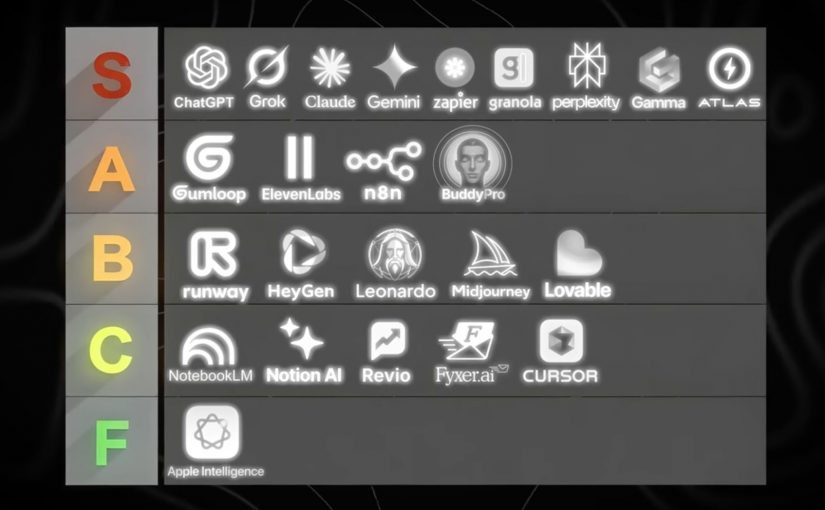
So here is a practical way to think about the landscape. A stack, grouped by what the tool does.

Here is one good example of a practical AI tool stack by use case

Foundation models and answer engines

  • ChatGPT: General-purpose AI assistant for reasoning, writing, analysis, and building lightweight workflows through conversation.
  • Claude (Anthropic): General-purpose AI assistant with strong long-form writing and document-oriented workflows.
  • Gemini (Google): Google’s AI assistant for multimodal tasks and deep integration with Google’s ecosystem.
  • Grok (xAI): General-purpose AI assistant positioned around fast conversational help and real-time oriented use cases.
  • Perplexity AI: Answer engine that combines web-style retrieval with concise, citation-forward responses.
  • NotebookLM: Document-grounded assistant that turns your sources into summaries, explanations, and reusable knowledge.
  • Apple Intelligence: On-device and cloud-assisted AI features embedded into Apple operating systems for everyday productivity tasks.

Creative production. Image, video, voice

  • Midjourney: High-quality text-to-image generation focused on stylized, brandable visual outputs.
  • Leonardo AI: Image generation and asset creation geared toward design workflows and production-friendly variations.
  • Runway ML: AI video generation and editing tools for fast content creation and post-production acceleration.
  • HeyGen: Avatar-led video creation for localization, explainers, and synthetic presenter formats.
  • ElevenLabs: AI voice generation and speech synthesis for narration, dubbing, and voice-based experiences.

Workflow automation and agent orchestration

  • Zapier: No-code automation for connecting apps and triggering workflows, increasingly AI-assisted.
  • n8n: Workflow automation with strong flexibility and self-hosting options for technical teams.
  • Gumloop: Drag-and-drop AI automation platform that connects data, apps, and AI into repeatable workflows.
  • YourAtlas: AI sales agent that engages leads via voice, SMS, or chat, qualifies them, and books appointments or routes calls without humans.

Productivity layers and knowledge work

  • Notion AI: AI assistance inside Notion for writing, summarizing, and turning workspace content into usable outputs.
  • Gamma: AI-assisted creation of presentations and documents with fast narrative-to-slides conversion.
  • Granola AI: AI notepad that transcribes your device audio and produces clean meeting notes without a bot joining the call.
  • Buddy Pro AI: Platform that turns your knowledge into an AI expert you can deploy as a 24/7 strategic partner and revenue-generating asset.
  • Revio: AI-powered sales CRM that automates Instagram outreach, scores leads, and provides coaching to convert followers into revenue.
  • Fyxer AI: Inbox assistant that connects to Gmail or Outlook to draft replies in your voice, organize email, and automate follow-ups.

Building software faster. App builders and AI dev tools

  • Lovable: Chat-based app and website builder that turns requirements into working product UI and flows quickly.
  • Cursor AI: AI-native code editor that accelerates coding, refactoring, and understanding codebases with embedded assistants.

Why this video is worth your time

Tool lists are everywhere. What is rare is a ranking based on repeated, operational exposure across real businesses.

Dan Martell frames this in a way I like. He treats tools as ROI instruments, not as shiny objects. He has tested a large number of AI tools across his companies, then sorts them into what is actually worth adopting versus what is hype.

That matters because most teams do not have a tooling problem. They have an integration problem. A “best tools” list only becomes valuable when you connect it to your operating model, your workflows, your governance, and your KPI layer.

For consumer-facing organizations, the real test is where a tool plugs into the content supply chain, CRM journeys, site experience, service workflows, analytics, and commerce operations.

Practical moves to integrate AI

If you are a CDO, CIO, CMO, or you run digital transformation in any serious way, here is the practical stance.

  • Stop optimising for pilots. Start optimising for capabilities.
  • Decide who owns the continuous loop. Make it explicit. Fund it properly.
  • Build reusable patterns with governance. Measure what finance accepts.
  • Treat tools as interchangeable components. Your real advantage is the operating model that lets you reuse, scale, and improve AI capabilities across content, CRM, service, analytics, and commerce workflows over time.

That is what “integrate” means. And that is where the winners will be obvious.


A few fast answers before you act

What does “integrating AI” actually mean?

Integrating AI means embedding AI into core workflows with clear ownership, governance, and measurement. It is not about running more pilots or using more tools. It is about making AI repeatable, auditable, and finance-credible across the workflows that drive revenue, cost, speed, and quality.

What is the difference between using AI and integrating AI?

Using AI is ad hoc and tool-led. Teams experiment with prompts, copilots, or point solutions in isolation. Integrating AI is workflow-led. It standardizes data access, controls, reusable patterns, and KPIs so AI outcomes can scale across the organization.

What is the simplest way to test AI maturity in an organization?

Ask who owns the continuous loop of scouting, testing, learning, scaling, and deprecating AI capabilities. If no one owns this end to end, the organization is likely accumulating pilots and tools rather than building an operating capability.

What does “AI as infrastructure” look like in practice?

AI as infrastructure includes standardized access to data, policy-based permissions, auditability, human-in-the-loop checkpoints, reusable workflow components, and a measurement layer that links AI activity to business KPIs.

What KPIs make AI initiatives finance-credible?

Common KPIs include cycle-time reduction, cost-to-serve reduction, conversion uplift, content throughput, quality improvements, and risk reduction. What matters most is agreeing on baselines and attribution logic with finance upfront.

What is a practical first step leaders can take in the next 30 days?

Select one or two revenue or cost workflows. Define the baseline. Introduce human-in-the-loop checkpoints. Instrument measurement. Then standardize the pattern so other teams can reuse it instead of starting from scratch.