
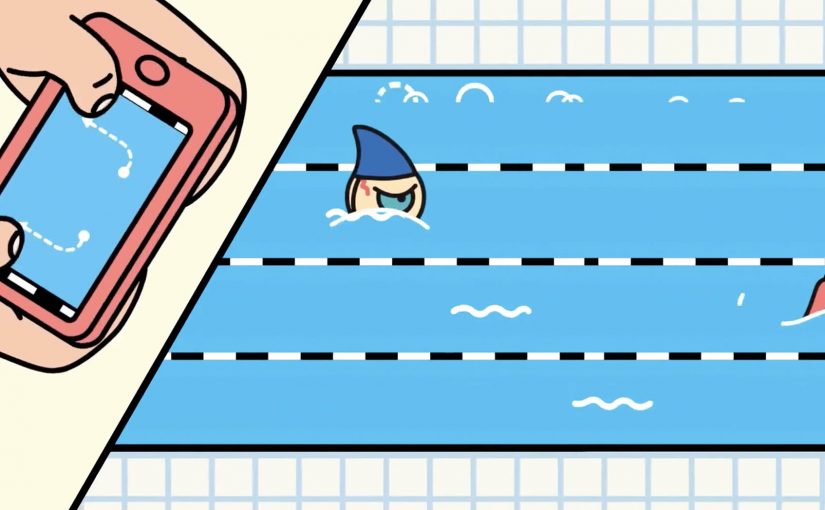
Chrome: Super Sync Sports

Google has recently released their latest Chrome Experiment called “Super Sync Sports” which allows players to convert their mobile phones and tablets into a remote control for their desktop browser.

To give it a spin visit www.chrome.com/supersyncsports/, choose a game i.e. running, swimming or cycling and then follow the instructions to sync your mobile phone. Once the sync is complete you can then play your way to victory, while the game plays out on your desktop.

What “super sync” really means in practice

The core mechanic is simple. Your desktop browser becomes the shared “big screen” for the race, while each phone or tablet becomes a personal input surface. Instead of mirroring the desktop, the mobile device acts like a controller and streams gestures to the browser in real time.

This is a classic second-screen pattern. A shared display for feedback, plus personal devices for control. It is a small idea with a lot of leverage when the onboarding is frictionless.

In digital marketing and product teams, multi-device web interactions are a repeatable way to turn passive screens into participatory experiences.

Why it lands (even when it is “just a game”)

It also makes a quiet point about distribution. The browser is the platform, so the “controller” is something people already have in-hand. That matters if you are designing for living rooms, events, retail floors, or any moment where downloads and logins kill momentum.

Extractable takeaway: When you want participation, put the rich visual feedback on a shared screen and keep input on personal devices. This lowers setup friction, supports groups naturally, and makes interaction feel immediate without specialized hardware.

The tech stack is the message

What will be interesting to see is how this type of interaction and technology is finally leveraged. The experience is described as being built on HTML5-era capabilities such as WebSockets for live synchronization, plus Canvas and CSS3 for rendering and motion. For brands, the value here is the interaction model, not the sports theme. The real lesson is not the specific APIs. It is the end-to-end pattern of low-latency input, shared feedback, and lightweight pairing.

The real question is whether you are building a one-off demo or a repeatable interaction model that people can join with the device already in their hand.

What to steal for brand experiences

  • Pairing flow: Use a short, forgiving pairing step (code on the big screen, quick join on the phone) and get to interaction fast.
  • Shared spectacle, private control: Keep the crowd watching one shared output, while each participant has a private “control lane” on their device.
  • Competition as UI: A leaderboard (even a lightweight one) can turn a demo into a repeatable loop.
  • Design for latency: Prefer simple, discrete gestures that still “feel” athletic even with imperfect connectivity.
  • Make it modular: The same controller concept can drive product configurators, quizzes, sampling stations, or event installations.

A few fast answers before you act

What is Super Sync Sports?

It is a Chrome Experiment that lets you run a sports game on a desktop browser while using a phone or tablet as the controller.

Why use a phone as the controller instead of the desktop keyboard?

It reduces the learning curve, supports multiplayer easily, and makes the interaction feel more physical. Touch gestures can map naturally to “run”, “swim”, and “cycle” without extra hardware.

What makes this pattern useful beyond games?

The same multi-device approach can turn any shared screen into a participatory surface. Think demos, audience voting, retail activations, guided experiences, or interactive storytelling where people control outcomes from their own device.

Which technologies are doing the heavy lifting?

The experience is described as using WebSockets for real-time synchronization, and Canvas and CSS3 for visuals and animation, all running in the browser.

What is the biggest risk if a brand tries this pattern?

Onboarding and latency. If pairing takes too long or input feels delayed, the magic disappears. The best executions keep the join flow short and the interaction vocabulary simple.

DoubleClick: Fly over France HTML5 banner

You open a banner and, instead of a product shot, you get a hot-air balloon. You pick up speed, drift across a map, and “tour” famous French locations from above, including the Eiffel Tower, Notre-Dame de la Garde in Marseille, and the Château de Versailles.

This demo came out of the DoubleClick HTML5 Banner Challenge, with Biborg Interactive and Alpha Layer showing what happens when a banner is treated like a mini experience instead of a static placement.

The rich media build, meaning a banner unit that runs real-time code in the browser rather than a fixed image, leans on several HTML5 capabilities at once. Geolocation can drop you near your own location at the start. WebGL handles the 3D-like rendering layer in capable browsers. Audio and video tags add atmosphere. Google Maps-style navigation does the heavy lifting for exploration.

HTML5-rich media lets a banner behave like a lightweight web app, while still living inside a standard media buy.

An HTML5 rich media banner is a display unit that runs real-time code in the browser. It can detect location (with permission), render interactive graphics, and respond to user input without plugins.

What makes this feel different from “banner interactivity”

Most interactive banners ask for clicks. This one offers navigation. If your goal is time-in-unit, navigation is the better default than click-to-reveal. The moment you give people directional control, the experience shifts from “ad” to “toy”, and time-in-unit rises naturally because curiosity takes over.

Extractable takeaway: When you turn a banner into something navigable with one obvious control, you trade “interaction” for exploration, and exploration reliably buys you time.

Why the tech stack choice matters

Geolocation is not a gimmick here. It personalizes the first frame by making “your world” the default starting point, if the user opts in. WebGL is not decoration. It signals modernity and smoothness, making the experience feel closer to a game than a widget.

In programmatic display buys, weight and cross-browser reach still win, so the core interaction has to survive even when advanced features fall back.

The business intent behind the challenge demo

This is less about selling France and more about selling a capability. The real question is whether your banner is built to be explored or merely clicked through. It is a proof point for what DoubleClick Studio and HTML5 workflows can support, and it is a portfolio-grade demonstration for the teams who built it.

Steal these patterns for your next HTML5 banner

  • Give viewers one clear control. Navigation beats click-to-reveal when you want time spent.
  • Use “permissioned” personalization. Geolocation works best when it improves the first 3 seconds, not when it tries to be clever later.
  • Design a graceful fallback. If 3D is not available, the core experience should still be enjoyable.
  • Make the value visible without instructions. If someone can understand the interaction from across the room, they will try it.

A few fast answers before you act

What is the DoubleClick HTML5 Banner Challenge demo here?

It is a rich media banner concept that lets users “fly” a hot-air balloon over a map of France and discover landmarks, built to showcase what HTML5 banners can do beyond animation.

Which HTML5 features does the banner use?

It is described as using geolocation (with permission), WebGL for interactive graphics, and native audio and video support, alongside map-based navigation to create a lightweight exploration experience.

Why is geolocation useful in a banner?

Because it can personalize the first moment. Starting near a user’s own location makes the experience feel immediately relevant, as long as it is optional and clearly explained.

What does WebGL add to rich media ads?

WebGL enables GPU-accelerated 2D and 3D graphics in the browser. In advertising units, that can translate into smoother motion, depth effects, and more game-like interaction.

What is the biggest risk with “mini-app” banners?

Weight and compatibility. If the unit is too heavy or too fragile across browsers, you lose reach. The best builds keep a simple core loop and treat advanced effects as optional upgrades.