

Berghs: Don’t Tell Ashton

Berghs School of Communication students want the advertising industry to notice their Interactive Communication class, and they decide to prove it instead of claiming it. They build a Twitter-driven artwork where participation is “paid” with a tweet.

The rule is easy to understand and easy to repeat. Tweet to join the frame. The more followers you have, the bigger your photo appears in the final piece. One person has enough followers to dominate the entire artwork by himself, Ashton Kutcher, so the campaign dares the internet with a simple prompt: Don’t tell Ashton.

How the social currency mechanic earns attention

The mechanism turns a social signal into a visible design system. Followers become “value”. Value becomes size. Size becomes status inside the artwork. Because the output is a single shared object, every participant has a reason to bring in more participants, and every new tweet is both payment and distribution.

In global creative education and talent recruiting, showing capability in a format that naturally spreads can outperform any brochure-style message about what you teach.

Why it lands

It uses a clean, game-like inequality that people instinctively understand. Bigger accounts get bigger presence. Smaller accounts still get in. The Ashton constraint makes the whole thing feel fragile and urgent, because one “wrong” tweet could ruin the artifact. Because the rule turns status into a visible outcome, people instantly understand why participation matters and why the object keeps spreading. That tension becomes the hook that keeps the story moving.

Extractable takeaway: If you want participation to scale, turn one simple social metric into a visible stake inside a shared outcome. Then add a single constraint that makes the outcome feel at risk.

What this is really doing for the program

This is a recruitment campaign disguised as an internet object. The artwork is the portfolio piece, and the spread is the proof that the makers understand how digital behavior works in the wild. The more people talk about the object, the more the school’s program name travels with it.

The real question is whether the program can turn its digital thinking into an object the industry wants to notice, share, and remember.

What to steal from the participation mechanic

  • Build one object people want to join. Collages, maps, frames, and leaderboards make participation legible.
  • Convert a metric into meaning. Followers, contributions, referrals, and time can become “materials” in the output.
  • Make the story retellable. If the rule cannot fit in one sentence, distribution collapses.
  • Add one constraint that creates urgency. A single “if X happens, we lose” condition can be enough.

A few fast answers before you act

What is the core idea of Don’t Tell Ashton?

A Twitter-built artwork where a tweet buys you a spot, and your follower count determines how large your portrait appears in the final piece.

Why tie portrait size to follower count?

It turns a social metric into a visible stake. That makes participation competitive, shareable, and instantly understandable without explanation.

What role does Ashton Kutcher play in the story?

He is the “edge case”. As the most-followed account in the story, one tweet from him could overwhelm the entire artwork, which gives the campaign its tension.

What makes this more than a clever stunt?

It demonstrates a transferable skill. Designing a mechanic where participation and distribution are the same action.

Why does this work better than a normal student showcase?

It makes the audience prove interest through participation. That produces evidence of relevance, not just a claim that the class understands interactive communication.
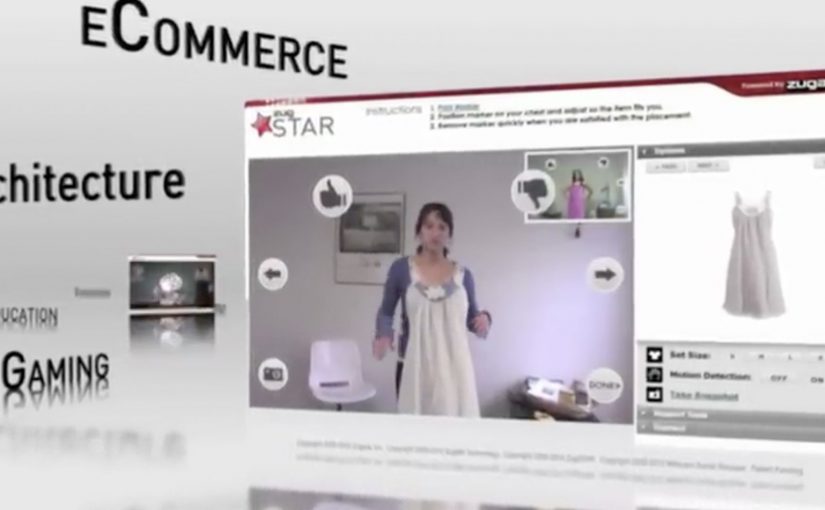
ZugSTAR: Interactive Live Video Conferencing in AR

The future of video conferencing is almost here. Zugara Streaming Augmented Reality (ZugSTAR) is described as a technology that lets people in different locations share an augmented reality experience through a browser-based video conferencing system.

The promise is simple. You do not just see and hear each other. You collaborate on the same interactive layer, with 3D objects and effects that both sides can reference in real time.

What ZugSTAR is trying to change

The mechanism is a shared AR overlay inside a live video call. Instead of treating the camera feed as the whole experience, the system adds a synchronized layer that both participants can see and respond to. The result is closer to “co-present” interaction than a standard webcam call.

In global distributed teams across marketing, product, training, and sales, the biggest conferencing gap is shared context.

Why this matters beyond novelty

This kind of shared overlay can make collaboration more concrete. A product can be demonstrated in 3D, a concept can be pointed at, and a workflow can be rehearsed visually. Because both sides reference the same synchronized layer, pointing and confirming happen in one loop instead of a long back-and-forth. In theory, this reduces the need for physical proximity by making “show me” possible without shipping people or prototypes.

Extractable takeaway: When the work depends on “show me”, a shared visual layer only helps if it behaves like a stable workspace, not a decoration.

The real question is whether a shared overlay reduces misunderstanding faster than screenshare for the work you actually do.

This is worth piloting only in cases where the shared layer replaces screenshare, rather than sitting on top of it.

The differentiator is not “video conferencing”. It is synchronized interaction. Both sides are meant to experience the same AR layer at the same time, so the call becomes a workspace, not only a conversation.

Where it could be useful

  • Sales demos. Show products and configurations as interactive visuals instead of static slides.
  • Training. Walk through procedures with step-by-step overlays that feel more like guided practice.
  • Remote assistance. Use shared visuals to clarify instructions when words are not enough.
  • Creative collaboration. Iterate on concepts that benefit from spatial context and rapid visual feedback.

Design rules for shared-overlay calls

  • Make the shared layer the point. If the overlay is optional decoration, it will not change outcomes.
  • Keep interaction low-friction. The first useful action should happen in seconds.
  • Design for “pointing” and “confirming”. The fastest collaboration loops are highlight, discuss, agree.
  • Measure success as reduced back-and-forth. The win is fewer misunderstandings, not more effects.

A few fast answers before you act

What is ZugSTAR in simple terms?

It is a browser-based video conferencing concept that adds a synchronized augmented reality layer, so both participants share the same interactive visuals during the call.

How is this different from a normal video call?

A normal call shares audio and video. This approach aims to share an interactive visual workspace on top of the video, not just the camera feed.

What is the main business benefit of shared AR in conferencing?

Better shared context. When people can see and reference the same visual layer, explaining, demonstrating, and deciding can become faster.

Where does this approach struggle?

When setup friction is high, hardware requirements are unclear, or the interaction is not stable enough for real work. If it feels fragile, teams fall back to screenshare.

What should you evaluate first if you consider something like this?

Whether the shared overlay reduces misunderstandings in your core use case. If it does not, it is entertainment, not collaboration.