I watched a recent interview between Vaibhav Sisinty, founder of GrowthSchool, and Josh Woodward, VP, Google Labs & Google Gemini. What makes it worth watching is that Woodward walks through a set of public Google AI products and experiments that, taken together, reveal a much bigger shift in how Google wants creative work to happen.
One interview. Seven demos. One much bigger signal.
On the surface, this looks like another executive interview plus product showcase. Underneath, it is a useful snapshot of Google’s current AI surface across content, design, research, image editing, music, immersive world-building, and communication. Google Labs is the home for AI experiments at Google, and the interview makes that portfolio feel less like scattered demos and more like an emerging system.
The setup is simple. One conversation shows how a marketer can move from source material to interface concept to visual asset to soundtrack to presentation layer without switching mental models every five minutes. That is why the interview matters more than the usual AI highlight reel.
Google is no longer just shipping tools. It is sketching a marketing workflow.
A marketing workflow is the connected chain of jobs from understanding a brief to shipping an asset, interface, or experience.
Google’s current AI surface now covers adjacent stages of work that used to require a mess of separate tools. Stitch handles UI design and front-end generation for apps and websites. NotebookLM handles source-grounded understanding. Pomelli handles on-brand marketing content. Nano Banana 2 handles image generation and editing. Lyria 3 handles music creation inside Gemini. Beam extends the stack into communication.
In practical terms, this means more of the work can happen inside one Google-shaped environment instead of bouncing across a pile of disconnected tools.
My view is that Google is not showing isolated AI tricks here. It is sketching the outline of a marketer-friendly workflow it wants to own. The real question is not whether every tool is perfect yet. It is whether Google is making enough of the workflow usable in one place that marketers start changing their habits.
The tools that make the pattern easy to see
Pomelli
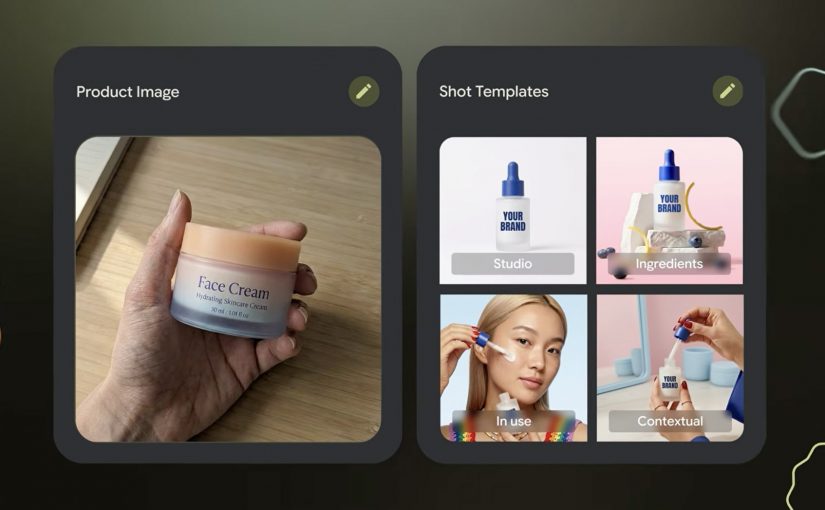
Pomelli is the most directly marketer-facing tool in the set. It is built to help businesses generate on-brand content faster. Easy use case: give it your site and product context, then generate campaign-ready visuals and messaging variations for social, ecommerce, or CRM. I unpacked one part of that story in my earlier Pomelli Photoshoot deep dive.
Stitch
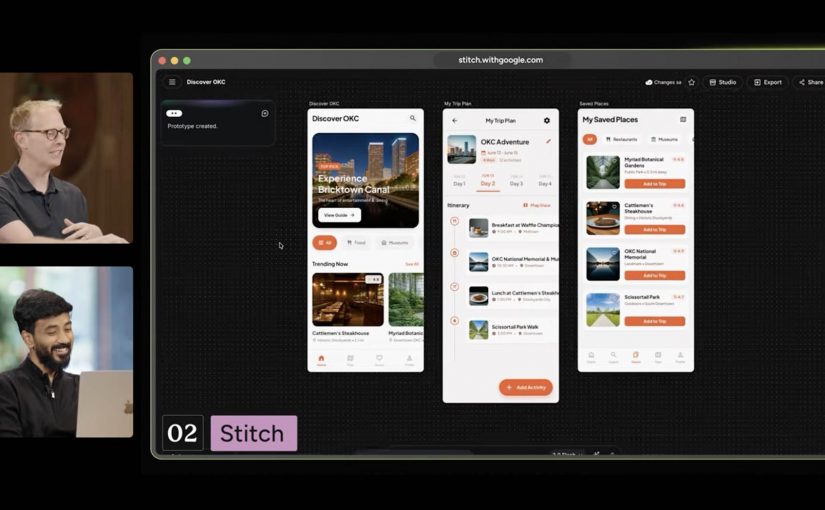
Stitch is Google’s answer to fast interface ideation. It turns prompts into UI concepts and front-end output for mobile apps and websites. Easy use case: turn a campaign landing-page idea or app flow into a first working interface before design and dev teams invest heavier production time.
NotebookLM
NotebookLM stands out because it starts from your own source material. It helps turn messy research into usable understanding. Easy use case: upload research docs, interview notes, or previous campaigns and use it to build a grounded strategy summary, FAQ, or narrative draft.
Project Genie
Project Genie is the experimental outlier, but it matters because it points to where interactive creation is heading. It lets users explore generated worlds in real time from simple prompts. Easy use case: prototype a branded world, retail concept, or immersive experience before committing to a more expensive 3D or gaming build.
Nano Banana 2
Nano Banana 2 is Google’s latest image-generation and editing push inside Gemini. It is built for faster visual creation, editing, and iteration. Easy use case: create localized campaign visuals, packaging mockups, or quick ad variants from one approved base asset without opening a traditional creative suite first.
Lyria 3 in Gemini
Lyria 3 brings music creation into Gemini. It lets users generate short custom tracks from prompts and creative inputs. Easy use case: create a first-pass soundtrack or mood bed for a product reel, internal concept film, or social clip before moving into full production.
Google Beam
Google Beam, formerly Project Starline, is the communication layer in this broader picture. It turns standard video streams into a more life-sized and spatial experience. Easy use case: use it for high-stakes remote collaboration, premium client conversations, or executive workshops where trust and presence matter more than standard video calls can deliver.
Why this lands faster than most AI demos
Most AI demos still fail the practical test. They show capability without showing where that capability fits into real work. This one lands because the tools map onto jobs people already understand. Research. Design. Asset creation. Editing. Sound. Presentation. Collaboration.
That is what makes the portfolio more memorable than a long list of model upgrades. People do not buy into AI because a benchmark moved. They buy in when they can picture a job getting easier, faster, or more creatively open.
What Google is really trying to own
Google’s business intent looks bigger than feature adoption. It is trying to make more of the marketer’s daily workflow feel native to its own ecosystem, from idea formation to content generation to communication. That is a stronger strategic position than winning a one-off feature comparison.
This is also why labs.google matters in the story. It is not just a gallery of experiments. It is the clearest public window into which adjacent jobs Google thinks belong together next.
What marketers should take from this now
Do not watch this interview as another AI tool roundup. Watch it as a preview of how Google wants more of the marketer workflow to happen inside one ecosystem.
Extractable takeaway: The strategic signal here is not one impressive Google AI demo. It is that Google is assembling enough connected creative building blocks that marketers can start reducing tool sprawl and shortening the path from brief to output.
The practical move is to start small and test the clearest sequence. NotebookLM for synthesis. Stitch for interface concepts. Pomelli or Nano Banana 2 for visual production. That is already enough to show whether your current bottleneck is research, creative iteration, or production speed.
A few fast answers before you act
Which Google tools in this interview matter most for marketers right now?
NotebookLM, Stitch, Pomelli, Nano Banana 2, and Lyria 3 are the most directly useful because they map to research, interface concepts, asset creation, editing, and soundtrack generation.
Why does this interview matter more than a normal product launch video?
Because it shows multiple Google AI products side by side, which makes the workflow pattern easier to spot than a single product announcement.
Is Google Labs just a showcase site?
No. It is Google’s public home for AI experiments, which makes it the best place to track how Google is connecting adjacent creative and knowledge tasks.
What is the clearest first test for a marketing team?
Use NotebookLM to digest source material, Stitch to mock the experience, and Pomelli or Nano Banana 2 to produce first-pass campaign assets.
What is the strategic takeaway for leaders?
Evaluate these tools as a workflow play, not as isolated demos, because the compounding value comes from reducing friction between connected jobs.