
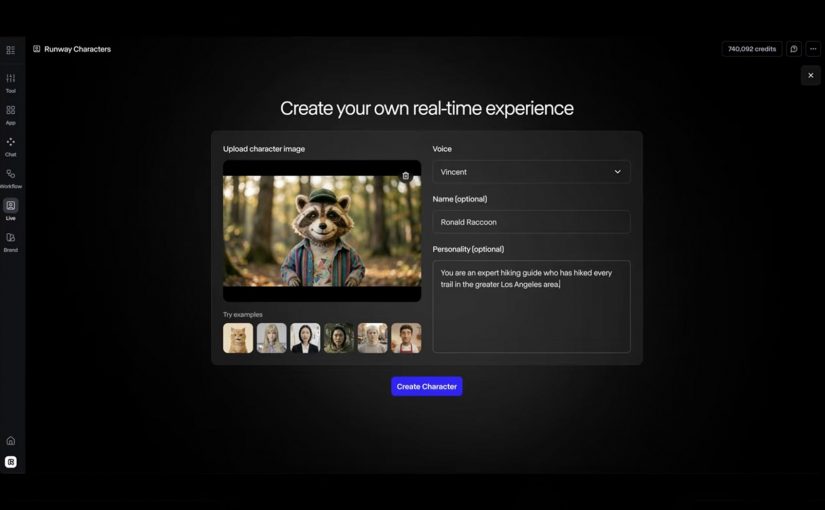
Runway Characters: Real-time AI avatars

Runway Characters: Real-time AI avatars

A real-time AI avatar is a video-based conversational agent that can listen, respond, and show synchronized facial movement during a live interaction.

Runway Characters is not just another image-to-video feature. It points to a bigger shift: interfaces that talk back, maintain expression, and sit inside websites, apps, support journeys and training environments as an interactive layer.

From chatbot box to embodied interface

For years, the consumer web has treated conversation as a text box. Runway Characters pushes the interaction into a more human-shaped format: a visual character with a voice, a defined personality, domain knowledge and live responsiveness.

The enterprise value is not the avatar; it is the controlled interaction layer around the avatar.

A controlled interaction layer is the set of rules, knowledge sources, permissions, actions, escalation paths and measurement signals that determine what the avatar can say and do.

This is why the product is more interesting for operators than for novelty-watchers. A branded face is easy to demo; turning it into a trusted, scalable and measurable service interface is the hard part.

The mechanism: image, voice, knowledge and action

The mechanism is straightforward: a single reference image defines the character, voice and personality shape the interaction, a knowledge base keeps the response inside a domain, and API actions allow the character to do work rather than just talk.

For enterprise teams, this turns the avatar from a creative asset into a governed service surface that sits between consumers, content, data and workflow.

A governed service surface is a customer-facing interface whose content, permissions, actions, analytics and escalation rules are deliberately controlled.

Because the avatar can combine expression, domain knowledge and actions in the same interaction, the experience can move from navigation to guided execution.

That is the commercial hinge. The avatar is not valuable because it smiles; it is valuable when it helps someone finish a task faster, with less confusion and fewer handoffs.

Where Runway Characters could create real utility

The obvious use cases are the ones Runway highlights: tutoring and education, customer support, training simulations, and interactive entertainment or gaming. Those are credible because the value depends on response, patience, expression and repetition.

The stronger enterprise use case is guided commerce and product selection. A character that understands a product range, asks clarifying questions, checks fit, explains trade-offs and hands off to the right next step could reduce decision friction in categories where consumers need guidance.

Brand and marketing experiences are another useful path, but only if they avoid becoming mascot theatre. A brand character should answer, guide, qualify, educate or convert; otherwise it is just a high-cost animation layer with weak business intent.

The real question is not whether the avatar looks impressive; it is whether the interaction reduces effort, shortens a service path, or improves a decision.

The operating model matters more than the character

The failure mode is predictable: teams launch a polished avatar before defining ownership, content governance, privacy boundaries, escalation logic and measurement. That creates a visible interface with unclear accountability.

For consumer experience platforms, the hard work sits behind the face. The avatar needs approved knowledge, consent-aware data access, clear action limits, analytics events, brand controls, QA scripts and a fallback path when confidence is low.

This also changes the content model. Product information, policy content, service scripts and training material need to be structured enough for a live character to use safely, not just published as static pages for humans to browse.

Runway Characters takeaway for enterprise teams

Runway Characters should be evaluated less like a creative tool and more like a new front-end pattern for service, learning, commerce and brand interaction. The adoption question is not “can we make a character?” but “which consumer or employee journey deserves a live conversational interface, and can we govern it?”

Takeaway: Treat real-time AI avatars as governed service surfaces, not animated brand assets. The winning teams will connect character design to knowledge governance, journey ownership, action permissions, measurement and fallback logic before scaling the experience.


A few fast answers before you act

What is Runway AI?

Runway is an AI company building generative media tools and world-simulation research systems. Runway describes its mission as building AI to simulate the world through the merging of art and science.

What is Runway Characters?

Runway Characters is Runway’s real-time avatar product for creating conversational video characters with customizable appearance, voice, personality, knowledge and actions.

Why does it matter for brands?

It matters because it can turn static content, support flows and training material into live guided interactions that feel more natural than a chatbot.

What are the best first use cases?

The best first use cases are narrow, repeatable journeys where guidance reduces effort: product advice, customer support triage, onboarding, training practice and education.

What is the main enterprise risk?

The main enterprise risk is launching a convincing avatar without clear governance over what it knows, what it can say, what it can do and when it must escalate.

How should teams measure success?

Teams should measure task completion, deflection quality, conversion support, time saved, escalation rate, user satisfaction and the cost of maintaining the knowledge base.
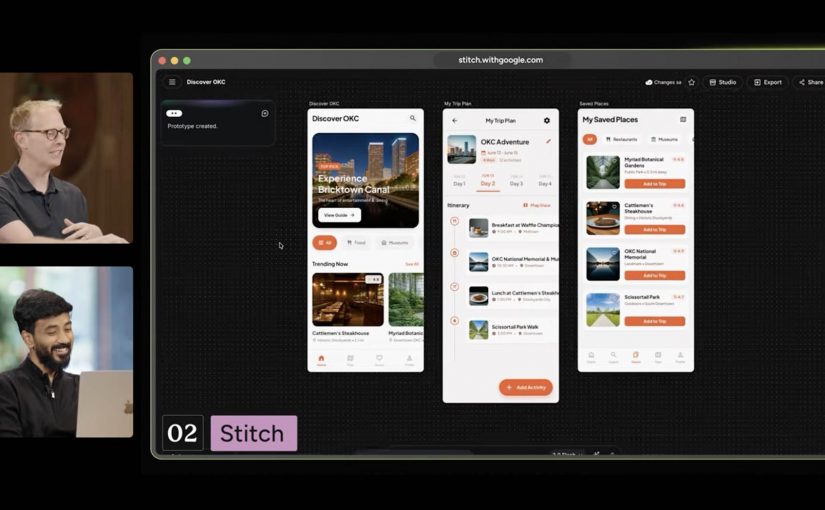
Google Labs: The emerging content stack

Google Labs: The emerging content stack

Most AI product interviews are easy to ignore. This one matters because, in a recent interview between Vaibhav Sisinty, founder of GrowthSchool, and Josh Woodward, VP, Google Labs & Google Gemini, Woodward walks through a set of public Google AI products and experiments that, taken together, reveal a much bigger shift in how Google wants creative work to happen.

One interview. Seven demos. One much bigger signal.

On the surface, this looks like another executive interview plus product showcase. Underneath, it is a useful snapshot of Google’s current AI surface across content, design, research, image editing, music, immersive world-building, and communication. Google Labs is the home for AI experiments at Google, and the interview makes that portfolio feel less like scattered demos and more like an emerging system.

The setup is simple. One conversation shows how a marketer can move from source material to interface concept to visual asset to soundtrack to presentation layer without switching mental models every five minutes. That is why the interview matters more than the usual AI highlight reel.

Google is no longer just shipping tools. It is sketching a marketing workflow.

A marketing workflow is the connected chain of jobs from understanding a brief to shipping an asset, interface, or experience.

Google’s current AI surface now covers adjacent stages of work that used to require a mess of separate tools. Stitch handles UI design and front-end generation for apps and websites. NotebookLM handles source-grounded understanding. Pomelli handles on-brand marketing content. Nano Banana 2 handles image generation and editing. Lyria 3 handles music creation inside Gemini. Beam extends the stack into communication.

In practical terms, this means more of the work can happen inside one Google-shaped environment instead of bouncing across a pile of disconnected tools. For enterprise teams, the more important question is whether that upstream work can move cleanly into existing content, design, and approval flows without creating new governance gaps.

My view is that Google is not showing isolated AI tricks here. It is sketching the outline of a marketer-friendly workflow it wants to own. The real question is not whether every tool is perfect yet. It is whether Google can make enough of the workflow usable, governable, and economically attractive in one environment that teams start shifting production behavior, not just experimenting at the edges.

The tools that make the pattern easy to see

Pomelli

Pomelli is the most directly marketer-facing tool in the set. It is built to help businesses generate on-brand content faster. Easy use case: give it your site and product context, then generate campaign-ready visuals and messaging variations for social, ecommerce, or CRM. I unpacked one part of that story in my earlier Pomelli Photoshoot deep dive.

Stitch

Stitch is Google’s answer to fast interface ideation. It turns prompts into UI concepts and front-end output for mobile apps and websites. Easy use case: turn a campaign landing-page idea or app flow into a first working interface before design and dev teams invest heavier production time.

NotebookLM

NotebookLM stands out because it starts from your own source material. It helps turn messy research into usable understanding. Easy use case: upload research docs, interview notes, or previous campaigns and use it to build a grounded strategy summary, FAQ, or narrative draft.

Project Genie

Project Genie is the experimental outlier, but it matters because it points to where interactive creation is heading. It lets users explore generated worlds in real time from simple prompts. Easy use case: prototype a branded world, retail concept, or immersive experience before committing to a more expensive 3D or gaming build.

Nano Banana 2

Nano Banana 2 is Google’s latest image-generation and editing push inside Gemini. It is built for faster visual creation, editing, and iteration. Easy use case: create localized campaign visuals, packaging mockups, or quick ad variants from one approved base asset without opening a traditional creative suite first.

Lyria 3 in Gemini

Lyria 3 brings music creation into Gemini. It lets users generate short custom tracks from prompts and creative inputs. Easy use case: create a first-pass soundtrack or mood bed for a product reel, internal concept film, or social clip before moving into full production.

Google Beam

Google Beam, formerly Project Starline, is the communication layer in this broader picture. It turns standard video streams into a more life-sized and spatial experience. Easy use case: use it for high-stakes remote collaboration, premium client conversations, or executive workshops where trust and presence matter more than standard video calls can deliver.

Why this lands faster than most AI demos

Most AI demos still fail the practical test. They show capability without showing where that capability fits into real work. This one lands because the tools map onto jobs people already understand. Research. Design. Asset creation. Editing. Sound. Presentation. Collaboration.

That is what makes the portfolio more memorable than a long list of model upgrades. People do not buy into AI because a benchmark moved. They buy in when they can picture a job getting easier, faster, or more creatively open.

What Google is really trying to own

Google’s business intent looks bigger than feature adoption. It is trying to make more of the marketer’s daily workflow feel native to its own ecosystem, from idea formation to content generation to communication. That is a stronger strategic position than winning a one-off feature comparison.

That has direct platform and MarTech implications. If more synthesis, interface ideation, and content creation start upstream inside Google’s environment, teams will need to decide how that work hands off into existing CMS, DAM, CRM, analytics, and approval workflows without creating fresh fragmentation.

This is also why labs.google matters in the story. It is not just a gallery of experiments. It is the clearest public window into which adjacent jobs Google thinks belong together next.

What marketers should take from this now

Do not watch this interview as another AI tool roundup. Watch it as a preview of how Google wants more of the marketer workflow to happen inside one ecosystem.

Extractable takeaway: The strategic signal here is not one impressive Google AI demo. It is that Google is assembling enough connected creative building blocks that marketers can start reducing tool sprawl and shortening the path from brief to output.

The practical move is to run one tightly scoped pilot across synthesis, interface concepts, and visual production. NotebookLM for synthesis. Stitch for interface concepts. Pomelli or Nano Banana 2 for visual production. Put one owner on it, define the handoff into your existing content and approval flow, and measure whether cycle time, iteration speed, or asset throughput actually improves.


A few fast answers before you act

Which Google tools in this interview matter most for marketers right now?

NotebookLM, Stitch, Pomelli, Nano Banana 2, and Lyria 3 are the most directly useful because they map to research, interface concepts, asset creation, editing, and soundtrack generation.

Why does this interview matter more than a normal product launch video?

Because it shows multiple Google AI products side by side, which makes the workflow pattern easier to spot than a single product announcement.

Is Google Labs just a showcase site?

No. It is Google’s public home for AI experiments, which makes it the best place to track how Google is connecting adjacent creative and knowledge tasks.

What is the clearest first test for a marketing team?

Use NotebookLM to digest source material, Stitch to mock the experience, and Pomelli or Nano Banana 2 to produce first-pass campaign assets.

What is the strategic takeaway for leaders?

Evaluate these tools as a workflow play, not as isolated demos, because the compounding value comes from reducing friction between connected jobs.