
Manus AI: Action Engine for Marketing

Manus AI: Action Engine for Marketing

Manus AI is interesting because it changes the unit of AI adoption in marketing. The useful question is no longer whether AI can write better copy, but whether it can safely execute repeatable marketing work across tools, accounts and output formats.

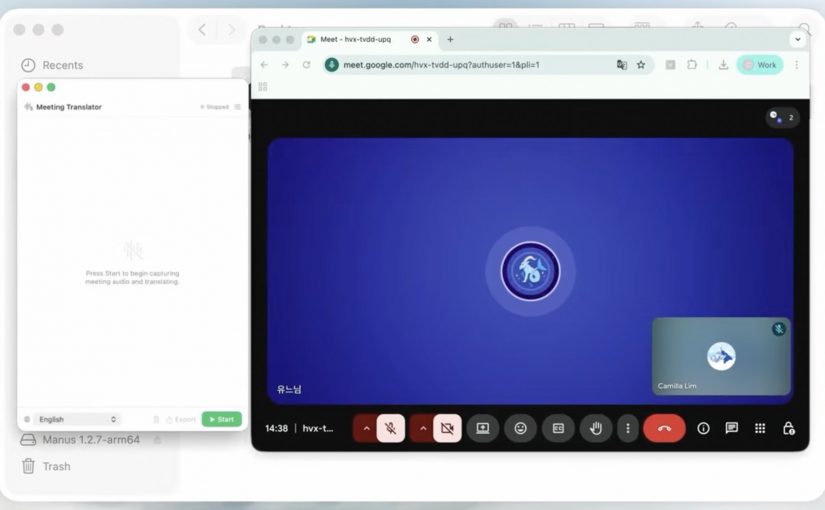
Vaibhav Sisinty, founder of GrowthSchool, frames the hype in the video, but the useful part is the work pattern: browser shopping, download cleanup, Meta ads analysis, Slack triage, influencer research, prototype building and Telegram-based task handoff.

These are not glamorous use cases. They are the small operational gaps that make marketing teams slower than they should be: extracting data, checking dashboards, comparing options, building lists, scanning messages, formatting outputs and turning loose requests into usable artefacts.

The operating shift: from answer to action

Most marketing teams still use AI as an answer layer. They ask for ideas, summaries, drafts, research angles, prompt variants or campaign copy, and then people still move the work manually through browsers, spreadsheets, CMS workflows, ad platforms, project tools and approval chains.

Manus describes itself as an action engine. An action engine is an AI layer that can plan, execute and package work across tools, rather than only generate recommendations.

The mechanism is straightforward: Manus combines planning, browser operation, connectors, file access, code generation and output packaging, so a marketing request can move from prompt to finished artefact without being manually rebuilt in five separate tools.

For marketing teams, that puts the pressure point on operating model design, not on prompt novelty.

This mechanism matters because execution creates real business value only when the system can reach the right tools, use the right data, follow the right rules and hand back something a team can trust.

The marketing question: control before scale

The real question is whether a marketing organization can give any agent safe enough access, clear enough tasks and strong enough controls to make the output usable.

The stance here is clear: treat Manus as a workbench for bounded execution, not as a replacement for marketing judgment.

In a real marketing stack, that distinction matters because the work crosses content systems, asset libraries, product data, CRM, analytics, ad platforms, consent, identity and approval workflows.

The Meta angle matters, but not as gossip

Manus still presents itself as part of Meta, while recent reporting says China has blocked the acquisition or ordered the transaction unwound. That tension deserves a brief mention, but it should not dominate the argument.

The business signal is not the takeover drama. It is that the market is moving from AI tools that advise marketers to AI systems that can sit closer to actual work.

That is why the Meta connection is relevant: ads, creators, messaging and business pages are workflow surfaces, not just media surfaces.

If an execution agent can sit near those surfaces, the commercial value is not another content generator. The value is shorter distance between insight, action, packaging and follow-up.

Governance decides whether this scales

An agent that can open browsers, read accounts, analyze campaigns, create files, draft replies and ship prototypes is useful only when access rights, approval steps and logs are explicit. Before scaling it, marketing teams need to define which accounts can be touched, which actions are read-only, which outputs require human approval, which data is excluded and which records prove what happened.

Without this, the failure mode is obvious. The agent becomes another shadow workflow, fast enough to bypass controls and persuasive enough to hide weak evidence.

That is also where adoption gets decided. People will not use an agent because it is magical; they will use it because it removes low-value work without making them responsible for invisible risk.

What marketing teams should operationalize

The practical move is not to connect everything at once. Start with bounded, reversible work: campaign monitoring, reporting summaries, initial lists of potential creators and influencers, content calendars, competitive scans, meeting follow-ups, prototype briefs and internal workflow cleanup. These jobs have enough friction to matter, enough structure to test, and low enough downside if a human reviewer stays in the loop.

Takeaway: Offerings like Manus AI are useful for marketing when they are treated as execution layers for controlled workflows, with clear access rules, human approval points, source checks, output QA and measurable time saved.


A few fast answers before you act

What is Manus AI?

Manus AI is a general-purpose AI agent designed to execute tasks, not just answer prompts. In marketing, that means it can support research, reporting, campaign analysis, workflow automation and prototype creation when access and review are controlled.

How is Manus different from ChatGPT or Claude?

ChatGPT and Claude are usually used as reasoning and drafting interfaces. Manus is positioned closer to an execution environment because it can use browser operation, connectors and output generation to turn a request into a finished artefact.

Should marketing teams connect Manus to real accounts?

Not without data governance and security review. Start with read-only access where possible, confirm what data leaves your environment, exclude sensitive customer or employee data, require human approval before external actions, and keep logs for every workflow that affects campaigns, customers or brand assets.

Does the Meta acquisition story change the marketing argument?

Only slightly. The ownership story is unstable, but the operating lesson is stable: AI agents are moving closer to ads, creators, messaging, commerce and business workflows.

What is the best first use case for Manus in marketing?

Start with recurring analysis and packaging work. Weekly campaign summaries, potential creator and influencer lists, competitor scans and meeting-to-action-plan workflows are easier to govern than live publishing or customer-facing execution.
Google Labs: The emerging content stack

Google Labs: The emerging content stack

Most AI product interviews are easy to ignore. This one matters because, in a recent interview between Vaibhav Sisinty, founder of GrowthSchool, and Josh Woodward, VP, Google Labs & Google Gemini, Woodward walks through a set of public Google AI products and experiments that, taken together, reveal a much bigger shift in how Google wants creative work to happen.

One interview. Seven demos. One much bigger signal.

On the surface, this looks like another executive interview plus product showcase. Underneath, it is a useful snapshot of Google’s current AI surface across content, design, research, image editing, music, immersive world-building, and communication. Google Labs is the home for AI experiments at Google, and the interview makes that portfolio feel less like scattered demos and more like an emerging system.

The setup is simple. One conversation shows how a marketer can move from source material to interface concept to visual asset to soundtrack to presentation layer without switching mental models every five minutes. That is why the interview matters more than the usual AI highlight reel.

Google is no longer just shipping tools. It is sketching a marketing workflow.

A marketing workflow is the connected chain of jobs from understanding a brief to shipping an asset, interface, or experience.

Google’s current AI surface now covers adjacent stages of work that used to require a mess of separate tools. Stitch handles UI design and front-end generation for apps and websites. NotebookLM handles source-grounded understanding. Pomelli handles on-brand marketing content. Nano Banana 2 handles image generation and editing. Lyria 3 handles music creation inside Gemini. Beam extends the stack into communication.

In practical terms, this means more of the work can happen inside one Google-shaped environment instead of bouncing across a pile of disconnected tools. For enterprise teams, the more important question is whether that upstream work can move cleanly into existing content, design, and approval flows without creating new governance gaps.

My view is that Google is not showing isolated AI tricks here. It is sketching the outline of a marketer-friendly workflow it wants to own. The real question is not whether every tool is perfect yet. It is whether Google can make enough of the workflow usable, governable, and economically attractive in one environment that teams start shifting production behavior, not just experimenting at the edges.

The tools that make the pattern easy to see

Pomelli

Pomelli is the most directly marketer-facing tool in the set. It is built to help businesses generate on-brand content faster. Easy use case: give it your site and product context, then generate campaign-ready visuals and messaging variations for social, ecommerce, or CRM. I unpacked one part of that story in my earlier Pomelli Photoshoot deep dive.

Stitch

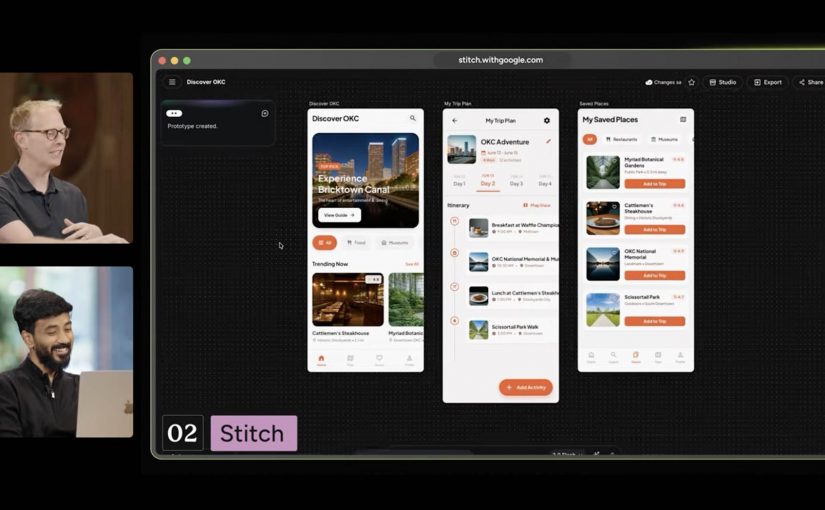
Stitch is Google’s answer to fast interface ideation. It turns prompts into UI concepts and front-end output for mobile apps and websites. Easy use case: turn a campaign landing-page idea or app flow into a first working interface before design and dev teams invest heavier production time.

NotebookLM

NotebookLM stands out because it starts from your own source material. It helps turn messy research into usable understanding. Easy use case: upload research docs, interview notes, or previous campaigns and use it to build a grounded strategy summary, FAQ, or narrative draft.

Project Genie

Project Genie is the experimental outlier, but it matters because it points to where interactive creation is heading. It lets users explore generated worlds in real time from simple prompts. Easy use case: prototype a branded world, retail concept, or immersive experience before committing to a more expensive 3D or gaming build.

Nano Banana 2

Nano Banana 2 is Google’s latest image-generation and editing push inside Gemini. It is built for faster visual creation, editing, and iteration. Easy use case: create localized campaign visuals, packaging mockups, or quick ad variants from one approved base asset without opening a traditional creative suite first.

Lyria 3 in Gemini

Lyria 3 brings music creation into Gemini. It lets users generate short custom tracks from prompts and creative inputs. Easy use case: create a first-pass soundtrack or mood bed for a product reel, internal concept film, or social clip before moving into full production.

Google Beam

Google Beam, formerly Project Starline, is the communication layer in this broader picture. It turns standard video streams into a more life-sized and spatial experience. Easy use case: use it for high-stakes remote collaboration, premium client conversations, or executive workshops where trust and presence matter more than standard video calls can deliver.

Why this lands faster than most AI demos

Most AI demos still fail the practical test. They show capability without showing where that capability fits into real work. This one lands because the tools map onto jobs people already understand. Research. Design. Asset creation. Editing. Sound. Presentation. Collaboration.

That is what makes the portfolio more memorable than a long list of model upgrades. People do not buy into AI because a benchmark moved. They buy in when they can picture a job getting easier, faster, or more creatively open.

What Google is really trying to own

Google’s business intent looks bigger than feature adoption. It is trying to make more of the marketer’s daily workflow feel native to its own ecosystem, from idea formation to content generation to communication. That is a stronger strategic position than winning a one-off feature comparison.

That has direct platform and MarTech implications. If more synthesis, interface ideation, and content creation start upstream inside Google’s environment, teams will need to decide how that work hands off into existing CMS, DAM, CRM, analytics, and approval workflows without creating fresh fragmentation.

This is also why labs.google matters in the story. It is not just a gallery of experiments. It is the clearest public window into which adjacent jobs Google thinks belong together next.

What marketers should take from this now

Do not watch this interview as another AI tool roundup. Watch it as a preview of how Google wants more of the marketer workflow to happen inside one ecosystem.

Extractable takeaway: The strategic signal here is not one impressive Google AI demo. It is that Google is assembling enough connected creative building blocks that marketers can start reducing tool sprawl and shortening the path from brief to output.

The practical move is to run one tightly scoped pilot across synthesis, interface concepts, and visual production. NotebookLM for synthesis. Stitch for interface concepts. Pomelli or Nano Banana 2 for visual production. Put one owner on it, define the handoff into your existing content and approval flow, and measure whether cycle time, iteration speed, or asset throughput actually improves.


A few fast answers before you act

Which Google tools in this interview matter most for marketers right now?

NotebookLM, Stitch, Pomelli, Nano Banana 2, and Lyria 3 are the most directly useful because they map to research, interface concepts, asset creation, editing, and soundtrack generation.

Why does this interview matter more than a normal product launch video?

Because it shows multiple Google AI products side by side, which makes the workflow pattern easier to spot than a single product announcement.

Is Google Labs just a showcase site?

No. It is Google’s public home for AI experiments, which makes it the best place to track how Google is connecting adjacent creative and knowledge tasks.

What is the clearest first test for a marketing team?

Use NotebookLM to digest source material, Stitch to mock the experience, and Pomelli or Nano Banana 2 to produce first-pass campaign assets.

What is the strategic takeaway for leaders?

Evaluate these tools as a workflow play, not as isolated demos, because the compounding value comes from reducing friction between connected jobs.