
AT&T: ZugMO webcam heading banner game

The AT&T banner brings you right into the game, using Zugara’s augmented reality motion capture technology called ZugMO. Here, “augmented reality” means webcam-based motion capture with game graphics layered over live camera input. ZugMO translates head movement into game input. You use your webcam to “head” crosses toward goal, with five shots to score as many as possible. There isn’t much more to it than that. But it is a very cool concept, especially because it is described as having run as a banner placement on ESPN.com with BBDO and Zoic Studios involved.

Why this banner feels different to click on

Most banners ask for a click and then try to convince you after the fact. This one flips the sequence. It gives you a tiny game first, then lets AT&T benefit from the time, focus, and small dopamine hit that comes from trying to score.

Extractable takeaway: A playable banner works when the mechanic is instantly legible, the interaction is frictionless, and the reward arrives fast enough that people try “just one more shot.”

What “augmented reality” means here

In this execution, “augmented reality” is less about 3D worlds and more about webcam-based motion capture layered with game graphics. Your movement is the controller. The screen overlays the ball path and goal feedback on top of live camera input, so the interaction feels physical even though you are still inside a standard banner unit.

The mechanic is the message

There are only a few moving parts. A webcam feed. Face and head tracking. A corner-kick animation. A simple scoring loop with five attempts. That minimalism matters because banners do not have time for onboarding. If the player cannot understand it in one glance, the banner has already lost.

In performance-driven digital advertising, the fastest way to earn attention is to let people experience the message with their own body in seconds.

The real question is whether your ad can earn five seconds of voluntary play without explaining itself.

Playable banners are worth doing when the first interaction is immediate, legible, and ends quickly enough to invite a replay.

The business intent behind the “cool concept”

Positioned around football attention, the deeper message is speed and responsiveness. Not by claiming it, but by making the ad itself respond to you. It is a small but smart translation of “fast network” into an experience you can feel.

Steal this pattern for playable banners

  • Design for zero instructions. If the mechanic cannot be understood instantly, simplify it.
  • Use the body as the controller. Webcam motion beats mouse clicks when you want memorability, not just reach.
  • Keep loops short. Five shots is a clear session boundary. It invites replay without feeling endless.
  • Make the feedback loud. Clear “goal” and “miss” cues turn confusion into compulsion.
  • Let the format prove the claim. If your message is speed, make the interaction snappy and responsive.

A few fast answers before you act

What is a “playable banner”?

A playable banner is a display ad that includes a lightweight interactive experience, usually a mini game, inside the ad unit itself. The goal is to trade passive impressions for active participation.

Why does webcam motion capture increase engagement?

Because it turns the user from a viewer into the controller. When your body movement drives the outcome, attention becomes harder to drop and easier to remember.

What makes this AT&T banner easy to understand?

The interaction maps to a real-world action. You head the ball. The scoring loop is obvious. The session is short. That combination removes the need for instructions.

What is ZugMO in simple terms?

ZugMO is Zugara’s webcam-based motion capture layer that detects user movement and converts it into game input. In this case, it translates head movement into a “header” action.

What is the biggest failure mode for interactive banner ads?

Too much friction. If the ad requires setup, permissions confusion, slow loading, or unclear controls, most people leave before the first reward moment arrives.
Magic Tee: Augmented Reality Kids Clothing

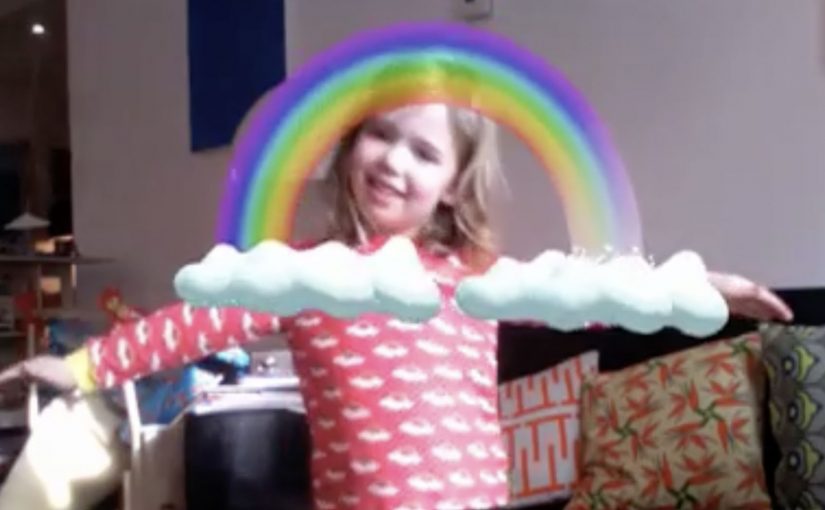
No one likes getting dressed in the morning. It is routine and usually boring. Magic Tee flips that by making clothes feel alive. Put the T-shirt on, stand in front of a webcam, and the print becomes an interactive animation that responds to the child’s movement.

It is described as the first piece of children’s clothing to incorporate augmented reality in this way, designed and developed by creative agency Brothers and Sisters for kidswear brand Brights & Stripes.

How a T-shirt becomes a screen

The mechanism is straightforward. The T-shirt print is designed so a webcam can recognize it reliably, then align a 3D animation to the child’s torso on-screen. When the child moves, the animation moves with them, so the shirt feels like a trigger for a small story rather than a static graphic.

Augmented reality kids clothing, in this context, is apparel whose printed design can be recognized by a camera so digital characters and effects can be layered onto the garment and react to the wearer’s motion.

In consumer brands looking to fuse physical products with digital play, this kind of camera-triggered interaction is a simple way to turn ownership into an experience.

Why this lands with kids and parents

For kids, the reward is immediate. Movement creates feedback, so the child quickly learns that they control what happens. That sense of viewer control is what turns novelty into repeat use.

Extractable takeaway: If you want repeat engagement, tie the reward loop to the user’s movement. Fast feedback turns “try once” into “play again.”

For parents, the concept reframes clothing from “something you have to put on” into “something that starts play.” It also creates a natural share moment because the experience is easiest to show when someone is watching the screen with you.

What the brand is really doing

The real question is whether you can make the product itself the interface, so the experience earns repeat attention inside a routine.

On paper, it is an AR stunt. In practice, it is a product differentiation play. The shirt becomes a conversation piece, and the brand earns a place in the child’s routine through interaction rather than purely through design.

It also sets up a longer runway. If the platform exists, new prints can unlock new animations, which turns a clothing line into a renewable content system.

Steal the pattern: product-triggered play

  • Make the trigger physical. When the product starts the experience, engagement feels earned.
  • Keep the first win fast. The first 10 seconds should produce a visible reaction.
  • Design for repeat play. Add simple variation so it does not feel “seen once.”
  • Build a shareable moment. Parents share outcomes, not features. Give them an outcome.

A few fast answers before you act

What is the core idea of Magic Tee?

A children’s T-shirt that acts as a trigger for an on-screen AR animation. A webcam recognizes the print and overlays moving characters that respond to the child’s motion.

Is this mobile AR or webcam-based AR?

As described in the campaign write-ups, it is webcam-based. The interaction happens when the child stands in front of a computer camera and sees the augmented layer on screen.

Why use clothing as the marker instead of a card or poster?

Because the marker is worn. That makes the experience personal, repeatable, and closely tied to identity and play.

What makes interactive apparel feel “not gimmicky”?

Speed and reliability. If recognition is instant and the animation responds smoothly to movement, the experience feels like play. If setup is slow, it feels like tech.

What is the most transferable lesson for marketers?

Turn the product into the interface. When the item in the basket is also the trigger for the experience, you get differentiation and word of mouth without adding more media.

NOOKA: Augmented Reality Accessorizer

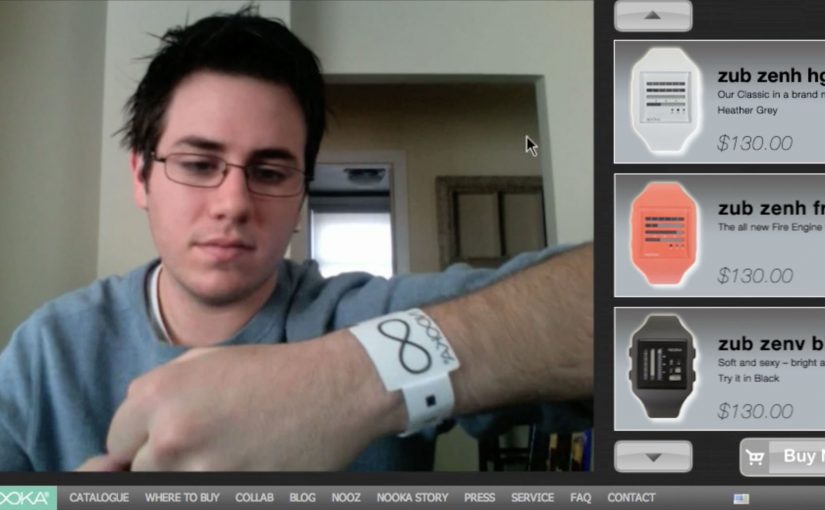
NOOKA watches created a video-led way to let you try out their watches virtually. All you need is a simple strip of NOOKA watch-representing paper to make it work, and once you see it in action, the idea becomes obvious.

A paper strip that turns your webcam into a fitting room

The mechanism is a coded wrist strip and a webcam. You place the strip on your wrist, hold your arm up to the camera, and the watch appears aligned to your wrist as you move. It is a fast, low-friction way to demonstrate “how it looks on me” without needing a physical product in hand.

Because the strip gives the webcam a stable reference, the overlay can track your wrist as it moves, which is what makes the preview feel believable.

In online retail, the fastest way to reduce hesitation is to replace abstract product specs with a visual proof the shopper can control.

The real question is whether you can turn “how will this look on me?” into a live proof the shopper can control before they decide.

Why this feels more convincing than a static product shot

Most product pages show the same images to everyone. This flips the experience from passive viewing to live preview. For look-and-fit products, a live preview like this is a stronger trust-builder than piling on more static shots. Even if the rendering is simple, the feeling of personalization comes from movement and alignment, not photorealism.

Extractable takeaway: If your product is bought on look and fit, design a try-on moment that uses a behavior people already understand (webcam + holding up your wrist), then make the payoff immediate so the demo does the selling.

Stealable moves for NOOKA’s print-to-digital bridge

By a “print to digital” bridge, I mean a physical cue that unlocks or anchors a digital preview in a way the viewer can control.

  • Use a physical key. A simple strip, card, or marker makes the digital experience feel tangible and intentional.
  • Keep the interaction one-step. The user should be able to try it within seconds, not after setup friction.
  • Build for sharing. The best proof is something people can show a friend in the moment.
  • Let the demo carry the story. If it needs heavy explanation, simplify the mechanic.

A few fast answers before you act

What is the NOOKA Augmented Reality Accessorizer?

It is an augmented reality try-on concept where a coded paper wrist strip and a webcam let a shopper preview a NOOKA watch aligned to their wrist in real time.

Why does a paper strip matter in an AR try-on?

It provides a consistent reference point for positioning and scale, and it makes the experience feel like a “real” object-assisted try-on rather than a random filter.

What makes this useful for e-commerce?

It reduces uncertainty about appearance and proportion. The shopper can see the watch on a wrist-sized reference and judge the look before buying.

What is one practical lesson to apply without AR?

Use a simple physical reference or on-screen guide that anchors scale and positioning, then let the shopper control the view quickly so the proof feels personal.

What is the main limitation of this type of approach?

It can show appearance and rough scale, but it cannot fully replicate comfort, weight, or how a strap feels. It works best as a confidence booster, not a perfect substitute for trying it on.