
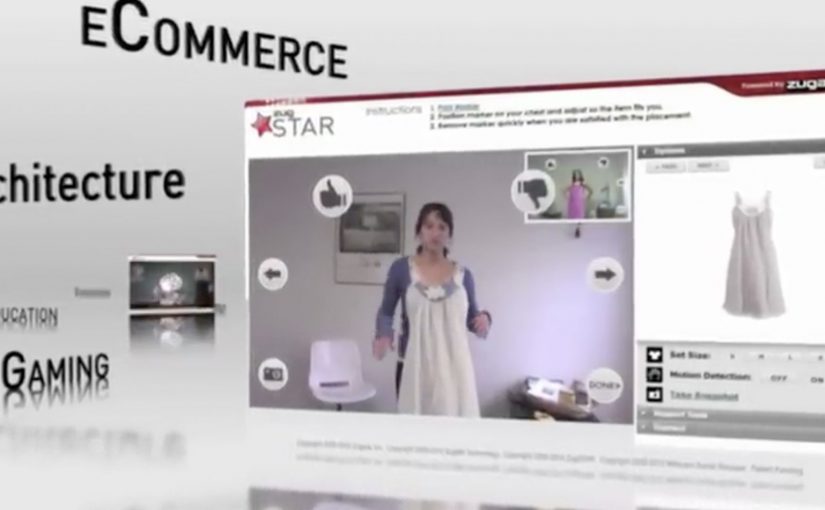
ZugSTAR: Interactive Live Video Conferencing in AR

The future of video conferencing is almost here. Zugara Streaming Augmented Reality (ZugSTAR) is described as a technology that lets people in different locations share an augmented reality experience through a browser-based video conferencing system.

The promise is simple. You do not just see and hear each other. You collaborate on the same interactive layer, with 3D objects and effects that both sides can reference in real time.

What ZugSTAR is trying to change

The mechanism is a shared AR overlay inside a live video call. Instead of treating the camera feed as the whole experience, the system adds a synchronized layer that both participants can see and respond to. The result is closer to “co-present” interaction than a standard webcam call.

In global distributed teams across marketing, product, training, and sales, the biggest conferencing gap is shared context.

Why this matters beyond novelty

This kind of shared overlay can make collaboration more concrete. A product can be demonstrated in 3D, a concept can be pointed at, and a workflow can be rehearsed visually. Because both sides reference the same synchronized layer, pointing and confirming happen in one loop instead of a long back-and-forth. In theory, this reduces the need for physical proximity by making “show me” possible without shipping people or prototypes.

Extractable takeaway: When the work depends on “show me”, a shared visual layer only helps if it behaves like a stable workspace, not a decoration.

The real question is whether a shared overlay reduces misunderstanding faster than screenshare for the work you actually do.

This is worth piloting only in cases where the shared layer replaces screenshare, rather than sitting on top of it.

The differentiator is not “video conferencing”. It is synchronized interaction. Both sides are meant to experience the same AR layer at the same time, so the call becomes a workspace, not only a conversation.

Where it could be useful

  • Sales demos. Show products and configurations as interactive visuals instead of static slides.
  • Training. Walk through procedures with step-by-step overlays that feel more like guided practice.
  • Remote assistance. Use shared visuals to clarify instructions when words are not enough.
  • Creative collaboration. Iterate on concepts that benefit from spatial context and rapid visual feedback.

Design rules for shared-overlay calls

  • Make the shared layer the point. If the overlay is optional decoration, it will not change outcomes.
  • Keep interaction low-friction. The first useful action should happen in seconds.
  • Design for “pointing” and “confirming”. The fastest collaboration loops are highlight, discuss, agree.
  • Measure success as reduced back-and-forth. The win is fewer misunderstandings, not more effects.

A few fast answers before you act

What is ZugSTAR in simple terms?

It is a browser-based video conferencing concept that adds a synchronized augmented reality layer, so both participants share the same interactive visuals during the call.

How is this different from a normal video call?

A normal call shares audio and video. This approach aims to share an interactive visual workspace on top of the video, not just the camera feed.

What is the main business benefit of shared AR in conferencing?

Better shared context. When people can see and reference the same visual layer, explaining, demonstrating, and deciding can become faster.

Where does this approach struggle?

When setup friction is high, hardware requirements are unclear, or the interaction is not stable enough for real work. If it feels fragile, teams fall back to screenshare.

What should you evaluate first if you consider something like this?

Whether the shared overlay reduces misunderstandings in your core use case. If it does not, it is entertainment, not collaboration.
Vampire Diaries Augmented Reality

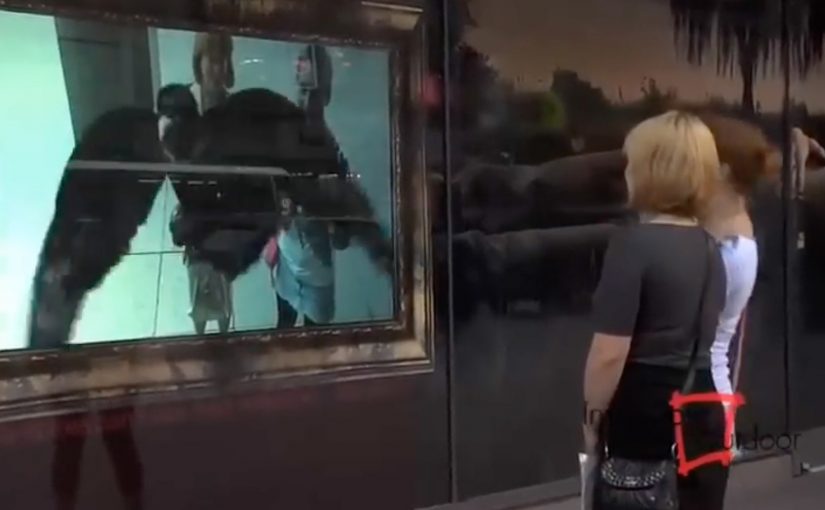
An outdoor advertising campaign by Inwindow Outdoor for CW’s Vampire Diaries appears in Los Angeles and New York. It uses augmented reality to trigger the on-screen display. Here, augmented reality functions as the activation cue that starts the display at the right moment.

The idea. Outdoor that reacts

The execution uses augmented reality as the activation layer. Instead of treating the screen as a static placement, the display is triggered through AR to create a moment that stands out in public space.

The real question is whether the AR layer changes what the outdoor screen does, or just decorates the same placement.

How it works. A trigger drives the screen

The on-screen content is not always running. It is initiated when the AR trigger is detected, turning a standard outdoor screen into a timed reveal rather than a constant loop.

In global entertainment marketing, outdoor activations like this work best when the trigger creates a clear before-and-after moment people can notice in a few seconds.

Where it runs

The installation appears in two major markets. Los Angeles and New York.

Why it lands

AR is worth the added complexity in outdoor only when it changes the behavior of the medium in public space. A triggered reveal creates contrast versus always-on loops, which is what makes the moment feel different rather than merely placed.

Extractable takeaway: Use AR as an activation layer that creates a noticeable state change on the screen, so the placement reads as a triggered experience, not static media.

What to apply in your next OOH activation

  • Design for a visible state change: Make the triggered moment look materially different from the idle screen state.
  • Keep the trigger simple: The audience should not need instructions to notice that something just changed.
  • Treat AR as the switch: Use AR to initiate the moment, not as decorative overlay on an unchanged placement.

A few fast answers before you act

What is this campaign?

An outdoor advertising campaign for CW’s Vampire Diaries by Inwindow Outdoor that uses augmented reality to trigger an on-screen display.

Where does it appear?

Los Angeles and New York.

What role does augmented reality play?

It is used as the activation layer that triggers the on-screen display.

Who executes it?

Inwindow Outdoor.

What is the core takeaway?

Use AR as an activation layer that turns an outdoor screen from static media into a triggered experience.

Esquire’s Augmented Reality Issue

You open a print issue of Esquire and the pages do not stop at ink. You point a webcam or phone at a marked page and the magazine layer expands. Here, “marked” means the page includes a printed visual marker the AR software can recognize. Video clips play, 3D objects appear, and extra content sits directly on top of the printed layout. The issue behaves like a portal, not a publication.

The move. Extending print with augmented reality

Esquire experiments with an augmented reality-enabled issue that connects physical pages to digital experiences. The print product becomes the trigger, and the digital layer becomes the reward for curiosity.

How it works. Markers plus a camera

  • Selected pages include visual markers designed to be recognized by software.
  • The reader opens the AR experience on a computer webcam or mobile device.
  • When the camera recognizes the page, digital content overlays the magazine.
  • The overlays can include video, interactive elements, and 3D objects tied to the editorial content.

In publishing and brand media, augmented reality works best when the page itself becomes the interface rather than a detour to a separate destination. Because the camera locks onto the page itself, the overlay feels anchored to the layout, which makes the payoff arrive without a context switch.

In consumer publishing and brand media, the most repeatable AR pattern is to let the page be the trigger and the camera be the lens.

Why it matters. A magazine that behaves like a medium

This is not a banner ad placed on paper. It is a format shift. The real question is whether you are using AR to deepen the editorial moment or to bolt on a gimmick. The reader keeps control, but the magazine now has depth. Print becomes interface, and “extra content” becomes spatial and contextual rather than hidden behind a URL. If the overlay does not deepen the page you are already reading, it should not ship.

Extractable takeaway: Use AR to deepen the page the reader is already in, with a fast first reveal anchored to the layout, so the extra layer feels earned instead of tacked on.

What to take from it. Designing for the moment of discovery

  • Use print as the entry point. A physical artifact can still be the strongest trigger for attention.
  • Reward curiosity quickly. The first overlay has to land fast to justify the setup.
  • Keep the experience editorial. AR works best when it extends the story, not when it interrupts it.
  • Plan for repeatable templates. Once the pipeline exists, AR pages become a scalable content format.

A few fast answers before you act

What is Esquire’s augmented reality issue?

A print magazine issue that unlocks digital overlays like video, interactive elements, and 3D objects when a camera recognizes marked pages.

What do readers need to experience it?

A webcam or phone camera, plus the AR experience that recognizes the markers in the issue.

What kind of content can appear?

Video clips, interactive elements, and 3D overlays tied to the editorial pages.

Why is this different from typical digital add-ons?

The print page becomes the interface, so the digital layer is contextual and anchored to the physical layout.

What is the transferable lesson?

Treat physical media as an activation surface, then design a fast, editorially relevant reveal that makes the extra layer feel earned.