
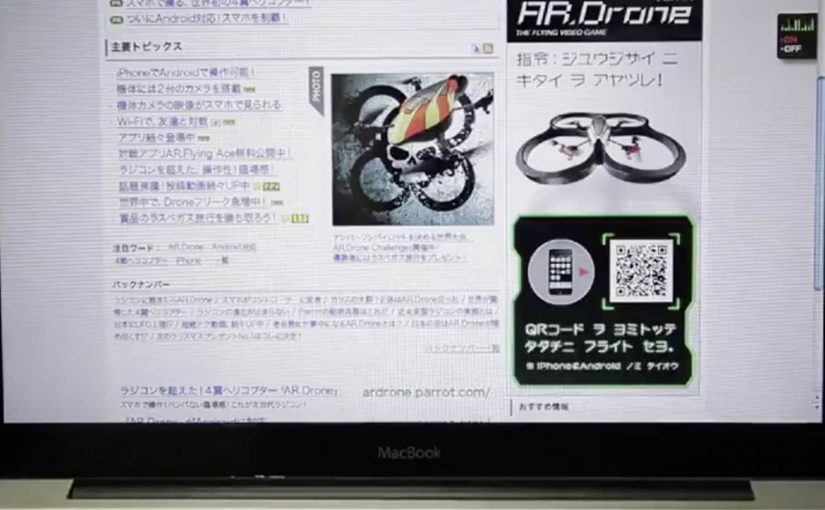
Parrot AR.Drone: The Flying Banner

The Parrot AR.Drone is a quadrotor you can control with an iPhone or iPad. Instead of explaining that in copy, Beacon Communications Tokyo built an interactive web banner that lets people experience the idea.

The banner displays a QR code. Scan it and your phone becomes the controller for a virtual AR.Drone that appears inside the banner. You pilot it around the screen using your smartphone, effectively turning the ad into a small playable product demo.

Why this banner stands out

Most banners talk about what a product can do. This one makes the product behaviour the message. If the AR.Drone is “controlled by your phone,” the ad is controlled by your phone. That direct mapping makes the idea instantly believable. For interface-led products, this is the right pattern: let people try the interface, not read about it.

Extractable takeaway: If your product is an interface, let the audience use that interface inside the ad unit, even in a simplified form.

The mechanic: QR to second screen control

The QR code is not decoration. It is the bridge that turns a passive placement into a two-device experience. Here, “second-screen control” means the desktop shows the scene while the phone acts as the controller. The banner stays on the desktop screen. Control moves to the phone. That split makes the interaction feel closer to the real product, and it also creates a small sense of “this is special” because the ad is no longer self-contained.

In consumer electronics launches, the most persuasive interactive advertising is a playable demo that mirrors the product experience in seconds.

The real question is whether the viewer can feel the core control loop before they decide to care.

How it creates attention without shouting

As described in industry coverage, users could fly the drone around the page and even “blast” parts of the site to reveal the full-screen message. That gives the interaction a purpose and a payoff. It is not just movement. It is progression.

Beacon also reported unusually strong click-through performance compared to typical expectations for the placement. In this case, that makes sense. People do not click because they were interrupted. They click because they were already playing.

Second-screen demo moves to copy

  • Replicate the product, do not describe it. A short, real interaction beats a long explanation.
  • Use one clear bridge between devices. QR works here because it is immediate and simple.
  • Design an obvious payoff. A reveal, a score, a result. Give the interaction a reason.
  • Keep the controls teachable. If people cannot learn it in seconds, the banner loses them.
  • Make it readable for spectators. Movement on the main screen helps others understand what is happening fast.

A few fast answers before you act

What is “The Flying Banner” for Parrot AR.Drone?

It is an interactive web banner where scanning a QR code turns your smartphone into a controller for a virtual AR.Drone that you can pilot inside the banner.

Why is this a stronger demo than a normal video ad?

Because it lets people feel the core promise. Phone-controlled flight, through direct interaction, not description.

What role does the QR code play in the experience?

It is the handoff mechanism from desktop to phone. The desktop shows the “world.” The phone becomes the controller, matching how the real product is used.

What is the biggest risk with multi-device banner ideas?

Drop-off. If the connection step is slow, confusing, or unreliable, most users abandon before they experience the payoff.

How would you modernize this mechanic today?

Keep the principle of second-screen control, but reduce friction. Use a fast connect flow and ensure the experience is still satisfying even if someone chooses not to connect a phone.

DoubleClick: Fly over France HTML5 banner

You open a banner and, instead of a product shot, you get a hot-air balloon. You pick up speed, drift across a map, and “tour” famous French locations from above, including the Eiffel Tower, Notre-Dame de la Garde in Marseille, and the Château de Versailles.

This demo came out of the DoubleClick HTML5 Banner Challenge, with Biborg Interactive and Alpha Layer showing what happens when a banner is treated like a mini experience instead of a static placement.

The rich media build, meaning a banner unit that runs real-time code in the browser rather than a fixed image, leans on several HTML5 capabilities at once. Geolocation can drop you near your own location at the start. WebGL handles the 3D-like rendering layer in capable browsers. Audio and video tags add atmosphere. Google Maps-style navigation does the heavy lifting for exploration.

HTML5-rich media lets a banner behave like a lightweight web app, while still living inside a standard media buy.

An HTML5 rich media banner is a display unit that runs real-time code in the browser. It can detect location (with permission), render interactive graphics, and respond to user input without plugins.

What makes this feel different from “banner interactivity”

Most interactive banners ask for clicks. This one offers navigation. If your goal is time-in-unit, navigation is the better default than click-to-reveal. The moment you give people directional control, the experience shifts from “ad” to “toy”, and time-in-unit rises naturally because curiosity takes over.

Extractable takeaway: When you turn a banner into something navigable with one obvious control, you trade “interaction” for exploration, and exploration reliably buys you time.

Why the tech stack choice matters

Geolocation is not a gimmick here. It personalizes the first frame by making “your world” the default starting point, if the user opts in. WebGL is not decoration. It signals modernity and smoothness, making the experience feel closer to a game than a widget.

In programmatic display buys, weight and cross-browser reach still win, so the core interaction has to survive even when advanced features fall back.

The business intent behind the challenge demo

This is less about selling France and more about selling a capability. The real question is whether your banner is built to be explored or merely clicked through. It is a proof point for what DoubleClick Studio and HTML5 workflows can support, and it is a portfolio-grade demonstration for the teams who built it.

Steal these patterns for your next HTML5 banner

  • Give viewers one clear control. Navigation beats click-to-reveal when you want time spent.
  • Use “permissioned” personalization. Geolocation works best when it improves the first 3 seconds, not when it tries to be clever later.
  • Design a graceful fallback. If 3D is not available, the core experience should still be enjoyable.
  • Make the value visible without instructions. If someone can understand the interaction from across the room, they will try it.

A few fast answers before you act

What is the DoubleClick HTML5 Banner Challenge demo here?

It is a rich media banner concept that lets users “fly” a hot-air balloon over a map of France and discover landmarks, built to showcase what HTML5 banners can do beyond animation.

Which HTML5 features does the banner use?

It is described as using geolocation (with permission), WebGL for interactive graphics, and native audio and video support, alongside map-based navigation to create a lightweight exploration experience.

Why is geolocation useful in a banner?

Because it can personalize the first moment. Starting near a user’s own location makes the experience feel immediately relevant, as long as it is optional and clearly explained.

What does WebGL add to rich media ads?

WebGL enables GPU-accelerated 2D and 3D graphics in the browser. In advertising units, that can translate into smoother motion, depth effects, and more game-like interaction.

What is the biggest risk with “mini-app” banners?

Weight and compatibility. If the unit is too heavy or too fragile across browsers, you lose reach. The best builds keep a simple core loop and treat advanced effects as optional upgrades.

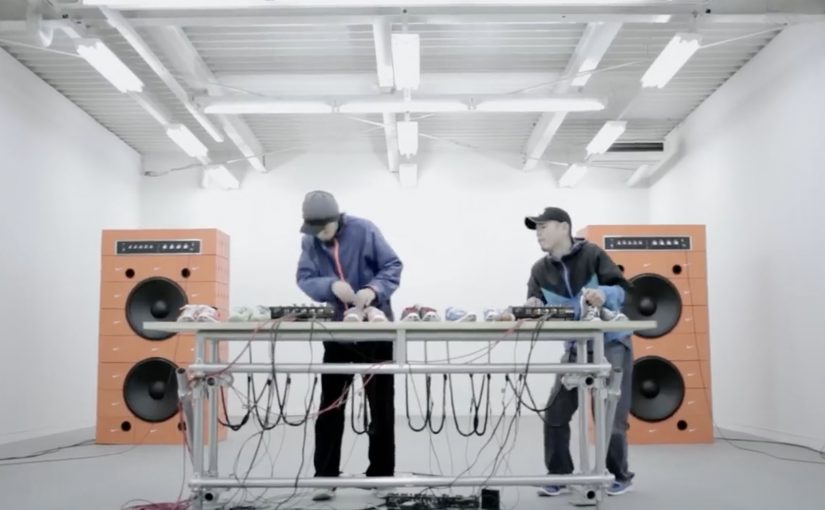
Nike: Music Shoes

Shoes as we know it are never going to be the same again. Nike has just come up with the first of its kind music shoes!

Here is a short video showing how the shoes were made…

This is the final Nike Music Shoes ad…

Why this idea feels like a shift

The shoes are not styled as fashion first. They are staged as an instrument. They are also staged as an interface. Here, “interface” means the shoe becomes a control surface that converts movement into sound. That reframing matters because it turns product into performance. Because the movement-to-sound mapping is immediate, the audience can grasp the idea without extra explanation. In global consumer marketing, proof-led product storytelling like this tends to travel further than style-led messaging. You do not watch someone wear them. You watch someone play them.

Extractable takeaway: When you introduce a new interaction, show the input and output in the same moment, so belief is earned through observable cause and effect, not claims.

  • Product becomes interface. Movement is translated into sound, which makes the shoe feel “alive”.
  • Proof in the making. The build film adds credibility and curiosity before the final creative payoff.
  • Shareable demonstration. People want to show others because the concept is easiest to understand when you see it.

What to learn from the two-video structure

Pairing a “how it was made” film with the final ad is a smart sequencing move. First you earn belief. Then you deliver the spectacle. In innovation storytelling, that order often performs better than going straight to the hero spot. The real question is whether your innovation needs a proof chapter before you ask people to share it. For novel product behaviors, lead with proof, then pay off with spectacle.

  • Earn belief first. Let the making-of do the minimum explanation needed for “this could be real”.
  • Then stage the performance. Use the final ad as the payoff where the product is “played”, not described.
  • Keep it demo-able. If a viewer cannot retell it after one watch, it will not travel.

A few fast answers before you act

What are Nike “Music Shoes”?

They are a concept where the shoe is treated like a musical instrument, translating movement into sound to create music through performance.

Why include a making-of film as well as the final ad?

The build film establishes credibility and explains just enough to make the final ad feel possible, not magical.

What is the core creative pattern here?

Turn a product into an interface, then let a live-style demonstration carry the message without heavy explanation.

How can brands reuse this idea without copying it?

Identify one product behavior you can translate into a new medium, then show both the “proof” and the “performance” as two linked chapters.