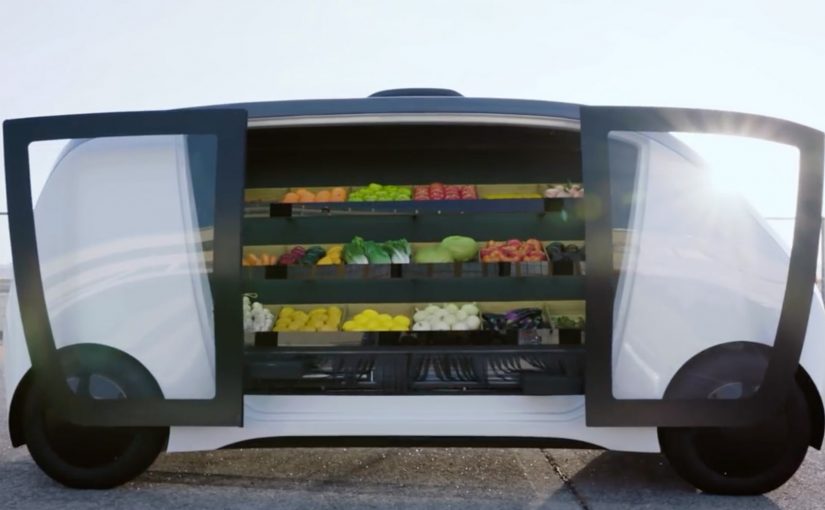
A mobile grocery store pulls up outside your door. You unlock it with a code, step up to the vehicle, pick what you want from everyday items and meal kits, and you are done. This spring, Robomart, a California-based company, teams up with grocery chain Stop & Shop to trial what it positions as a driverless grocery store service in Boston, Massachusetts.
What Robomart is solving in grocery
Grocery is often described as a roughly $1 trillion market, yet only a small fraction of spend moves online. Two frictions dominate. On-demand delivery is expensive for retailers to fund sustainably. And for many shoppers, the moment that matters is still the same: picking your own food.
How the Robomart experience works
The flow is designed to feel like the convenience of the old door-to-door model, updated with autonomous tech.
- You summon the mobile store using a mobile app.
- When it arrives outside your door, you enter a code to unlock the doors.
- You grab what you want from the on-board selection of everyday items and meal kits.
In this post, “driverless” is shorthand for a self-serve visit where the customer interaction is handled by software, not a human driver at the door.
In US metro areas where time-poor households do quick top-up shops, a curbside micro-store can trade delivery labor for self-serve convenience.
Why the code-unlock handoff feels trustworthy
The mechanism is simple: you physically see the inventory, you choose the exact item, and you only open what you are entitled to via an authenticated code. Because the handoff is “pick it yourself” instead of “accept a substitution,” the model reduces the trust and quality anxiety that makes grocery delivery feel risky for fresh and high-preference items.
Extractable takeaway: If you want on-demand convenience without paying full delivery labor, move the last meter of work back to the shopper, but keep the moment of choice in their hands.
The bigger pattern: autonomy scales door-to-door retail
For decades, consumers have enjoyed the convenience of a local greengrocer, milkman, or ice-cream vendor coming door to door. It rarely makes economic sense to scale. The claim here is that autonomous driving changes the cost equation enough to make the model viable at scale. The vehicle becomes a moving retail shelf, and the app becomes the “front door” that controls access and payment.
This model succeeds when autonomy removes labor cost, while shopper control stays high on selection, timing, and authentication.
For digital and retail leaders, the key design move is the same across variants. Make the pickup moment fast, self-serve, and verifiably secure. The rest is unit economics, route density, and replenishment discipline.
A second proof point: Nuro and Kroger’s autonomous lockers
A similar model shows up in summer 2018, when Nuro teams up with supermarket giant Kroger for autonomous grocery delivery in Scottsdale, Arizona. The mechanics differ. It is not a roaming mini-store. It is pre-picked orders loaded into secure lockers. But the handoff is the same. A code unlocks your groceries.
- Customers place an order with Kroger via a smartphone app.
- Staff load the autonomous pod’s secure lockers with the customer order at the depot.
- When the “R1” autonomous delivery pod arrives, the customer enters a code to open the locker and access their groceries.
The two examples illustrate a useful split. Robomart maximizes shopper choice at the vehicle. Nuro and Kroger maximize efficiency by pre-picking, then making the handoff secure and low-touch.
What to steal for retail and CX teams
- Design for viewer control at the moment of choice. If customers cannot see and select, they will demand tighter guarantees on substitutions, freshness, and refunds.
- Make access visibly secure. Code-based access is not just a security control. It is a trust signal that “this is yours” and that the inventory is protected.
- Keep the interaction time-boxed. The value proposition collapses if a “2-minute pickup” becomes a 10-minute browse, and route plans start to break.
- Instrument the handoff, not just the app. Track unlock success, dwell time, abandoned sessions, and replenishment accuracy. That is where the model wins or dies.
- Decide what you are scaling. If you scale choice, accept more on-vehicle assortment and replenishment complexity. If you scale efficiency, accept more pre-pick labor and substitution policy.
A few fast answers before you act
What is Robomart, in this post?
A “store on wheels” experience you summon via app, then unlock with a code so you can pick items directly from the vehicle.
Where does the Stop & Shop trial take place?
Boston, Massachusetts.
Why has grocery been slow to move online?
Retailers struggle to fund on-demand delivery economics, and many consumers prefer to pick their own food, especially for fresh and high-preference items.
What is the comparable example mentioned?
Nuro and Kroger’s autonomous grocery delivery service in Scottsdale, Arizona, using secure lockers opened by code on an “R1” pod.
What has to be true for this model to scale?
High route density, fast and reliable unlock-and-pickup flows, disciplined replenishment, and clear policies for availability, substitutions, and refunds.