The Moby Mart

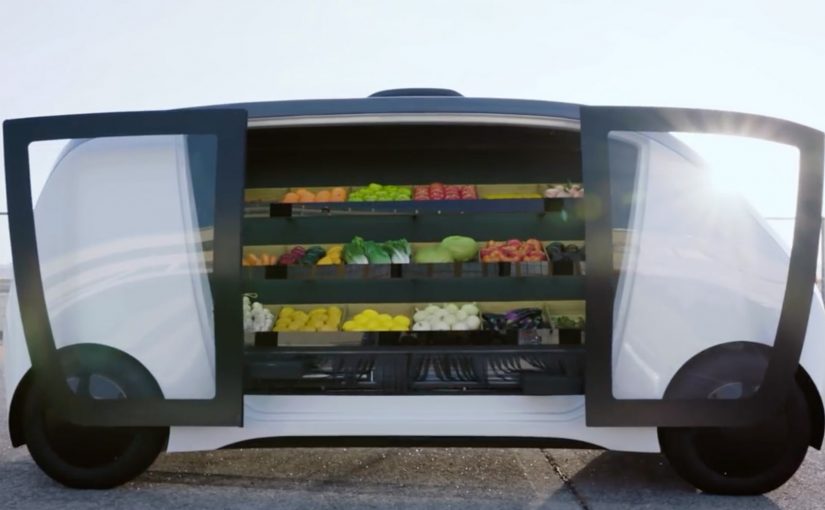
Every parking space becomes a 24-hour store. The Moby Mart is designed to turn ordinary parking spots into always-on retail. Roughly the size of a small bus, it carries everyday products such as snacks, meals, basic groceries, and even shoes. To use it, you download an app, register as a customer, and use your smartphone to unlock the doors. Here, “always-on” means open around the clock without staff on site.

The idea is in trial mode. The store is undergoing trials in Shanghai through a collaboration between Swedish startup Wheelys Inc and China’s Hefei University. For now, the trial prototype is stationary, based permanently in a car park. But the company says it is working with technology partners to develop the self-driving capability, as shown in the video.

The mechanism behind the parking-space store

The mechanism is app-gated access plus self-service. Entry, selection, payment, exit. When that first unlock step feels safe and effortless, an unattended unit starts to feel like normal retail, not a gimmick.

In urban convenience retail, reducing the distance and time between intent and purchase is often the real differentiator.

The real question is whether you can move retail to the moment of demand without breaking trust, support, and replenishment.

If the access and “this worked” confirmation are not rock-solid, mobility and novelty will not save the experience.

What this concept makes tangible

This lands because it reframes “location” as something you can deploy and operate, not just something you lease and staff. The store becomes infrastructure, and the app becomes the front door.

Extractable takeaway: When you make access the first experience, trust and operations become part of the product, not back-office details.

Retail flips from “go to store” to “store comes to you”

The provocation is simple. If the unit can be deployed anywhere, then proximity becomes a variable you can design, not a constraint you accept.

Friction reduction becomes the product

The app unlock and self-service flow compresses the journey. Entry, selection, payment, exit. Less waiting, less staffing, less handoff.

Mobility creates new placement logic

A store on wheels changes what “location strategy” means. Instead of long-term leases, the unit can be positioned where demand spikes, or where fixed retail is uneconomical.

What to copy from Moby Mart

  • Start with a familiar format. People immediately understand a convenience store. That lowers cognitive load.
  • Make access the first experience. App unlock is the “moment of truth.” If that step is seamless, everything downstream feels modern.
  • Design for unattended trust. Clear rules, clear prompts, and a clear “this worked” confirmation prevent anxiety in a staffless space.
  • Prototype the operating model early. Mobility, restocking, and support are not secondary. They are the offering.

A few fast answers before you act

What is the Moby Mart?

A bus-sized, staffless, mobile convenience store concept that aims to turn parking spaces into 24-hour retail, accessed via a smartphone app.

How do customers use it?

They download an app, register, and unlock the doors with their phone to shop inside.

Where is it being tested?

It is undergoing trials in Shanghai through a collaboration between Wheelys Inc and China’s Hefei University.

Is it already self-driving?

The trial prototype is stationary in a car park. The company says it is working with partners on self-driving capability.

What is the core lesson for marketers and innovators?

Move the experience to the moment and place of demand. Then design the access, trust, and operations as the real product.

The intelligent car from Mercedes-Benz

Mercedes-Benz announces that its 2016 and 2017 vehicles in the US can connect with Amazon Echo and Google Home. With that integration in place, owners can remotely start or lock their vehicle, and they can send an address from home straight into the car’s in-car navigation.

The real question is: how do we make connected features actually adopted and used repeatedly?

What makes this interesting is not the novelty of voice commands. It is the direction. The car starts behaving like a node in a wider home automation ecosystem, not a standalone product you only interact with once you sit behind the wheel. You speak to your assistant at home. The car responds. The boundary between “home experience” and “driving experience” gets thinner.

The ecosystem move, not a feature add-on

A single capability like “remote start” is useful. But the strategic move is building an intelligent ecosystem around the car, using third-party voice assistants people already trust and use daily. That lowers adoption friction and accelerates habit formation.

By “intelligent ecosystem”, I mean a set of authenticated, reliable, cross-device flows where a home assistant can trigger vehicle actions and pre-driving tasks via the car’s connected backend, not just a few isolated voice shortcuts.

Third-party assistant integrations should be treated as a habit and distribution layer for connected services, not as a feature checklist item.

In global automotive and mobility brands, the fastest adoption lever is piggybacking on the household’s existing voice-assistant routines, not inventing a new in-car habit.

This also shifts expectations. Once the car is connected into the household’s digital layer, people start wanting context-aware flows. Context-aware flows mean the action is triggered in the right moment in a larger routine, like “leaving home” or “planning a trip”, not as a standalone command. Because the assistant already sits inside daily routines, routing car actions through it reduces cognitive load and raises repetition. That is why this integration is more likely to stick than another “connected car” toggle buried in an app.

Why this actually gets used

Customers do not adopt “capabilities”. They adopt reliable routines. If the assistant is already the control surface for lights, heating, music, and reminders, adding the car becomes a low-effort extension of an established behavior. The psychological win is familiarity plus predictability. The product win is fewer new interaction patterns to teach.

Extractable takeaway: The adoption flywheel for connected products is not “more features”. It is “fewer new habits”. Attach your service to an existing routine and a trusted control surface, then make it work every single time.

Mercedes is not alone in spotting the pattern

Mercedes-Benz is not the first automaker to recognise the potential of third-party voice assistants. At CES earlier this year, Ford unveiled plans to roll out Alexa-equipped vehicles. Around the same time, Hyundai announced a partnership with Google to add voice control through Google Home.

The competitive question becomes simple. Who turns the car into a meaningful part of the customer’s everyday digital routines first, and who reduces the connected car to a checklist feature.

Steal this pattern for your roadmap

  • Pick one routine (leaving home, arriving home, trip planning) and design an end-to-end flow around it.
  • Design for trust by default: explicit permissioning, clear confirmation, and an audit trail for remote actions.
  • Make reliability a feature: treat uptime, latency, and failure-handling as first-class product work.
  • Start upstream: focus on “before you drive” moments like destination sending, pre-conditioning, and readiness checks.
  • Measure repetition, not activation: weekly active use of the routine beats “connected feature enabled”.
  • Keep the command surface consistent: do not fork the experience across assistant, app, and in-car UI without a clear ownership model.
  • Ship the smallest lovable flow, then expand: one routine, one set of permissions, one predictable outcome.

A few fast answers before you act

What does Mercedes-Benz enable through Alexa and Google Home?

Mercedes-Benz enables owners to remotely start or lock the vehicle and to send an address from home directly into the car’s navigation.

Why is this bigger than “voice control in the car”?

It connects the car to an existing smart home ecosystem, which makes the vehicle addressable before you drive and pushes value into planning and daily routines.

What is the “intelligent car” in one sentence in this context?

In this context, an “intelligent car” is a connected vehicle that can be addressed from outside the cockpit as part of authenticated, cross-device routines.

What should product, CX, and marketing teams watch closely?

Teams should watch which routines become habitual, how permissions and confirmations are handled, and whether end-to-end reliability is strong enough for repeat use.

What should you measure to prove value beyond “connected” activation?

You should measure repeat usage of the routine, task completion success rate, latency, failure recovery, and downstream outcomes like reduced support contacts or higher service attach.

What is the strategic takeaway in one line?

The “intelligent car” story is increasingly an ecosystem story, meaning the battle is about where the car lives inside the customer’s broader digital routines.

Gatebox: The Virtual Home Robot

You come home after work and someone is waiting for you. Not a speaker. Not a disembodied voice. A character in a glass tube that looks up, recognizes you, and says “welcome back.” She can wake you up in the morning, remind you what you need to do today, and act as a simple control layer for your smart home.

That is the proposition behind Gatebox. It positions itself as a virtual home robot, built around a fully interactive holographic character called Azuma Hikari. Here, “virtual home robot” means a stationary device that uses a character interface to run simple routines and smart home control, rather than a mobile physical robot. The pitch is not only automation. It is companionship plus utility. Face recognition. Voice recognition. Daily routines. Home control. A “presence” that turns a smart home from commands into a relationship.

What makes Gatebox different from Alexa, Siri, and Cortana

Gatebox competes on a different axis than mainstream voice assistants.

Voice assistants typically behave like tools. You ask. They answer. You command. They execute.

Gatebox leans into a different model:

  • Character-first interface. A persistent persona you interact with, not just a voice endpoint.
  • Ambient companionship. It is designed to greet you, nudge you, and keep you company, not only respond on demand.
  • Smart home control as a baseline. Home automation is part of the offer, not the story.

The result is a product that feels less like a speaker and more like a “someone” in the room.

In consumer smart homes, the interface layer matters as much as the devices, because it shapes whether automation feels like commands or companionship.

Why the “holographic companion” framing matters

A lot of smart home innovation focuses on features. Gatebox focuses on behavior. By keeping a persistent character in your peripheral vision, it turns prompts into small social cues, which is why it can feel relational rather than transactional.

Extractable takeaway: If you want technology to be used every day, design for a lightweight loop of interaction that stays alive between commands, not just for perfect answers on demand.

It is designed around everyday moments:

  • waking you up
  • reminding you what to remember
  • welcoming you home
  • keeping a simple loop of interaction alive across the day

That is not just novelty. It is a design bet that people want technology to feel relational, not transactional.

What the product is, in practical terms

At its most basic, Gatebox:

  • controls smart home equipment
  • recognizes your face and your voice
  • runs lightweight daily-life interactions through the Azuma Hikari character

It is currently available for pre-order for Japanese-speaking customers in Japan and the USA, at around $2,600 per unit. For more details, visit gatebox.ai.

The business bet behind a companion interface

The real question is whether your home interface should be a command surface, or a companion that maintains a simple relationship across the day.

The intent is straightforward: keep the interaction loop alive so “smart home control” becomes a daily habit, not a feature you try once and forget.

Character-first companions are a stronger interaction bet than voice-only assistants when you want sustained engagement, as long as utility stays the default.

The bigger signal for interface design

Instead of:

  • screens everywhere
  • apps for everything
  • menus and settings

It bets on:

  • a single persistent companion interface
  • a character that anchors interaction
  • a device that makes “home AI” feel present, not hidden in the cloud

That is an important shift for anyone building consumer interaction models. The interface is not the UI. The interface is the relationship.

Four patterns to borrow for companion interfaces

  • Design for in-between moments. Build a lightweight loop of greetings, nudges, and routines that persists between explicit commands.
  • Make utility the baseline, not the punchline. The companion framing works only if home control and reminders stay reliable and fast.
  • Anchor interaction in one persistent “someone”. A stable persona reduces friction compared to hopping between apps, menus, and settings.
  • Use presence to change behavior. A visible, ambient interface shifts usage from “ask when needed” to “engage because it is there”.

A few fast answers before you act

What is Gatebox in one sentence?

Gatebox is a virtual home robot that combines smart home control with a holographic companion character, designed for everyday interaction.

Who is Azuma Hikari?

Azuma Hikari is Gatebox’s first character, presented as an interactive holographic girl that acts as the interface for utility and companionship.

What can it do at a basic level?

At a basic level, it can control smart home equipment, recognize face and voice, and run daily routines like wake-up, reminders, and greetings.

Why compare it to Alexa, Siri, and Cortana?

The comparison helps clarify positioning. Gatebox frames itself as more than a voice assistant, using a character-first, companion-style interface instead of a purely voice-first tool.

What is the commercial status?

It is described as available for pre-order for Japanese-speaking customers in Japan and the USA, at around $2,600 per unit.