
AI Maturity Is Not a Race to Level 7

I shut down one of my most important AI workflows after a week dominated by attempts to make it reliable.

It had connected sources, a detailed runbook, persistent records and acceptance checks. The final run still failed. Instead of reducing my work, it kept giving me more audits, reruns and repairs.

That changed how I think about AI maturity. Being able to build more does not mean you should run more.

The ladder: a seven-level AI capability model

In my development notes, I use a seven-level AI capability model. It is a working framework, not an accredited ranking.

Level 1: Casual User. Uses AI for simple answers and rewriting. Think: rewrite this email, summarise this document or explain this topic.

Level 2: Prompt User. Writes decent prompts but works ad hoc. Think: give AI a good brief for a presentation or campaign, but start again next time.

Level 3: Structured User. Uses templates, roles, examples and constraints. Think: give AI the same briefing structure, approved examples and rules each time.

Level 4: Workflow User. Turns recurring tasks into repeatable AI workflows. Think: run the same research, drafting and review sequence every week instead of reinventing the process.

Level 5: Advanced Operator. Uses AI across real workstreams with gates, quality checks and source material. Think: research a campaign, challenge unsupported claims, check the sources and approve only what meets the standard.

Level 6: Operating-Model Designer. Builds scalable AI-enabled ways of working with rules, decision gates and measurement. An AI operating model defines how people, AI and systems share work, decisions and accountability. Think: define the sources, acceptance criteria, owner, exception path and metrics so the workflow can be managed consistently.

Level 7: AI Platform Implementer. Connects AI to systems, data, automation, evaluation, governance and measurable outcomes. Think: retrieve approved product data, create the output, route it through the right approval, update the next system, record what happened and measure whether it helped.

The progression is useful. It moves from using AI, to organising the work, to designing how the work operates, to connecting that design across systems.

But the ladder can create the wrong instinct: if Level 6 is good, Level 7 must be better.

My experience taught me otherwise. The model tells me what capability has been built. It does not tell me whether every workflow should use all of it.

The repair loop: more control was not yet proof

A separate weekly campaign-research workflow made that distinction concrete.

A rerun surfaced 15 campaign entries, but that was not a verified count of qualifying campaigns. The audit still failed. Two campaigns were outside the pre-defined launch window. Two others lacked sufficient evidence that they had launched within it. The required video-verification process had not been demonstrated for every counted campaign.

The visible count problem had been fixed. The qualification problem had not.

Because campaigns could enter the counted total before their evidence was cleared, a report could meet its numerical target without meeting the brief.

For brand, content and commerce teams, that is the difference between a full research pack and a sound basis for the next campaign brief.

The same type of failure had appeared before, so another rerun was not enough. The rules themselves needed repair. Launch evidence, completion of the video-verification process and reconciliation of the totals now had to pass before a campaign could enter the count.

That improved the design. It did not yet prove better delivery.

The next run still had to earn that proof.

What worked: measurement without a new tactic

Another workflow showed the useful side of automation.

My LinkedIn post-performance process uses the same checkpoints for every tracked post: 24 hours, 48 hours and seven days. It preserves LinkedIn’s own analytics evidence, records the metrics and keeps missing or unattributable results visible instead of filling the gaps with assumptions.

After seven posts had completed that measurement cycle, the evidence did not justify changing the publishing strategy.

So I did not change it.

That is less exciting than announcing a new formula for follower and impression growth. It is also what a useful measurement system should do: change the decision only when the evidence supports it.

The workflow therefore produced something useful: a defensible decision.

That still does not prove that every part of the automation pays for itself. Useful evidence, reliable execution and positive ROI remain separate claims.

The test: three answers, not one score

I now read the maturity ladder alongside three questions: Can it run? Is the work accepted? Is it worth running?

Can it run? Prove that the workflow can reach the required sources, perform the permitted actions and produce an output.

Is the work accepted? Prove that repeated outputs meet the agreed standard. Keep failed runs, corrections and missing results visible.

Is it worth running? Compare the useful result with the existing process or a simpler alternative. Include setup, required review, maintenance and repair.

Having someone approve the work is different from needing them to keep fixing it. Approval is a control. Repeatedly fixing the same failure is repair. Both cost time, but only one signals a reliability problem.

Capability maturity describes what the AI-enabled system can reliably do. Outcome maturity asks whether that capability repeatedly creates worthwhile improvement. In my framework, full Level 7 requires both.

The real question is not how much AI I can get to operate. It is what is worth keeping in operation.

The decision: fund the outcome, not the level

Stopping is not automatically mature. Some workflows deserve a bounded repair. Others genuinely need deeper integration. I would judge maturity by whether the next capability improves the outcome, not by whether it moves the workflow up a level.

At the next AI rollout review, put three things side by side: implementation evidence, acceptance history and the business benefit the workflow was meant to create. Expand when the evidence supports it. Repair when the failure is specific and fixable. Simplify or stop when the value does not justify the effort. Fund the outcome, not the next level.


A few fast answers before you act

What are the seven AI capability levels?

The working model moves from Casual User, Prompt User, Structured User and Workflow User to Advanced Operator, Operating-Model Designer and AI Platform Implementer. It describes increasing capability, not a requirement that every workflow reach Level 7.

Can a Level 6 workflow be the better choice?

Yes. A governed Level 6 workflow may already solve the problem. Moving to connected Level 7 infrastructure makes sense when integration creates measurable additional value, not simply because the capability exists.

When should an AI workflow be stopped?

When repeated failures, repair effort or operating cost outweigh the useful result and another repair does not have a credible value case. Keep the learning even when you stop the workflow.

Does mature AI require less human involvement?

Not necessarily. Human judgment and approval may be necessary controls. The problem is when people have to keep fixing or rerunning work that should already be dependable.

How should leaders test an AI maturity claim?

Ask three separate questions: can it run, is the work accepted, and is it worth running? Success on one does not prove the next.

My AI Finished. I Wasn’t Done.

An AI workflow updated 125 files in my knowledge system. Then the chat broke.

The files had changed, but I had no completion message. Fortunately, I was already using two chats: one to develop the strategy and prompt, the other to execute with a more capable model. While the execution chat was unavailable, I used the first to inspect the saved results without repeating the update.

For leaders putting AI into recurring work, the practical question is how much work a team can safely hand over. My recent experiments show why the answer depends on verified delivery, clear ownership and the effort that comes back when a run fails.

The handover: 125 files and a broken chat

This was a controlled update to my Second Brain. My Second Brain is a structured collection of knowledge files that AI can read and update within agreed limits. I used ChatGPT Work with Astra at Extra High to add four YAML metadata fields to each of 125 Markdown files. These are structured properties at the top of a file.

A streaming error prevented a usable completion message, and the Work chat became inaccessible on my phone. Some hours later, back at my desk, I opened a support ticket with OpenAI. Independent of the open ticket, after a six-hour wait, the chat became accessible through my desktop browser, but its visible history was blank. When I asked, the AI said it could still access the history and confirmed completion.

Because the updated files were saved outside the failed conversation, the other chat could inspect them. It confirmed that all 125 contained the four requested fields.

For teams maintaining shared content and reporting, the equivalent requirement is that completed work remains verifiable when the conversation that produced it becomes unavailable.

Consider a regional content update handed from one team to another. The recipient needs to know which records changed, which checks passed and what remains unresolved before deciding whether anything needs to be repeated. Otherwise, even a successful update can leave the next team investigating instead of using it.

The update succeeded. The handover failed. I still had to spend time checking that the work was complete.

The report: plenty of output, more auditing

My weekly campaign-intelligence task exposed a different problem.

One report had 16 campaign cards and six AI items. The audit still rejected its coverage claim. Some video links were marked as usable without confirming that readers could actually watch the campaign videos.

I went through three audit passes on the campaign workflow. A later weekly run still needed more corrections.

The brief sounded straightforward: find relevant campaigns, establish what launched and when, and provide working links to the sources and relevant campaign videos. The report arrived. Then I had to check whether it had met that brief.

An unchecked campaign claim can become an agency briefing error. Catch it after work has started, and brand and agency teams may have to redo the research, recommendation and brief.

Updating the runbook gave the next run better instructions. But I still had to check subsequent reports to see whether the same failures returned.

The real question is how much work remains with the person who supposedly delegated the task to the AI.

The fallback: ten URLs, back on my desk

My website-indexing workflow made that burden concrete.

The intended daily routine was to inspect eligible Ramble pages in Google Search Console, request indexing for up to ten URLs and record the outcomes. This meant submitting requests for Google to consider.

In a batch of ten selected URLs, ChatGPT Work successfully submitted one before Google Search Console returned an error. That left nine unsubmitted. I submitted those manually.

I subsequently defined a recovery path. On the next daily occurrence, the ChatGPT Work cloud browser could not be opened or run for the task. ChatGPT advised me to open a support ticket. But repeated checking and manual execution left too much work with me. So I stopped the workflow without opening a support ticket for this failure.

The technical cause remains unresolved. The operating outcome was clear: this workflow had failed to take the recurring task off my hands.

In a content operation, someone still has to notice the missed work, clear the backlog and decide whether the workflow should continue. A manual fallback can be sensible. It still needs an owner, time and a place in the business case.

The infrastructure: delivering a checked result

My LinkedIn post-performance workflow showed what a more complete delivery could look like. It used authenticated browser access to open the analytics, export the native spreadsheet and inspect its contents. It then recorded the metrics in my maintained Second Brain source, read them back to check that everything had been saved, deleted the exact temporary export and verified its removal.

That sequence of connected access, execution and verification completed successfully. The result was available in the record for subsequent analysis, with the temporary file removed after the checks.

For shared marketing reporting, the same approach would give the next analyst a saved result they could inspect and reuse. Source retrieval, recording and verification would be part of delivery, reducing the work each recipient has to reconstruct.

This chain produced useful work. Reliable repetition and net time saved still need demonstrating.

The model: one part of the service

Comparing ChatGPT Plus and Pro pushed me to separate three questions:

  • Can the model do the thinking the task requires?
  • Can the environment complete the required actions?
  • Does the workflow deliver usable work with an acceptable review burden?

A more capable model may help with difficult reasoning. It does not establish that a browser session will work, a saved result will be checked or a missed delivery will reach the right person.

The same separation belongs in an enterprise buying decision. Model quality, tool access, capacity and operating effort each need assessment. A successful run is evidence for that task and setup; attributing the benefit to a higher subscription tier requires a separate comparison.

The economics: count the work that comes back

I would judge an AI workflow by accepted output and the total human effort needed to obtain it. By accepted output, I mean a result that meets the agreed requirements and is usable for its intended purpose.

If a report needs two repairs before acceptance, it is one delivered report with three attempts behind it. A scheduled run that produces nothing usable still belongs in the record. So does time spent maintaining instructions, recovering access and finishing the task manually.

For a team pilot, three measures would make the business case more useful: acceptance on first delivery, human review and recovery effort, and whether the output was actually used. Missing and abandoned runs must stay visible. Before claiming time savings, count the time spent running, checking and fixing the AI workflow, then compare it with the time the same task took before.

Ownership matters just as much. Someone needs responsibility for missed runs and recovery. Someone needs authority to accept the result. In a small team, those may be the same person. Both responsibilities still need to be explicit.

Controls also take time. If every harmless step needs approval, the task keeps returning to its owner. Checks should sit at consequential decisions, while already-authorised work continues. The result must be worth the money and staff time spent producing, checking and correcting it.

The next step: test the AI handover

The next test is whether a colleague can use the result and handle a failed run without calling the person who built the workflow. That shows whether the team can operate it when its creator is unavailable.

Choose one recurring workflow and define what its recipient needs to accept the result. Name who handles failures, run it through its normal schedule and test a handover to another team member. Record missing and repaired deliveries, actual use and total human effort against the existing process. Expand when the evidence supports the extra scale; narrow or stop when the work keeps coming back.


A few fast answers before you act

Is a scheduled task the same as an AI agent?

No. A schedule determines when work starts. An AI agent uses a model, instructions and tools to pursue a goal and choose its next steps. In ChatGPT Work, a scheduled task can run this kind of workflow. Setting the schedule alone does not make it reliable.

What should count as successful AI delivery?

Successful delivery means the result meets its agreed requirements and is available where the recipient needs it. Record any review, correction or recovery required. A useful result can still have failed its first delivery.

Why keep AI workflow records outside the chat?

Saved results and decision records support continuity when a conversation becomes unavailable. Recovery depends on what was preserved and can be inspected. Another AI’s assurance of completion should be checked against the saved result.

Will a more expensive AI plan make workflows reliable?

A higher price does not establish reliable execution. Evaluate model quality, tools, access, capacity and recovery separately, using comparable work. Attribute a subscription benefit only when the evidence supports it.

How much governance does an AI workflow need?

Match controls to the consequences. Name who accepts the result and who handles failures. Use mechanical checks where possible, reserve approval for decisions that require it and let already-authorised work continue. Measure the review burden alongside errors caught.

What should an enterprise AI pilot measure?

Measure acceptance on first delivery, human review and recovery effort, and practical use against the existing process. Include missing runs, abandoned work and instruction maintenance. Test whether another team member can operate the workflow.

KLM: Meet & Seat

Most brands use social channels tactically, mainly to reach people with social ads. KLM takes a different route by turning social into a flight feature, not just a media channel.

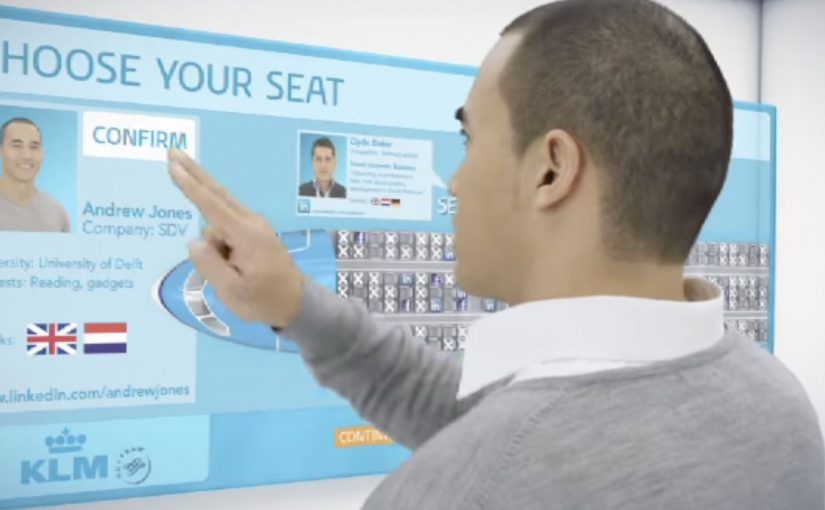
Last year KLM announced it would launch a social seating service in 2012 that lets Facebook and LinkedIn users meet interesting passengers on their flight.

From social graph to seat map

The mechanism is opt-in. Passengers can link a Facebook or LinkedIn profile to their booking, view other participating passengers, and use that context to decide who they might like to sit near. Instead of “broadcasting” brand messages, KLM uses social signals to make the journey feel more connected and a little less anonymous.

In global airline customer experience, social features only earn their place when they reduce travel friction while keeping passenger comfort and control intact.

Why this goes beyond advertising

The real question is whether your “social” idea earns a place inside the core workflow, or stays a bolt-on marketing layer.

This is not a campaign that ends when the media stops. It is a product layer that sits inside the booking and seat-selection experience. That matters because the value is practical. The idea helps solo travelers find relevant people. It helps professionals spot peers. It helps conference-goers connect before landing.

What makes the idea feel safe enough to try

The service is framed as voluntary. You choose to participate, and the experience only works if passengers trust they can opt in, opt out, and keep the interaction lightweight. That balance is the difference between “novel” and “creepy”, especially when your setting is an enclosed cabin for many hours.

Extractable takeaway: If a feature touches identity inside a captive environment, design for clear consent, easy exit, and low-pressure interaction first.

Where it is live, for now

Meet & Seat has now gone live and is currently available on KLM flights between Amsterdam and New York, San Francisco and São Paulo. The stated intent is to extend the service to other sectors over time.

Steal this pattern for social utility

  • Turn social into utility. A social feature that solves a real moment beats social content that asks for attention.
  • Make it opt-in by design. Voluntary participation is how you earn trust for anything identity-adjacent, meaning tied to real identity or profile data.
  • Embed it in a workflow. Booking and seat selection are high-intent moments where new features get tried.
  • Keep the promise small. Help people meet someone interesting. Do not overclaim “matchmaking”.

A few fast answers before you act

What is KLM Meet & Seat in one line?

An opt-in service that lets passengers connect via Facebook or LinkedIn and use that context during seat selection to sit near people they find interesting.

Why is this different from a normal social media campaign?

Because it is a service embedded in the travel journey, not content distributed around it.

Why does opt-in matter so much here?

Because seatmate selection touches identity and comfort. Participation needs to feel controlled, reversible, and low-pressure.

Where should a similar feature live in the journey?

Put it in a high-intent step, such as booking or seat selection, so people can try it when they already have a reason to act.

What is the main transferable lesson?

Stop treating social as a megaphone. Treat it as a signal you can convert into a useful moment inside the customer journey.