Durex UK: Dual Screen Ads

When the “real” ad plays on your second screen

People watch TV with a phone in hand. Durex UK used that habit to turn a standard broadcast spot into an interactive experience.

Last year, Durex UK created a new way for viewers to interact with its TV ad. Viewers who used the Durex Explore mobile app while watching the ad on their TV or computer got a steamy alternative on their second screen.

How the dual-screen mechanic worked

The mechanism was straightforward. The broadcast spot acted as the trigger, and the Durex Explore app delivered an alternative experience on the viewer’s phone or tablet.

That split matters. The TV carried the mainstream version. The second screen carried the more private, more personal layer, where the viewer could engage without turning the living room into a shared moment.

In UK brand communications, second-screen behavior is already the norm.

Why it lands in real viewing contexts

This works because it respects how people actually consume media.

Phones are personal. TV is social. By moving the steamy content to the second screen, Durex created a “permissioned” experience. The viewer chooses it, in their own space, on their own device.

It also rewards attention. Instead of asking viewers to tolerate an ad, it gives them a reason to participate.

The business intent behind extending TV and radio through an app

The intent is to convert passive reach into active engagement, while keeping the broadcast execution broadly acceptable.

Then, on Valentine’s Day this year, Durex UK repeated the same idea via radio. They released a steamy radio spot that also used the Durex Explore app to provide listeners with a similar steamy video experience on their smartphone or tablet.

That is the strategic move. One app. Multiple channels. A consistent interaction model that travels across TV, computer viewing, radio, and mobile.

What to steal from this second-screen pattern

  • Use the second screen for the private layer. Put the content that needs discretion on the personal device.
  • Make participation optional and clear. The viewer should feel in control of switching modes.
  • Design one mechanic that scales across channels. If the app is the interface, TV and radio can both become entry points.
  • Reward attention with a different experience. The second-screen payoff must feel meaningfully distinct from the broadcast spot.

A few fast answers before you act

What did Durex UK do with the Explore app?

They used it to deliver an alternative, steamy second-screen experience for viewers watching a TV ad, and later for listeners hearing a radio spot.

What is the core mechanism?

A broadcast ad acts as the trigger. The mobile app provides the alternative content on a phone or tablet.

Why is second screen a good fit for this category?

Because it keeps intimate content on a personal device, while the broadcast remains suitable for shared environments.

What business goal does this support?

Turning broadcast reach into measurable engagement and creating a repeatable interaction layer that works across channels.

What is the main takeaway for marketers?

If your message has a “public” and “private” version, broadcast the public layer and let the second screen deliver the private layer by choice.

NIVEA: Protection Ad

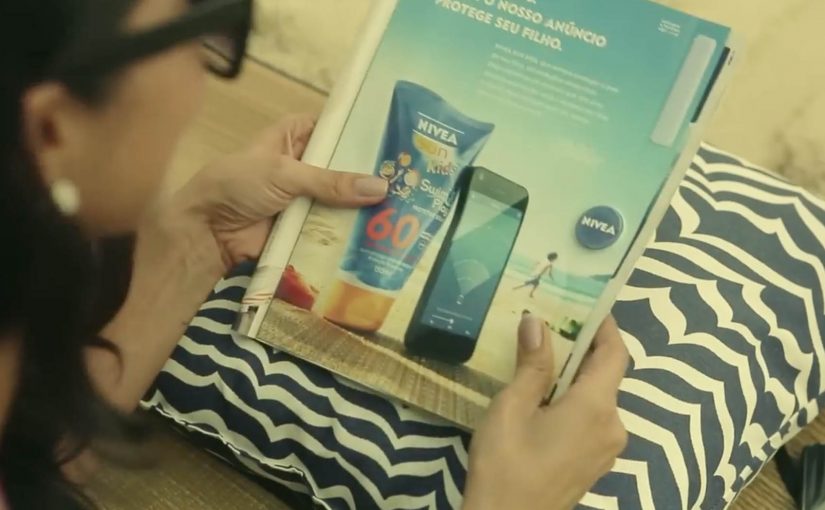
Last year NIVEA transformed a regular print ad into a portable solar charger for smartphones. Now in its latest ad, NIVEA has made the right side detachable, so people on the beaches of Brazil can use it as a trackable bracelet.

Parents who want to keep an eye on their children can rip off the bracelet, attach it to a child’s arm, and then download the companion app. In the app, they can add each child’s name and set the maximum distance each child can wander. If a child goes too far, the app sends a loud alert.

From print to proximity

The clever part is that it is not just a “detachable freebie”. The bracelet is described as embedding Bluetooth proximity tech, so the printed unit becomes a functional signal that a phone can detect and monitor.

In FMCG innovation, utility-based media works best when the object removes a real anxiety in the exact moment the product is used.

Why the idea lands on the beach

NIVEA’s product promise is protection, but protection on a beach is not only about skin. It is also about the panic of losing sight of a child in a crowded, noisy, high-movement environment. The bracelet reframes the brand benefit from a claim to a service.

The mechanism is also instantly explainable. Tear it out. Put it on. Set a safe radius. Get alerted. That simplicity is what turns a print placement into something people talk about, and something press can repeat without over-explaining.

Business intent

This is a campaign designed to win preference in a category full of parity. It makes NIVEA Sun Kids feel like an innovator in a place where it matters, and it creates a reason to choose the brand that is not only SPF.

The work later received major awards recognition, including winning the Mobile Lions Grand Prix at Cannes Lions.

What to steal

  • Turn media into a usable object. If it solves a real problem, people keep it and share it.
  • Map the utility to the brand promise. The best “useful ads” make the benefit feel literal.
  • Make setup frictionless. Clear instructions and a fast pairing experience are the difference between buzz and abandonment.
  • Design for the real environment. Beach. Noise. Distance. Movement. The alert has to work in the messy world.

A few fast answers before you act

What is NIVEA’s Protection Ad?

It is a print ad that includes a tear-out bracelet for children, paired with a mobile app that alerts parents if a child moves beyond a preset distance on the beach.

How does the bracelet connect to the phone?

Coverage describes the bracelet as using Bluetooth proximity technology. The phone detects the bracelet, and the app uses distance thresholds to trigger alerts.

Why does this count as strong “useful advertising”?

Because the ad delivers a real service in-context. It does not only talk about protection, it provides an extra layer of it during a real beach day.

What is the biggest risk with safety-themed tech campaigns?

Trust and reliability. If pairing fails, alerts misfire, or the experience feels unclear, the concept turns from reassurance into frustration.

What should you measure if you build something similar?

Redemption and pairing success rate, app installs driven by the ad unit, repeat usage during real outings, and brand preference uplift versus a control region or period.

Coca-Cola Mini Me: 3D-Printed Mini Figurines

After Volkswagen, Coca-Cola is the next brand to tap the 3D printing trend.

For the launch of its new mini bottles in Israel, Coca-Cola with their agency Gefem Team came up with a campaign that allowed anyone to create 3D mini figurines of themselves. To get one in real users had to work a bit.

So first users created the minis using a mobile app. Then they had to keep them happy by feeding it and taking care of its needs.

There was even a virtual supermarket within the app that you could visit to buy your groceries for your mini self.

Those who successfully participated were then invited to the 3D printing lab inside Coca-Cola’s factory in Israel, where they received the mini versions of themselves.

Why this is more than a 3D-printing stunt

The 3D print is the reward, not the whole experience. The real engine is the progression loop. Create a mini-self. Care for it. Earn the invitation. Then collect the physical proof.

  • Personal creation. You do not receive a generic giveaway. You create “you”.
  • Ongoing engagement. Feeding and caring builds repeated interactions over time.
  • Escalation to the physical world. The factory lab visit turns digital participation into a memorable moment.

The virtual care loop makes the prize feel earned

The app mechanic is intentionally effortful. You have to keep the mini happy. You have to manage its needs. Even the virtual supermarket reinforces routine and “ownership”.

That matters because it shifts the figurine from a freebie into a trophy. Something you earned by participating.

Why the factory lab invitation is a smart finale

Bringing people into a Coca-Cola factory adds legitimacy and drama. It also creates a content moment. A physical place, a “lab”, and a 3D print reveal that people can photograph and share.

  1. Access as a reward. The invitation itself feels exclusive.
  2. Proof of innovation. The brand demonstrates capability in a tangible way.
  3. Memory value. The experience becomes a story, not just a product launch.

What to take from this if you build digital-to-physical campaigns

  1. Make the reward personal. Personal outputs are more meaningful and more shareable.
  2. Use a progression loop. Repeated small actions can outperform a single big interaction.
  3. Finish with a real-world moment. Physical experiences create stronger recall than purely digital stunts.
  4. Let the brand environment play a role. A factory lab gives credibility and theatre without feeling fake.

A few fast answers before you act

What is Coca-Cola “Mini Me”?

It is a campaign in Israel where users created a virtual mini-self in a mobile app, cared for it over time, and then received a 3D-printed figurine version after qualifying.

How did users qualify to get a real figurine?

They created the mini using the app and kept it happy by feeding it and taking care of its needs, including buying items in a virtual supermarket.

Where did the 3D printing happen?

Qualified participants were invited to a 3D printing lab inside Coca-Cola’s factory in Israel, where they received their mini figurines.

Why include a virtual care mechanic?

It creates repeat engagement and makes the physical reward feel earned rather than given away.

What is the transferable lesson for campaign design?

If you combine personal creation with a progression loop and a physical payoff, you can turn a product launch into a longer-lasting experience.