
Volvo Keyless Cars

You land at Gothenburg airport, walk up to your car. There is no key handover. No kiosk. No awkward “where did I put it?”. You unlock the door with your phone, start the engine, and drive off. That is the behavioral shift Volvo is putting on the table as it pilots a Bluetooth-enabled digital key. The physical key stops being the default. The car starts behaving like a shareable service.

Volvo’s plan is straightforward and bold. Replace the physical car key with a mobile app that acts as a digital key. It locks and unlocks doors and trunk. It also allows the engine to be started. Volvo intends to roll this out to a limited number of commercially available cars in 2017, with real-world testing beginning in spring 2016 via Sunfleet at Gothenburg airport in Sweden. Physical keys remain available for people who want them.

What “keyless” really changes

Most coverage of keyless cars focuses on convenience. That is real, but it is not the headline. The headline is that the key becomes software, and software is shareable, revocable, time-bound, and measurable.

Once the key is an app, a car can be:

  • Shared without meeting up. You can grant access remotely, without physically transferring anything.
  • Granted for a window of time. A key can expire after a set period, or be limited to a specific day.
  • Revoked instantly. Access can be removed without changing locks or reissuing hardware.
  • Audited. Digital access can create a clean trail of who had access, when, and potentially under what conditions.

Those are not just UX improvements. They are the primitives of “car as a platform,” meaning a vehicle where access and entitlement are programmable.

The real question is whether turning the key into software makes sharing trustworthy and reversible, without adding friction in everyday edge cases.

In mobility services and car-sharing operations, making access software is the quiet foundation for scalable sharing, service models, and trust.

The strategic unlock for car sharing and new mobility behavior

Volvo is not positioning this as a novelty feature. The real-world test through Sunfleet is the tell. Keyless is a missing piece for car sharing because physical keys create friction at exactly the moment you need trust and speed.

Extractable takeaway: When an entitlement becomes software, the hard problem shifts from logistics to permissions, which is why sharing can scale without constant handoffs.

When access is digital:

  • You can share your own car more safely, because you do not need to hide a key or coordinate handoffs.
  • You can operate fleets with lower operational drag, because key logistics shrink.
  • You can start designing new use cases that are impractical when keys are physical.

This is where brand storytelling gets interesting. Volvo is not “marketing an app.” It is marketing an engineered shift in how the product behaves. The brand moves from sheet metal and safety features to a designed system of access, trust, and mobility.

What the digital key needs to get right

Moving the key to a phone is a promise. It must hold up in the messy reality of travel days, dead batteries, and edge cases.

A credible keyless experience typically needs clear answers to:

  • What happens if the phone battery dies? (Fallback options matter, including a physical key for those who want it.)
  • How does identity and authorization work? (Who can issue a key. Who can revoke it. What is the recovery path.)
  • How secure is the handoff? (Bluetooth is convenient. It also raises expectations around encryption, pairing, and spoofing resistance.)
  • How does it work for families and multi-driver households? (Multiple keys, multiple devices, and different permissions.)
  • How does it behave when connectivity is weak? (Airports and parking structures are not always friendly environments.)

None of these are reasons to avoid keyless. Keyless is worth doing, but only when fallbacks and recovery are designed as first-class features.

The marketing lesson hiding inside the engineering

This is a strong pattern in modern innovation storytelling. A brand earns attention when the innovation is tangible and legible. Not “we are digital.” Instead, “a thing you used to do physically becomes software, and your behavior changes.”

For Volvo, the narrative is easy to grasp:

  • The key becomes an app.
  • Access becomes shareable.
  • Mobility becomes more flexible.

That is the kind of product story that travels well. It is engineering that people can feel.

Steal the pattern: access becomes software

  • Reframe the benefit. Lead with “the key becomes software,” then show sharing, revocation, and time-bounding as the real unlock.
  • Design trust into the edge cases. Dead batteries, weak connectivity, and recovery paths decide whether the behavior shift sticks.
  • Make sharing operationally cheap. When keys stop being objects, handoffs and key logistics stop being the bottleneck.
  • Use auditability to increase confidence. If access is trackable, it can support clearer accountability and faster issue resolution.

A few fast answers before you act

What is a digital car key?

A digital car key is a phone-based key that can replace the physical key for core actions like locking, unlocking, and starting the car.

Why does keyless matter beyond convenience?

Because access becomes programmable. You can share it, time-limit it, revoke it, and potentially audit it. That changes how ownership and sharing can work.

What is Volvo actually proposing here?

A Bluetooth-enabled app that replaces the physical key, with a real-world test through Sunfleet at Gothenburg airport, and a limited rollout planned for 2017. Physical keys remain available.

What is the immediate business implication for mobility services?

Lower friction. Less operational overhead around key handling. More flexible sharing models for fleets and individuals.

What must be true for this to feel trustworthy?

Clear fallbacks and recovery paths, secure authorization and revocation, and a user experience that holds up in real-life edge cases like dead batteries and poor connectivity.
TV Viewing: Super Bowl Meets HoloLens

TV viewing is overdue for a real change

The TV viewing experience does not change drastically for years. Bigger screens, better resolution, smarter interfaces. But the core behavior stays familiar.

That is why sophisticated headsets like Microsoft HoloLens feel like a genuine breakpoint.

They do not just improve the screen. They change the environment around it.

Microsoft and the NFL re-imagine the Super Bowl

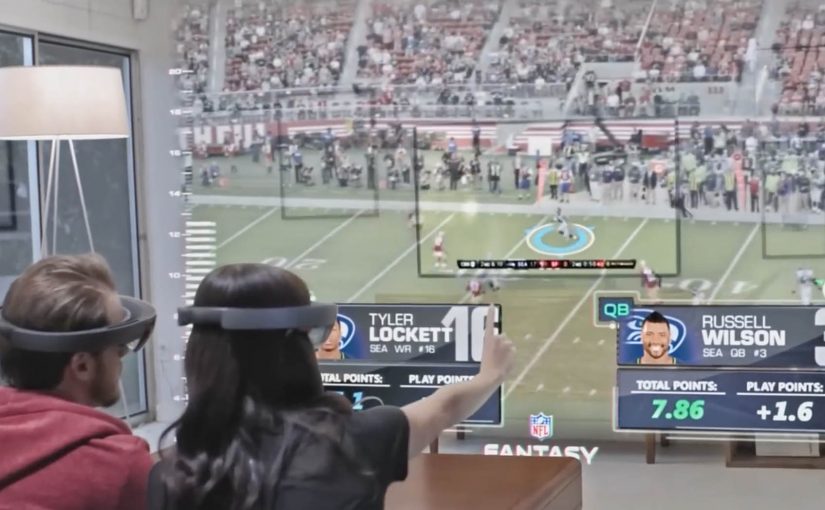
In a recently released video, Microsoft and the NFL re-imagine how a Super Bowl game could be watched with multiple friends and family members.

The scenario pushes beyond passive viewing. It turns the living room into an interactive layer, where the game experience becomes more immersive, more social, and more spatial.

By spatial, I mean the content is anchored to the room, not confined to the TV frame.

This is the kind of concept that makes the future of TV feel tangible.

In mass-market entertainment, the constraint is not what immersive concepts can show, but when consumer hardware becomes affordable, comfortable, and mainstream.

Why this lands for co-viewing

TV should prioritize co-viewing, meaning multiple people watching and reacting together in the same room, because a shared, spatial layer creates viewer control that a single rectangle cannot. The real question is whether you are designing for shared viewer control in the room, or just adding data overlays to a screen.

Extractable takeaway: When you move sports content into the room, design the experience around shared reference points, lightweight interaction, and conversation pacing, not around more screen real estate.

Immersive viewing is real. Consumer timing is not

The video shows how immersive TV watching can get. But Microsoft is not fast-tracking HoloLens for consumer consumption.

For now, only developers can order HoloLens, shipping this year.

No one knows when consumers get access, or when scenarios like this become a reality.

That uncertainty is part of the story. The vision is clear. The rollout timeline is not.

Steal these design cues for living-room sports

  • Design for the room. Treat the TV as one surface among many, then anchor the key moments and data where people naturally look and point.
  • Make co-viewing explicit. Support multiple viewers and viewpoints, so participation feels shared instead of “one person driving.”
  • Prototype for constraints. Assume headsets stay niche for a while, and test what still works when only one person has the device.

A few fast answers before you act

Is this still “TV” or something else?

It starts as TV content, but behaves more like a shared, spatial experience than a single screen.

What is the core shift headsets enable?

They move content off the rectangle and into the room, so viewing becomes environmental and interactive.

What is the biggest constraint right now?

Availability and consumer readiness. Until mainstream hardware adoption happens, this remains concept-led.

What should experience designers take from this?

Design for co-viewing and spatial context. Multiple people, multiple viewpoints, and shared interaction become first-class requirements.

What should you prototype first?

Prototype the simplest “shared moments” layer, so two to four people can compare and discuss the same play without anyone leaving the game flow.

Hyundai: Virtual Guide AR App for Owners

An owner’s manual you point at the car

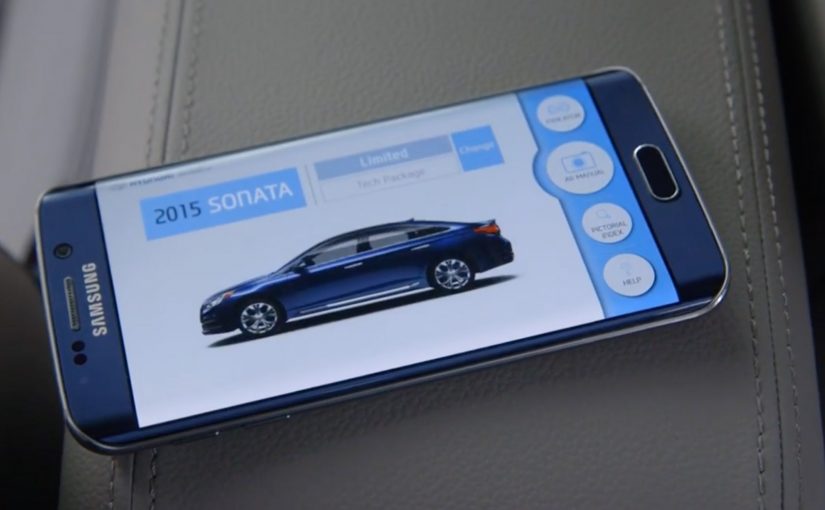
To make life easier for car owners, Hyundai has built an augmented reality app called the Virtual Guide. It allows Hyundai owners to use their smart phones to get more familiar with their car and learn how to perform basic maintenance without delving into a hundred page owner’s manual.

Here, augmented reality means on-screen overlays that label real-world parts and show step by step guidance while you view the car through the phone camera.

Here is a short demo video of the app from The Verge at CES 2016.

The clever part: help appears exactly where you need it

Instead of searching through pages, you point your phone at the car and learn in-context. That one shift. From reading about a feature to seeing guidance on the actual part. Makes learning faster and less frustrating.

In consumer product and mobility brands, the highest-value help shows up at the moment of use, not in a document you have to hunt for.

The real question is whether your product help meets people where the problem happens, or sends them off to search.

In-context, camera-based guidance should be the default for “how do I” tasks. Manuals should be the fallback.

Why this is a big deal for everyday ownership

Most drivers do not ignore manuals because they do not care. They ignore them because the effort is too high at the moment they need help. AR lowers that effort by turning “How do I…?” into a quick visual answer while you are standing next to the car.

Extractable takeaway: If you can put guidance on the real object in front of someone, you remove the search step. That makes follow-through more likely.

What Hyundai is really building here

Fewer support moments, fewer avoidable service misunderstandings, and a smoother owner experience that strengthens trust in the brand long after purchase.

The Virtual Guide app will be available in the next month or two for the 2015 and the 2016 Hyundai Sonata and will come to the rest of the Hyundai range later on this year.

Patterns to borrow for product help

  • Move instruction from documentation into the environment. In-context guidance beats search.
  • Design for the real moment of need. Standing next to the product, phone in hand.
  • Make “basic maintenance” feel doable. Confidence is a retention lever.

A few fast answers before you act

What is Hyundai Virtual Guide?

An augmented reality app that helps Hyundai owners learn car features and perform basic maintenance using a smartphone instead of relying on the printed owner’s manual.

How does it work in practice?

You use your phone to view parts of the car and get guidance designed to help you understand features and maintenance steps in context.

Which models does the post say it supports first?

The post says it will be available first for the 2015 and 2016 Hyundai Sonata, then expand across the Hyundai range later in the year.

Where was the demo shown?

The post references a demo video from The Verge at CES 2016.