
Google Goggles: Rise of Visual Search

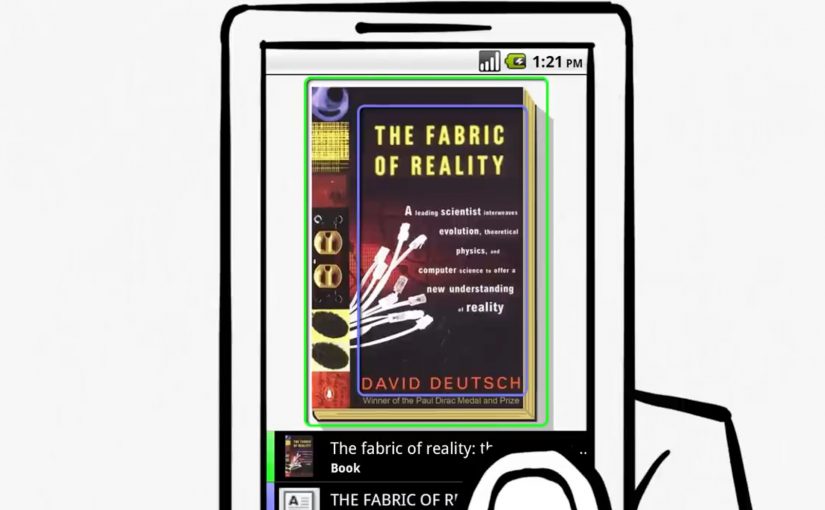
You take an Android phone, snap a photo, tap a button, and Google treats the image as your search query. It analyses both imagery and any readable text inside the photo, then returns results based on what it recognises.

This is visual search, meaning search where a captured image becomes the input instead of typed words. The point is not a clever camera trick. The point is that “point and shoot” can replace “type and search” in moments where you cannot name what you are looking at.

Before this, the iPhone already has an app that lets users run visual searches for price and store details by photographing CD covers and books. Google now pushes the same behaviour to a broader, more general-purpose level.

From typing to pointing

Google Goggles changes the input model. The photo becomes the query, and the system works across two parallel signals:

  • What the image contains, via visual recognition.
  • What the image says, via text recognition.

Because the system can extract both shape and text from the same frame, it removes the translation step between seeing something and turning it into keywords. That translation step is where most friction lives on a small mobile keyboard.

Why “internet-scale” recognition is the point

Google positions this as search at internet scale, not a small database lookup. The index described here includes 1 billion images, which signals the ambition to recognise the long tail of everyday objects, covers, signs, and printed surfaces.

In mobile, in-the-moment consumer and retail discovery, this matters because intent often starts with something you can see but cannot name.

Why it lands beyond “cool tech”

When the camera becomes a search interface, the web becomes more accessible in moments where typing is awkward or impossible. You can point, capture, and retrieve meaning in a single flow, using the environment as the starting point.

Extractable takeaway: The winning experiences are the ones that convert recognition into an immediate next step. Identify what I am looking at, then answer the implied question, such as “what is this?”, “where can I buy it?”, “what does it cost?”, “how do I use it?”.

When the camera becomes the keyboard, every physical surface becomes a potential search box. Brands that make their packaging, signage, and product imagery easy for humans and machines to read get discovered even when no one types their name.

The bet Google is making

This is a meaningful shift in input, but it will not replace typed search. It will win the moments where the user’s intent is anchored in the physical world and the fastest way to express that intent is to show the object.

What to steal if you build digital experiences

  • Design for machine-readable cues. High-contrast logos, consistent product shots, and legible typography increase the odds that recognition resolves to the right thing.
  • Assume zero-keyboard intent. Build journeys that start from what people see around them, not only from brand names and product model numbers.
  • Plan for ambiguity. Recognition will be probabilistic, so your assets should help disambiguate similar-looking items.
  • Treat demos as proof, not decoration. If your pitch is “this feels different,” show it working, as the original Goggles demo does.

A few fast answers before you act

What does Google Goggles do, in one sentence?

It lets you take a photo on an Android phone and uses the imagery and any readable text in that photo as your search query.

What is the comparison point mentioned here?

An iPhone app already enables visual searches for price and store details via photos of CD covers and books.

What signals does Goggles read from a photo?

It uses both visual recognition of what is in the image and text recognition of what is written in the image.

What is the scale of the image index described?

Google describes an index that includes 1 billion images.

What is included as supporting proof in the original post?

A demo video showing the visual search capability.
Vampire Diaries Augmented Reality

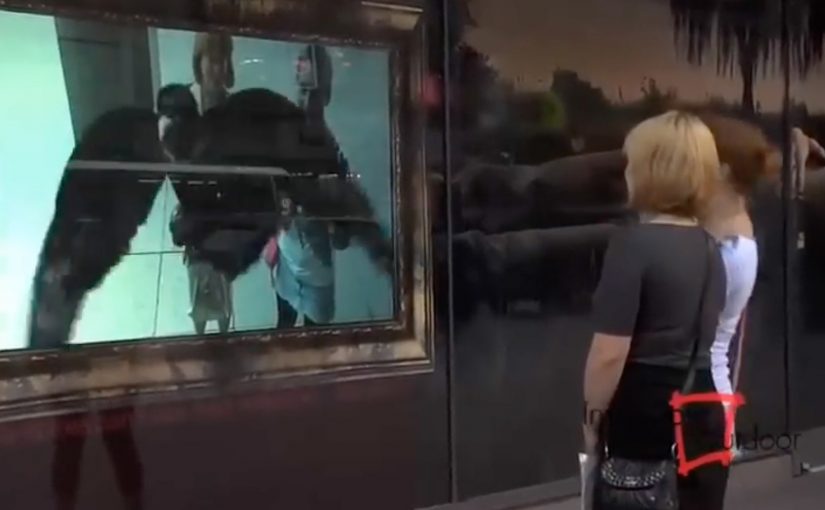
An outdoor advertising campaign by Inwindow Outdoor for CW’s Vampire Diaries appears in Los Angeles and New York. It uses augmented reality to trigger the on-screen display. Here, augmented reality functions as the activation cue that starts the display at the right moment.

The idea. Outdoor that reacts

The execution uses augmented reality as the activation layer. Instead of treating the screen as a static placement, the display is triggered through AR to create a moment that stands out in public space.

The real question is whether the AR layer changes what the outdoor screen does, or just decorates the same placement.

How it works. A trigger drives the screen

The on-screen content is not always running. It is initiated when the AR trigger is detected, turning a standard outdoor screen into a timed reveal rather than a constant loop.

In global entertainment marketing, outdoor activations like this work best when the trigger creates a clear before-and-after moment people can notice in a few seconds.

Where it runs

The installation appears in two major markets. Los Angeles and New York.

Why it lands

AR is worth the added complexity in outdoor only when it changes the behavior of the medium in public space. A triggered reveal creates contrast versus always-on loops, which is what makes the moment feel different rather than merely placed.

Extractable takeaway: Use AR as an activation layer that creates a noticeable state change on the screen, so the placement reads as a triggered experience, not static media.

What to apply in your next OOH activation

  • Design for a visible state change: Make the triggered moment look materially different from the idle screen state.
  • Keep the trigger simple: The audience should not need instructions to notice that something just changed.
  • Treat AR as the switch: Use AR to initiate the moment, not as decorative overlay on an unchanged placement.

A few fast answers before you act

What is this campaign?

An outdoor advertising campaign for CW’s Vampire Diaries by Inwindow Outdoor that uses augmented reality to trigger an on-screen display.

Where does it appear?

Los Angeles and New York.

What role does augmented reality play?

It is used as the activation layer that triggers the on-screen display.

Who executes it?

Inwindow Outdoor.

What is the core takeaway?

Use AR as an activation layer that turns an outdoor screen from static media into a triggered experience.

Esquire’s Augmented Reality Issue

You open a print issue of Esquire and the pages do not stop at ink. You point a webcam or phone at a marked page and the magazine layer expands. Here, “marked” means the page includes a printed visual marker the AR software can recognize. Video clips play, 3D objects appear, and extra content sits directly on top of the printed layout. The issue behaves like a portal, not a publication.

The move. Extending print with augmented reality

Esquire experiments with an augmented reality-enabled issue that connects physical pages to digital experiences. The print product becomes the trigger, and the digital layer becomes the reward for curiosity.

How it works. Markers plus a camera

  • Selected pages include visual markers designed to be recognized by software.
  • The reader opens the AR experience on a computer webcam or mobile device.
  • When the camera recognizes the page, digital content overlays the magazine.
  • The overlays can include video, interactive elements, and 3D objects tied to the editorial content.

In publishing and brand media, augmented reality works best when the page itself becomes the interface rather than a detour to a separate destination. Because the camera locks onto the page itself, the overlay feels anchored to the layout, which makes the payoff arrive without a context switch.

In consumer publishing and brand media, the most repeatable AR pattern is to let the page be the trigger and the camera be the lens.

Why it matters. A magazine that behaves like a medium

This is not a banner ad placed on paper. It is a format shift. The real question is whether you are using AR to deepen the editorial moment or to bolt on a gimmick. The reader keeps control, but the magazine now has depth. Print becomes interface, and “extra content” becomes spatial and contextual rather than hidden behind a URL. If the overlay does not deepen the page you are already reading, it should not ship.

Extractable takeaway: Use AR to deepen the page the reader is already in, with a fast first reveal anchored to the layout, so the extra layer feels earned instead of tacked on.

What to take from it. Designing for the moment of discovery

  • Use print as the entry point. A physical artifact can still be the strongest trigger for attention.
  • Reward curiosity quickly. The first overlay has to land fast to justify the setup.
  • Keep the experience editorial. AR works best when it extends the story, not when it interrupts it.
  • Plan for repeatable templates. Once the pipeline exists, AR pages become a scalable content format.

A few fast answers before you act

What is Esquire’s augmented reality issue?

A print magazine issue that unlocks digital overlays like video, interactive elements, and 3D objects when a camera recognizes marked pages.

What do readers need to experience it?

A webcam or phone camera, plus the AR experience that recognizes the markers in the issue.

What kind of content can appear?

Video clips, interactive elements, and 3D overlays tied to the editorial pages.

Why is this different from typical digital add-ons?

The print page becomes the interface, so the digital layer is contextual and anchored to the physical layout.

What is the transferable lesson?

Treat physical media as an activation surface, then design a fast, editorially relevant reveal that makes the extra layer feel earned.