
Macy’s iBeacon: Retail Enters Micro-Location

Macy’s iBeacon: Retail Enters Micro-Location

iBeacon moves from concept to real retail

Apple is working to bring iBeacon technology into retail stores. But the first real-world deployment lands fast.

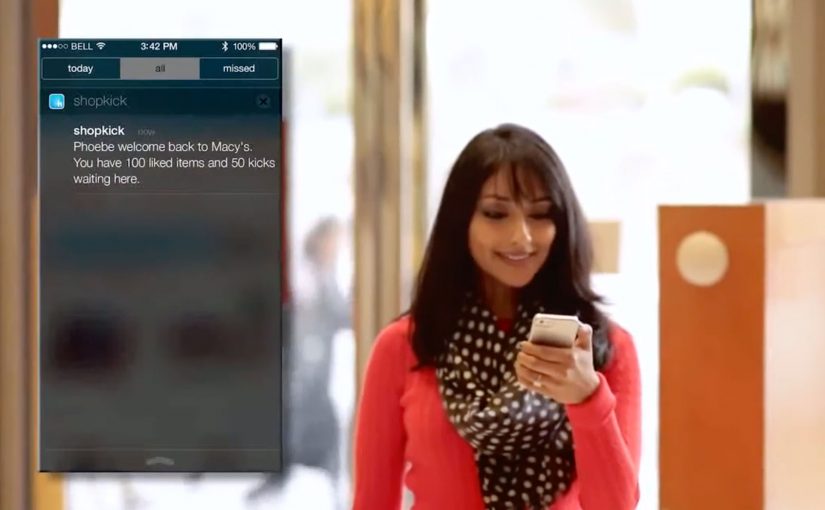
On November 20, Shopkick deploys an iBeacon system at Macy’s, effectively bringing beacon-driven retail experiences live before Apple’s own retail rollout becomes mainstream.

At Macy’s, the implementation is branded as shopBeacon, an iBeacon-based in-store experience.

What iBeacon makes possible in-store

iBeacon, introduced with iOS 7, uses Bluetooth Low Energy (BLE) signaling to enable micro-location services inside stores, meaning aisle-level positioning rather than GPS-level proximity.

That matters because it changes what mobile in-store experiences can do. Because the signal is precise inside the environment, experiences can trigger at the moment of intent, reducing the need for shoppers to search.

Stores can deliver information and value based on a shopper’s precise location inside the environment, not just on GPS-level proximity.

Micro-location enables location-specific deals and discounts, product recommendations by aisle or department, loyalty rewards triggered by presence, and contextual content that enhances the shopping journey.

The promise is simple. The store becomes a responsive, context-aware interface.

In brick-and-mortar retail, micro-location only matters when it is permissioned, useful, and tied to measurable in-store behavior change.

What makes Macy’s deployment noteworthy

This is not a lab demo. It is a live retail environment.

The shopBeacon trial runs as a closed beta at Macy’s Herald Square in New York and Macy’s Union Square in San Francisco.

This marks the shift from talking about beacons to operationally testing them in flagship stores, where footfall, density, and shopper intent are real.

The strategic signal for retailers and brands

Beacon technology is not another channel. It is an in-store intelligence layer that links a shopper’s physical context to digital triggers and measurement.

Extractable takeaway: Micro-location only becomes strategic when it turns permissioned context into real utility that changes behavior, not just into more messages.

The real question is whether you can turn aisle-level context into permissioned help that measurably changes in-store behavior.

If executed with permission and relevance, it can reduce friction in discovery and decision-making, increase the utility of mobile without forcing shoppers to search, and bridge physical browsing with digital personalization.

If executed poorly, it becomes noise. The win condition is not proximity. It is context plus permission plus usefulness.

What to borrow for your beacon pilot

  • Win permission first. Treat opt-in and relevance as the product, not an afterthought.
  • Design for usefulness at the moment of intent. Use aisle-level context to reduce discovery and decision friction, not to spam offers.
  • Make measurement non-negotiable. Track opt-in rates, perceived usefulness, and impact on dwell and conversion to prove behavior change.

A few fast answers before you act

What does “micro-location” mean in a store context?

It means detecting a shopper’s location at aisle or department level, not just “near the store”, enabling experiences that change based on where the shopper is standing.

Why is BLE central to iBeacon-style deployments?

Bluetooth Low Energy enables persistent, low-power proximity signals that make in-aisle triggers and experiences feasible without draining devices.

Is the main value just pushing offers?

No. Offers are one use case. The stronger value is contextual service, guidance, and relevance when it reduces shopping friction.

What should retailers measure in early pilots?

Opt-in rates, perceived usefulness, impact on dwell and conversion, and whether the experience feels helpful rather than intrusive.

What is the quickest way for this to fail?

When it becomes noisy, repetitive, or unpermissioned. Proximity alone is not value. Context and usefulness are the win condition.
The Adaptive Storefront: BLE Retail Display

The Adaptive Storefront: BLE Retail Display

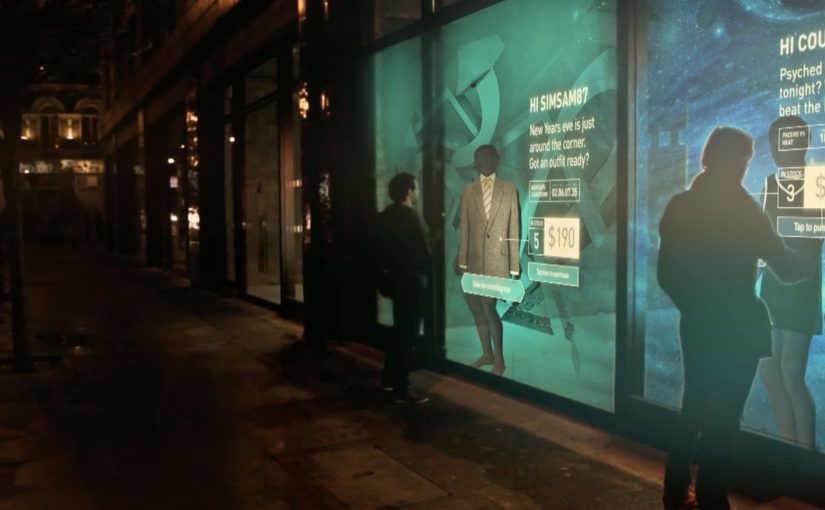
Shop windows, billboards, bus stops, and car showrooms do not have to be passive experiences. In the video below, a prototype interactive digital display adapts to whoever stands in front of it.

The display identifies shoppers using Bluetooth Low Energy (BLE) and reacts to personal data stored on the shopper’s mobile device, such as shopping habits and preferences. Shoppers can swipe through personalised content, place items in a virtual shopping cart, and purchase straight from the display.

When glass turns into a shoppable interface

This “adaptive storefront” concept takes a familiar retail surface and makes it behave like a storefront UI. Here, “adaptive storefront” means the window can recognise a nearby device via BLE and change what it shows based on data available on that device. Not a poster. Not a looped video. A live interface that changes per person and lets you complete an action while you are still in that high-intent moment of attention.

How the prototype behaves in front of a shopper

  • Detect. BLE proximity is used to recognise that a specific shopper is present.
  • Adapt. The display adjusts what it shows based on data available on the shopper’s phone.
  • Let the shopper drive. Swiping changes what is on screen, rather than forcing a fixed sequence.
  • Close the loop. Items can be added to a cart and purchased directly from the display.

In physical retail environments, the storefront is the first high-attention interface a brand controls before a shopper reaches the shelf.

Why it lands

Because the display can recognise a nearby device and accept input on the surface, it compresses discovery, consideration, and purchase into one interaction. The value is not the novelty of a “smart window”. It is the reduction of steps between interest and action, while the shopper’s intent is still fresh. The real question is whether you can do that with clear permission and control, not silent personalisation.

Extractable takeaway: A surface becomes valuable when it combines context with immediate action. Personalisation only earns its keep when it removes friction and helps a shopper decide faster, not when it merely looks clever.

What it is really trying to unlock for brands

Behind the demo is a clear ambition. Turn high-footfall surfaces into conversion surfaces. If the experience is permissioned and useful, it can bridge the gap between physical browsing and digital checkout without forcing a shopper to open an app, search, and start over.

That also hints at a measurement upgrade. A storefront that can be interacted with can be instrumented. What people swipe. What they ignore. What they add. Where they drop. That is a very different feedback loop than counting impressions.

Practical takeaways for adaptive storefronts

  • Start with one job-to-be-done. For example, “help me shortlist”, “show me what is in stock”, or “let me buy in two taps”.
  • Make control obvious. If swiping is the interaction, design the UI so people understand it in one second.
  • Keep data minimal and on-device. Use only what is needed to improve relevance, and avoid making the experience feel intrusive.
  • Design for the environment. Glare, distance, dwell time, and group behaviour change everything compared to mobile UX.
  • Plan the opt-in moment. The experience works best when the shopper understands why the screen adapts and what they get in return.

A few fast answers before you act

What is an “adaptive storefront” in plain terms?

It is a storefront display that changes what it shows based on who is standing in front of it, and lets the shopper interact and buy directly on the surface.

Why use BLE for this type of experience?

BLE enables low-power proximity detection, so a display can recognise a nearby device and trigger the right experience without requiring scanning a code each time.

What data is needed to personalise the display?

Only enough to improve relevance. For example, stated preferences, browsing history, or saved items, ideally kept on the shopper’s phone and shared with clear permission.

What makes this feel useful instead of creepy?

Permission, transparency, and value. The shopper should understand what is happening, control it, and get something meaningfully better than a generic screen.

What should you measure in a pilot?

Opt-in rate, interaction rate, add-to-cart rate, conversion rate, and whether the experience reduces time-to-decision without increasing drop-off.

KPT/CPT: Smileball

KPT/CPT: Smileball

Since June 2010, I had seen smile detection technology used in vending machines and Facebook apps to create innovative engagement with target audiences.

Now, in this example, KPT in Switzerland decides to show that it has the happiest health insurance clients. To demonstrate that, they create Smileball, a pinball machine controlled by smiles.

Unlike normal pinball machines where the two paddles are controlled by buttons on either side, Smileball uses motion sensing technology to detect changes in a person’s smile and map that input to the respective paddles. By playing the game, participants get a chance to win a trip to a comedy show in New York.

A pinball machine that rewards the emotion it wants

The twist is that the game cannot be mastered by tense concentration. You need to keep smiling. That forces the behavior the brand wants to claim, and it makes the proof visible to anyone watching, because the input is literally on the player’s face.

How the mechanism works

The machine replaces buttons with a camera-based smile input. Smile more on one side and the corresponding flipper becomes easier to trigger. Relax your face and you lose precision. The interface quietly trains you into the brand message through play, not persuasion.

In Swiss health insurance marketing, turning an intangible promise like “happier customers” into a visible, shared moment can outperform any satisfaction statistic.

The real question is whether the interface makes a soft brand claim believable in public.

Why it lands

It is self-explaining, socially contagious, and it creates a public demonstration loop. People walk up because it is a pinball machine. They stay because it behaves differently. The crowd laughs because the control method is human and slightly absurd. In the end, the player’s smile becomes the performance, and the brand gets credit for orchestrating it.

Extractable takeaway: If your proof point is an emotion, design an interaction where that emotion is the input. When the audience can see the input in real time, the claim stops sounding like marketing.

What health brands can steal from Smileball

  • Make the proof visible to bystanders. Spectators are your free distribution channel.
  • Replace a standard control with a brand-relevant one. The control method is the message.
  • Keep the first 10 seconds obvious. If people do not “get it” instantly, they will not try.
  • Add a lightweight reward. A prize gives hesitant people a reason to step up.

A few fast answers before you act

What is Smileball?

A pinball machine where the flippers are controlled by changes in the player’s smile instead of physical buttons.

Why is smile-based control a strong branding choice for a health insurer?

Because it turns “happy customers” into a visible behavior. The player’s smile becomes proof in the moment, not a claim in copy.

Does this store or profile people’s faces?

The campaign is presented as in-the-moment smile detection used only to control the game interface. No storage or profiling is described in the original framing.

What is the biggest risk in executions like this?

Calibration. If the smile detection feels inconsistent, people assume the game is rigged and the experience collapses.

How could a brand apply this pattern without face-based input?

Keep the principle. Make the brand’s desired behavior the control input, then make that input visible so the claim proves itself in public.