
Nutricia: Baby Connection

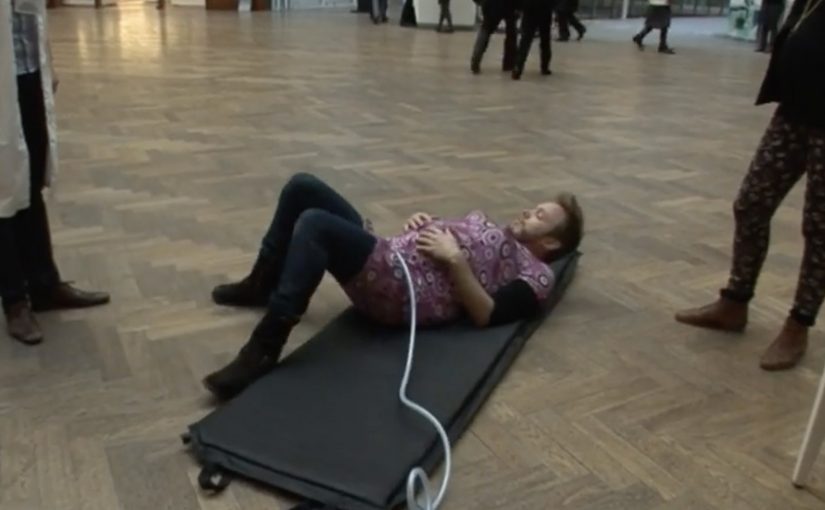
Young parents all over Belgium rely on Nutricia babyfoods every day. To support mums even before their baby is born, Duval Guillaume helped Nutricia create Baby Connection, an iPhone app designed to get dads more involved in the pregnancy.

Baby Connection works best when you use it as a couple. There is a mum version and a dad version, and everything each parent adds is automatically synced with their partner’s phone. The app can even transform two iPhones into one big screen.

A couples app that turns involvement into habit

The mechanism is simple and deliberate. Split the experience into two roles, then keep both roles in lockstep through syncing. Add a playful physical trick, two phones acting like one screen, to make “doing this together” feel tangible, not just promised.

In Belgian consumer brand building, support tools land best when they reduce friction for both parents and make the dad’s role practical, not symbolic.

Why it lands

This works because it shifts the conversation from “be more involved” to “here is exactly how”. Shared inputs, shared visibility, shared moments. The app design quietly nudges the couple into repeated check-ins, which is where involvement stops being intention and becomes routine.

Extractable takeaway: If you want two people to share responsibility, design the product so both can contribute in small ways, see each other’s contributions instantly, and feel like a team without extra coordination effort.

Launching an app with an experience, not a banner

The real question is how to make shared participation feel real before the baby arrives, not how to advertise another pregnancy app.

To launch Baby Connection, Duval Guillaume backed the app with a campaign designed to be as distinctive as the product itself, and to pull the idea into public conversation beyond the app store listing.

The stronger move is to market the shared behaviour the product enables, not just the app itself.

What pregnancy-support brands can borrow

  • Design for the couple, not the individual. Two roles, one shared narrative.
  • Make syncing the default. Shared visibility is the involvement mechanic.
  • Add one physical “together” moment. A simple device interaction can signal partnership better than copy.
  • Launch the product idea, not only the product. If the behaviour change is the point, market the behaviour.

A few fast answers before you act

What is Nutricia Baby Connection?

A paired iPhone app for expectant couples, with separate mum and dad versions that sync pregnancy updates and activities between both phones.

What is the core mechanism?

Two-role design plus automatic syncing, so both parents can add and see information without manual coordination.

Why does the “two iPhones as one screen” idea matter?

It turns a digital feature into a physical couple moment, reinforcing that pregnancy planning is shared, not solo.

What is the business intent behind this kind of app?

To support and deepen trust with parents before birth, by providing a practical tool that keeps the brand present in daily routines.

What is the most reusable lesson here?

If you want involvement from a second person, make contribution easy, feedback immediate, and shared progress visible.
Volkswagen Norway: Test drive in a print ad

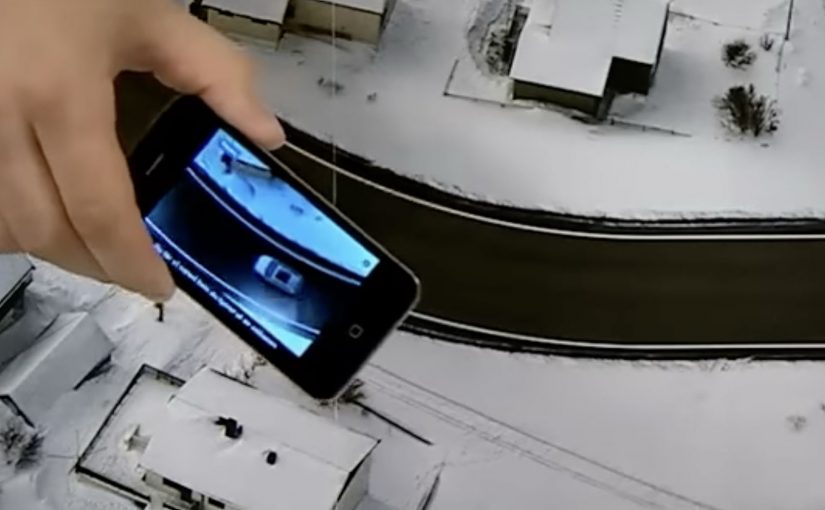
You open a magazine and see a long, empty road. Then you hover an iPhone over the printed page and a Volkswagen appears to “drive” along that road on your screen. It is a test drive that happens inside a print ad, with summer and winter road versions depending on the magazine insert.

Volkswagen Norway builds this as a hybrid print and mobile experience. Readers are prompted to download an app, developed by Mobiento, that turns the printed road into a track. The phone becomes the controller and the page becomes the environment. The payoff is simple viewer control. You move the phone. The car moves with you.

An augmented reality print ad is a piece of print that a camera can recognize as a trigger. Once recognized, an app overlays a digital layer onto the page, anchored to the printed design so the interaction feels connected to the physical medium.

In European automotive marketing, the hardest part is making driver-assist feel concrete without getting people behind the wheel.

The experience is designed to demo three features in a way print usually cannot. Lane assist, adaptive lights, and cruise control. It is not a real test drive, but it is a clear and surprisingly tactile explanation of systems that are otherwise hard to “feel” from a magazine spread.

Why this works as an explanation engine

By “explanation engine” I mean a format that lets someone experience a feature benefit in seconds, not just read about it. Driver-assist features are abstract until you see them respond to a road situation, and this setup works because the printed road plus the phone’s motion becomes a simple input loop the viewer can control. This kind of demo is worth doing when the feature’s value is easier to show than to describe.

Extractable takeaway: When the benefit is behavioural, make the user’s motion the control and the physical asset the scenario.

What the campaign is really doing for the brand

This is a positioning move as much as a product demo. It says Volkswagen brings technology into everyday life and it does it with familiar media, not only with future-facing formats. Print becomes the doorway into a mobile experience, and that contrast makes both feel more interesting.

The real question is whether your media choice can carry the product story without needing a live demo.

What to steal for your own print-to-mobile idea

  • Make the printed asset the interface. The road is not decoration. It is the input surface.
  • Choose features that benefit from simulation. Assist systems and “smart” behaviours are ideal for quick demos.
  • Keep the interaction one-step. Download, point, move. Anything more kills curiosity.
  • Provide two contexts. Summer and winter versions make the concept feel robust and replayable.

A few fast answers before you act

What is “test drive in a print ad” in simple terms?

It is a magazine ad that works with an iPhone app. When you hover the phone over the printed road, the app overlays a car on screen and lets you simulate driving along the page.

What features does the VW print-ad test drive demonstrate?

The experience is built around lane assist, adaptive lights, and cruise control, using the printed road as the scenario that triggers the system behaviours.

Why is this better than a normal print ad for tech features?

Because it shows behaviour, not descriptions. The viewer sees the system respond in a road context, which is more memorable than reading about it.

Is it accurate to call it the world’s first?

Volkswagen Norway bills it that way, and the work is widely described as an early example of augmented reality applied to print as a functional “test road”.

What is the main risk with print-to-app activations?

Friction. If install or recognition is slow, people stop. The first payoff has to arrive quickly so the novelty turns into understanding.

Honda Jazz Interactive TV Ad

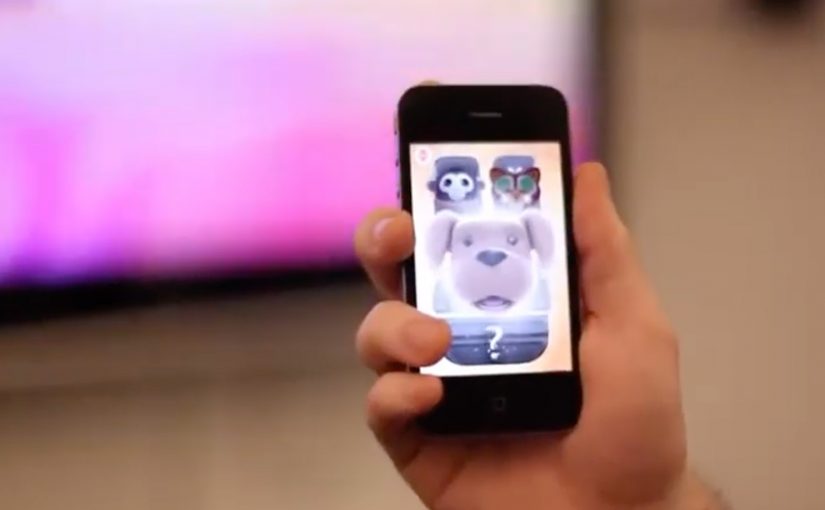
You watch the Honda Jazz “This Unpredictable Life” TV spot. At the same time, you open a companion iPhone app and literally “grab” what is happening in the ad. A character jumps onto your phone in the exact moment it appears on TV. Then you take that character with you and keep playing after the commercial ends.

Wieden + Kennedy London is behind this interactive TV campaign for the new Honda Jazz. The idea is simple and sharp. Use the iPhone as a second screen that syncs to the broadcast and turns a passive spot into a real-time experience. Here, “second screen” means the phone becomes the companion interface while TV stays the primary video canvas.

What the iPhone app does while the ad plays

The mechanic is “screen hopping.” The iPhone app recognises the sound from the TV ad and matches it to predefined audio fingerprints. That timing tells the app exactly which character or moment is live in the commercial, so it can surface the right interactive content on your phone in real time. Because the sync is driven by the ad’s audio, the handoff can happen on the exact beat the viewer sees on TV, which is what makes the interaction feel seamless.

In European consumer-brand marketing teams, this pattern matters most when broadcast reach and mobile engagement are owned and designed as one experience.

The real question is whether your second-screen sync can stay instant and obvious enough to feel like part of the spot, not a separate product.

What happens after you “grab” a character

Once a character lands on your iPhone, you interact with it away from the TV. You can trigger behaviours and mini-interactions, including singing into the phone to make characters react and dance. The TV spot becomes the gateway. The mobile experience becomes the engagement layer you keep.

Why this matters for interactive advertising

This is a clear step toward campaigns that treat broadcast as the launchpad and mobile as the control surface. When the second screen is tightly synchronised, you can design moments that feel native to the content people are already watching, rather than forcing a separate “go online later” call-to-action. This is worth doing when the sync is instant and the post-spot interaction is fun enough to continue without the TV.

Extractable takeaway: If you want broadcast to create action, design the mobile handoff so it happens on the same beat the viewer sees on TV, then give the phone a simple loop that keeps going after the spot ends.

This is also not the first time an iPhone engagement model starts to bridge media and action. A related example uses a similar iPhone-led interaction pattern for coupons and augmented reality: location based augmented reality coupons.

Design cues to reuse from this campaign

  • Anchor everything on a single trigger. Let the TV spot be the trigger, and let the phone pick up the same moment without delay.
  • Make the interaction obvious in one move. “Grab a character” is a clean mental model that needs almost no instructions.
  • Carry the payoff beyond the broadcast window. Treat the spot as the gateway and the phone as the layer that continues after the ad ends.
  • Keep the experience playful, not feature-heavy. Simple behaviours and reactions beat complex menus when timing is the point.

A few fast answers before you act

What is “screen hopping” in advertising?

Screen hopping is when content “jumps” from one screen to another during a live experience. Here, the TV spot triggers synchronized content on an iPhone so viewers can capture and interact with elements of the ad.

How does the Honda Jazz app sync to the TV commercial?

The app uses audio recognition. It matches the ad’s sound to predefined audio patterns so it knows what is playing at any moment and can show the right character or interaction on the phone.

What is the value of a second-screen experience like this?

It extends a short broadcast moment into a longer engagement loop. The ad becomes a gateway. The phone becomes the interactive layer that continues before, during, and after the spot.

What should a brand get right to make this work?

Timing and simplicity. The sync must feel instant, the interaction must be obvious, and the “reward” for participating must be fun enough to carry beyond the TV moment.