
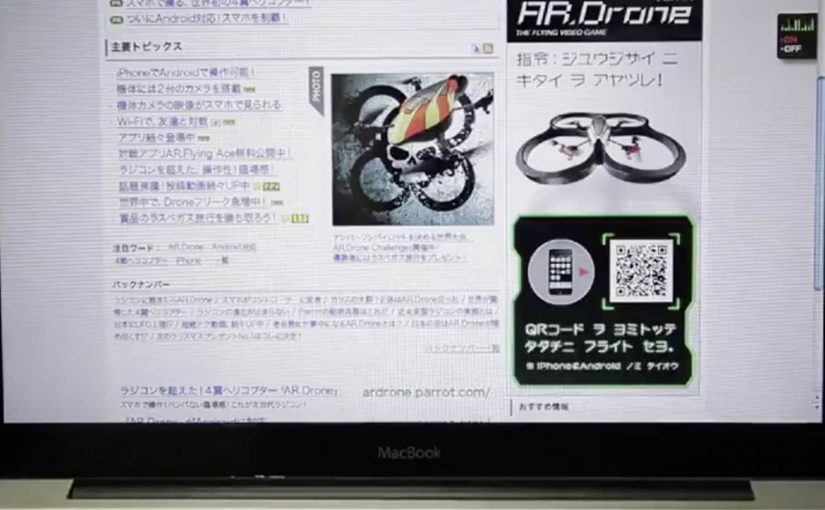
Parrot AR.Drone: The Flying Banner

The Parrot AR.Drone is a quadrotor you can control with an iPhone or iPad. Instead of explaining that in copy, Beacon Communications Tokyo built an interactive web banner that lets people experience the idea.

The banner displays a QR code. Scan it and your phone becomes the controller for a virtual AR.Drone that appears inside the banner. You pilot it around the screen using your smartphone, effectively turning the ad into a small playable product demo.

Why this banner stands out

Most banners talk about what a product can do. This one makes the product behaviour the message. If the AR.Drone is “controlled by your phone,” the ad is controlled by your phone. That direct mapping makes the idea instantly believable. For interface-led products, this is the right pattern: let people try the interface, not read about it.

Extractable takeaway: If your product is an interface, let the audience use that interface inside the ad unit, even in a simplified form.

The mechanic: QR to second screen control

The QR code is not decoration. It is the bridge that turns a passive placement into a two-device experience. Here, “second-screen control” means the desktop shows the scene while the phone acts as the controller. The banner stays on the desktop screen. Control moves to the phone. That split makes the interaction feel closer to the real product, and it also creates a small sense of “this is special” because the ad is no longer self-contained.

In consumer electronics launches, the most persuasive interactive advertising is a playable demo that mirrors the product experience in seconds.

The real question is whether the viewer can feel the core control loop before they decide to care.

How it creates attention without shouting

As described in industry coverage, users could fly the drone around the page and even “blast” parts of the site to reveal the full-screen message. That gives the interaction a purpose and a payoff. It is not just movement. It is progression.

Beacon also reported unusually strong click-through performance compared to typical expectations for the placement. In this case, that makes sense. People do not click because they were interrupted. They click because they were already playing.

Second-screen demo moves to copy

  • Replicate the product, do not describe it. A short, real interaction beats a long explanation.
  • Use one clear bridge between devices. QR works here because it is immediate and simple.
  • Design an obvious payoff. A reveal, a score, a result. Give the interaction a reason.
  • Keep the controls teachable. If people cannot learn it in seconds, the banner loses them.
  • Make it readable for spectators. Movement on the main screen helps others understand what is happening fast.

A few fast answers before you act

What is “The Flying Banner” for Parrot AR.Drone?

It is an interactive web banner where scanning a QR code turns your smartphone into a controller for a virtual AR.Drone that you can pilot inside the banner.

Why is this a stronger demo than a normal video ad?

Because it lets people feel the core promise. Phone-controlled flight, through direct interaction, not description.

What role does the QR code play in the experience?

It is the handoff mechanism from desktop to phone. The desktop shows the “world.” The phone becomes the controller, matching how the real product is used.

What is the biggest risk with multi-device banner ideas?

Drop-off. If the connection step is slow, confusing, or unreliable, most users abandon before they experience the payoff.

How would you modernize this mechanic today?

Keep the principle of second-screen control, but reduce friction. Use a fast connect flow and ensure the experience is still satisfying even if someone chooses not to connect a phone.

IKEA Beröra

To launch the iPad version of the IKEA catalogue in Norway, ad agency SMFB created a brand new IKEA product called “Beröra”.

“Beröra” is a sewing kit with a special conductive thread that you sew into the index finger of your favourite gloves. Once the operation is done, the gloves work on a touch screen.

The idea in one clean sentence: Beröra turns any winter glove into a touchscreen glove, so the IKEA catalogue app fits the reality of how people live and move.

A launch mechanic that feels like a product, not a campaign

The smart move is that the “ad” looks and behaves like an IKEA item. A needle, instructions, and conductive thread. Simple enough to DIY (do it yourself), tangible enough to talk about, and useful enough to keep around after the novelty fades.

Extractable takeaway: When a digital launch depends on in-the-moment behavior, ship a small physical fix that removes the biggest usage friction so trial becomes effortless.

Conductive thread matters because most touch screens register conductive contact. So the kit essentially makes a glove fingertip “readable” to the device without forcing people to buy specialised tech gloves. By solving the glove-on touchscreen problem up front, the kit makes the first app interaction frictionless, which is what turns curiosity into downloads.

In cold-climate retail markets, the fastest way to accelerate digital adoption is to remove the tiny physical frictions that stop people trying it in the moment.

The real question is whether your launch removes the first real-world barrier to trial, or just asks people to work around it.

Solve the barrier first, then market the now-easier behavior.

Results and recognition

The promotion generated a lot of interest. As reported at the time, 12,000 kits went in roughly two weeks, and the IKEA Norway iPad catalogue app broke download records.

The work later picked up awards-circuit recognition, including a One Show merit award, and gold at the Festival of Media in Montreux in the Best Launch Campaign category.

What to steal for your next app launch

  • Turn the barrier into the giveaway. Do not “explain” the friction. Remove it with something people can hold.
  • Make the object shareable offline. A physical product travels through homes, offices, and friend groups faster than a banner ever will.
  • Keep the installation simple. If the user needs a tutorial longer than a minute, the drop-off kills word of mouth.
  • Let the product demonstrate the promise. When the benefit is self-evident, belief comes for free.

A few fast answers before you act

What is Beröra, in plain terms?

Beröra is a DIY conductive-thread sewing kit created for IKEA Norway. You sew the thread into a glove fingertip so it works on touchscreen devices, supporting the launch of IKEA’s iPad catalogue.

Why does a physical kit help launch a digital catalogue?

Because it removes a real-world usage barrier. If people cannot comfortably use a phone or tablet in winter conditions, they will not build the habit. The kit makes the app feel practical, not theoretical.

What makes this a strong “earned media” idea?

It creates a story that is easy to repeat. IKEA made a product that solves a modern annoyance, and it is tied directly to the app being promoted. That combination tends to travel well as earned media, meaning unpaid coverage and sharing.

What is the key mechanism that drives engagement here?

Utility creates trial. Trial creates talk. Talk creates downloads. The kit is the trigger that makes the catalogue experience easier, then social sharing does the distribution work.

What should you measure if you do something similar?

Track speed of redemption, install lift during the distribution window, and repeat usage of the app. If you have it, add branded search lift and share-of-voice during the launch period.

NuFormer: Interactive 3D video mapping test

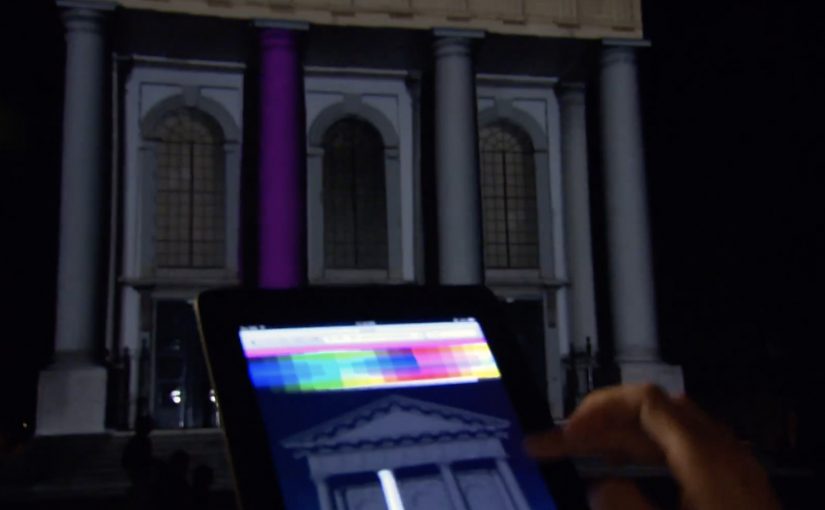
NuFormer, after executing 3D video mapping projections onto objects and buildings worldwide, adds interactivity to the mix in this test.

Here the spectators become the controller and interact with the building in real time using gesture-based tracking (Kinect). People influence the projected content using an iPad, iPhone, or a web-based application available on both mobile and desktop. For this test, Facebook interactivity is used, but the idea is that other social media signals can also be incorporated.

From mapped surface to live interface

Projection mapping usually works like a film played on architecture. This flips it into a live system. The building is still the canvas, but the audience becomes an input layer. Gesture tracking drives the scene changes, and second-screen control, meaning a phone or browser used as a remote, extends participation beyond the people standing closest to the sensor.

Extractable takeaway: Interactive mapping is most compelling when the control model, the set of simple inputs people can learn instantly (wave, move, tap), is legible at a glance and the projection responds quickly enough that people trust the cause-and-effect.

In large-scale public brand experiences, projection mapping becomes more than spectacle when it gives the crowd meaningful viewer control instead of a one-way show.

Why the “crowd as controller” move matters

Interactivity changes what people remember. A passive crowd remembers visuals. An active crowd remembers ownership. The moment someone realises their movement, phone, or social input changes the facade, the projection stops being “content” and becomes “play.”

The real question is whether your interaction model makes people feel in control within seconds, or confused for minutes.

Because the facade responds immediately to a person’s input, the crowd shifts from watching to experimenting, which keeps people around long enough to teach each other and try again.

That also changes the social dynamics around the installation. People look for rules, teach each other controls, and stick around to try again. The result is longer dwell time and more organic filming, because participation is the story.

What brands can do with this, beyond a tech demo

As described in coverage and in NuFormer’s own positioning, branded content, logos, or product placement can be incorporated into interactive projection applications. The strategic upside is that you can design a brand moment that is co-created by the crowd, rather than merely watched.

When social signals are part of the input (Facebook in this case), the experience can also create a bridge between the physical venue and online participation. That hybrid loop is where campaigns can scale.

Patterns for your next mapping brief

  • Pick one primary control. Gesture, phone, or web. Then add a secondary layer only if it increases participation rather than confusion.
  • Make feedback immediate. The projection must respond fast or people assume it is fake or broken.
  • Design for “spectator comprehension.” Bystanders should understand what changed and why, from a distance.
  • Use social inputs carefully. Keep the mapping between input and output obvious so it feels fair, not random.
  • Plan for crowd flow. Interactive mapping is choreography. Sensors, sightlines, and safe space matter as much as visuals.

A few fast answers before you act

What is “interactive projection mapping” in this NuFormer test?

It is 3D projection mapping where the projected content changes in real time based on audience input. Here that input includes Kinect gesture tracking plus control via iPad, iPhone, and web interfaces.

Why add phones and web control when you already have gesture tracking?

Gesture tracking usually limits control to people near the sensor. Second-screen control expands participation to more people and enables a clearer “turn-taking” interaction model.

How does Facebook interactivity fit into a projection experience?

It acts as an additional input stream, letting social actions influence what appears on the building. The key is to make the mapping from social action to visual change understandable.

What is the biggest failure mode for interactive mapping?

Latency and ambiguity. If the response is slow or the control rules are unclear, crowds disengage quickly because they cannot tell whether their input matters.

What should a brand measure in an interactive mapping activation?

Dwell time, participation rate (people who trigger changes), repeat interaction, crowd size over time, and the volume and quality of user-captured video shared during the event window.