
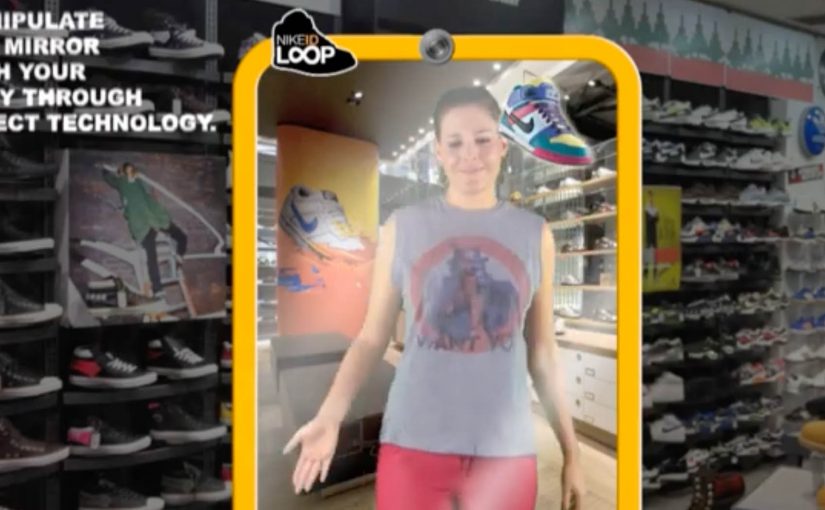
NikeID Loop: Sneaker Customization Concept

Here is another interesting concept coming out of Miami Ad School, this time for Nike.

Since Nike has a huge range of sneakers, it’s next to impossible to try each one of them at the store. In fact, it’s not even possible to find them all at the store.

So a unique interactive mirror using Microsoft’s Kinect technology was created to customize the sneakers on the user’s feet. This way, one could try on every pair of Nike sneakers ever made in record time.

The core problem this concept tackles

Retail has a physical constraint. Shelf space. Inventory. Time. Nike’s catalog depth makes “try everything” impossible, even in flagship stores.

This concept flips the constraint by moving variety from physical inventory into a digital layer, while keeping the try-on moment anchored in the body. By “digital layer” here, I mean a live overlay that swaps variants in the mirror without needing physical stock. Your feet. Your stance. Your movement.

The real question is how you let shoppers explore more options without turning the store into a warehouse or the decision into homework.

Why the mirror mechanic is powerful

Because the mirror tracks movement and renders variants instantly, it keeps the try-on believable in motion, which is what makes fast switching persuasive instead of gimmicky.

Extractable takeaway: When you can add choice in software while preserving an embodied try-on moment, you reduce assortment friction without reducing confidence.

  • It keeps context real. You see the shoe on you, not on a product page.
  • It compresses decision time. Rapid switching creates a new kind of “browsing”.
  • It turns discovery into play. The experience is inherently interactive, which increases dwell time.
  • It reduces inventory friction. The store can showcase breadth without stocking breadth.

In retail environments where shoppers want high-confidence fit and style decisions in minutes, embodied digital try-on can expand perceived assortment without expanding stock.

What this implies for customization and personalization

NikeID is already about making a product feel personal. A Kinect-style mirror extends that by making customization immediate and visual, which can increase confidence before purchase.

This kind of embodied customization is worth betting on, because it makes breadth feel real without demanding more shelf space.

The concept also suggests a future where “catalog” becomes a service layer. The physical store is the stage for decision-making, not a warehouse for options.

What to take from this if you run retail CX

  1. Start with the constraint. Space and assortment are physical limits. Digital can expand them.
  2. Keep the experience embodied. Seeing a product on yourself is stronger than seeing it on a screen.
  3. Design for speed. Rapid iteration can become a feature, not a compromise.
  4. Make the output actionable. The experience should flow naturally into saving, sharing, or ordering.

A few fast answers before you act

What is the NikeID Loop concept?

It is a Miami Ad School concept for Nike that uses an interactive mirror and Microsoft Kinect technology to let users customize and “try” different Nike sneakers on their feet digitally.

What problem does it solve in stores?

It addresses the fact that Nike’s full range of sneakers cannot be stocked or tried in one location, by shifting variety into a digital interface.

Why use Kinect or motion tracking?

Motion tracking lets the system align the visual shoe to the user’s feet in real time, keeping the experience believable as people move.

Is this a product or a concept?

In this case, it is presented as a concept coming out of Miami Ad School, showing a possible direction for interactive retail.

What is the transferable lesson?

If you can remove physical constraints through an embodied digital layer, you can increase choice, speed, and confidence without expanding inventory.

Bike Guide: Detachable Bike Tour Vehicle

A tour bus that splits into bikes when the city gets interesting

“Bike Guide” is an innovative concept from Seoul based designer Kukil Han. He has conceptualized a convenient two-in-one tour bus, which enables the passengers to detach their bikes at specific checkpoints in order to explore the surroundings.

Bike Guide is a detachable-bike tour vehicle concept where a single bus carries multiple bikes, lets riders peel off at checkpoints to explore independently, then recombines the group at a planned rendezvous.

Two-in-one tour bus here means one vehicle that functions as group transport and also as a mobile dock for individual bicycles.

The mechanic: modular touring with a built-in regroup button

Each individual bike is supposed to be equipped with a GPS, which would also notify the user of when and where to rejoin the group. In this concept, the “regroup button” is the GPS prompt that tells riders exactly when and where to meet the bus again.

A checkpoint in this concept is a planned stop where riders detach bikes, explore a nearby area, then meet the bus again at the next agreed point.

In urban tourism and micro-mobility, the winning experiences blend group convenience with moments of solo freedom, without making regrouping stressful.

The real question is whether you can offer controlled independence without making timing and safety feel like work for the rider.

This pattern works best when the product treats splitting and rejoining as first-class moments, not edge cases.

Why the idea is clever. Even before it becomes real

The promise is simple: you get the efficiency of a guided tour without the feeling of being dragged past everything. You ride when you want to ride. You rejoin when you want the tour to move on. The GPS layer matters because it turns “go explore” into “go explore safely”. It reduces anxiety about getting lost or missing the group, which is the main barrier to letting tourists detach at all.

Extractable takeaway: If you want people to roam, make regrouping predictable. Navigation is less about directions and more about permission.

What to steal if you are designing modular mobility

  • Design the detach and rejoin moments. The “handoff” is the product. Not the vehicle.
  • Make the rule-set obvious. Where do I split. How long do I have. Where do I meet.
  • Use navigation as reassurance. GPS is not a feature. It is permission to roam.
  • Plan for mixed energy levels. Some people want to pedal. Others want to sit. This concept serves both.

A few fast answers before you act

What is the Bike Guide concept?

It is a tour-bus concept that carries detachable bicycles. Passengers can split off at checkpoints to explore by bike, then rejoin the bus later.

What problem does this solve for city tours?

It combines the efficiency of group touring with the freedom of cycling, reducing the common trade-off between “seeing more” and “feeling free”.

How does it keep riders from losing the group?

Each bike is supposed to include GPS guidance and notifications that tell riders when and where to rendezvous, so exploration stays bounded and regrouping stays predictable.

Why is the modular “detach and rejoin” mechanic the real innovation?

Because the handoff is the product moment. It lets different energy levels coexist, while keeping the overall experience coordinated and time-boxed.

What would make this feel safe and usable for tourists?

Clear rules. A visible countdown or meet-time. Simple navigation back to the rendezvous. A fallback if someone misses the group.

What should mobility designers copy from this concept?

Design for controlled independence. Give people freedom inside guardrails, and make regrouping effortless so exploration does not create stress.

AR Cinema: London Movie Scenes on iPhone

Turn London into a living movie map

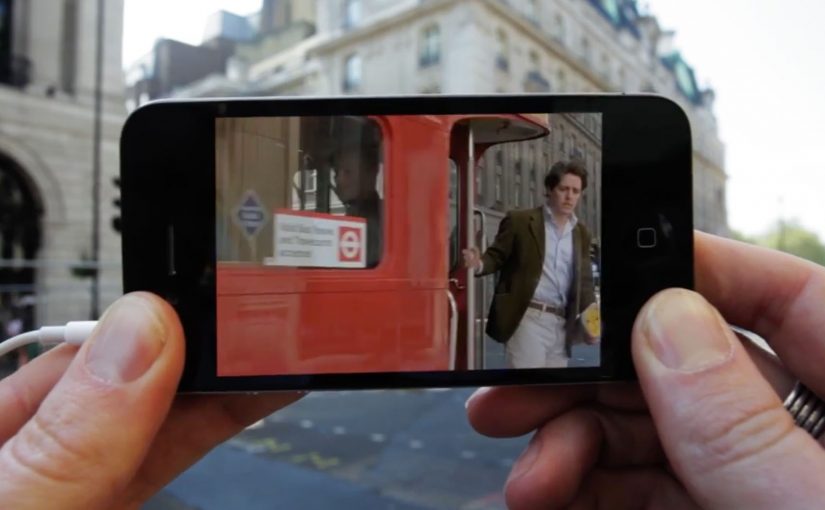
The Augmented Reality Cinema app for the iPhone allows you to walk around London and discover all the places where movies have been shot. Just point your iPhone in the direction of a sweetspot, and get a replay of the movie scene that was shot there. Here, a “sweetspot” is simply a nearby filming-location marker the app points you to.

The app is currently a work in progress prototype. But if and when it does see the light of day, I am sure it will make a great gizmo for all the movie buffs out there.

The magic is not AR. It is time travel

The clever part is the juxtaposition. You stand in the real location. Then you pull the filmed moment back into that exact space. That overlap between “here” and “then” is what makes the concept feel instantly shareable and instantly fun. The AR layer should stay secondary. The scene is the hero.

City exploration experiences land best when they turn real-world wandering into a lightweight mission with an instant payoff.

In European city tourism and cultural discovery, experiences like this work when they reward curiosity without changing how people naturally move.

The real question is whether you can make a place feel different in ten seconds, with one gesture, without breaking the walk.

Why this fits the way people explore cities

It turns wandering into a mission without forcing a route. You move naturally, and the city rewards curiosity with a scene. That is a strong mechanic for tourists and locals alike because it makes discovery feel personal.

Extractable takeaway: If your experience can turn “I am here” into “I was there” with a single action, the user will do the sharing for you.

What this prototype is really aiming for

A new kind of location-based entertainment. Part guided walk, part trivia, part nostalgia. Built around the simplest action. Point. Watch. Move on.

Steal this pattern for AR city walks

  • Real place first. Anchor the experience to real places people already want to visit.
  • One gesture unlocks payoff. Give the user one simple gesture that unlocks the payoff. Point and replay.
  • Use “before vs now” contrast. Use “before vs now” contrast as the hook. It creates emotion without heavy storytelling.

A few fast answers before you act

What does the Augmented Reality Cinema app do?

It lets you walk around London, point your iPhone toward a location “sweetspot,” and replay the movie scene filmed there.

Is the app available?

The post describes it as a work-in-progress prototype.

Who is it for?

Movie buffs and anyone who enjoys exploring film locations while walking the city.

What is the core mechanic?

Location-based discovery paired with an AR replay that overlays a movie scene onto the real place where it was shot.

Why does this feel like “time travel” rather than AR?

Because the payoff is the filmed moment mapped back onto the real location, so you experience “here” and “then” at the same time.