

Chrome: Super Sync Sports

Google has recently released their latest Chrome Experiment called “Super Sync Sports” which allows players to convert their mobile phones and tablets into a remote control for their desktop browser.

To give it a spin visit www.chrome.com/supersyncsports/, choose a game i.e. running, swimming or cycling and then follow the instructions to sync your mobile phone. Once the sync is complete you can then play your way to victory, while the game plays out on your desktop.

What “super sync” really means in practice

The core mechanic is simple. Your desktop browser becomes the shared “big screen” for the race, while each phone or tablet becomes a personal input surface. Instead of mirroring the desktop, the mobile device acts like a controller and streams gestures to the browser in real time.

This is a classic second-screen pattern. A shared display for feedback, plus personal devices for control. It is a small idea with a lot of leverage when the onboarding is frictionless.

In digital marketing and product teams, multi-device web interactions are a repeatable way to turn passive screens into participatory experiences.

Why it lands (even when it is “just a game”)

It also makes a quiet point about distribution. The browser is the platform, so the “controller” is something people already have in-hand. That matters if you are designing for living rooms, events, retail floors, or any moment where downloads and logins kill momentum.

Extractable takeaway: When you want participation, put the rich visual feedback on a shared screen and keep input on personal devices. This lowers setup friction, supports groups naturally, and makes interaction feel immediate without specialized hardware.

The tech stack is the message

What will be interesting to see is how this type of interaction and technology is finally leveraged. The experience is described as being built on HTML5-era capabilities such as WebSockets for live synchronization, plus Canvas and CSS3 for rendering and motion. For brands, the value here is the interaction model, not the sports theme. The real lesson is not the specific APIs. It is the end-to-end pattern of low-latency input, shared feedback, and lightweight pairing.

The real question is whether you are building a one-off demo or a repeatable interaction model that people can join with the device already in their hand.

What to steal for brand experiences

  • Pairing flow: Use a short, forgiving pairing step (code on the big screen, quick join on the phone) and get to interaction fast.
  • Shared spectacle, private control: Keep the crowd watching one shared output, while each participant has a private “control lane” on their device.
  • Competition as UI: A leaderboard (even a lightweight one) can turn a demo into a repeatable loop.
  • Design for latency: Prefer simple, discrete gestures that still “feel” athletic even with imperfect connectivity.
  • Make it modular: The same controller concept can drive product configurators, quizzes, sampling stations, or event installations.

A few fast answers before you act

What is Super Sync Sports?

It is a Chrome Experiment that lets you run a sports game on a desktop browser while using a phone or tablet as the controller.

Why use a phone as the controller instead of the desktop keyboard?

It reduces the learning curve, supports multiplayer easily, and makes the interaction feel more physical. Touch gestures can map naturally to “run”, “swim”, and “cycle” without extra hardware.

What makes this pattern useful beyond games?

The same multi-device approach can turn any shared screen into a participatory surface. Think demos, audience voting, retail activations, guided experiences, or interactive storytelling where people control outcomes from their own device.

Which technologies are doing the heavy lifting?

The experience is described as using WebSockets for real-time synchronization, and Canvas and CSS3 for visuals and animation, all running in the browser.

What is the biggest risk if a brand tries this pattern?

Onboarding and latency. If pairing takes too long or input feels delayed, the magic disappears. The best executions keep the join flow short and the interaction vocabulary simple.

Sony: Headphone Music Festival AR posters

People in Tokyo who wear headphones, or simply want to try new ones, were treated to an augmented reality music festival from Sony Japan. Four popular local rock groups were turned into original AR performances, then “played” through band tour posters placed in busy locations. Sony-branded headphone trial stations were set up nearby so anyone could join in.

The loop is clean. Spot the poster. Scan it. Get a performance that feels like it is happening in your surroundings. Then step over and compare that moment on Sony headphones.

What makes this feel like a festival, not a tech demo

The execution is essentially a pop-up concert system distributed across the city. The posters act as stages. The phone acts as the ticket. The headphone stand acts as the product trial. That chain of touchpoints is why the experience reads as “festival” rather than “app feature.”

The mechanism: posters as portals

Instead of forcing people into a microsite or a branded app maze, Sony uses a familiar object. The tour poster. The poster becomes the launch surface for AR content. That matters because it removes the biggest friction in mobile AR. The “what do I point my camera at” question.

In supporting materials, the technology is described as Sony’s SmartAR and a smartphone app that recognises the posters and overlays 3D performance content into the live camera view. The mechanics stay invisible to the audience. They just see the band appear.

In dense urban retail markets, AR works best when it turns everyday street media into an immediate try-before-you-buy demo.

The real question is whether your AR trigger reduces friction enough that product trial becomes the next obvious step.

Why it lands for headphone marketing

Headphones are hard to sell with words. Most people cannot translate driver specs into feeling. This activation sells through a direct comparison. You hear a performance, then you hear it again through the product the brand wants you to try.

Extractable takeaway: A retail AR activation lands when the trigger is already in public view, the payoff is instant, and the path from wow-moment to product trial is one physical step away.

It also frames Sony as the host of the music moment, not just the logo next to it. That is a stronger association than “better sound.” It is “better access to the thing you love.”

The business intent behind the street setup

The intent is not just awareness. It is footfall and trial. The AR content pulls people in, but the trial stations convert curiosity into a product experience. If you can get someone to listen for 30 seconds, you can start building preference.

Steal this for poster-triggered AR trials

  • Anchor AR to a physical trigger people already understand. Posters, packaging, signage, tickets.
  • Make the payoff immediate. The first five seconds decide whether AR feels magical or annoying.
  • Keep the bridge to trial short. If you sell hardware, put the demo within sightline of the trigger.
  • Use content that earns replays. Music clips, reveals, limited drops, rotating “sets” work better than static overlays.
  • Design for scanning in real conditions. Glare, crowds, bad signal, rushed users. Make recognition forgiving.

A few fast answers before you act

What is the Sony “Headphone Music Festival” idea?

It is a street-based AR activation where tour posters trigger AR music performances on a phone. Sony pairs that content with nearby headphone trial stations so people can immediately test the product while they are engaged.

Why use posters instead of geofencing or QR codes?

Posters provide a clear camera target and an obvious reason to scan. They also carry cultural meaning. A tour poster already signals music and discovery, so the AR layer feels natural.

What makes AR effective for selling headphones?

It creates a controlled listening moment in an uncontrolled environment. The activation gives you a reason to put headphones on right now and compare the experience immediately.

What is the biggest pitfall in poster-triggered AR campaigns?

Recognition friction. If the scan fails or the experience takes too long to load, people abandon it. The trigger must be reliable and the content must appear quickly.

How do you measure success for this kind of activation?

Track scans per poster location, completion rates for the AR experience, and trial-station interactions. If possible, connect trial interactions to store visits or product interest signals.

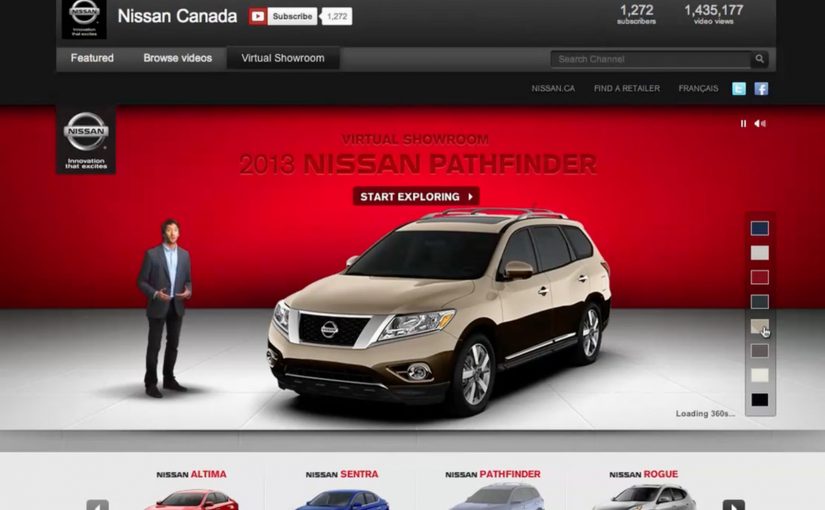
The Nissan Virtual Showroom

There was a time when people would go to the dealership to research cars. But now most research (70%) is done online, with 50% of buyers stating that online information was the most influential part of their research.

So Nissan decided to bring their dealership to the online audience through a custom YouTube Channel experience.

And for people on the go using smartphones for research, they also created a first of its kind custom mobile YouTube Channel, where they replicated the desktop experience for smaller screens.

As a result Nissan is said to have received an extremely positive response, along with a significant increase in people looking for their dealership after researching.

When a channel becomes product UI

What makes this interesting is not that Nissan published more videos. It is that the channel itself is treated like product UI. Here, “product UI” means the navigation and information scent that helps shoppers self-direct to the next best video step. Instead of forcing viewers to hunt through a generic grid, the experience is designed to guide shopper intent from model discovery to feature deep-dives, then onward to the next step in the buying journey.

A “virtual showroom” in this sense is a structured video experience that lets a buyer explore models, features, and trims in a self-directed way, without sales pressure, and without leaving the environment where they are already doing research.

In automotive marketing, the research screen becomes the showroom. So the channel needs to behave like a product experience, not a playlist.

In platform-led categories, the “research screen becomes the showroom” dynamic shows up anywhere buyers start their learning inside someone else’s interface.

The real question is whether you are designing the research journey, or just uploading assets into a grid.

Why it lands with real car-shopping behavior

The psychology is simple. When someone is researching a car, they want control. They want to compare, replay, and go deep only on the features they care about. A channel-built showroom supports that viewer control, and it keeps momentum high because the buyer never has to “leave to learn” and then try to find their way back.

Extractable takeaway: If your customer’s moment of curiosity happens on mobile, mirror the same structured pathways on the small screen so intent is not lost to a new search.

Business intent: turn video curiosity into dealer intent

Nissan is said to have received an extremely positive response, along with a significant increase in people looking for their dealership after researching. Brands should treat high-intent platform surfaces like product UI when the buyer journey starts there. The strategic bet is clear. If you can keep the research experience coherent and confidence-building, you increase the odds that the next action is dealership search, a test drive, or a shortlist decision, rather than another brand’s video.

Stealable patterns for your next “research-first” launch

  • Design the navigation, not just the content. The way viewers move matters as much as the videos themselves.
  • Map content to buyer questions. Make it easy to jump from overview to the exact feature proof someone is hunting for.
  • Keep parity across devices. If your audience researches on mobile, do not treat mobile as a scaled-down afterthought.
  • Build a clean handoff to the next step. The experience should naturally lead into dealer discovery, test drive intent, or model comparison.

A few fast answers before you act

What is a “virtual showroom” on a brand channel?

A virtual showroom is a structured video experience that helps shoppers explore products like they would in-store, with clear pathways from model overview to feature details, without relying on a salesperson or a separate site.

Why build the showroom inside a video platform experience?

Because that is where research attention already lives. Keeping the experience native reduces friction, preserves intent, and lets buyers move from curiosity to confidence without context-switching.

What makes a mobile virtual showroom different from “mobile video”?

It is not just playback on a phone. It is an interface designed for mobile decision-making, where browsing, comparing, and drilling into details still feels coherent on a smaller screen.

How does this drive dealership outcomes without being pushy?

By making the buyer feel informed and in control. When research is easy and confidence increases, dealer search and test drive intent tend to follow naturally as the next step.

What content do you need for this to work?

You need a library that covers the full set of buyer questions. Walk-throughs, feature explainers, comparisons, and proof points that can be consumed in any order depending on what the shopper cares about.

How do you measure whether it worked?

Track signals that reflect progression in the funnel, such as deeper feature engagement, repeat visits, branded search lift, and increases in dealer-locator usage or dealership queries following content exposure.