
#The8N8 Twitter Campaign

#The8N8 Twitter Campaign

A celebrity tweets a question about the new Nokia N8. You spot the clue, follow the celebrity, and race to reply with the correct answer before everyone else. Do it fast enough, and you earn the follow-back. Repeat until you have eight.

The brief. Launching the Nokia N8 on Twitter

Wunderman Buenos Aires is given the task to launch the new Nokia N8 smart phone. They create a Twitter-based activation campaign called #The8N8. Here, “activation” means a participatory game on Twitter, driven by clue tweets and timed replies.

The real question is whether you can turn product features into a race people choose to replay.

This is a strong Twitter launch mechanic because it forces people to learn features under time pressure, while making the reward publicly visible.

How it works. Clues, speed, and follow-backs

  • Nokia enlists top celebrities to tweet questions, clues, and features of the phone.
  • Users find the clues, follow the celebrity, and respond correctly in the fastest time.
  • The reward is the celebrity following the user back.
  • The first eight people to get eight celebrities to follow them back win the new Nokia N8.

In consumer electronics launches on fast-moving social platforms, attention windows are short and social proof is a primary currency.

Why the follow-back works

By making the reward a follow-back from a celebrity, the mechanic converts speed and accuracy into instant social proof, which is why participants keep replaying the hunt.

Extractable takeaway: When you attach a visible status reward to answering product-feature clues fast, you can make launch messaging feel like a game instead of an ad.

Results. Reach and follower growth

The campaign is reported to reach 300,000 Twitter users. It is also reported to increase Nokia’s fan base on Twitter and Facebook by over 100%.

How to reuse the mechanic in a launch

  • Turn features into clues. Write prompts that translate key features into quick, answerable questions.
  • Make speed the differentiator. Keep the rule simple. First correct reply earns the follow-back.
  • Keep the reward visible. A follow-back is public, so the prize doubles as social proof.
  • Use a clear finish line. “Eight follow-backs” makes progress legible and creates urgency.

A few fast answers before you act

What is #The8N8?

A Twitter-based activation by Wunderman Buenos Aires to launch the Nokia N8.

What do participants actually do?

They follow participating celebrities, answer their clue tweets correctly, and do it faster than others to earn follow-backs.

What is the win condition?

Be among the first eight people to get eight celebrities to follow you back.

What are the reported outcomes?

Reported reach of 300,000 Twitter users and reported fan base growth on Twitter and Facebook by over 100%.

What is the transferable mechanic?

Turn product messaging into a speed-based game that rewards social proof. Here, that social proof is the follow-back.
NikeID Loop: Sneaker Customization Concept

NikeID Loop: Sneaker Customization Concept

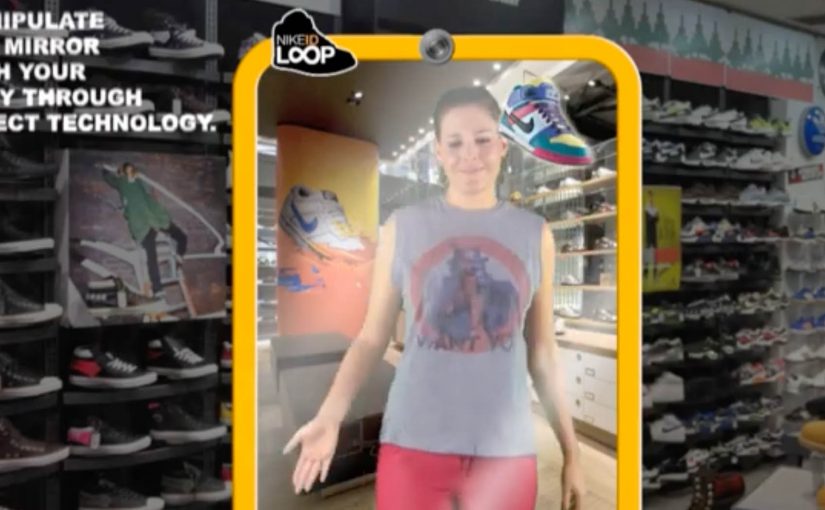
Here is another interesting concept coming out of Miami Ad School, this time for Nike.

Since Nike has a huge range of sneakers, it’s next to impossible to try each one of them at the store. In fact, it’s not even possible to find them all at the store.

So a unique interactive mirror using Microsoft’s Kinect technology was created to customize the sneakers on the user’s feet. This way, one could try on every pair of Nike sneakers ever made in record time.

The core problem this concept tackles

Retail has a physical constraint. Shelf space. Inventory. Time. Nike’s catalog depth makes “try everything” impossible, even in flagship stores.

This concept flips the constraint by moving variety from physical inventory into a digital layer, while keeping the try-on moment anchored in the body. By “digital layer” here, I mean a live overlay that swaps variants in the mirror without needing physical stock. Your feet. Your stance. Your movement.

The real question is how you let shoppers explore more options without turning the store into a warehouse or the decision into homework.

Why the mirror mechanic is powerful

Because the mirror tracks movement and renders variants instantly, it keeps the try-on believable in motion, which is what makes fast switching persuasive instead of gimmicky.

Extractable takeaway: When you can add choice in software while preserving an embodied try-on moment, you reduce assortment friction without reducing confidence.

  • It keeps context real. You see the shoe on you, not on a product page.
  • It compresses decision time. Rapid switching creates a new kind of “browsing”.
  • It turns discovery into play. The experience is inherently interactive, which increases dwell time.
  • It reduces inventory friction. The store can showcase breadth without stocking breadth.

In retail environments where shoppers want high-confidence fit and style decisions in minutes, embodied digital try-on can expand perceived assortment without expanding stock.

What this implies for customization and personalization

NikeID is already about making a product feel personal. A Kinect-style mirror extends that by making customization immediate and visual, which can increase confidence before purchase.

This kind of embodied customization is worth betting on, because it makes breadth feel real without demanding more shelf space.

The concept also suggests a future where “catalog” becomes a service layer. The physical store is the stage for decision-making, not a warehouse for options.

What to take from this if you run retail CX

  1. Start with the constraint. Space and assortment are physical limits. Digital can expand them.
  2. Keep the experience embodied. Seeing a product on yourself is stronger than seeing it on a screen.
  3. Design for speed. Rapid iteration can become a feature, not a compromise.
  4. Make the output actionable. The experience should flow naturally into saving, sharing, or ordering.

A few fast answers before you act

What is the NikeID Loop concept?

It is a Miami Ad School concept for Nike that uses an interactive mirror and Microsoft Kinect technology to let users customize and “try” different Nike sneakers on their feet digitally.

What problem does it solve in stores?

It addresses the fact that Nike’s full range of sneakers cannot be stocked or tried in one location, by shifting variety into a digital interface.

Why use Kinect or motion tracking?

Motion tracking lets the system align the visual shoe to the user’s feet in real time, keeping the experience believable as people move.

Is this a product or a concept?

In this case, it is presented as a concept coming out of Miami Ad School, showing a possible direction for interactive retail.

What is the transferable lesson?

If you can remove physical constraints through an embodied digital layer, you can increase choice, speed, and confidence without expanding inventory.

Wacom Inkling: paper sketches, digitized

Wacom Inkling: paper sketches, digitized

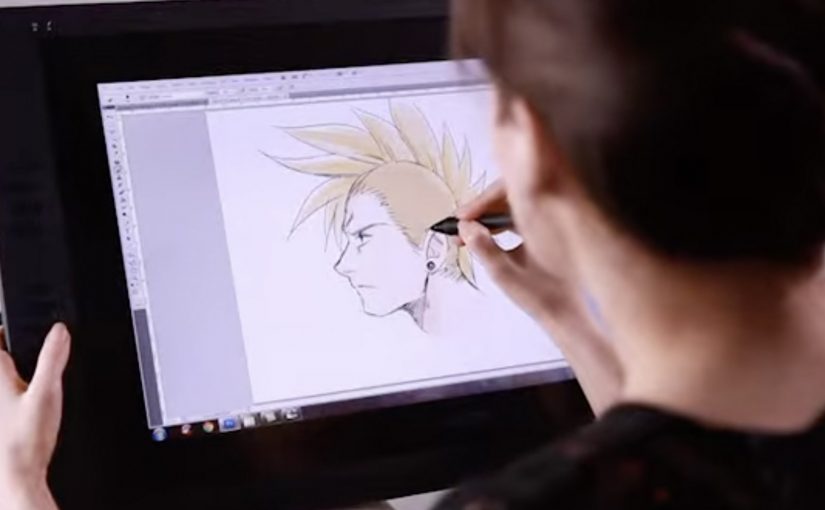
Wacom is launching a cool new digital sketch pen for artists called the Inkling. This unique pen allows artists to draw or sketch on a standard piece of paper and then automatically have a digital version created.

The trick is that Inkling pairs a real ink pen with a small receiver that clips to your paper and records your strokes as you draw, so you can plug it into a computer later and bring the sketch into your digital workflow.

What Inkling changes in a familiar habit

Most artists already start with pen and paper because it is fast, portable, and forgiving. Inkling keeps that behaviour intact, but removes the “scan it later” step by capturing the drawing while it happens.

How the capture works in practice

  • Draw normally. You sketch with an actual ballpoint pen on regular paper.
  • Record quietly. The clipped receiver tracks each stroke and stores the sketch.
  • Transfer when ready. You connect the receiver to your computer and import the captured file for editing.
  • Refine digitally. The value shows up when you want to iterate, clean up, or reuse elements without redrawing from scratch.

In creative and design workflows, bridging paper-first sketching to digital editing keeps momentum for artists who think with their hands.

The real question is whether you can keep paper-first speed while still landing in edit-ready digital files.

Why it lands: it removes one of the most annoying handoffs

The friction is never “making the sketch”. The friction is getting that sketch into the tools where it becomes a layout, a storyboard, an illustration draft, or a presentation asset. Inkling makes the handoff feel like part of the act of drawing, not a separate job you do later.

Extractable takeaway: If you remove one ugly handoff between a familiar analog habit and a digital toolchain, you get adoption without asking creators to change how they start.

What Wacom is really selling here

This is not just a new pen. It is a bridge product that expands Wacom’s relevance beyond tablets and into the earliest moment of creation, when ideas are still raw and fast. A bridge product connects a trusted old workflow to a newer one, so users can cross without friction. Wacom is right to focus on the handoff, not on adding more pen features. If the first capture happens with Wacom, the next steps in the workflow are more likely to happen with Wacom-friendly tools too.

Takeaways for marketing creator tools

  • Respect existing habits. Do not force a new behaviour when the old one already works.
  • Remove a single painful step. “No scanning” is a clearer benefit than a long list of features.
  • Sell the workflow, not the gadget. The story is speed from idea to editable file.
  • Show the before and after. Demos work best when viewers can see the exact handoff being eliminated.

A few fast answers before you act

What is Wacom Inkling?

It is a digital sketch pen system that lets you draw on regular paper with real ink while capturing a digital version of the sketch for later transfer to a computer.

Do you need special paper to use Inkling?

No. The idea is that you sketch on standard paper while a clipped receiver records your strokes.

How do you get the sketch onto your computer?

You connect the receiver to your computer and import the stored sketch so it can be edited digitally.

What is the main benefit compared to scanning?

You skip the “capture later” step. The sketch is already recorded as you draw, which makes it faster to move from rough idea to editable file.

Who is this best suited for?

It fits artists and designers who start on paper for speed, then want to refine, iterate, or reuse parts of the sketch digitally without redrawing everything.