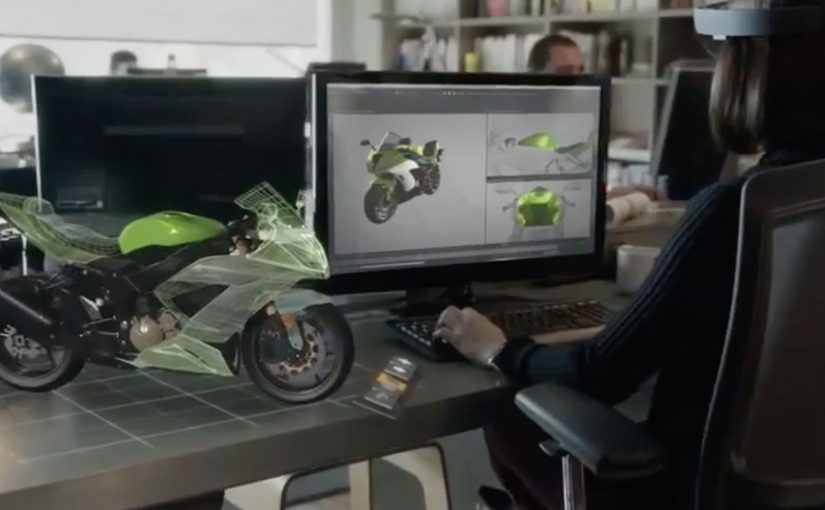
Microsoft HoloLens: The Next Step of Computing

Microsoft HoloLens: The Next Step of Computing

Microsoft brings holograms into the real world

At Microsoft’s Windows 10 event, the company unveils a new augmented reality experience for the platform called HoloLens.

Using a special holographic headset, Windows 10 users can make holograms appear in real life. Not on a screen. In the room, anchored to space.

This is the kind of step-change that reframes computing from something you look at to something you live inside.

Watch below how Microsoft demonstrates holograms as spatial interfaces, not screen content.

What makes HoloLens different

HoloLens is positioned as an untethered augmented reality experience, built to feel like a real device rather than a lab prototype.

The device is said to use:

  • See-through lenses
  • Spatial sound
  • Advanced sensors
  • A dedicated holographic processing unit

Together, these elements aim to deliver a state-of-the-art mixed reality experience without cables or external trackers.

In this context, augmented reality means digital objects are layered into the real world through see-through optics, not a fully immersive virtual environment.

Why this matters

HoloLens signals a shift in interface design. Instead of dragging windows around a flat screen, digital objects become part of physical space. Apps turn into holograms. Workflows become spatial. Interaction becomes more natural because it maps to how people already understand the world.

In global digital product and marketing teams, the significance is not just the headset. It is the move from screen-first design to space-first interaction.

Extractable takeaway: HoloLens is important because it presents AR not as a feature inside existing software, but as a new computing layer where interface, content, and context are all anchored to physical space.

What to steal from this launch

The real question is not whether holograms look futuristic. It is whether a new interface model changes behavior in a way people can feel immediately.

That is what this launch gets right. It demonstrates the shift through experience, not just specification. The message is simple: when a technology changes where interaction happens, it also changes how products should be designed.

  • Lead with the interaction shift, not the feature list. Show what changes in the user’s behavior before explaining the underlying technology.
  • Make the benefit visible in context. Demonstrate the experience in a real environment so people immediately understand the practical value.
  • Use the demo as proof, not decoration. The strongest launch moments show the product working in the exact conditions users care about.
  • Explain the stack after the experience lands. Once the audience feels the change, technical details reinforce credibility instead of creating friction.
  • Design for the new interface model. If interaction moves from screens to space, content, UI, and workflows must be rethought for that environment.

A few fast answers before you act

Is HoloLens virtual reality?

No. It is augmented reality using see-through lenses that overlay holograms onto the real world.

What is the key technical promise?

Untethered, spatially aware holograms powered by sensors, spatial sound, and a dedicated holographic processing unit.

Why is being untethered important?

Untethered hardware makes the experience feel like a real computing device instead of a lab setup, which lowers friction for everyday use and demonstration.

What changes when apps become spatial?

The interface moves off the screen and into physical space, which changes how people place, view, and interact with digital content while moving through the real world.

What makes this feel like a new computing layer?

The shift is not only visual. It combines sensing, sound, and spatial anchoring so digital objects behave as if they belong in the room, not just on a display.

Novalia: Playable Album Cover DJ Deck

Novalia: Playable Album Cover DJ Deck

You pick up a record, touch the artwork, and the sleeve behaves like a DJ controller. Swipe to scratch. Tap to trigger effects. Use the crossfader. The physical album cover becomes an input device, not just a package.

That’s the latest project from Novalia, a Cambridge-based company that turns classic print into smart, touch-based surfaces using conductive ink and sensors, previously seen in work like The Sound of Taste.

How the album cover becomes a controller

For this release, Novalia works with DJ Qbert to create what is described as the world’s first interactive DJ decks on an album cover. The cover includes a printed mixer and deck layout. Touching the surface activates a companion setup with the Algoriddim djay app, allowing the user to scratch, mix, and fade any songs they already have loaded in the app directly from the paper surface.

Under the hood, the cover uses printed touch sensors. Those sensors translate finger position and gestures into control signals that the DJ app can interpret like a hardware controller.

In music and entertainment packaging, interactive print can turn a passive object into a playable interface, which makes “physical media” feel alive again. Here, interactive print means a printed surface with touch-sensitive inputs that control a connected digital experience.

Why this lands

This works because it collapses the gap between artwork and performance. The cover is not a souvenir. It is an instrument. That shift creates immediate curiosity and a strong demo moment, and it makes the format, vinyl and packaging, part of the innovation rather than a nostalgic constraint.

Extractable takeaway: If you want people to care about a physical format, give it a job. Turn the object into an interface that controls something digital, so “owning it” unlocks a behaviour, not just a collectible.

What the tech is really proving

Novalia is not just showing a clever one-off. It is demonstrating that printed surfaces can behave like UI. Buttons, sliders, decks, and triggers, without looking like electronics. The real question is how a printed object can stop being packaging and start behaving like an interface people want to use.

That opens the door for interactive posters, magazine inserts, packaging, and merchandise that can control sound, apps, or connected experiences while staying lightweight and familiar.

What to steal from interactive print packaging

  • Make the object the interface. The most memorable interaction is the one that defies expectations of the format.
  • Use a companion app people already accept. Pair print with a mainstream app so the learning curve stays low.
  • Design for demo. If it looks good on camera, your audience will do distribution for you.
  • Keep the interaction legible. Touch, swipe, fade, scratch. Actions should map to familiar behaviours.

A few fast answers before you act

What is a “playable” album cover?

It’s an album sleeve printed with touch sensors so the artwork functions like a controller. Your fingers become the input, and the connected app produces the sound.

What does Novalia contribute to this project?

Novalia provides the interactive print technology. Conductive ink touch sensors and the electronics layer that translates touches into control signals.

Do you control only the album’s music?

The setup is designed to control tracks loaded into the companion DJ app, so the interaction is not limited to the album content itself.

Why is this more compelling than a QR code to a playlist?

A QR code points somewhere else. This makes the physical object itself the experience, which increases replay value and perceived uniqueness.

Where does this pattern make sense outside music?

Anywhere the packaging or printed surface can become an input. Posters, product boxes, magazine inserts, event badges, and retail displays that trigger sound, data capture, or app control.