

iBeacons: Context as the Interface

iBeacons: Context as the Interface

From proximity to context

iBeacons introduce a simple but powerful idea. The physical world can trigger digital behavior.

A smartphone does not need to be opened. A user does not need to search. The environment itself becomes the signal.

At their core, iBeacons enable proximity-based awareness. When a device enters a defined physical range, a predefined digital action can occur. That action may be a notification, a content change, or a service trigger.

The evolution is not about distance. It is about context.

What iBeacons enable

iBeacons are small Bluetooth Low Energy transmitters. They broadcast an identifier. Nearby devices interpret that signal and respond based on predefined rules.

This creates a new interaction model. Digital systems respond to where someone is, not just what they click. Because that location signal arrives before a click, the system can reduce friction by pre-loading the most relevant content or service for that moment.

Retail stores, public spaces, machines, and even wearable objects become programmable environments. The physical location is no longer passive. It actively participates in the experience.

Why proximity alone is not the breakthrough

Early use cases focus heavily on messaging. Push notifications triggered by presence. Alerts sent when someone enters a zone.

That framing misses the point.

The real value emerges when proximity is combined with intent, permission, and relevance. Without those elements, proximity quickly becomes noise.

iBeacons are not a messaging channel. They are an input layer. Here, “input layer” means a reliable real-world signal that can change digital content or services without requiring a click.

The real question is whether proximity removes a step for the user, or just adds another interruption.

In global retail and consumer-brand environments, iBeacons work best when they connect physical moments to consented digital help at the point of need.

From messaging to contextual experience design

As iBeacon use matures, the focus shifts away from alerts and toward experience orchestration.

Instead of asking “What message do we send here?”, the better question becomes “What should adapt automatically in this moment?”

This is where real-world examples start to matter.

Example 1. When a vending machine becomes a brand touchpoint

The SnackBall Machine demonstrates how iBeacons can turn a physical object into an interactive experience.

Developed for the pet food brand GranataPet in collaboration with agency MRM / McCann Germany, the machine uses iBeacon technology to connect the physical snack dispenser with a digital layer.

The interaction is not about pushing ads. It is about extending the brand experience beyond packaging and into a moment of engagement. The machine becomes a contextual interface, meaning the object itself selects the right digital behavior when someone is present. Presence triggers relevance.

This is iBeacon thinking applied correctly. Not interruption, but augmentation.

Example 2. When wearables make context portable
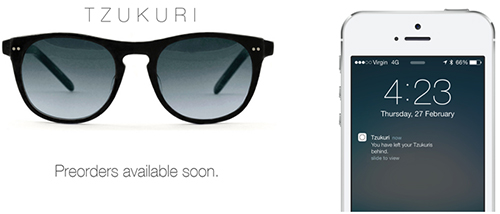
Tzukuri iBeacon Glasses enable hands-free, glance-based, context-aware information.

The Tzukuri iBeacon Glasses, created by Australian company Tzukuri, take the concept one step further.

Instead of fixing context to a location, the context moves with the person.

The glasses interact with nearby beacons and surfaces, enabling hands-free, glance-based, context-aware information. The interface does not demand attention. It integrates into the wearer’s field of view.

This example highlights a critical shift. iBeacons are not limited to phones. They are part of a broader ambient computing layer. Here, “ambient computing layer” means computing embedded in objects and surroundings that responds without demanding a screen-first interaction.

Modern product and experience design is slowly replacing “screen” with “context” as the interface.

Why these examples matter

Both examples share a common pattern.

Extractable takeaway: Treat proximity as a signal to adapt the service in the moment. If it does not reduce friction or increase clarity, it is not context. It is noise.

The user is not asked to do more. The system adapts instead.

The technology fades into the background. The experience becomes situational, timely, and relevant.

That is the real evolution of iBeacons. Not scale, but subtlety.

The real evolution. Invisible interaction

The most important step in the evolution of iBeacons is not adoption. It is disappearance.

The more successful the system becomes, the less visible it feels. No explicit action. No conscious trigger. Just relevance at the right moment.

This aligns with a broader shift in digital design. Interfaces recede. Context takes over. Technology becomes ambient rather than demanding.

Why iBeacons are an early signal, not the end state

iBeacons are not the final form of contextual computing. They are an early, pragmatic implementation.

They prove that location can be a reliable input. They expose the limits of interruption-based design. They push organizations to think in terms of environments rather than channels.

What evolves next builds on the same principle. Context first. Interface second.

Practical rules for context-first experiences

  • Start with the moment, not the message. Define what should adapt automatically when someone is present, before deciding what to notify.
  • Proximity is an input, not a channel. Use beacon signals to change content, offers, or service steps. Do not treat them as another push pipeline.
  • Permission and intent are part of the design. Make opt-in explicit and only trigger actions that match why the user is there.
  • Optimize for invisibility. The best beacon experience feels like the environment helping, not marketing interrupting.
  • Measure behavior change. Track whether friction drops and tasks complete faster, not whether notifications were opened.

A few fast answers before you act

What are iBeacons in simple terms?

iBeacons are small Bluetooth Low Energy transmitters that let phones detect proximity to a location or object and trigger a specific experience based on that context.

Do iBeacons automatically track people?

No. The experience usually depends on app presence and permissions. Good implementations make opt-in clear and use proximity as a trigger, not as silent surveillance.

What is the core mechanism marketers should understand?

Proximity becomes an input. When someone is near a shelf, a door, or a counter, the system can change what content or actions are offered, because the context is known.

What makes a beacon experience actually work?

Relevance and timing. The action has to match the moment and reduce friction. If it feels like random messaging, it fails.

What is the main takeaway?

Design the experience around the place, not the screen. Use context to simplify choices and help people complete a task, then measure behavior change, not opens.
Coca-Cola Peace Machines

Coca-Cola Peace Machines

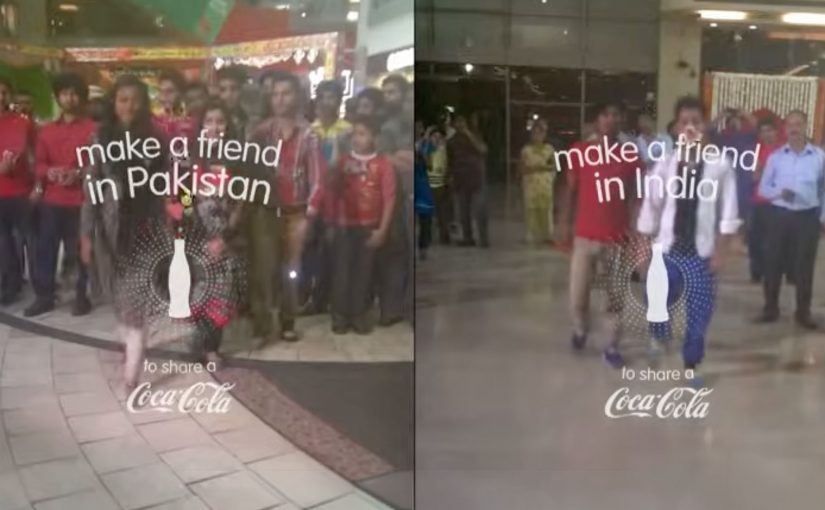
Small World Machines. India and Pakistan meet through a Coke

Over the years Coca-Cola keeps experimenting with vending machines and tries to make them much more than the average soda-spitter-outer. It places two machines, one in India and the other in Pakistan, and turns them into a communication portal. These “Small World Machines” allow citizens from both countries to interact with each other and complete shared tasks. Here, “shared tasks” means actions designed to be completed together, not alone. The machines reward them with a Coke. The results…

Fair Play Machines. Inter and Milan fans can only give to rivals

The success of that has inspired Coca-Cola to once again bring fighting parties together. Now instead of bringing together nations at odds, it has tapped into the rivalry between Italian soccer teams Inter and Milan.

To ease the aggression between the fans, Coca-Cola installed their “Fair Play Machines” on opposite sides of Milan’s San Siro stadium as the teams faced off. Pressing the button of one machine dropped a Coke can down the chute of that on the side of the rival team. So this way rivals could only receive Cokes from each other. The results…

The real question is whether you can design an interaction where the easiest way to get your reward is to give something to the other side first.

In global consumer brands, especially when audiences are polarized, experience rules travel further than slogans.

What this teaches about “peace” as a design problem

The strongest move is not messaging. It is creating a constraint that makes cooperation the easiest path to a reward. A constraint is a built-in rule of the experience that limits options so the intended behaviour becomes the easiest one. This works because the reward is gated behind a cooperative act, so the social friction becomes part of the game instead of a barrier. When a machine encodes that rule, behaviour shifts without anyone needing to preach.

Extractable takeaway: If you want two sides to act differently, stop asking for goodwill. Change the rules of the interaction so the smallest “yes” becomes the default move.

Design moves you can borrow from Peace Machines

  • Gate the reward behind a give-first action. Make the path to getting something run through giving something to the other side.
  • Keep the rule legible in one glance. If people need an explanation, the moment is gone.
  • Turn tension into a shared task. Use a simple co-action that feels like play, not reconciliation.

A few fast answers before you act

What are Coca-Cola “Peace Machines” in this context?

They are vending machine concepts that turn a simple Coke transaction into a social interaction, designed to reduce tension between rival groups.

What is the core mechanic of the Fair Play Machines?

Pressing the button on one machine sends a Coke to the machine on the rival side. Rivals can only receive Cokes from each other.

How do Small World Machines relate to this?

They use the same principle. A machine becomes a bridge, enabling people in opposing contexts to interact and complete shared tasks that lead to a reward.

What does “constraint” mean in experience design?

It is a built-in rule that limits options so the intended behaviour is the easiest one to choose.

What is the main design lesson for brands?

If you want behaviour change, build the rule into the experience. Make the cooperative action the trigger for the reward, and keep it simple enough to understand instantly.

Jung von Matt/Alster: The Trojan Font

Jung von Matt/Alster: The Trojan Font

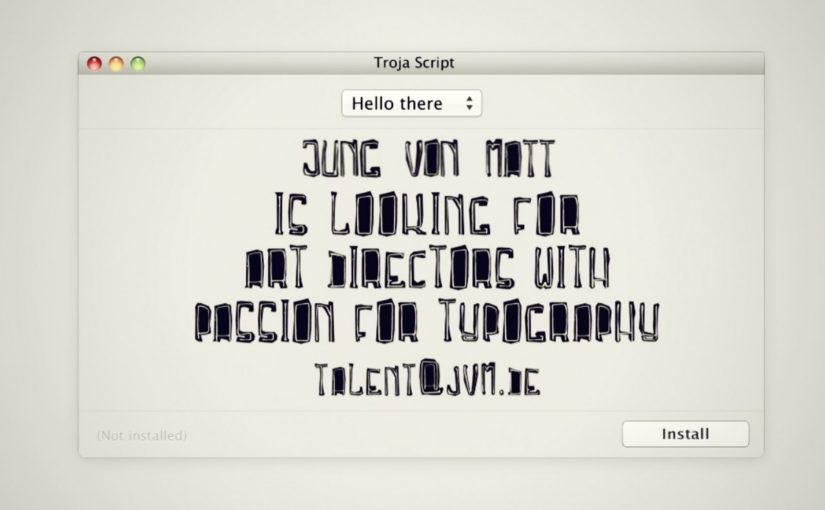
To reach designers with a passion for typography, Jung von Matt/Alster created a font of their own. Dubbed “Troja Script,” the typeface hides a recruitment ad where you’d normally expect the standard font preview.

Uploaded to free font websites, the font turned the download flow into a hiring funnel. Instead of “Aa Bb Cc,” the preview text itself carried the job pitch, so the first interaction with the product was the message.

Why the font format is the perfect carrier

Fonts are one of the few “free resources” designers actively seek out and evaluate with intent. That evaluation moment is intimate. You’re zooming in, testing, imagining usage. Replacing the preview with a recruitment message means the ad arrives when attention is already high and the audience is self-selected.

In creative industry hiring, embedding the application hook directly into a designer’s natural workflow can outperform broad employer-brand messaging.

Why this lands

This works because the medium is the filter. If you’re downloading free fonts, you’re likely the exact kind of person the agency wants to talk to. The message also feels earned rather than intrusive, because it appears inside a utility the user chose to access.

Extractable takeaway: If you’re recruiting for a specialist craft, place the pitch inside a tool or asset that specialists already pull into their process, so the channel itself does the targeting.

The business intent underneath

The stronger move is not to promote the vacancy more loudly, but to place it inside a behaviour that already signals fit.

The real question is how to turn a specialist asset into a self-qualifying hiring channel.

The campaign turns three steps into one. Discovery, qualification, and application. The reported outcome is a high ratio of signal to noise, because downloads come from the right community, and applications come from people who actually noticed and understood the move.

What this teaches about workflow-native recruiting

  • Make the artefact do the targeting. Put your message inside something only the right audience will seek out.
  • Embed the pitch in the default interaction. Use the “preview” moment, not an extra landing page.
  • Keep the twist legible. If the audience needs explanation, the hack loses momentum.
  • Measure the whole funnel. Track not just reach, but qualified actions (downloads) and outcomes (applications).

A few fast answers before you act

What is the “Trojan Font” idea?

It’s a font distributed through free font sites where the preview text is replaced with a recruitment message, turning a download into a hiring touchpoint.

Why target designers through free font websites?

Because that’s where typography-minded designers actively browse and evaluate resources, so attention and relevance are naturally high.

What makes this more effective than a normal job ad?

The audience is self-selected, and the message arrives inside a workflow moment, so it feels like discovery rather than interruption.

What result did the campaign report?

It was reported to generate around 14,000 downloads and 23 job applications for the open role.

How can other companies adapt the pattern?

Create a useful specialist asset, distribute it where specialists already look, and embed the hiring hook in the default usage or evaluation step.