
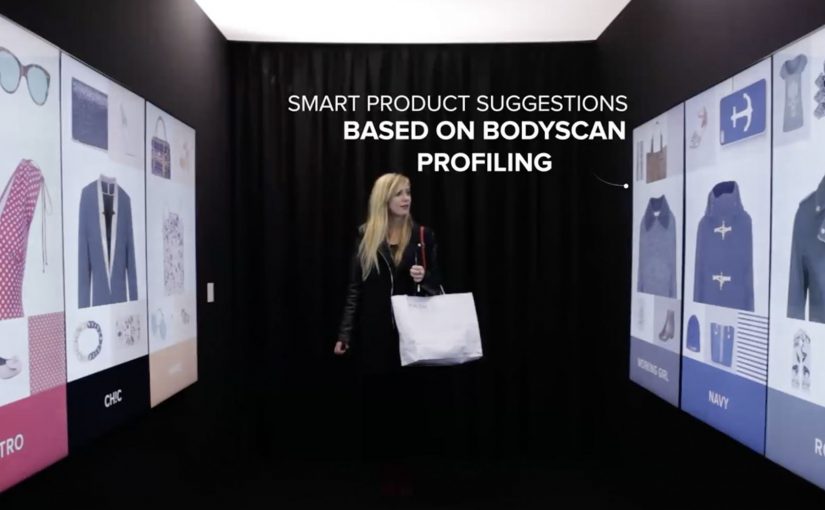
Klépierre: Inspiration Corridor

One of the biggest problems brick-and-mortar retailers face is that many consumers prefer the convenience of shopping online. So Klépierre, a European specialist in shopping center properties, decides to give customers a unique and personal window shopping experience that simultaneously advertises multiple brands available in its shopping center.

How the corridor turns browsing into a saved journey

The mechanism is a walk-in “inspiration corridor” that is described as using an infrared camera and live detection to adapt the interface to the visitor. The walls then show a curated set of products pulled from real-time inventory, and the visitor can tap items to add them to a personal shopping list. At the end, the selection syncs to the Klépierre mobile app, which then helps locate the chosen products in the mall.

Here, live detection means the corridor reads the visitor in the moment and adjusts what appears on the walls accordingly.

In European shopping centers, the winning retail experiences blend discovery and convenience, giving visitors a reason to browse physically while keeping the efficiency people associate with online shopping.

The result is a browse-first experience that keeps discovery and wayfinding in one flow.

Why this beats “more screens”

This lands because it does not ask shoppers to learn a new behavior. It upgrades a familiar one. Window shopping. The corridor simply makes browsing feel personal and actionable, then removes the “I’ll never find it again” friction by saving the picks and turning them into a navigable list. The stronger move is not to add more screens, but to make physical browsing easier to finish. That works because discovery, selection, and store-finding happen in one continuous interaction.

Extractable takeaway: If your category is losing visits to online convenience, do not fight browsing. Instrument it. Let people browse with their body language and taps, then hand them a saved list that makes the rest of the journey feel effortless.

The quiet business intent

The real question is whether one shared experience can turn mall-level discovery into measurable value for multiple tenants at once.

Klépierre is not only showcasing technology. It is selling a multi-brand promise. One interaction can route a shopper to several tenants, lift discovery across stores, and create measurable signals of interest without needing a single retailer to run the whole experience alone.

What mall operators should borrow

  • Curate across brands. A mall operator can create value by packaging discovery in a way individual stores cannot do alone.
  • Connect to live stock. Recommendations feel credible when they map to what is actually available right now.
  • Make saving the default. “Tap to add” is the key bridge from inspiration to purchase intent.
  • Close the loop with wayfinding. The experience should end with “here’s where to get it”, not just “wasn’t that cool”.
  • Design for low friction. The corridor should work in seconds, even for someone who did not plan to engage.

A few fast answers before you act

What is Klépierre’s Inspiration Corridor?

It is an in-mall interactive experience that personalizes product recommendations on surrounding walls and lets visitors tap to save items to a shopping list that syncs to the mall’s app.

How does the personalization work?

It is described as using live detection, for example via an infrared camera, to adapt recommendations and the interface to the visitor in the moment.

What problem does this solve versus standard mall advertising?

It turns passive promotion into active selection. Instead of only seeing brand messages, shoppers leave with a saved list and a practical path to find products.

What is the main metric to watch?

Saved items per session, app sync rates, store visit lift for featured tenants, and conversion from saved lists to purchases where measurement is possible.

What should you be careful about when deploying live detection?

Be explicit about what is being detected and why, keep the experience usable without any personal account setup, and avoid language that implies storing identities or profiling.
The Adaptive Storefront: BLE Retail Display

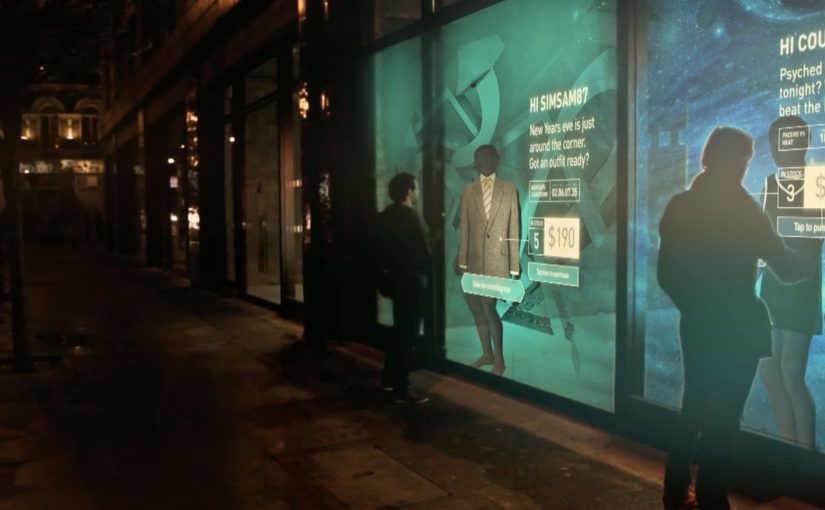
Shop windows, billboards, bus stops, and car showrooms do not have to be passive experiences. In the video below, a prototype interactive digital display adapts to whoever stands in front of it.

The display identifies shoppers using Bluetooth Low Energy (BLE) and reacts to personal data stored on the shopper’s mobile device, such as shopping habits and preferences. Shoppers can swipe through personalised content, place items in a virtual shopping cart, and purchase straight from the display.

When glass turns into a shoppable interface

This “adaptive storefront” concept takes a familiar retail surface and makes it behave like a storefront UI. Here, “adaptive storefront” means the window can recognise a nearby device via BLE and change what it shows based on data available on that device. Not a poster. Not a looped video. A live interface that changes per person and lets you complete an action while you are still in that high-intent moment of attention.

How the prototype behaves in front of a shopper

  • Detect. BLE proximity is used to recognise that a specific shopper is present.
  • Adapt. The display adjusts what it shows based on data available on the shopper’s phone.
  • Let the shopper drive. Swiping changes what is on screen, rather than forcing a fixed sequence.
  • Close the loop. Items can be added to a cart and purchased directly from the display.

In physical retail environments, the storefront is the first high-attention interface a brand controls before a shopper reaches the shelf.

Why it lands

Because the display can recognise a nearby device and accept input on the surface, it compresses discovery, consideration, and purchase into one interaction. The value is not the novelty of a “smart window”. It is the reduction of steps between interest and action, while the shopper’s intent is still fresh. The real question is whether you can do that with clear permission and control, not silent personalisation.

Extractable takeaway: A surface becomes valuable when it combines context with immediate action. Personalisation only earns its keep when it removes friction and helps a shopper decide faster, not when it merely looks clever.

What it is really trying to unlock for brands

Behind the demo is a clear ambition. Turn high-footfall surfaces into conversion surfaces. If the experience is permissioned and useful, it can bridge the gap between physical browsing and digital checkout without forcing a shopper to open an app, search, and start over.

That also hints at a measurement upgrade. A storefront that can be interacted with can be instrumented. What people swipe. What they ignore. What they add. Where they drop. That is a very different feedback loop than counting impressions.

Practical takeaways for adaptive storefronts

  • Start with one job-to-be-done. For example, “help me shortlist”, “show me what is in stock”, or “let me buy in two taps”.
  • Make control obvious. If swiping is the interaction, design the UI so people understand it in one second.
  • Keep data minimal and on-device. Use only what is needed to improve relevance, and avoid making the experience feel intrusive.
  • Design for the environment. Glare, distance, dwell time, and group behaviour change everything compared to mobile UX.
  • Plan the opt-in moment. The experience works best when the shopper understands why the screen adapts and what they get in return.

A few fast answers before you act

What is an “adaptive storefront” in plain terms?

It is a storefront display that changes what it shows based on who is standing in front of it, and lets the shopper interact and buy directly on the surface.

Why use BLE for this type of experience?

BLE enables low-power proximity detection, so a display can recognise a nearby device and trigger the right experience without requiring scanning a code each time.

What data is needed to personalise the display?

Only enough to improve relevance. For example, stated preferences, browsing history, or saved items, ideally kept on the shopper’s phone and shared with clear permission.

What makes this feel useful instead of creepy?

Permission, transparency, and value. The shopper should understand what is happening, control it, and get something meaningfully better than a generic screen.

What should you measure in a pilot?

Opt-in rate, interaction rate, add-to-cart rate, conversion rate, and whether the experience reduces time-to-decision without increasing drop-off.

The future of Augmented Reality

You point your phone at the world and it answers back. In Hidden Creative’s video, a mobile device scans what’s around you and returns live, on-the-spot information. The same AR layer lets you preview change before you commit to it, by virtually rearranging furniture or trying colours in a real space.

Utility AR: the phone becomes a real-time lens

The value is not “wow.” It is utility. The device behaves like a real-time lens you can use in the middle of a decision:

  • Scan surroundings and get contextual information immediately.
  • Overlay objects into physical space to plan renovations or layout changes.
  • Configure colours virtually before making real-world changes.

What the mechanic actually is

At its simplest, the camera feed becomes the interface. The device recognises elements in the scene, then anchors relevant information and virtual objects to the real world so you can act on what you see. When overlays reliably “stick” to reality, the experience stops feeling like a gimmick and starts behaving like a tool you can trust.

In consumer retail and home-improvement scenarios, AR becomes habitual only when it works predictably across devices and requires near-zero setup beyond opening the camera.

Why this kind of AR lands

People do not adopt AR because it is impressive. They adopt it when it reduces uncertainty in a moment that matters, like “Will this fit?”, “Will this look right?”, or “What is this thing in front of me?”. Campaign AR often optimises for novelty. Everyday AR has to optimise for reliability, speed, and repeatability.

Extractable takeaway: If AR does not reduce a real decision into a faster yes or no, it will stay a one-off experience, even if engagement looks great in the first week.

The real question is standardisation, not creativity

Augmented Reality is already active in brand campaigns around the world, mainly because it creates high engagement and talk value. Yet it still does not play an everyday role in most people’s lives because the experience is fragmented across ecosystems.

Before daily-life AR becomes normal, platform owners and developers need to standardise the experience across their ecosystems. Apple, Google, and Microsoft/Nokia each move in their own direction, and the result is fragmentation.

By “a standard AR experience,” I mean a consistent base layer for recognition, anchoring, lighting, scale, and interaction patterns so users do not have to relearn AR every time they switch apps or devices.

One master app vs. an app store full of one-offs

Right now the app stores are cluttered with many Augmented Reality apps, each doing a slice of the job. One cross-platform “master app,” or at least a consistent base layer, is a plausible starting point for making AR feel like an always-available capability instead of a novelty download.

The stance: AR becomes mainstream when it is treated like a standard capability layer, not a series of isolated one-off apps.

What to steal for your next AR decision

  • Design for repeat use. Pick a high-frequency decision moment, not a “shareable” moment.
  • Reduce setup friction. If the experience needs a special download for a single task, adoption will stall.
  • Make reliability visible. Use cues that show tracking and anchoring are stable so users trust what they see.
  • Define the base layer you depend on. Be explicit about which platform capabilities you require and what breaks without them.

A few fast answers before you act

What does the Hidden Creative video demonstrate?

It shows a phone scanning a real environment, returning contextual information in real time, and overlaying virtual objects into the scene for practical tasks like planning and previewing changes.

What is the core AR mechanic described here?

The camera feed becomes the interface. The device recognises the scene and anchors information or objects to it so the overlay stays aligned with the real world while you move.

Why does AR still feel like a campaign tool in most cases?

Because many AR experiences optimise for novelty and short-term engagement, not for reliability and repeat use. Fragmentation across platforms also prevents a consistent everyday habit.

What does “a standard AR experience” mean in practice?

It means consistent behaviour across devices and apps for recognition, anchoring, scale, lighting, and interaction patterns so users do not have to relearn AR each time.

What is meant by a “base layer” or “master app” for AR?

A shared foundation that reduces fragmentation. Instead of dozens of one-off AR apps, users get a consistent AR capability that multiple experiences can plug into.

What is the simplest next step if a brand team wants AR to drive real adoption?

Target one repeatable decision moment and design the experience to work quickly and predictably with minimal setup. If it does not reduce uncertainty, it will not become a habit.