
IKEA: Catalogue Countdown Room

IKEA: Catalogue Countdown Room

You walk into IKEA and find a room that is not finished. It is counting down. Each day the space changes again, styled with new catalogue products, like the store itself is teasing what is about to arrive.

That is the idea behind IKEA’s in-store Catalogue Countdown Room in Singapore and Malaysia. After previously re-imagining the 2013 catalogue with visual recognition technology that brought pages to life, this launch moment focuses on anticipation and theatre inside the store. It turns the catalogue release into a daily event that people can watch, not just pick up.

In practice, the countdown room is refreshed repeatedly as the countdown progresses, then broadcast live via IKEA’s Facebook presence so the excitement travels beyond the store floor.

Why a countdown room beats “catalogue is here”

Catalogue launches usually arrive with a shrug. Everyone expects them, so attention is low. A countdown reframes the arrival as something you can miss, and that creates urgency. The room format also makes the catalogue feel less like a book and more like a living set of ideas you can step into.

Extractable takeaway: If you can show visible progress on a reliable rhythm, routine product drops start to feel like a story people choose to follow.

What the mechanism is really doing

The room is a content engine. In this context, a content engine is a repeatable setup that produces fresh, shareable moments on a schedule. Each refresh creates a new “moment” for store visitors and a new visual for social, which is why the idea keeps earning attention. It can host small performances, demos, and micro-events without needing a different concept every day. The catalogue becomes the raw material.

The real question is: can you turn a catalogue release into a daily moment people choose to follow?

In omnichannel retail marketing, the most repeatable “launch” pattern is to make one physical moment behave like media, then let social distribution carry it further than paid reach alone.

What to steal for your next retail launch

  • Build one stage that can change. A single physical space that transforms repeatedly generates content without extra production locations.
  • Turn “arrival” into anticipation. Countdowns make routine drops feel like events.
  • Design for shareable proof. The room should look different enough each day that people want to show the change.
  • Let the store be the hero. When the in-store moment is genuinely interesting, social becomes documentation, not advertising.

A few fast answers before you act

What is the IKEA Catalogue Countdown Room?

It is an in-store installation that changes during a countdown to the new IKEA catalogue launch. The room is repeatedly restyled using catalogue products, and the changes are shared through social channels.

Why does a countdown create more engagement than a standard catalogue drop?

A countdown adds scarcity and rhythm. People know something is happening each day, so they return, check in, and talk about what changed instead of treating the catalogue as background noise.

What makes this an integrated campaign?

The same story runs across the store, social distribution, and supporting communications. The room creates the physical event. Social extends it beyond store visitors. The catalogue provides the content foundation.

What is the key lesson for retailers launching many new products at once?

Do not try to communicate everything at once. Create a single repeatable format that can spotlight different products over time, so attention compounds across multiple touchpoints.

What is the biggest risk with “live” retail content?

If the daily payoff is weak, people stop checking. The room needs visible change and a reason to watch each day, otherwise the countdown becomes decoration.
IKEA: A New Kind of Catalog

IKEA: A New Kind of Catalog

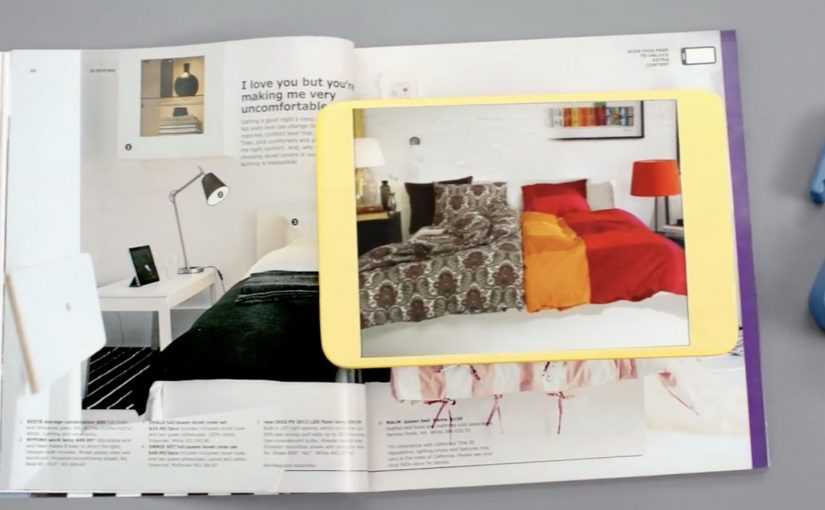
Every year, the IKEA Catalog inspires people around the world to create homes they love. For the 2013 edition, IKEA takes the inspiration one step further by bringing technology to the paper catalog and creating a more seamless connection to purchase.

IKEA worked with McCann New York to re-imagine the catalog via a visual recognition app that brings select pages and the offerings within to life. The experience is positioned around inspirational videos, designer stories, “X-ray” views that peek inside furniture, and more.

How the catalog becomes an interface

The mechanic is page recognition. You point your phone at a printed page and the app identifies the exact spread, then overlays or opens the matching digital layer. That is what “visual recognition” means here. The camera view is used to recognize the image itself, so the print can stay clean without obvious codes taking over the layout.

This is interactive print done as a product layer, not as a QR code workaround. The page remains a premium editorial surface, and the interactivity is unlocked through recognition rather than visible markers.

In global retail organizations with massive print distribution, recognition-based layers let brands turn a static catalog into a measurable, updateable experience without redesigning the entire print grammar.

The real question is whether your print can behave like an interface without sacrificing the editorial feel that makes people pick it up in the first place.

Why “X-ray” and stories beat a pure commerce push

What makes this approach land is that it does not start with “buy now.” It starts with curiosity. Here, the “X-ray” layer is a simple cutaway view that lets people see inside furniture to understand utility. Peek inside a unit. Watch the product in context. Hear the thinking behind a room setup. Those are the moments where browsing becomes intent.

Extractable takeaway: If you want print-to-digital to stick, lead with reassurance and curiosity, not a commerce CTA. Use interactivity to remove uncertainty in one fast payoff, not to add a menu of options.

The “X-ray” idea is also a smart translation of a physical store behavior. People open drawers and cupboards in-store to understand utility. This gives a lightweight version of that reassurance from the page.

What IKEA is really building with this

At face value, it is an augmented catalog. Underneath, it is a bridge between inspiration and action. A catalog is already a decision-shaping channel. Adding tappable layers makes it a trackable channel and creates new points where IKEA can educate, reassure, and nudge the path to purchase.

Copyable moves for print-to-digital catalogs

  • Keep the print clean. If the page looks like a code sheet, you lose the lifestyle premium.
  • Use interactivity to remove uncertainty. Show how it works, what fits inside, how it looks in a room.
  • Design for quick wins. One scan should yield something useful immediately, not a long menu.
  • Make the layer repeatable. If it can work on many pages, it becomes a system, not a stunt.

A few fast answers before you act

What is a “visual recognition” catalog app?

An app that recognizes a printed page using the phone camera, then unlocks related digital content tied to that exact spread.

Why is recognition better than QR codes for premium catalogs?

Because it preserves design. Recognition can keep layouts clean and still enable interaction, while QR codes often force visible markers into the page.

What is the “X-ray” feature actually communicating?

Utility and confidence. It helps people understand storage and function without needing to visit a store or guess from a single photo.

What is the main business value of interactive print?

It turns inspiration into measurable engagement and creates additional moments to guide purchase decisions, especially for considered categories like furniture.

What is the biggest risk with print-to-digital layers?

Friction. If scanning is slow, unreliable, or the payoff is thin, people abandon the habit after one try.

The smallest Ikea store in the world

The smallest Ikea store in the world

With city populations on the rise, living spaces have become increasingly limited. Ikea however believes that no matter how cramped your space, there’s always a solution. To demonstrate this, they built an entire Ikea store in a 298×250 pixels web banner.

People looking for studio flats as well as one/two bedroom apartments were targeted. The tiny Ikea store held 2800 products and was placed in ImmobilienScout 24, Germany’s largest online real estate market. As with their full size stores, shoppers were able to browse by department and buy all of the featured products.

A full store, compressed into one banner

The concrete move is the point. Ikea did not run a banner that “talked about” small-space living. It built a miniature storefront that behaved like a store, inside the same footprint where most brands would place a static message.

  • Format: 298×250 banner
  • Assortment: 2800 products
  • Placement context: shown where people were actively searching for apartments
  • Behaviour: browse by department and purchase, like a full-size store

Why the placement choice is the strategy

Putting the “store banner” inside a real estate marketplace aligns message and moment. If you are apartment hunting, you are already thinking in constraints. Size, layout, storage. That makes Ikea’s space-saving promise feel immediately relevant, because it shows up at the exact point the problem is top-of-mind.

Extractable takeaway: When the product promise is about solving everyday constraints, the media unit should demonstrate the solution inside the moment the constraint is felt.

In urban retail and home-living categories, the winning move is often to put the solution inside the moment people are actively negotiating space constraints.

What the banner is really trying to do

The real question is whether the media unit itself can do the selling work instead of just sending people somewhere else.

The business intent is to collapse awareness, product discovery, and purchase into one compact touchpoint. That is a stronger retail-media use of the banner than a static awareness message, because it turns the ad unit itself into a shoppable retail surface.

What to borrow for shopper marketing

  • Make the media unit do the job. If the claim is “there’s always a solution”, show solutions in action, not slogans.
  • Match the need environment. Place the idea where the need is active, not where attention is accidental.
  • Reduce steps to purchase. If people can browse and buy inside the experience, you keep momentum.

A few fast answers before you act

What was “the smallest Ikea store in the world”?

An entire Ikea store built inside a 298×250 pixel web banner.

How many products were included?

The banner store held 2800 products.

Where was it placed?

It was placed in ImmobilienScout 24, described as Germany’s largest online real estate market.

Who was it aimed at?

People looking for studio flats and one or two bedroom apartments.

Why does this work as shopper marketing?

It turns a small ad unit into a browsable store experience and puts it in front of people already thinking about limited living space.