
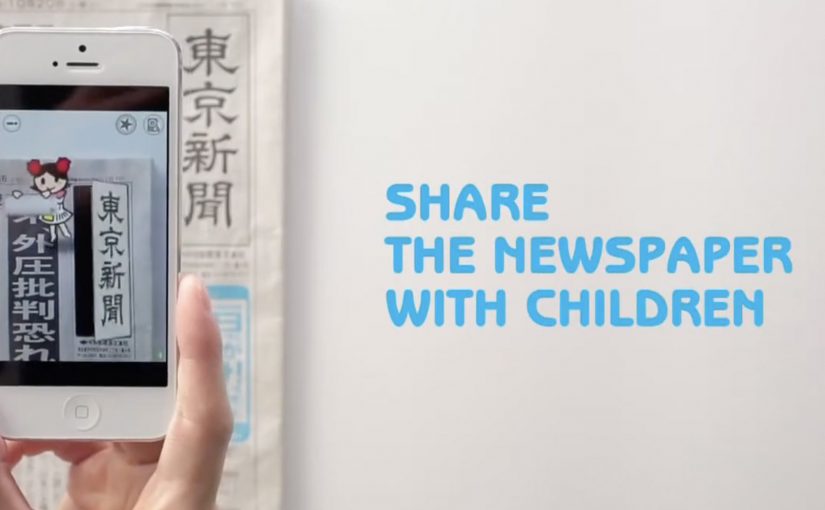
A kid points a smartphone at a newspaper article and the page starts “talking back”. Characters pop up, headlines simplify, and the story becomes easier to understand without leaving print.
Connected devices such as smartphones and tablets have contributed to an explosion in digital media consumption. As these devices gain adoption, print newspapers around the world are seen suffering from declining readership and revenue. To combat this, Tokyo Shimbun, along with Dentsu Tokyo, came up with a new way to connect with readers. An augmented reality reader app brings the newspaper to life by overlaying educational, kid-friendly versions of selected articles.
How the newspaper becomes a “teaching layer”
The mechanism is straightforward. The app uses the phone camera to recognize specific articles, then overlays animated commentary, simplified explanations, and visual cues on top of the printed page so kids can follow along. Here, “teaching layer” means this AR overlay that translates the printed article into simpler language and guided visuals. Because the overlay sits directly on the printed article, kids do not have to leave the page to get context, which lowers friction and keeps attention on the story.
In publishing and media brands that still rely on print touchpoints, augmented reality can turn paper into an entry point for younger audiences without abandoning the physical ritual of reading.
Why this lands with parents and kids
It respects the newspaper as a shared household object, but removes the comprehension barrier for children. The child gets a friendly “translator”. The parent gets a moment of joint attention that feels educational, not like more screen time for its own sake.
Extractable takeaway: If you want kids to adopt a legacy touchpoint, use the digital layer to reduce comprehension friction first and add spectacle second.
What the business intent looks like
This is not only a novelty layer. It is a retention and habit play. If children can engage with a paper alongside adults, the newspaper has a better chance of staying present in the home and staying relevant as a family product.
The real question is whether the AR layer builds repeat, family co-reading habits, not whether it feels novel the first time.
Practical moves for print-plus-AR translation
- Overlay explanation, not just effects. Make the digital layer add clarity, not only animation.
- Choose a narrow trigger set. Start with selected stories that benefit most from translation and context.
- Design for “family co-use”. Make it easy for a parent to participate without taking over the phone.
- Keep the print object central. The magic works best when the page remains the interface.
A few fast answers before you act
What does the Tokyo Shimbun AR reader app do?
It lets kids scan selected newspaper articles with a smartphone and see animated, kid-friendly explanations layered on top of the print page.
Why pair augmented reality with a newspaper at all?
Because the newspaper is still a household touchpoint. AR can lower comprehension barriers for kids while keeping the shared reading ritual intact.
Is this mainly entertainment or education?
The strongest value is educational translation. The animations act as attention hooks, but the real utility is simplifying and explaining complex topics.
What makes this different from sending kids to a website?
The entry point stays on the printed page. The experience is anchored in the article the family is already holding, which supports shared attention.
What is the biggest execution risk?
If scanning is finicky or the overlays feel gimmicky, kids will not repeat the behavior and parents will not recommend it.
