
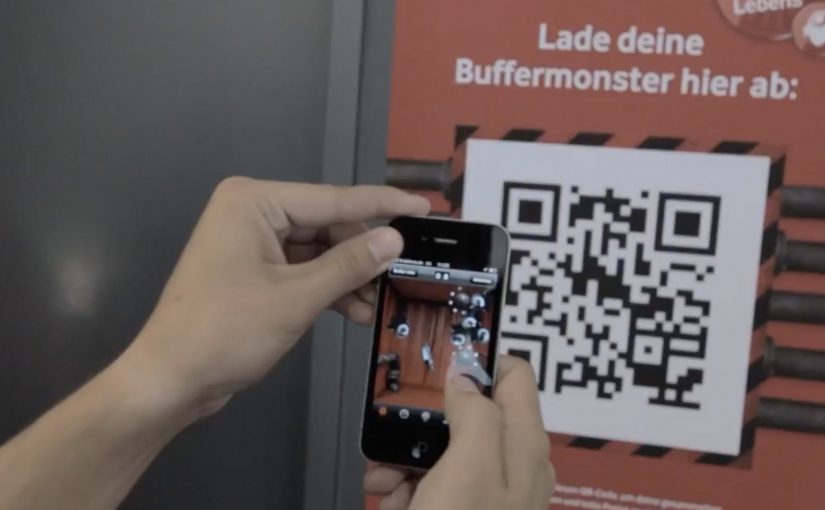
Vodafone: Buffer Busters AR Monster Hunt

The pitch is familiar: “fastest network.” The execution is not. Vodafone Germany turns the claim into a street-level AR game where your city becomes the arena and “Buffer Monsters” become the enemy.

You walk around with an iPhone or Android smartphone, spot the monsters through the camera view, and capture them. Once you’ve banked 50, you take them to a nearby Vodafone store to “dump” them and keep playing. Top performers compete for a lifetime plan.

In telecom marketing, gamified AR is a neat way to convert an abstract network promise into something people can experience with their own movement and time.

Turning buffering into a villain you can catch

The smartest move here is the metaphor. “Buffering” is a universal pain, so the campaign gives it a face, then gives you a job: remove slowness from the streets.

That story does two things at once. It makes the “fast network” positioning emotionally legible. It also creates a reason to keep playing beyond novelty, because the monsters represent a real frustration.

The mechanic: capture loop, then a store-based reset

The gameplay loop is intentionally simple:

  • Discover: find monsters while moving through real locations.
  • Capture: use the phone view to trap them.
  • Capacity cap: collect up to 50 before you hit the limit.
  • Reset in retail: visit a Vodafone store to unload the bank and continue.

The cap is not just game balance. It is the bridge to the business goal: repeat footfall into stores without making the experience feel like a coupon hunt.

Why it lands: it makes speed social and competitive

This works because it turns “my network is fast” into a contest. Players are not only consuming a message. They are proving commitment through time spent, distance walked, and monsters captured.

It also benefits from “viewer control.” Players choose when to play, where to hunt, and how hard to push the leaderboard, which makes the brand message feel earned rather than delivered.

What Vodafone is really optimizing for

On the surface, it is an AR advergame. Underneath, it is a store traffic engine plus a positioning reinforcer. The store visit is framed as part of the fantasy, so retail becomes a checkpoint, not an interruption.

It is also a clean way to recruit advocates. The people who do best are the ones most likely to talk about it, because the game gives them a score they can brag about.

What to steal for your next launch

  • Personify the pain point so the product promise has an enemy to defeat.
  • Add a capacity cap to create natural “reset moments” that map to business actions.
  • Make the brand touchpoint a checkpoint, store, event, or partner location, not a forced detour.
  • Design for retell, “I caught 50 monsters and had to dump them at a store” is a complete story.

The TVC supporting the initiative is also well done, and helps explain the mythology quickly for people who never touch the app.


A few fast answers before you act

What is Buffer Busters, in one line?

An AR street game from Vodafone Germany where you hunt “Buffer Monsters” with your phone, then reset your collection by unloading them at Vodafone stores.

Why does the “50 monsters” limit matter?

It creates a loop. Players hit a cap, then have a reason to visit a store to continue, which turns gameplay momentum into retail footfall.

What business problem does this solve beyond awareness?

It converts a network claim into participation, drives repeat store visits, and builds competitive motivation through leaderboards and prizes.

What makes the story-device strong here?

Buffering is a universal frustration. Turning it into a villain gives the “speed” promise a concrete, memorable meaning.

What is the biggest failure mode for AR hunts like this?

Friction. If discovery is unreliable, capture feels inconsistent, or permissions and setup are confusing, people drop before the loop becomes rewarding.
NikeID Loop – Sneaker Customization Concept

Here is another interesting concept coming out of Miami Ad School, this time for Nike.

Since Nike has a huge range of sneakers, its next to impossible to try each one of them at the store. In fact its not even possible to find them all at the store.

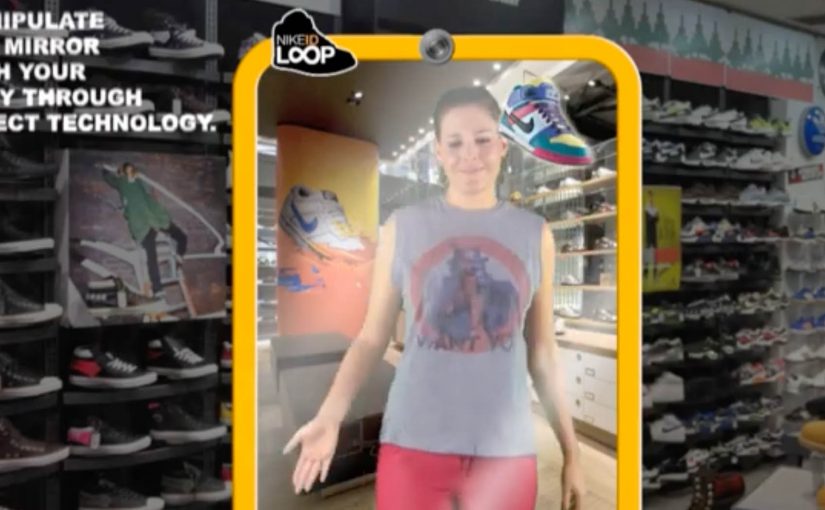
So a unique interactive mirror using Microsofts Kinect Technology was created to customize the sneakers on the users feet. This way one could try on every pair of Nike sneakers ever made in record time.

The core problem this concept tackles

Retail has a physical constraint. Shelf space. Inventory. Time. Nike’s catalog depth makes “try everything” impossible, even in flagship stores.

This concept flips the constraint by moving variety from physical inventory into a digital layer, while keeping the try-on moment anchored in the body. Your feet. Your stance. Your movement.

Why the mirror mechanic is powerful

  • It keeps context real. You see the shoe on you, not on a product page.
  • It compresses decision time. Rapid switching creates a new kind of “browsing”.
  • It turns discovery into play. The experience is inherently interactive, which increases dwell time.
  • It reduces inventory friction. The store can showcase breadth without stocking breadth.

What this implies for customization and personalization

NikeID is already about making a product feel personal. A Kinect-style mirror extends that by making customization immediate and visual, which can increase confidence before purchase.

The concept also suggests a future where “catalog” becomes a service layer. The physical store is the stage for decision-making, not a warehouse for options.

What to take from this if you run retail CX

  1. Start with the constraint. Space and assortment are physical limits. Digital can expand them.
  2. Keep the experience embodied. Seeing a product on yourself is stronger than seeing it on a screen.
  3. Design for speed. Rapid iteration can become a feature, not a compromise.
  4. Make the output actionable. The experience should flow naturally into saving, sharing, or ordering.

A few fast answers before you act

What is the NikeID Loop concept?

It is a Miami Ad School concept for Nike that uses an interactive mirror and Microsoft Kinect technology to let users customize and “try” different Nike sneakers on their feet digitally.

What problem does it solve in stores?

It addresses the fact that Nike’s full range of sneakers cannot be stocked or tried in one location, by shifting variety into a digital interface.

Why use Kinect or motion tracking?

Motion tracking lets the system align the visual shoe to the user’s feet in real time, keeping the experience believable as people move.

Is this a product or a concept?

In this case, it is presented as a concept coming out of Miami Ad School, showing a possible direction for interactive retail.

What is the transferable lesson?

If you can remove physical constraints through an embodied digital layer, you can increase choice, speed, and confidence without expanding inventory.

Wacom Inkling: paper sketches, digitized

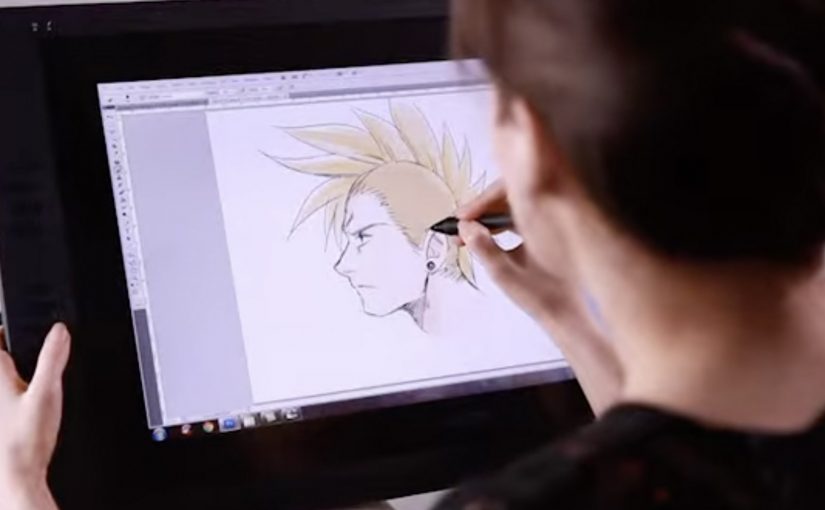
Wacom is launching a cool new digital sketch pen for artists called the Inkling. This unique pen allows artists to draw or sketch on a standard piece of paper and then automatically have a digital version created.

The trick is that Inkling pairs a real ink pen with a small receiver that clips to your paper and records your strokes as you draw, so you can plug it into a computer later and bring the sketch into your digital workflow.

In creative and design workflows, bridging paper-first sketching to digital editing keeps momentum for artists who think with their hands.

What Inkling changes in a familiar habit

Most artists already start with pen and paper because it is fast, portable, and forgiving. Inkling keeps that behaviour intact, but removes the “scan it later” step by capturing the drawing while it happens.

How the capture works in practice

  • Draw normally. You sketch with an actual ballpoint pen on regular paper.
  • Record quietly. The clipped receiver tracks each stroke and stores the sketch.
  • Transfer when ready. You connect the receiver to your computer and import the captured file for editing.
  • Refine digitally. The value shows up when you want to iterate, clean up, or reuse elements without redrawing from scratch.

Why it lands: it removes one of the most annoying handoffs

The friction is never “making the sketch”. The friction is getting that sketch into the tools where it becomes a layout, a storyboard, an illustration draft, or a presentation asset. Inkling makes the handoff feel like part of the act of drawing, not a separate job you do later.

What Wacom is really selling here

This is not just a new pen. It is a bridge product that expands Wacom’s relevance beyond tablets and into the earliest moment of creation, when ideas are still raw and fast. If the first capture happens with Wacom, the next steps in the workflow are more likely to happen with Wacom-friendly tools too.

What to steal if you market tools for creators

  • Respect existing habits. Do not force a new behaviour when the old one already works.
  • Remove a single painful step. “No scanning” is a clearer benefit than a long list of features.
  • Sell the workflow, not the gadget. The story is speed from idea to editable file.
  • Show the before and after. Demos work best when viewers can see the exact handoff being eliminated.

A few fast answers before you act

What is Wacom Inkling?

It is a digital sketch pen system that lets you draw on regular paper with real ink while capturing a digital version of the sketch for later transfer to a computer.

Do you need special paper to use Inkling?

No. The idea is that you sketch on standard paper while a clipped receiver records your strokes.

How do you get the sketch onto your computer?

You connect the receiver to your computer and import the stored sketch so it can be edited digitally.

What is the main benefit compared to scanning?

You skip the “capture later” step. The sketch is already recorded as you draw, which makes it faster to move from rough idea to editable file.

Who is this best suited for?

It fits artists and designers who start on paper for speed, then want to refine, iterate, or reuse parts of the sketch digitally without redrawing everything.